1. Product Overview
The VIVO STAND-VAD3 is a height-adjustable VESA adapter designed to provide additional vertical adjustment for monitors mounted on existing VESA-compatible stands or arms. This adapter allows for precise height positioning of individual monitors, enhancing ergonomic viewing and optimizing workspace setups. It is constructed from durable alloy steel and features a tool-free adjustment mechanism.

Figure 1: VIVO STAND-VAD3 Height Adjustable VESA Adapter Stand.
2. Safety Information
Please read and understand all instructions before installation and use. If you do not understand these instructions or have any doubts about the safety of the installation, please contact a qualified installer. Improper installation or use may cause damage or serious injury.
- Verify that the mounting surface can safely support the combined weight of the equipment and all attached hardware.
- Do not exceed the maximum weight capacity of 17.6 lbs (8 kg).
- Ensure all screws are securely tightened before use. Do not overtighten screws.
- This adapter is not compatible with monitors containing power and video ports in the center.
- Hardware for monitors with curved or recessed VESA mounting pockets is not included and may require additional spacers or longer screws.
- Keep children away from the product during installation and adjustment.
3. Package Contents
Carefully unpack the box and ensure all components are present and undamaged. If any parts are missing or damaged, please contact VIVO customer support.
- Height Adjustable VESA Adapter (Main Unit)
- VESA Plate (Detachable)
- Thumbscrew for securing VESA Plate
- Mounting Screws for Monitor (various sizes, typically M4, M5, M6)
- Mounting Screws for VESA Arm/Stand
- Instruction Manual
4. Specifications
| Feature | Detail |
|---|---|
| Model Number | STAND-VAD3 |
| Material | Alloy Steel |
| Color | Black |
| Item Weight | 1.63 pounds (0.74 kg) |
| Package Dimensions | 10.31 x 4.8 x 1.34 inches (26.19 x 12.19 x 3.4 cm) |
| Mounting Type | Wall Mount (Adapter for existing VESA mount) |
| Movement Type | Fixed (Height adjustable via adapter mechanism) |
5. Compatibility
This VESA adapter is designed for specific monitor and mount configurations. Please verify compatibility before installation.
- Monitor Size: Designed for 13 to 27 inch monitors.
- Weight Capacity: Supports monitors up to 17.6 lbs (8 kg).
- VESA Patterns (Monitor Side): Compatible with VESA 75x75mm or 100x100mm mounting patterns.
- VESA Patterns (Mount Side): Your existing monitor mount must have 75x75mm VESA compatibility.
- Recessed VESA Pockets: Not compatible with monitors that have deeply recessed VESA mounting pockets unless appropriate spacers and longer screws are sourced separately.
- Center Ports: Not compatible with monitors that have power and video ports located in the center of the VESA mounting area.

Figure 2: VESA compatibility and screen size guidelines.
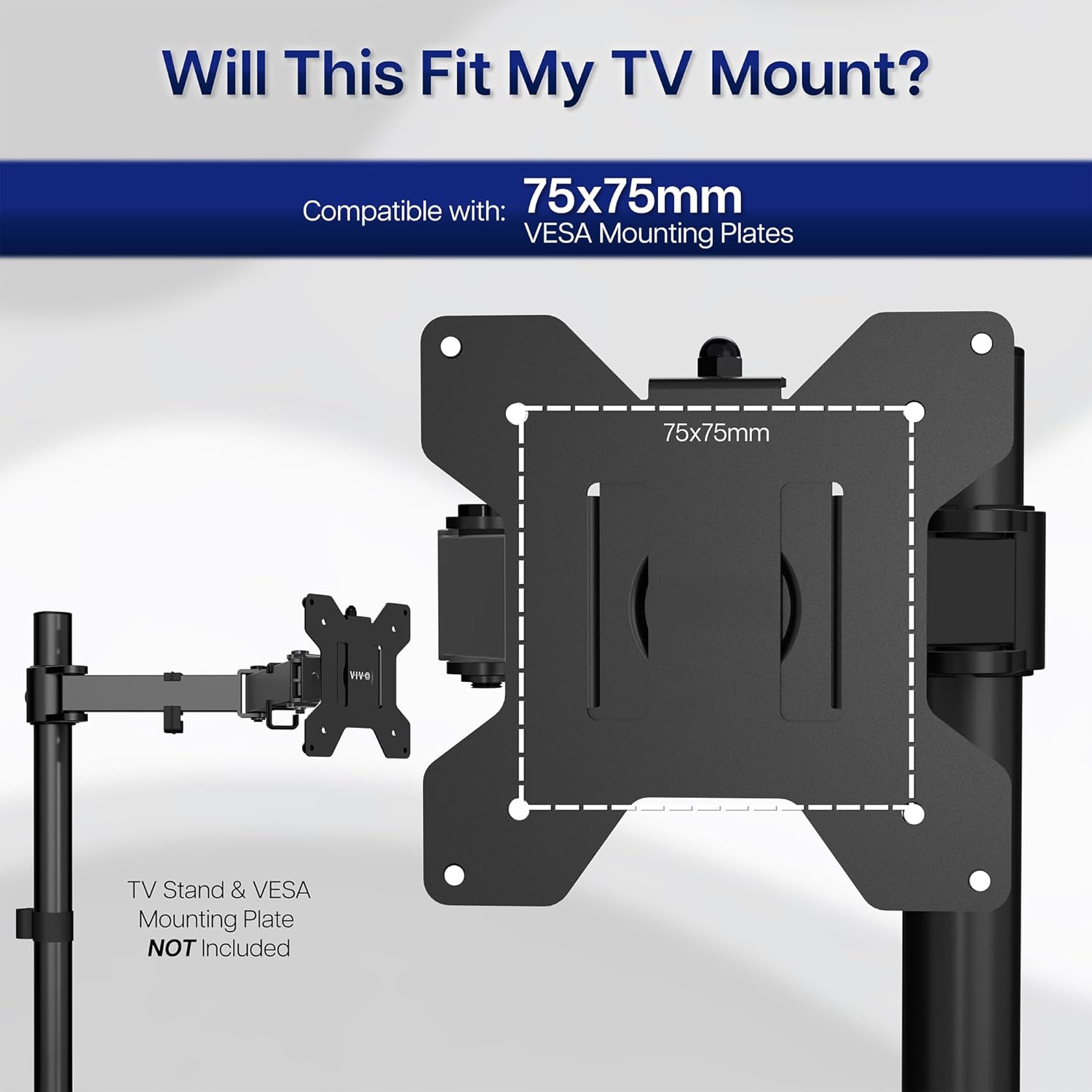
Figure 3: VESA mounting plate compatibility with existing monitor mounts.
6. Setup and Installation
Follow these steps to properly install your VIVO STAND-VAD3 Height Adjustable VESA Adapter.
6.1. Prepare the VESA Adapter
- Lower the VESA bracket to the bottom position until it clicks.
- Raise it all the way to the top until you hear a second click.
- Remove the thumbscrew and separate the VESA plate from the VESA bracket.
Video 1: VIVO STAND-VAD3 Assembly Guide. This video demonstrates the full assembly process for the height adjustable VESA adapter, including separating the VESA plate and attaching it to the monitor and existing mount.
6.2. Mount VESA Plate to Your Monitor Mount
- Attach the VESA plate (the smaller, square plate you just removed) to your existing monitor mount using the appropriate screws. Ensure it is securely fastened.
6.3. Attach VESA Bracket to the Back of Your Monitor
- Align the VESA bracket (the larger, rectangular plate with the height adjustment mechanism) with the VESA mounting holes on the back of your monitor.
- Secure the VESA bracket to the monitor using the provided screws. Ensure all screws are tightened evenly and securely.

Figure 4: Visual guide for simple installation, showing steps to remove the VESA plate, attach the bracket, install the screen, and adjust height.
6.4. Install Monitor onto Mount
- Carefully slide the monitor (with the attached VESA bracket) onto the VESA plate that is already mounted to your monitor arm/stand.
- Secure the monitor by re-inserting and tightening the thumbscrew into the VESA bracket.

Figure 5: The VESA adapter mounted to a monitor and an existing monitor arm, showing the side profile.
7. Operating Instructions
The VIVO STAND-VAD3 offers tool-free height adjustment for your monitor.
7.1. Adjusting Monitor Height
- To adjust the monitor's height, gently lift the monitor all the way to its highest position until it clicks. This resets the internal mechanism.
- Once reset, you can then lower the monitor to your desired height. The mechanism will lock into place at various increments.
- The adapter provides approximately 6.25 inches of height adjustment (3.25 inches up and 3 inches down from the center position).
- Additionally, there are 3 mounting configurations that offer an extra 4 inches (2 inches up and 2 inches down) of adjustment by choosing different initial mounting points for the VESA plate.

Figure 6: Diagram illustrating the 2-way height adjustment mechanism and mounting configurations.
Video 2: VIVO STAND-VAD3 Feature Overview. This video highlights the key features of the height adjustable VESA adapter, including its tool-free height adjustment capability.
8. Maintenance
Regular maintenance ensures the longevity and safe operation of your VIVO STAND-VAD3 adapter.
- Cleaning: Wipe the adapter with a soft, dry cloth. Avoid using abrasive cleaners or solvents that may damage the finish.
- Inspection: Periodically check all screws and connections to ensure they remain tight. Re-tighten if necessary.
- Padding: The adapter includes padding to protect your monitor from scuffs or scratches. Ensure this padding remains intact.
9. Troubleshooting
If you encounter issues with your VIVO STAND-VAD3, refer to the following common problems and solutions.
- Monitor is not adjusting height: Ensure the thumbscrew is loosened sufficiently to allow movement. If the mechanism feels stuck, try lifting the monitor all the way up to reset it, then lower it.
- Monitor feels wobbly after installation: Check all mounting screws on both the monitor and the existing mount. Ensure they are securely tightened. Excessive wobble might indicate an issue with the existing monitor arm/stand or exceeding the weight capacity.
- Adapter does not fit my monitor: Verify your monitor's VESA pattern (75x75mm or 100x100mm) and ensure it does not have deeply recessed VESA pockets or center-located ports that interfere with the adapter.
- Adapter does not fit my existing mount: Confirm your existing monitor mount has a 75x75mm VESA plate for the adapter to attach to.
10. Warranty and Support
VIVO is committed to providing quality products and excellent customer service.
- Product Protection: VIVO products come with generous product protection. Please refer to the product packaging or VIVO's official website for specific warranty details.
- U.S. Based Support: Our Sales and Technical Support team members are based in the U.S. and are available to assist with any questions or concerns regarding your product.
- Contact Information: For support, please visit the official VIVO website or refer to the contact details provided on your product packaging.


