
RP-TOOLS RP-R-GA12
Instruction Manual for RP-TOOLS Weight Tray
Model: RP-R-GA12
1. Introduction
This manual provides essential information for the proper setup, operation, and maintenance of your RP-TOOLS Weight Tray, model RP-R-GA12. This accessory is specifically designed for use with RP-U100PN and RP-U120PN tire balancing machines. It is an original, precisely fitting accessory made from durable plastic, featuring additional compartments to keep various balancing weights and tools organized and within easy reach, enhancing efficiency in your workshop.
2. Product Overview
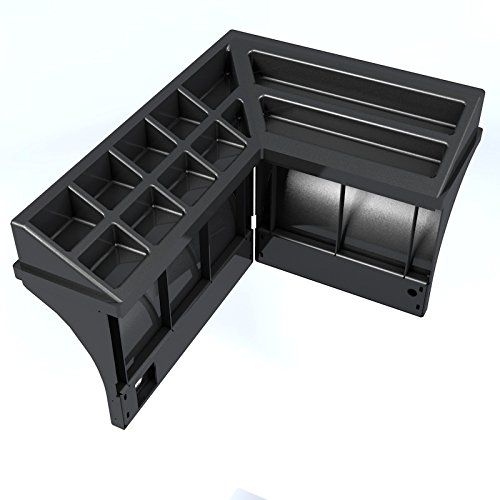
Figure 2.1: RP-TOOLS Weight Tray (Model RP-R-GA12)
This image displays the RP-TOOLS weight tray, designed as an L-shaped accessory with multiple compartments for organizing balancing weights and tools. The tray is made of durable black plastic and features various sized slots for different types of weights and accessories, ensuring a tidy and efficient workspace.
3. Setup and Installation
The RP-TOOLS Weight Tray is designed for straightforward installation on compatible RP-U100PN and RP-U120PN tire balancing machines. Ensure the machine is powered off and stable before beginning installation.
- Unpack the Tray: Carefully remove the weight tray from its packaging and inspect it for any signs of damage during transit.
- Identify Mounting Points: Locate the designated mounting points on your RP-U100PN or RP-U120PN tire balancing machine. These are typically pre-drilled holes or slots designed to accommodate the tray.
- Align and Secure: Align the weight tray with the mounting points. Depending on your machine model, secure the tray using the provided fasteners (screws, bolts, or clips). Ensure the tray is firmly attached and does not wobble.
- Verify Stability: Gently test the installed tray to confirm it is stable and securely mounted before placing any weights or tools into it.
For detailed machine-specific installation instructions, refer to the user manual of your RP-U100PN or RP-U120PN tire balancing machine.
4. Operating Instructions
The RP-TOOLS Weight Tray is designed to enhance the organization and accessibility of your balancing weights and tools during tire balancing operations.
- Weight Organization: Utilize the various compartments of the tray to sort and store different types and sizes of balancing weights (e.g., clip-on weights, adhesive weights). This helps in quick identification and selection during balancing procedures.
- Tool Storage: The larger sections can be used to hold essential tools such as weight pliers, scrapers, or other small accessories required for tire balancing.
- Accessibility: Position the most frequently used weights and tools in the compartments that are easiest to reach from your working position.
- Maintain Order: Regularly return weights and tools to their designated compartments after use to maintain an organized and efficient workspace.
5. Maintenance
Proper maintenance ensures the longevity and continued functionality of your RP-TOOLS Weight Tray.
- Cleaning: Regularly wipe down the tray with a damp cloth to remove dust, dirt, and any residue from weights or tools. For stubborn grime, a mild, non-abrasive cleaning solution can be used. Avoid harsh chemicals that may damage the plastic.
- Inspection: Periodically inspect the tray for any signs of wear, cracks, or damage. Check the mounting points to ensure the tray remains securely attached to the balancing machine.
- Avoid Overloading: Do not exceed the practical capacity of the tray. While durable, excessive weight can lead to deformation or damage over time.
6. Troubleshooting
This section addresses common issues you might encounter with the weight tray.
| Problem | Possible Cause | Solution |
|---|---|---|
| Tray feels loose or wobbly. | Improper installation or loose fasteners. | Check all mounting points and tighten any loose screws or bolts. Ensure the tray is correctly aligned with the machine's mounting structure. |
| Difficulty fitting weights into compartments. | Incorrect weight type for compartment size or debris in compartment. | Ensure you are using the appropriately sized compartment for the weight. Clean out any debris or foreign objects from the compartments. |
| Tray appears discolored or dirty. | Accumulation of dust, dirt, or grease. | Clean the tray regularly with a damp cloth and mild detergent. Avoid abrasive cleaners. |
7. Specifications
| Feature | Detail |
|---|---|
| Product Name | Weight Tray for Tire Balancing Machines |
| Model Number | RP-R-GA12 |
| Brand | RP-TOOLS |
| Compatibility | RP-U100PN, RP-U120PN Tire Balancing Machines |
| Material | Durable Plastic |
| Item Weight | Approximately 30 Kilograms |
| Manufacturer Reference | RP-R-GA12 |
8. Warranty and Support
For information regarding warranty coverage, technical support, or spare parts for your RP-TOOLS Weight Tray, please contact your authorized RP-TOOLS dealer or visit the official RP-TOOLS website. Please have your model number (RP-R-GA12) and purchase details ready when contacting support.
Official Website: www.rp-tools.com (Example link, actual link may vary)
Ask a question about this manual
Ask about setup, troubleshooting, compatibility, parts, safety, or missing instructions. Manuals+ will review the question and use this page’s manual context to help answer it.