
1. Introduction
The VIPARSPECTRA VT600-S LED Grow Light is designed for indoor plant cultivation, providing a full spectrum light with timer control and dimmable features. This manual provides instructions for the safe and efficient operation of your grow light, ensuring optimal plant growth through all stages.
2. Safety Information
- Indoor Use Only: This product is not waterproof and must be used in dry indoor environments.
- Eye Protection: The LED bulbs are extremely bright. Do not look directly at the LED bulbs when the light is operating to prevent eye strain or damage.
- Ventilation: Ensure adequate ventilation around the grow light to prevent overheating.
- Power Supply: Connect the light only to a properly grounded power outlet within the specified voltage range (AC100-240V).
- No External Ballast: No additional ballast is required for this unit.
- Infrared (IR) LEDs: This light includes IR LEDs (730nm) which may appear dim or invisible to the human eye. These are not faulty LEDs and are essential for the full spectrum.
3. Package Contents
Verify that all items are present in the package:
- 1 x VT600-S LED Lighting Unit
- 1 x Remote Control
- 1 x User Instructions (this manual)
- 1 x Hanging Kit
- 1 x 6ft Power Cord

Figure 3.1: Contents included in the VT600-S package.
4. Setup
4.1 Mounting the Grow Light
- Attach the provided hanging kit to the four mounting points on the top of the VT600-S unit.
- Securely hang the grow light from a sturdy support structure in your grow area. Ensure the light is level.
- Adjust the hanging height according to your plant's growth stage. For vegetative growth, a height of approximately 32 inches is recommended for a 3x3 ft coverage. For flowering, a height of approximately 22 inches is recommended for a 2.5x2.5 ft coverage.

Figure 4.1: VT600-S LED Grow Light installed in a grow tent.
4.2 Power Connection
Connect the 6ft power cord to the power inlet on the grow light unit and then plug it into a standard AC100-240V power outlet.
4.3 Daisy Chain Function
The VT600-S features a daisy chain outlet, allowing multiple lights to be connected and powered from a single outlet. Connect the power cord from the daisy chain outlet of one light to the power inlet of another. Ensure the total wattage does not exceed the circuit's capacity.
Figure 4.2: Power inlet and Daisy Chain Outlet on the VT600-S unit.
5. Operating Instructions
5.1 Control Panel Overview
The VT600-S features an integrated control panel with a digital display, control knob, and buttons for remote control, digital timer, and adjustable intensity.
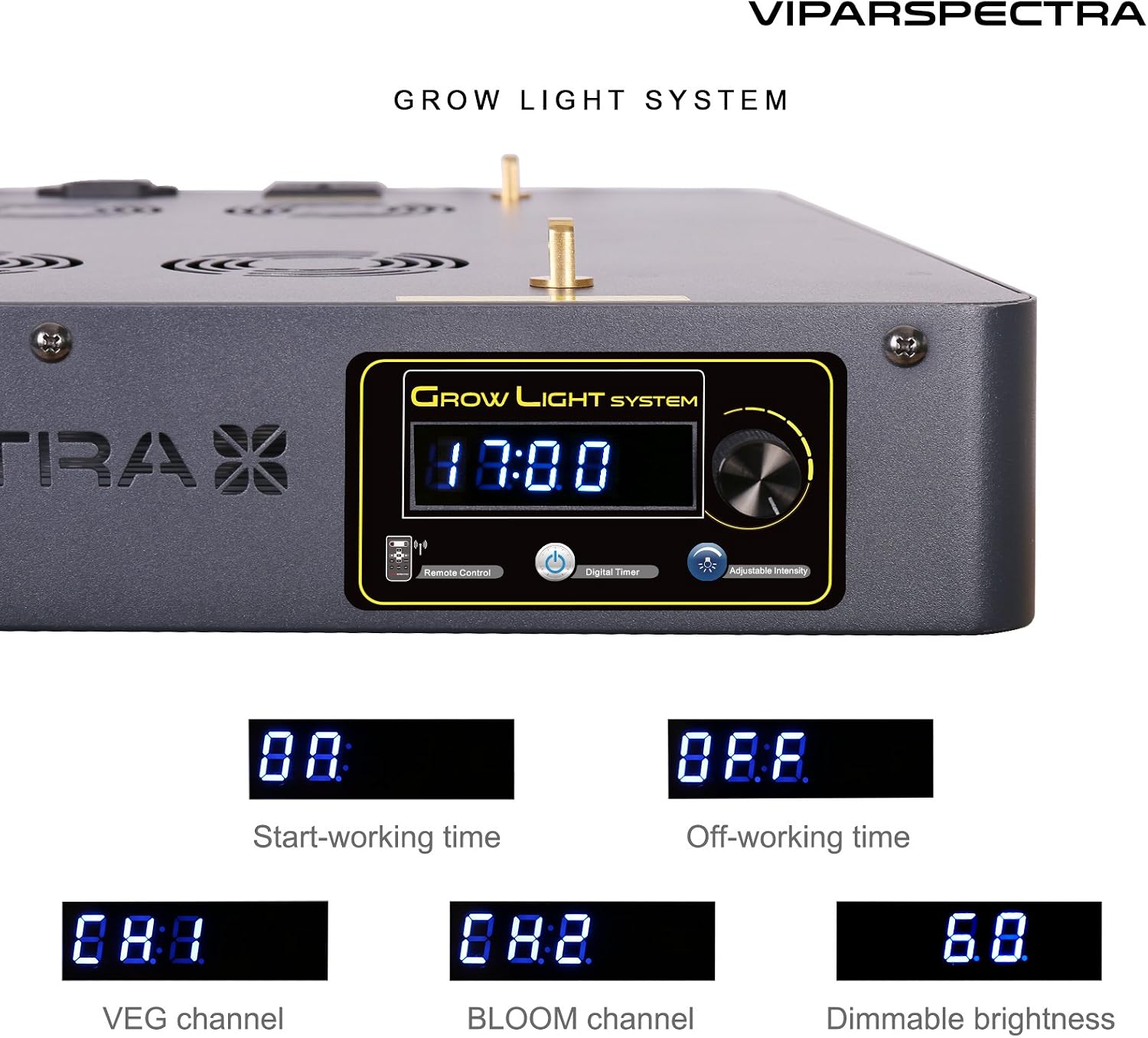
Figure 5.1: VT600-S Control Panel.
5.2 Remote Control Functions
The included remote control allows for convenient adjustment of settings.

Figure 5.2: Remote Control for VT600-S.
5.3 Timer Control
The built-in timer allows automatic on/off cycles. The timer controls both VEG and BLOOM channels simultaneously; they cannot be controlled separately by the timer.
- Setting Start Time: Use the control knob or remote to set the desired 'Start-working time' (e.g., 08:00).
- Setting Off Time: Use the control knob or remote to set the desired 'Off-working time' (e.g., 08:00).
5.4 Dimmable VEG/BLOOM Channels
The VT600-S features dimmable VEG and BLOOM channels, allowing you to customize the light intensity for different growth stages.
- VEG Channel: Primarily blue and white LEDs for vegetative growth. Adjust intensity using the control knob or remote (e.g., CH.1).
- BLOOM Channel: Primarily red and IR LEDs for flowering. Adjust intensity using the control knob or remote (e.g., CH.2).
- Dimmable Brightness: The overall brightness can be adjusted (e.g., 6.0 for 60% brightness).
Figure 5.3: Display settings for timer and dimming.

Figure 5.4: VEG Channel ON (left) and BLOOM Channel ON (right).
6. Usage Guidelines
6.1 Recommended Coverage and Hanging Height
- Vegetative Coverage: Approximately 3x3 feet at a hanging height of 32 inches.
- Flowering Coverage: Approximately 2.5x2.5 feet at a hanging height of 22 inches.
6.2 Full Spectrum Details
The VT600-S provides a 12-band full spectrum, including various wavelengths from IR (730nm) to UV, and white light (3000K, 7500K) to support all stages of plant growth.
Figure 6.1: 12-Band Full Spectrum provided by VT600-S.
6.3 PAR Value Information
Photosynthetically Active Radiation (PAR) values indicate the light intensity available for photosynthesis. The VT600-S is designed to deliver balanced PAR output.

Figure 6.2: VT600-S PAR Value at 24 inches height.

Figure 6.3: VT600-S PAR Value at various heights.
7. Maintenance
- Cleaning: Ensure the light is unplugged before cleaning. Use a soft, dry cloth to wipe the surface of the light. Do not use liquid cleaners or sprays.
- Fan Maintenance: The unit features quiet high-speed cooling fans. Periodically check the fans for dust accumulation and clean gently with compressed air if necessary to maintain optimal cooling performance.
- Heat Sinks: The revolutionary aluminum heat sinks are designed for efficient heat dissipation. Ensure they are not obstructed.
8. Troubleshooting
- Light Not Turning On:
- Check if the power cord is securely connected to both the light and the power outlet.
- Verify that the power outlet is functional.
- Ensure the timer settings are correctly configured and not set to an 'off' period.
- Some LEDs Appear Dim/Invisible:
- The VT600-S includes Infrared (IR) LEDs (730nm) which are part of the full spectrum but appear dim or invisible to the human eye. This is normal operation and not a fault.
- Overheating:
- Ensure the cooling fans are operating correctly and not obstructed.
- Verify that there is sufficient airflow around the unit.
9. Specifications
| Feature | Specification |
|---|---|
| Model Number | VT600-S |
| Dimensions | 15.7 x 15.7 x 2.8 inches |
| Item Weight | 14.5 pounds |
| Replaces HPS/MH | 400W |
| Avg. Power Draw | 270W MAX |
| LED Chips | 120pcs High Intensity 5W Bridgelux/Epileds |
| LEDs Angle | 90° |
| Input Voltage | AC100-240V |
| Frequency | 50-60Hz |
| Lifespan | 100,000 hours |
| Batteries | 1 Product Specific battery required (included for remote) |
10. Warranty and Support
The VIPARSPECTRA VT600-S LED Grow Light is designed for durability with a lifespan of 100,000 hours. For warranty claims, technical support, or further assistance, please contact VIPARSPECTRA customer service through their official website or the retailer where the product was purchased. Please have your model number (VT600-S) and purchase information ready.