
1. Introduction
The VIPARSPECTRA VT600 LED Grow Light is engineered to provide a balanced PAR output and coverage for indoor plant cultivation. This unit features a built-in timer, dimmable VEG and BLOOM channels, and a full 12-band spectrum to support various plant growth stages. This manual provides essential information for the safe and effective operation of your grow light.

Image 1.1: The VIPARSPECTRA VT600 LED Grow Light installed within a grow tent environment, illustrating its application for indoor plant growth.
2. Safety Instructions
- Always disconnect power before installation, cleaning, or maintenance.
- Do not look directly at the LED lights when the unit is operating, as intense light can cause eye strain. Protective eyewear is recommended.
- Ensure the light is installed in a well-ventilated area to prevent overheating.
- This product is designed for indoor use only. Do not expose to water or high humidity environments, despite its 'Waterproof' rating, to prevent electrical hazards.
- Keep out of reach of children and pets.
- Do not attempt to modify or disassemble the unit. Refer all servicing to qualified personnel.
3. Package Contents
Verify that all items are present in the package:
- 1 x VIPARSPECTRA VT600 LED Lighting Unit
- 1 x Remote Control
- 1 x User Instructions (this manual)
- 1 x 6ft Power Cord
- 1 x Hanging Kit (carabiners and adjustable ropes)

Image 3.1: Visual representation of the VIPARSPECTRA VT600 package contents, including the light unit, remote, power cord, and hanging kit, along with key dimensions.
4. Product Overview
The VT600 features a robust design with integrated controls for ease of use.
- Display Screen: Shows current time, timer settings, and brightness levels.
- Control Knob: Used for navigating menus and adjusting settings.
- Remote Control Receiver: For wireless operation.
- Cooling Fans: Multiple high-speed fans ensure efficient heat dissipation.
- Hanging Points: Four sturdy points for secure suspension.
- Power Inlet: Connects the main power cord.
- Daisy Chain Outlet: Allows connection of multiple VT600 units from a single power source.
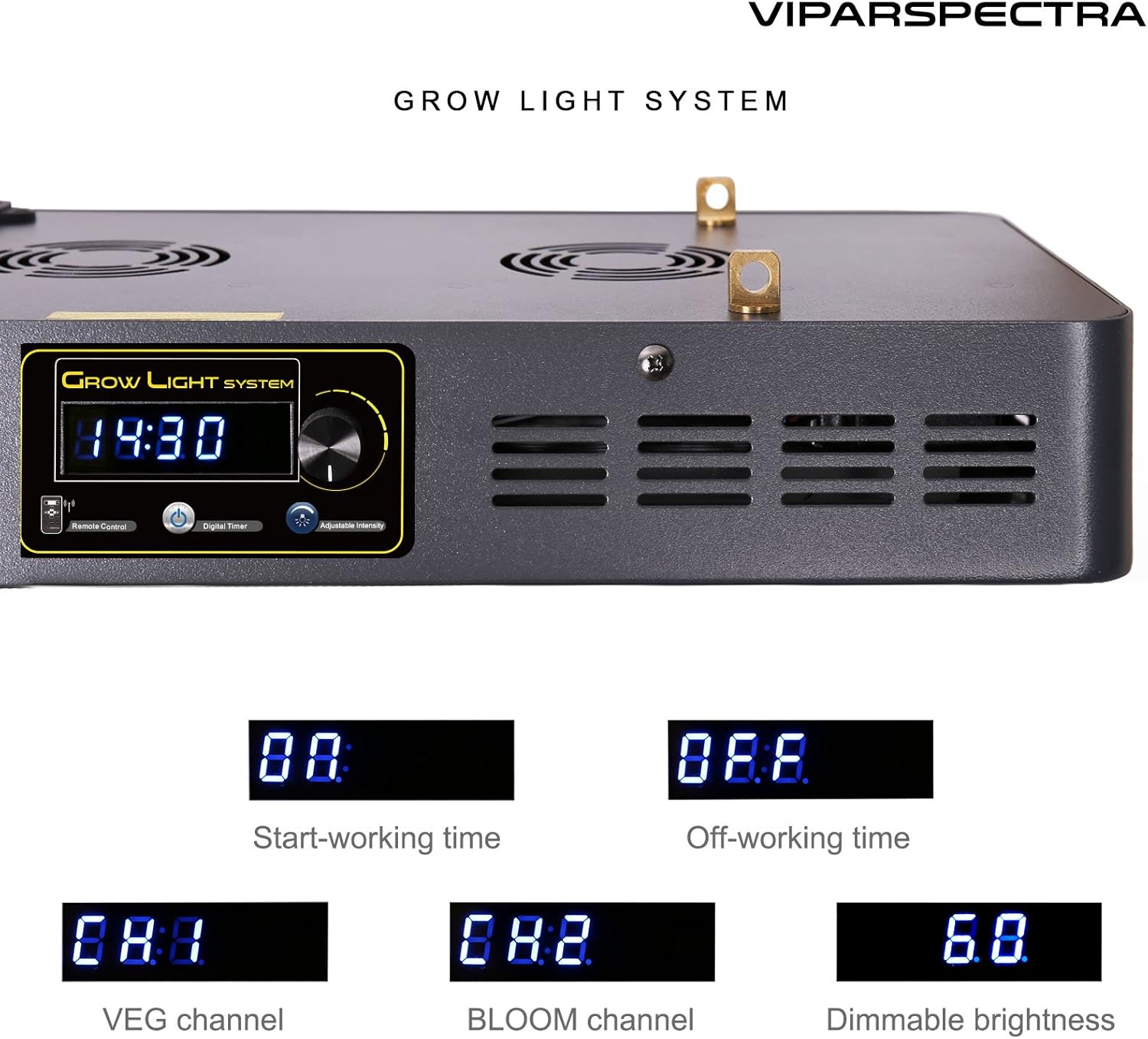
Image 4.1: Close-up view of the VIPARSPECTRA VT600 control panel, showing the digital display, control knob, and remote control sensor.
5. Setup and Installation
5.1 Mounting the Light
- Attach the carabiners from the hanging kit to the four hanging points on the top of the light fixture.
- Use the adjustable ropes to suspend the light from a sturdy ceiling mount or grow tent frame. Ensure the light is level and securely fastened.
- Adjust the hanging height according to your plant's growth stage (refer to Section 6.4 for recommendations).
5.2 Power Connection
- Connect the provided 6ft power cord to the power inlet on the light fixture.
- Plug the other end of the power cord into a standard 110V AC electrical outlet.
5.3 Daisy Chain Function
The daisy chain feature allows you to connect multiple VT600 units using a single power outlet. This is useful for expanding your grow area without needing additional wall sockets.
- Connect the power cord of the first light to a wall outlet.
- Use an additional power cord (not included) to connect the daisy chain outlet of the first light to the power inlet of the second light.
- Repeat this process for additional lights.
WARNING: Do not exceed a total true wattage of 600W for all connected lights in a daisy chain to prevent overloading the circuit.
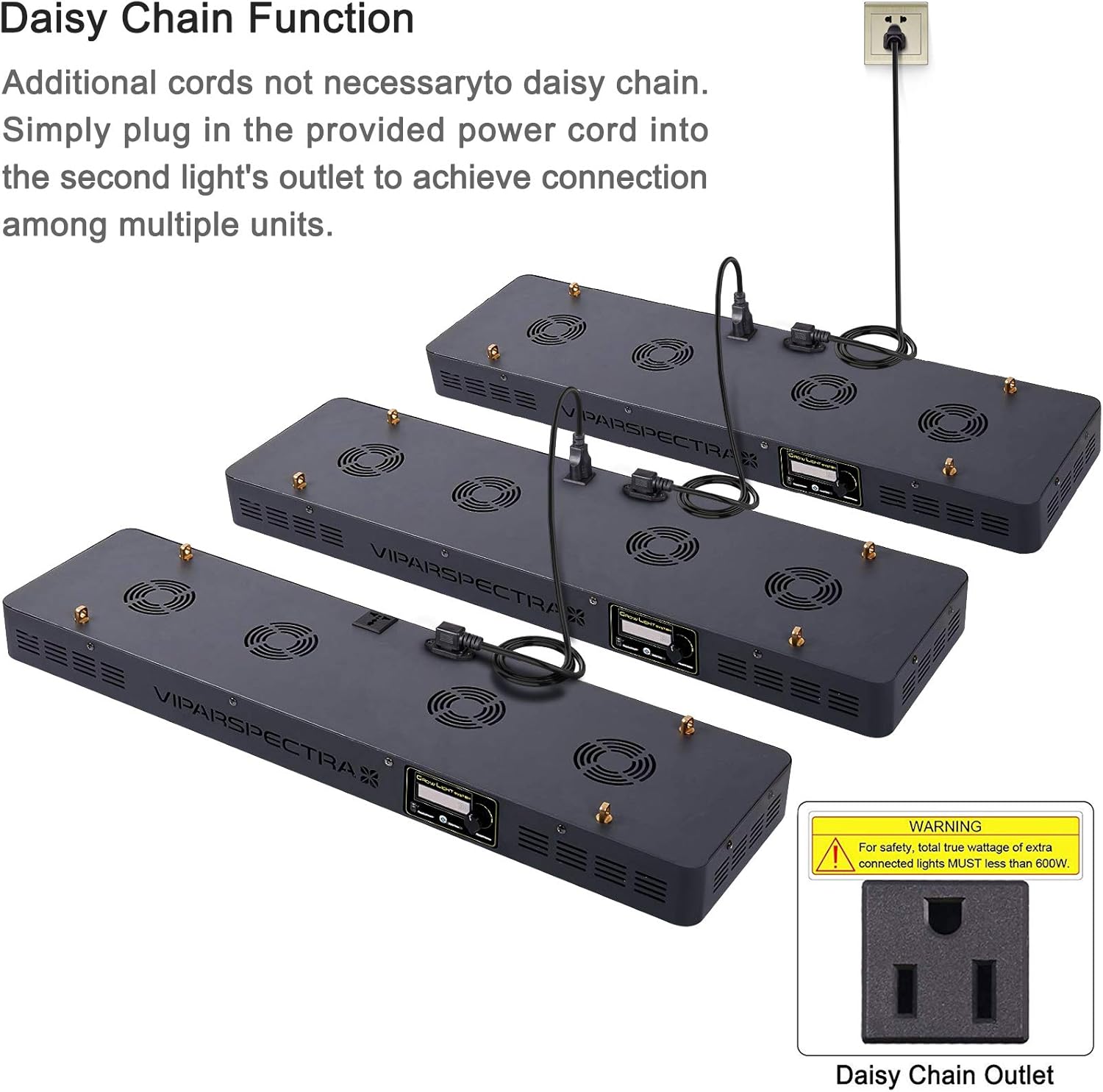
Image 5.1: Illustration of the daisy chain function, showing multiple VIPARSPECTRA VT600 units connected in series to a single power outlet.
6. Operation
6.1 Powering On/Off
Press the 'ON' button on the remote control or the power button on the unit to turn the light on. Press 'OFF' to turn it off.
6.2 Using the Remote Control
The remote control provides convenient access to all light functions.
- Power Button: Turns the light on or off.
- VEG Button: Activates/deactivates the VEG spectrum channel.
- BLOOM Button: Activates/deactivates the BLOOM spectrum channel.
- +/- Buttons: Adjust brightness levels for selected channels or navigate menu options.
- OK Button: Confirms selections.
- CLOCK Button: Accesses timer settings.

Image 6.1: The VIPARSPECTRA VT600 remote control, highlighting its various buttons for power, spectrum selection, brightness adjustment, and timer settings.
6.3 Setting the Timer and Dimmable Channels
The built-in timer allows for automatic on/off cycles, and the dimmable feature enables individual brightness control for VEG and BLOOM channels.
- Set Current Time: Press the 'CLOCK' button. Use the +/- buttons to adjust the hour and minute, then 'OK' to confirm.
- Set Start/Off Working Time: Press 'CLOCK' again to cycle through timer settings. Set the desired 'Start-working time' and 'Off-working time' using +/- and 'OK'.
- Adjust VEG Channel Brightness (CH.1): Press the 'VEG' button. The display will show 'CH.1'. Use the +/- buttons to set the brightness level (0-100%). Press 'OK' to confirm.
- Adjust BLOOM Channel Brightness (CH.2): Press the 'BLOOM' button. The display will show 'CH.2'. Use the +/- buttons to set the brightness level (0-100%). Press 'OK' to confirm.
- The light will now operate according to your set timer and brightness levels.
6.4 12-Band Full Spectrum
The VT600 provides a comprehensive 12-band full spectrum, including IR (730nm), red (660nm, 630nm, 615nm, 595nm, 580nm), blue (475nm, 460nm, 445nm, 440nm), and white (3000K, 7500K) light, optimized for all stages of plant growth. Note that IR LEDs may appear dim or off to the naked eye, but they are functioning.

Image 6.2: Detailed breakdown of the 12-band full spectrum provided by the VIPARSPECTRA VT600, showing the various wavelengths and their distribution.
6.5 Recommended Coverage and Hanging Height
For optimal plant growth, consider the following recommendations:
- Vegetative Coverage: Approximately 4x3 feet at a hanging height of 32 inches.
- Flowering Coverage: Approximately 3.5x2.5 feet at a hanging height of 22 inches.
The PAR value chart below illustrates light intensity at various distances and coverage areas.

Image 6.3: PAR (Photosynthetically Active Radiation) value chart for the VIPARSPECTRA VT600, measured at a 24-inch height, indicating light intensity distribution over a given area.
7. Maintenance
7.1 Cleaning
Periodically clean the light fixture to ensure optimal performance. Disconnect power before cleaning.
- Use a soft, dry cloth to wipe down the exterior of the unit.
- Gently clean the LED lenses to remove any dust or debris that may obstruct light output.
- Do not use harsh chemicals or abrasive cleaners.
7.2 Fan Inspection
The VT600 is equipped with quiet, high-speed cooling fans. Regularly inspect the fans for any obstructions or excessive noise. Ensure proper airflow around the unit to maintain efficient cooling.
8. Troubleshooting
| Problem | Possible Cause | Solution |
|---|---|---|
| Light does not turn on. | No power, loose connection, or unit malfunction. | Check power cord connection to the unit and wall outlet. Ensure the outlet is functional. If using daisy chain, check connections. |
| Timer settings are inaccurate or jump. | Internal clock discrepancy. | Reset the timer by following the instructions in Section 6.3. If the issue persists, contact customer support. |
| Display light is too bright or affects plants. | Light emission from the display screen. | While the display cannot be turned off, you may cover it with opaque tape during dark periods if it is affecting photosensitive plants. Ensure tape does not block ventilation. |
| Fans are noisy or not working. | Dust accumulation, obstruction, or fan malfunction. | Disconnect power and gently clean around the fan vents. Ensure no objects are obstructing the fan blades. If noise persists or fans are not spinning, contact customer support. |
| IR LEDs appear dim or off. | Infrared light is not visible to the human eye. | This is normal. IR LEDs are functioning correctly even if they do not appear bright. |
9. Specifications
| Feature | Specification |
|---|---|
| Model Number | VT600 |
| Wattage | 600 watts (Nominal) / 270W (Actual Consumption) |
| Voltage | 110 Volts |
| Light Source Type | LED (12-Band Full Spectrum) |
| Special Features | Dimmable, Timer Control |
| Control Method | Remote |
| Material | Iron, Aluminum |
| Product Dimensions | 31.5 x 2.6 x 8.5 inches |
| Item Weight | 15.1 pounds |
| Mounting Type | Ceiling Mount |
| Indoor/Outdoor Usage | Indoor |
| Batteries | 1 Product Specific battery required (included for remote) |
10. Warranty Information
For detailed warranty terms and conditions, please refer to the official VIPARSPECTRA website or the warranty card included with your product packaging. Keep your purchase receipt as proof of purchase for any warranty claims.
11. Customer Support
If you have any questions, require technical assistance, or need further support regarding your VIPARSPECTRA VT600 LED Grow Light, please contact VIPARSPECTRA customer service through their official website or the contact information provided in your product packaging.


