
Introduction
This manual provides comprehensive instructions for the setup, operation, maintenance, and troubleshooting of your Mediacom 2020B1-B2 Universal On Demand TV/Cable Remote Control. Please read this guide thoroughly to ensure proper use and to maximize the functionality of your remote.
Setup
1. Battery Installation
The remote control requires two AAA batteries (included). Follow these steps to install them:
- Locate the battery compartment cover on the back of the remote control.
- Press down on the tab and slide the cover off.
- Insert two AAA batteries, ensuring the positive (+) and negative (-) terminals align correctly with the markings inside the compartment.
- Slide the battery cover back into place until it clicks securely.

Image: Back view of the Mediacom 2020B1-B2 remote control, showing the battery compartment and quick setup instructions.
2. Quick Setup / Programming
To program your remote control to operate your TV or cable box, use the quick setup method:
- Press and Hold SETUP: Locate the 'SETUP' button on your remote. Press and hold this button until the LED indicator light on the remote blinks twice.
- Enter 3-Digit Code: Refer to your device's manual for the appropriate 3-digit programming code for your TV or cable box. Enter this code using the number buttons on the remote.
- Test Functionality: After entering the code, press the 'CH+' or 'CH-' button to test if the remote is controlling your device. If the device responds, the programming was successful. If not, repeat the steps with a different code from your device's manual, if available.
Operating Instructions
The Mediacom 2020B1-B2 remote control features a standard layout for easy navigation of your TV and cable services. Below are the primary functions of key buttons:
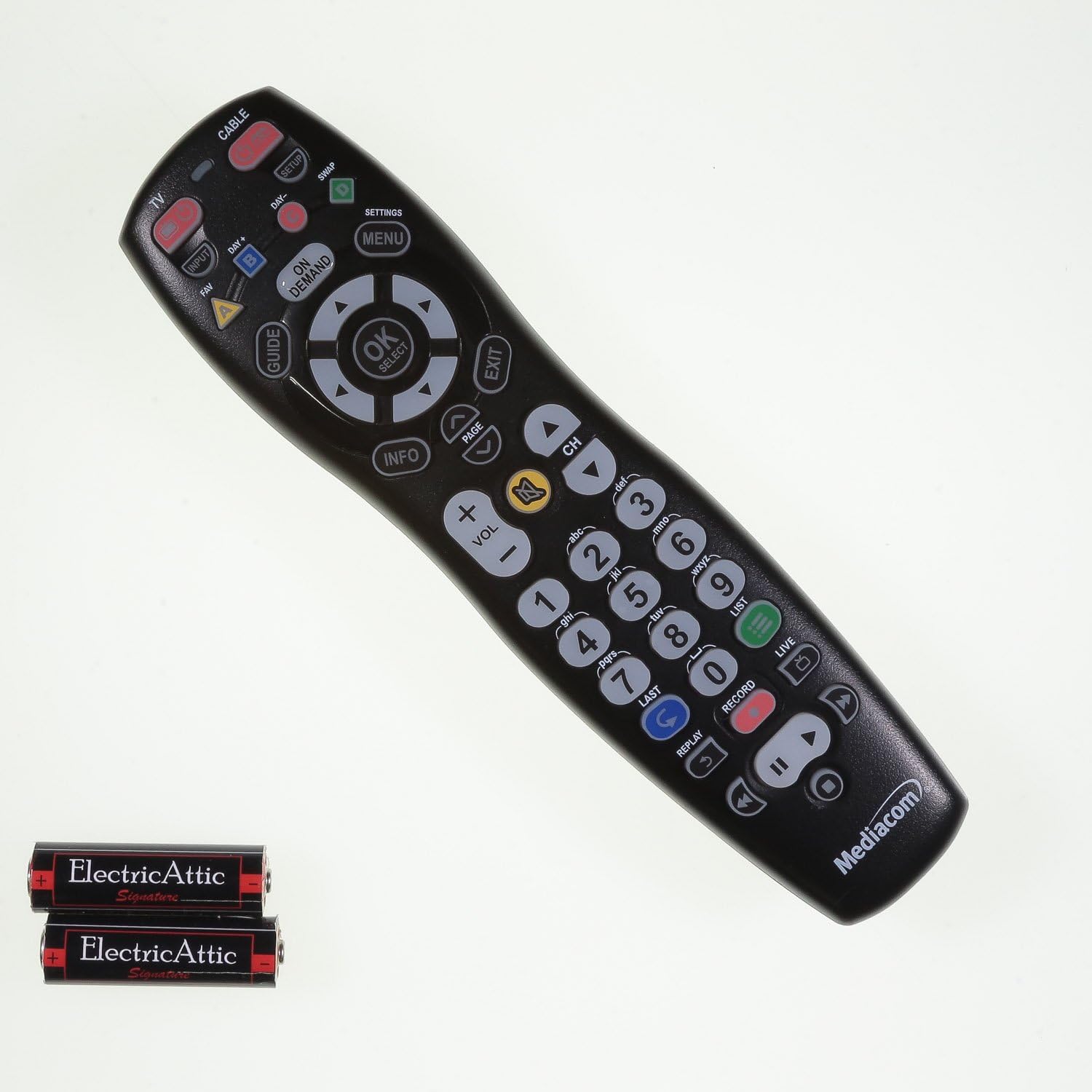
Image: Front view of the Mediacom 2020B1-B2 remote control, displaying all operational buttons.
- POWER: Turns your TV or cable box on/off.
- TV / CABLE: Toggles control between TV and cable box functions.
- GUIDE: Displays the program guide.
- MENU / SETTINGS: Accesses the device's main menu or settings.
- OK / SELECT: Confirms selections within menus.
- Navigation Arrows (Up, Down, Left, Right): Navigates through menus and program guides.
- VOL +/-: Adjusts the volume level.
- CH +/-: Changes channels up or down.
- Number Pad (0-9): Directly enters channel numbers.
- INFO: Displays information about the current program.
- ON DEMAND: Accesses On Demand content.
- Playback Controls (PLAY, PAUSE, STOP, REW, FWD, RECORD): Controls media playback functions.
Maintenance
Battery Replacement
Replace batteries when the remote's LED indicator light fails to illuminate or blinks weakly, or when the remote becomes unresponsive. Always replace both batteries simultaneously with new AAA batteries.
Cleaning
To clean the remote, use a soft, dry cloth. For stubborn dirt, slightly dampen the cloth with water. Avoid using harsh chemicals or abrasive cleaners, as these can damage the remote's surface or internal components.
Troubleshooting
- Remote not responding: Check battery orientation and ensure batteries are fresh. Reprogram the remote if necessary.
- Specific buttons not working: Ensure the remote is in the correct mode (TV or CABLE). Clean around the unresponsive button to remove any debris.
- LED indicator not blinking: This usually indicates dead or incorrectly installed batteries. Replace batteries and check their orientation.
- Remote not controlling device after programming: Try alternative 3-digit codes for your device. Ensure there are no obstructions between the remote and the device's infrared sensor.
Specifications
- Model Number: 2020B1-B2
- Connectivity Technology: Infrared
- Compatible Devices: Television, Cable Box
- Power Source: 2 x AAA Batteries
- Color: Black
- Item Weight: Approximately 6 ounces
- Package Dimensions: Approximately 9.84 x 2.48 x 1.26 inches
- Special Feature: Universal
Support
For additional support, programming codes, or further assistance with your Mediacom 2020B1-B2 Universal Remote Control, please visit the official support website:


