
1. Introduction
Thank you for choosing the CATA E-120-G Exhaust Fan. This manual provides essential information for the safe and efficient installation, operation, and maintenance of your new exhaust fan. Please read these instructions carefully before use and retain them for future reference.
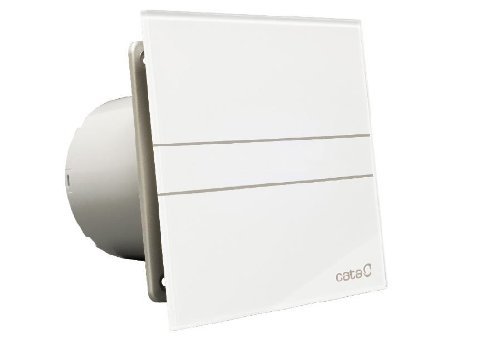
Figure 1: Front view of the CATA E-120-G Exhaust Fan.
2. Important Safety Instructions
To reduce the risk of fire, electric shock, or injury to persons, observe the following:
- Read all instructions before installing or servicing this fan.
- Installation must be carried out by a qualified electrician in accordance with all local and national electrical codes.
- Ensure the power supply is disconnected before installation, maintenance, or cleaning.
- This appliance is not intended for use by persons (including children) with reduced physical, sensory, or mental capabilities, or lack of experience and knowledge, unless they have been given supervision or instruction concerning use of the appliance by a person responsible for their safety.
- Children should be supervised to ensure that they do not play with the appliance.
- Do not use this fan with any solid-state speed control device.
- Do not use the fan in areas where water or other liquids may come into contact with electrical components. The fan is water-resistant but not submersible.
- Ensure proper ventilation is provided to prevent back-drafting of gases from open-flame appliances.
- The fan is designed for outdoor usage in bathrooms, ensuring proper air extraction.
3. Package Contents
Please check the package for the following items:
- CATA E-120-G Exhaust Fan unit
- Instruction Manual (this document)
- Mounting hardware (screws, wall plugs) - (Assumed, as typical for such products)
4. Installation Instructions
The CATA E-120-G exhaust fan is designed for wall or ceiling mounting, typically in bathrooms for outdoor exhaust.
4.1. Site Preparation
- Choose a suitable location for installation, ensuring adequate space for the fan unit and ducting.
- The fan requires a circular opening with a diameter of approximately 118 mm (ØA for E GLASS -120 in the dimensions table).
- Ensure the mounting surface is flat and strong enough to support the fan.
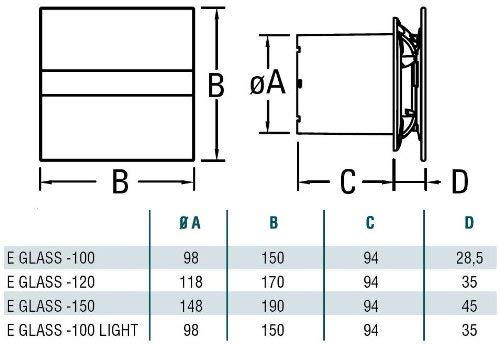
Figure 2: Dimensions for CATA E-Glass series fans. For E-120-G, refer to the 'E GLASS -120' row.
4.2. Mounting the Fan
- Carefully remove the front glass panel by gently pulling it away from the main body.
- Position the fan body into the prepared opening.
- Mark the drilling points for the mounting screws through the holes on the fan's base.
- Drill holes and insert wall plugs if necessary.
- Secure the fan body to the wall/ceiling using appropriate screws.
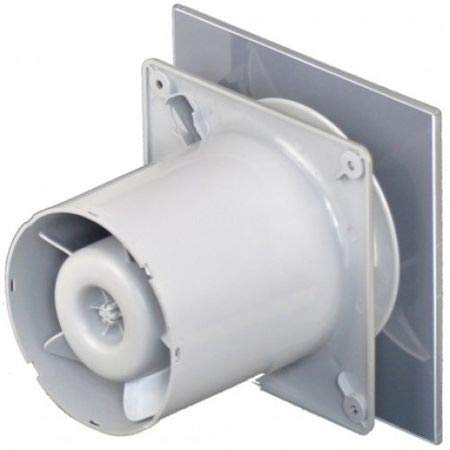
Figure 3: Rear view of the fan, illustrating the duct connection and mounting points.

Figure 4: Illustration of the fan body being inserted into the duct opening.
4.3. Electrical Connection
WARNING: Electrical connections must be performed by a qualified electrician. Ensure power is disconnected at the main circuit breaker before proceeding.
- Locate the electrical terminal block inside the fan unit.
- Connect the live (L), neutral (N), and earth (E) wires from your power supply to the corresponding terminals on the fan.
- For models with a timer or humidity sensor (if applicable to your specific E-120-G variant), refer to the specific wiring diagram for additional connections (e.g., switched live 'SL' for timer function).
- Ensure all connections are secure and properly insulated.
- Replace the front glass panel, ensuring it clicks securely into place.
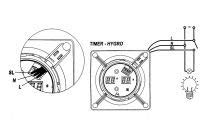
Figure 5: Example wiring diagram for models with timer or hygrostat functions. Consult a qualified electrician for proper connection.
5. Operating Instructions
The CATA E-120-G exhaust fan is designed for simple operation.
- Power On/Off: The fan is typically connected to a light switch or a dedicated fan switch in your bathroom. Flipping the switch will turn the fan on or off.
- Automatic Operation (if applicable): Some variants of the E-Glass series may include features like a timer, humidity sensor (Hygro), or infrared presence sensor (PIR). If your model has these features, the fan will operate automatically based on the detected conditions or set time. The E-120-G is a standard model, but other E-Glass models offer these advanced features.
- Energy Efficiency: The E-120-G is designed for high energy efficiency, consuming approximately 8 Watts during operation.

Figure 6: The fan is designed for energy efficiency, consuming approximately 8 Watts.
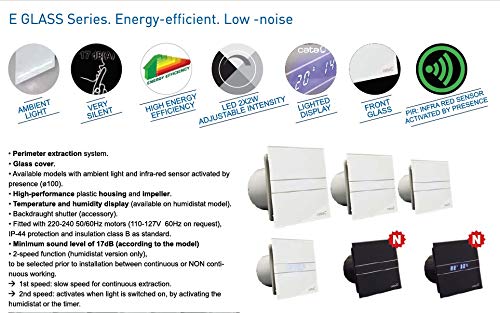
Figure 7: Overview of CATA E-Glass Series features, highlighting energy efficiency and low noise operation.
6. Maintenance and Cleaning
Regular cleaning will ensure optimal performance and extend the lifespan of your CATA E-120-G exhaust fan.
- WARNING: Always disconnect the power supply to the fan at the main circuit breaker before cleaning or performing any maintenance.
- Front Panel Cleaning: Gently remove the front glass panel. Clean it with a soft, damp cloth and a mild, non-abrasive detergent. Dry thoroughly before reattaching.
- Fan Blade Cleaning: Carefully wipe the fan blades and the interior of the fan housing with a soft, damp cloth. Avoid using excessive water or harsh chemicals.
- Reassembly: Once all parts are clean and dry, carefully reattach the front glass panel, ensuring it is securely fastened.
- Do not lubricate the motor. The motor is permanently lubricated.
7. Troubleshooting
If you experience issues with your CATA E-120-G exhaust fan, refer to the following common problems and solutions:
| Problem | Possible Cause | Solution |
|---|---|---|
| Fan does not turn on. | No power supply. Loose wiring connection. Faulty switch. |
Check circuit breaker. Ensure power is off, then check wiring connections. Test or replace the switch. |
| Fan is noisy. | Obstruction in fan blades. Loose mounting. Damaged motor/bearings. |
Disconnect power, remove front panel, clear any obstructions. Ensure fan is securely mounted. Contact customer support if motor is damaged. |
| Poor air extraction. | Blocked ducting. Dirty fan blades. Incorrect fan size for room. |
Check ducting for obstructions. Clean fan blades and housing. Ensure fan is appropriate for room volume. |
If the problem persists after attempting these solutions, please contact customer support.
8. Specifications
| Brand | CATA |
| Model | E-120-G |
| Colour | White |
| Material | Glass |
| Finish Type | Powder Coated or Painted |
| Electric Fan Design | Exhaust Fan |
| Power Source | Electric |
| Room Type | Bathroom |
| Indoor/Outdoor Usage | Outdoor |
| Switch Type | Push Button (External switch) |
| Special Features | Portable, Water Resistant, Waterproof |
| Dimensions (Overall) | 170 mm (Width) x 170 mm (Height) x 94 mm (Depth of body) x 35 mm (Front panel thickness) |
| Duct Diameter (ØA) | 118 mm |
| Power Consumption | Approx. 8 Watts |
Note: Specifications are subject to change without prior notice for product improvement.
9. Warranty Information
The CATA E-120-G Exhaust Fan comes with a standard manufacturer's warranty. Please refer to the warranty card included with your purchase or contact your retailer for specific warranty terms and conditions. Keep your purchase receipt as proof of purchase for warranty claims.
This warranty typically covers defects in materials and workmanship under normal use. It does not cover damage resulting from improper installation, misuse, abuse, accident, or unauthorized repairs.
10. Customer Support
For technical assistance, troubleshooting beyond this manual, or warranty inquiries, please contact your local CATA distributor or the retailer from whom you purchased the product.
When contacting support, please have the following information ready:
- Product Model: CATA E-120-G
- Date of Purchase
- Description of the issue
You may also visit the official CATA website for more information and support resources: www.cata.com (Note: This is a placeholder URL, please verify the actual official website for CATA products in your region.)


