
Introduction
The VIPARSPECTRA VT300 LED Grow Light is designed to provide optimal lighting for indoor plant cultivation across all growth stages. This light features a built-in timer, dimmable vegetative (VEG) and flowering (BLOOM) channels, and a 12-band full spectrum output. It is engineered to deliver a balanced PAR output and coverage, consuming approximately 135W while offering performance comparable to traditional 250W HPS/MH systems.
Safety Information
- Extremely Bright Light: Do not look directly at the LED bulbs when the light is operating. Prolonged direct exposure can cause eye strain or damage.
- Indoor Use Only: This product is designed for indoor use and is not waterproof. Avoid exposure to water or high humidity environments.
- No External Ballast Required: The VT300 has an integrated driver; no additional ballast is needed.
- Infrared (IR) LEDs: This light includes IR LEDs (730nm) which may appear dim or invisible to the naked eye. This is normal and does not indicate a fault.
- Ventilation: Ensure adequate ventilation around the light to prevent overheating.
Package Contents
Verify that all items are present in the package:
- 1 x VT300 LED Grow Light
- 1 x Remote Control
- 1 x User Instructions (this manual)
- 1 x Hanging Kit
- 1 x 6ft Power Cord

Image: Contents of the VIPARSPECTRA VT300 LED Grow Light package, showing the light unit, remote control, power cord, and hanging kit.
Setup
Mounting the Grow Light
- Unpack: Carefully remove the VT300 LED Grow Light and all accessories from the packaging.
- Attach Hanging Kit: Connect the provided hanging wires to the four hanging points on the top of the light fixture. Ensure they are securely fastened.
- Suspend Light: Use the carabiners on the hanging kit to suspend the light from a sturdy support structure (e.g., grow tent frame, ceiling hook). Adjust the height according to your plant's growth stage and coverage requirements.

Image: The VT300 LED Grow Light suspended inside a grow tent, demonstrating how the hanging kit is used to position the light above plants.
Power Connection
- Connect Power Cord: Insert the 6ft power cord into the power inlet on the side of the VT300 light fixture.
- Plug In: Plug the other end of the power cord into a standard AC100-240V electrical outlet.
Operating Instructions
Control Panel Overview
The VT300 features a digital display and control knob on the unit, along with a remote control for convenient operation.

Image: Detailed view of the VT300's control panel, showing the digital display, buttons for remote control and digital timer, and the adjustable intensity knob.
Remote Control Functions
The included remote control allows for easy adjustment of settings.

Image: The VIPARSPECTRA remote control, highlighting buttons for power, channel selection (VEG/BLOOM), timer settings, and intensity adjustments.
- Power Button: Turns the light ON or OFF.
- VEG Button: Activates or deactivates the vegetative growth channel.
- BLOOM Button: Activates or deactivates the flowering growth channel.
- +/- Buttons: Adjusts the intensity (brightness) of the selected channel.
- CLOCK Button: Accesses timer settings.
- OK Button: Confirms selections.
Timer Settings
The built-in timer allows for automatic on/off cycles. The timer controls both VEG and BLOOM channels simultaneously; they cannot be set to turn on/off independently.
- Press the CLOCK button on the remote or the 'Digital Timer' button on the unit.
- Use the navigation buttons or control knob to set the desired Start-working time (ON time).
- Confirm the start time, then set the Off-working time (OFF time).
- The light will now automatically turn on and off according to your programmed schedule.
Dimmable Channels
The VT300 features dimmable VEG and BLOOM channels, allowing you to customize light intensity for different growth phases.
- Press the VEG or BLOOM button to activate the respective channel.
- Use the +/- buttons on the remote or the adjustable intensity knob on the unit to increase or decrease the brightness.
- Adjust the intensity gradually to avoid shocking plants.
Spectrum Information
The VIPARSPECTRA VT300 utilizes a 12-band full spectrum, developed through extensive testing to support all stages of plant growth. This spectrum includes wavelengths from UV to IR, ensuring plants receive the necessary light for photosynthesis and development.

Image: Visual representation of the 12-band full spectrum, detailing wavelengths like 730nm (IR), 660nm, 630nm, 615nm, 595nm, 580nm, 475nm, 460nm, 445nm, 440nm, 3000K, and 7500K. It also shows the appearance of the VEG and BLOOM channels when active, noting that IR LEDs may appear dim.
Infrared (IR) LEDs
The VT300 incorporates 730nm IR LEDs. These LEDs are crucial for plant development but may appear very dim or invisible to the human eye. This is normal operation and not a defect.
Coverage and PAR Values
The VT300 is designed to provide specific coverage areas and PAR (Photosynthetically Active Radiation) values at different heights, optimized for vegetative and flowering stages.
- Vegetative Coverage: Approximately 2.5 x 2.5 feet at a hanging height of 24 inches.
- Flowering Coverage: Approximately 2 x 2 feet at a hanging height of 18 inches.
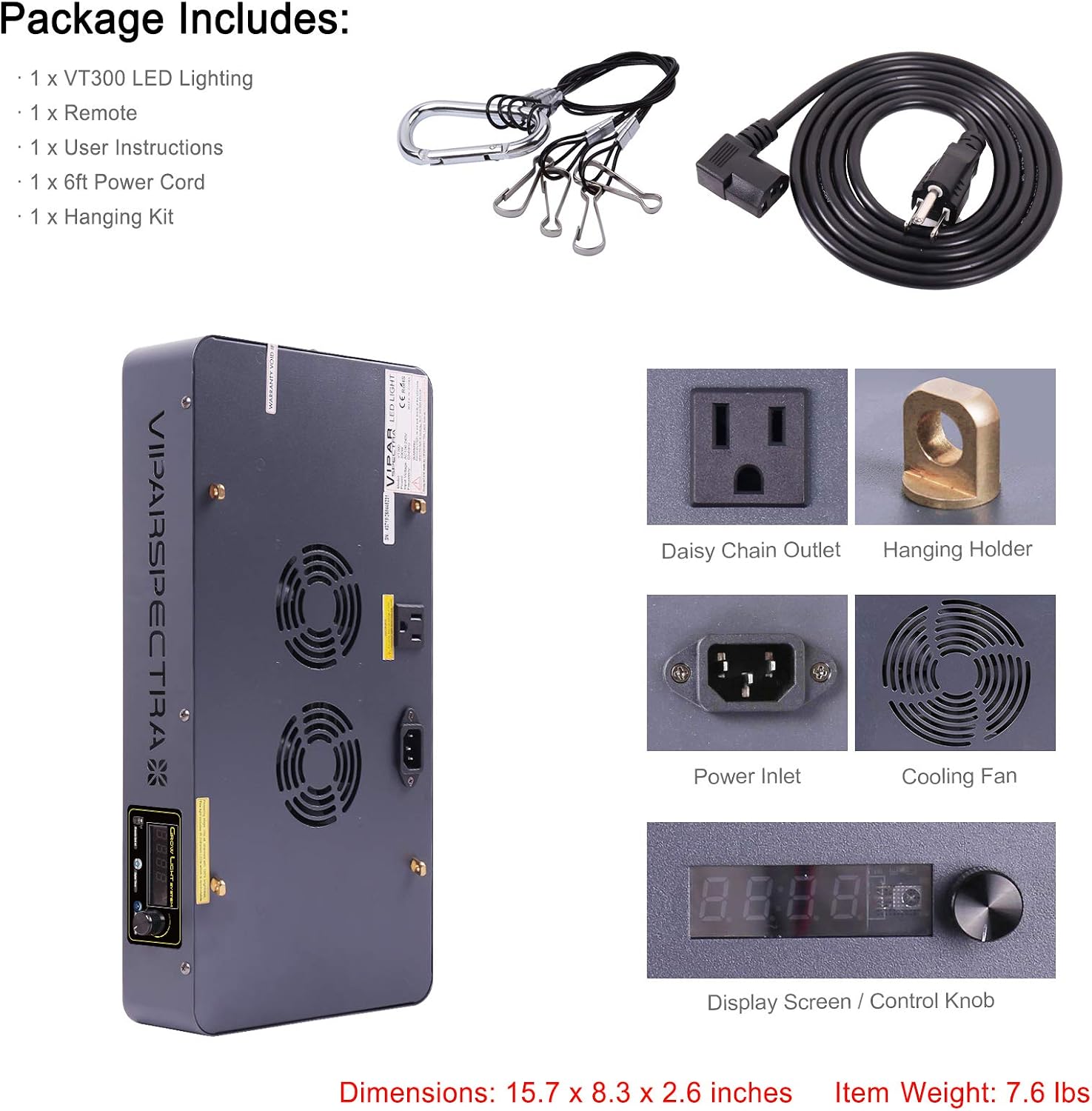
Image: The VT300 light in operation, with a PAR meter showing a reading of 565 µmol m⁻² s⁻¹ at an 18-inch distance from the light source.
PAR Value Distribution

Image: A grid map illustrating the PAR (Photosynthetically Active Radiation) values in µmol m⁻² s⁻¹ across a 3x3 foot area when the VT300 is positioned at an 18-inch height. The center shows a peak of 565, with values decreasing towards the edges.
PAR Value at Various Heights

Image: A vertical diagram showing the measured PAR values (µmol m⁻² s⁻¹) of the VT300 at various distances from the light source, ranging from 0 inches (1505) to 36 inches (100).
Maintenance
- Cleaning: Periodically wipe the light fixture and reflector with a soft, dry cloth to remove dust and debris. Ensure the light is unplugged before cleaning. Do not use liquid cleaners directly on the LEDs or electrical components.
- Fan Inspection: Regularly check the cooling fans for any obstructions or excessive noise. Keep the fan vents clear to ensure proper airflow and heat dissipation.
- Cable Check: Inspect the power cord and hanging wires for any signs of wear or damage. Replace immediately if damage is found.
Troubleshooting
- Light Not Turning On:
- Ensure the power cord is securely plugged into both the light fixture and the electrical outlet.
- Check if the outlet is functional by plugging in another device.
- Verify the timer settings are correct and not set to an 'OFF' period.
- Some LEDs Appear Dim/Off:
- This is normal for Infrared (IR) LEDs (730nm). They are part of the full spectrum but are barely visible to the human eye.
- Remote Control Not Responding:
- Ensure there are no obstructions between the remote and the light's sensor.
- Check and replace the remote control batteries if necessary.
- Overheating:
- Ensure adequate ventilation around the light. Clear any dust or debris from the cooling fans and vents.
- Do not operate the light in an enclosed space without airflow.
Specifications
| Feature | Specification |
|---|---|
| Model Number | VT300 |
| Replaces HPS/MH | 250W |
| Avg. Power Draw | 135W MAX |
| LED Chips | 60pcs High Intensity 5W Bridgelux/Epileds |
| Input Voltage | AC100-240V |
| Frequency | 50-60Hz |
| Vegetative Coverage (24") | 2.5 x 2.5 ft |
| Flowering Coverage (18") | 2 x 2 ft |
| Item Weight | 7.6 Pounds |
| Material Type | Iron |
| Shade Material | Iron |
| Control Method | Remote Control |
| Additional Features | Dimmable, Built-in Timer |
| Indoor Outdoor Usage | Indoor |
| Water Resistance Level | Not Waterproof (Indoor Use Only) |
Warranty and Support
The VIPARSPECTRA VT300 LED Grow Light comes with a 3-year warranty from the date of purchase. Additionally, VIPARSPECTRA offers a 30-day satisfaction or return guarantee.
For technical support, warranty claims, or any questions regarding your product, please contact VIPARSPECTRA customer service through their official website or the retailer where the product was purchased. Please have your model number (VT300) and proof of purchase ready when contacting support.


