
1. Introduction
This manual provides detailed instructions for the installation, operation, and maintenance of the UOTEK UT-890-TC USB Type-C to RS-485/422 Serial Converter. This device facilitates reliable communication between USB Type-C enabled devices and RS-485 or RS-422 serial equipment, featuring robust ESD protection for industrial environments.
2. Product Features
- Standards Compliance: Conforms to USB V1.1, 1.0, 2.0, 3.1, EIA RS-485, and RS-422 standards, ensuring broad compatibility.
- Operating Modes: Supports asynchronous, point-to-point or point-to-multipoint, 2-wire half-duplex, and 4-wire full-duplex communication.
- Automatic Direction Control: Features automatic data stream control for seamless recognition and management of data transmission direction.
- High Baud Rate: Achieves baud rates from 300 to 921.6Kbps with automatic detection of the serial interface signal transmission rate.
- Load Capacity: Supports point-to-multipoint configurations, allowing connection of up to 32 RS-422 or RS-485 interface devices.
- Extended Transmission Distance: Up to 1200 meters for RS-485/422 (at 9600bps) and up to 5 meters for USB.
- Robust Protection: Integrated 600W lightning strike and surge protection, along with ±5KV electrostatic protection.
- Interface Types: USB Type-C male connector and DB9 male connector.
- Status Indicators: Equipped with three LED indicators for Power (PWR), Send (TXD), and Receive (RXD) to monitor operational status.
- Wide Operating Temperature: Functions reliably from -40°C to 85°C.
- Broad OS Support: Compatible with Win2000/2003/2008/2012/XP/Vista/7/8/8.1/10/CE, Mac, and Linux operating systems.
3. Package Contents
Please verify that all items are present in the package:
- UOTEK UT-890-TC USB Type-C to RS-485/422 Serial Converter
- Terminal Block (if included with your model)
- User Manual (this document)
4. Setup and Installation
4.1 Driver Installation
The UT-890-TC converter typically uses standard USB serial drivers. For most modern operating systems (Windows 10/8.1/8/7, Mac, Linux), drivers may install automatically upon connection. If automatic installation fails, please visit the UOTEK official website for the latest driver downloads specific to your operating system.
- Connect the USB Type-C end of the converter to an available USB Type-C port on your computer.
- Allow your operating system to attempt automatic driver installation.
- Verify successful installation in your device manager (e.g., "Ports (COM & LPT)" on Windows). Note the assigned COM port number.
- If drivers do not install automatically, download and install them manually from the manufacturer's website.
4.2 Hardware Connection
Connect the DB9 male connector of the UT-890-TC to your RS-485 or RS-422 serial device. Ensure secure connections. If using a terminal block, connect your serial wires according to the pin assignments provided in Section 5.
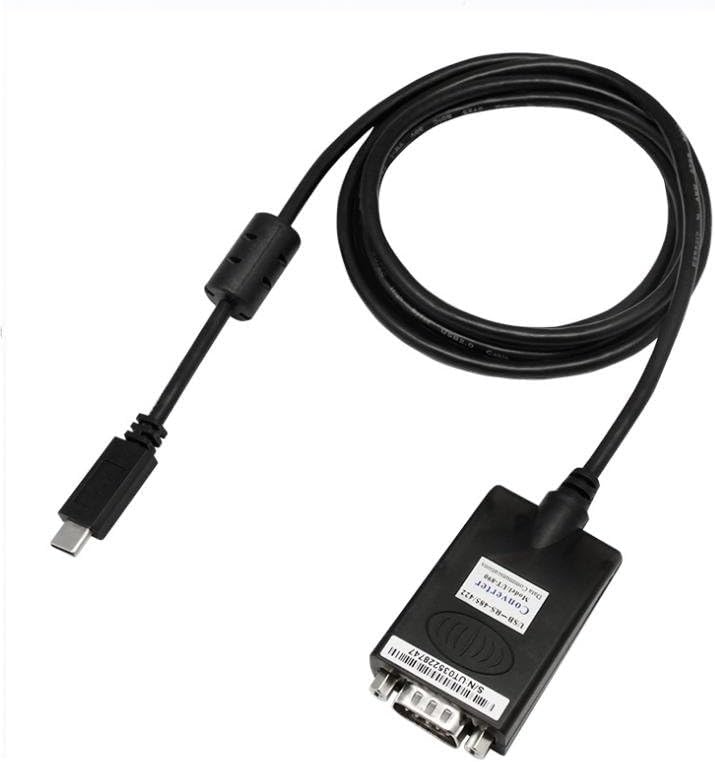
Figure 1: UOTEK UT-890-TC USB Type-C to RS-485/422 Serial Converter. This image shows the overall design of the converter cable with its USB Type-C connector and DB9 serial port.
5. Pin Assignments and Wiring
Correct wiring is essential for proper operation. Refer to the following pin assignments for the DB9 connector and USB Type-C interface.
5.1 DB9 Male Connector Pin Assignment
| DB9 Male (PIN) | Output Signal | RS-422 Wiring | RS-485 Wiring |
|---|---|---|---|
| 1 | T/R+ | RS-485(A+) | RS-485(A+) |
| 2 | T/R- | RS-485(B-) | RS-485(B-) |
| 3 | RXD+ | (A+) | N/A |
| 4 | RXD- | (B-) | N/A |
| 5 | GND | GND | GND |
| 6 | N/A | ||
| 7 | N/A | ||
| 8 | N/A | ||
| 9 | N/A |
5.2 USB Type-C Signal Input & Pin Assignment
| A12 | A11 | A10 | A9 | A8 | A7 | A6 | A5 | A4 | A3 | A2 | A1 |
|---|---|---|---|---|---|---|---|---|---|---|---|
| GND | RX2+ | RX2- | VBUS | SBU1 | D- | D+ | CC | VBUS | TX1- | TX1+ | GND |
| B1 | B2 | B3 | B4 | B5 | B6 | B7 | B8 | B9 | B10 | B11 | B12 |
|---|---|---|---|---|---|---|---|---|---|---|---|
| GND | TX2+ | TX2- | VBUS | VCONN | SBU2 | VBUS | RX1- | RX1+ | GND |
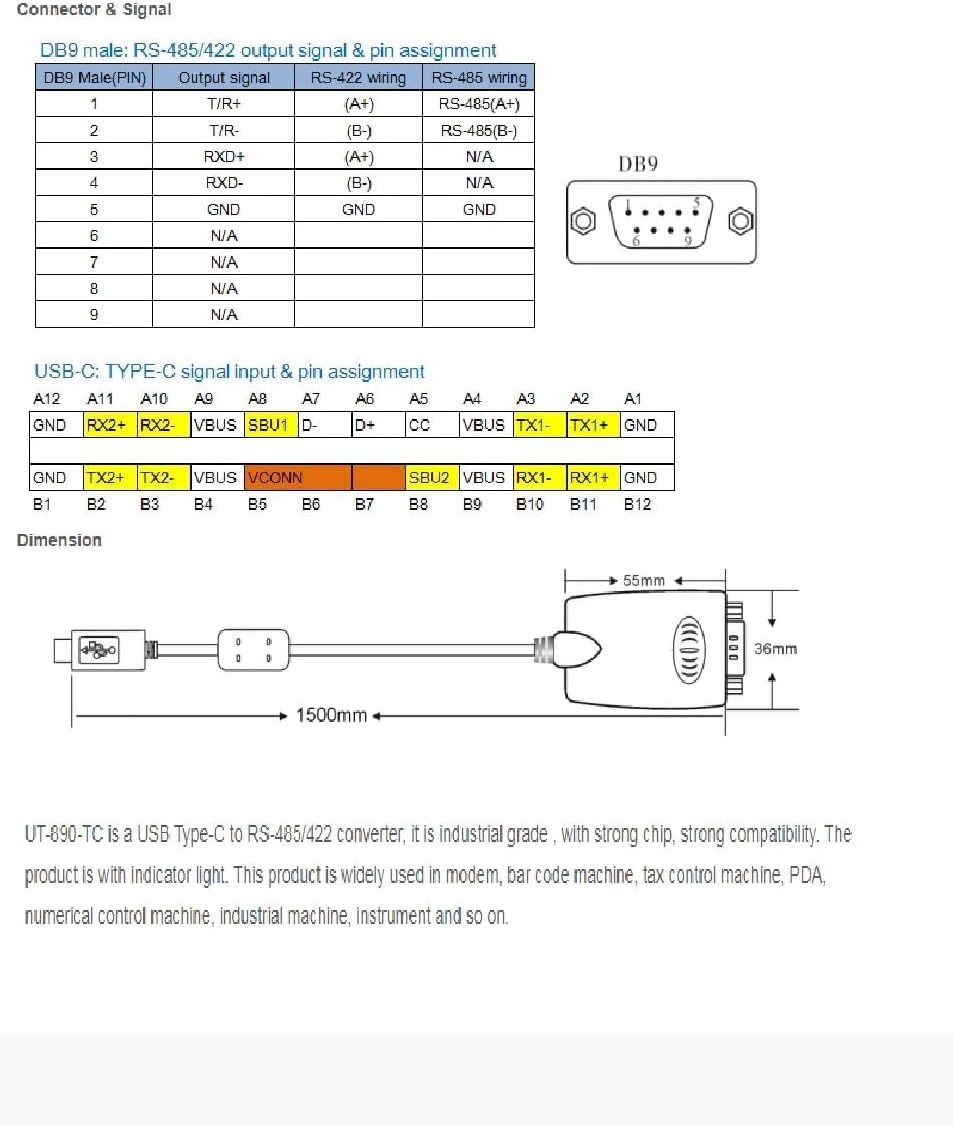
Figure 2: Detailed pin assignments for the DB9 male connector (RS-485/422) and USB Type-C interface, along with product dimensions. This diagram is crucial for correct wiring and understanding the physical layout.
6. Operating Instructions
6.1 Communication Modes
The UT-890-TC supports various communication modes:
- Point-to-point 4-line full duplex
- Point-to-multipoint 4-line full duplex
- Point-to-point 2-line half duplex
- Point-to-multipoint 2-line half duplex
Select the appropriate mode based on your serial device requirements. The converter automatically handles data transmission direction for half-duplex modes.
6.2 LED Indicators
Monitor the LED indicators for operational status:
- PWR (Power): Indicates the device is powered on and connected correctly.
- TXD (Transmit Data): Flashes when data is being transmitted from the USB side to the serial side.
- RXD (Receive Data): Flashes when data is being received by the USB side from the serial side.
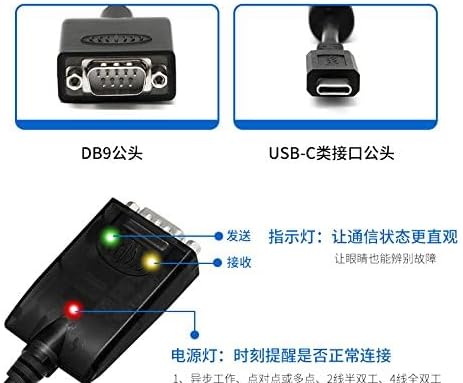
Figure 3: Close-up view of the converter showing the LED indicators for Power, Transmit (TXD), and Receive (RXD). These indicators provide visual feedback on the device's operational status.
7. Specifications
| Feature | Description |
|---|---|
| Standards | USB V1.1, 1.0, 2.0, 3.1; EIA RS-485, RS-422 |
| USB Signals | VCC, DATA+, DATA-, GND, FG |
| RS-485 Signals | T/R+, T/R-, GND |
| RS-422 Signals | T/R+, T/R-, R+, R-, GND |
| Working Modes | Asynchronous, point-to-point or point-to-multipoint, 2-line half duplex, 4-line full duplex |
| Direction Control | Automatic data stream control |
| Baud Rate | 300-921.6Kbps (automatic detection) |
| Load Capacity | Up to 32 RS-422 or RS-485 devices |
| Transmission Distance | RS-485/422: 1200m (at 9600bps); USB: 5m max |
| Port Protection | 600W lightning strike & surge protection, ±5KV electrostatic protection |
| Interface Forms | USB Type-C male, DB9 male |
| Signal Indication | PWR, TXD, RXD LEDs |
| Transmission Media | Twisted-pair cable or shielded cable |
| Dimensions | 55mm x 36mm x 18mm (converter module) |
| Cable Length | Approximately 1.5 meters (from image) |
| Operating Temperature | -40°C to 85°C |
| Relative Humidity | 5% to 95% |
| OS Support | Win2000/2003/2008/2012/XP/Vista/7/8/8.1/10/CE, Mac, Linux |
| Item Weight | 4.8 ounces (0.14 Kilograms) |
8. Troubleshooting
- No Power (PWR LED Off):
- Ensure the USB Type-C connector is fully inserted into a powered USB port.
- Try a different USB Type-C port or computer.
- No Data Transmission (TXD/RXD LEDs not flashing):
- Verify driver installation in Device Manager. Reinstall drivers if necessary.
- Check serial port settings (COM port, baud rate, data bits, parity, stop bits) in your application to match the connected device.
- Ensure correct wiring of the RS-485/422 interface according to Section 5.
- Confirm the serial device is powered on and functioning correctly.
- For RS-485, ensure termination resistors are correctly applied if required by your network.
- Intermittent Communication:
- Check for loose connections on both USB and serial ends.
- Ensure the transmission media (twisted-pair or shielded cable) is appropriate and not damaged.
- Verify that the total cable length does not exceed the recommended transmission distance.
- Minimize electromagnetic interference (EMI) by keeping the converter and cables away from strong electrical noise sources.
- Device Not Recognized by OS:
- Try connecting to a different USB Type-C port.
- Restart your computer.
- Manually install the latest drivers from the UOTEK website.
9. Maintenance
The UOTEK UT-890-TC converter is designed for robust operation and requires minimal maintenance. Follow these guidelines:
- Keep the device clean and free from dust and debris. Use a soft, dry cloth for cleaning.
- Avoid exposing the device to extreme temperatures, direct sunlight, or high humidity.
- Do not attempt to open or modify the converter, as this will void the warranty and may cause damage.
- Ensure cables are not bent sharply or subjected to excessive strain.
10. Warranty and Support
UOTEK products are designed for reliability and performance. For warranty information, technical support, or service inquiries, please refer to the warranty card included with your product or visit the official UOTEK website. Please have your product model number (UT-890-TC) and purchase details ready when contacting support.