
Alpicool C50
Alpicool C50 Portable Refrigerator User Manual
Model: C50 | Brand: Alpicool
Introduction
Thank you for choosing the Alpicool C50 Portable Refrigerator. This versatile 53-quart (50-liter) unit is designed to provide efficient cooling and freezing for various applications, including vehicles, trucks, RVs, boats, and home use. It operates on both 12/24V DC and 110-240V AC power, making it an ideal companion for travel, outdoor adventures, and everyday needs. This manual provides essential information for safe operation, setup, maintenance, and troubleshooting to ensure optimal performance and longevity of your Alpicool C50.
Safety Information
- Read all instructions carefully before operating the appliance.
- Do not operate the appliance if it is visibly damaged.
- Ensure proper ventilation around the unit to prevent overheating.
- Avoid placing the appliance near heat sources or in direct sunlight for prolonged periods.
- Do not use electrical devices inside the refrigerator unless they are recommended by the manufacturer.
- Keep the appliance away from water and moisture.
- Always disconnect the power supply before cleaning or performing maintenance.
- This appliance is not intended for use by persons (including children) with reduced physical, sensory or mental capabilities, or lack of experience and knowledge, unless they have been given supervision or instruction concerning use of the appliance by a person responsible for their safety.
Product Overview
The Alpicool C50 Portable Refrigerator is designed for convenience and efficiency. Below are its key features and components.

Figure 1: Front view of the Alpicool C50 Portable Refrigerator, showcasing its silver and black design with the Alpicool logo.

Figure 2: Overview of key features including portable refrigeration, Celsius/Fahrenheit conversion, vehicle/RV compatibility, fast freeze, battery protection, anti-shaking, rated power of 45W, mute low noise operation, and a temperature range of -4°F to 68°F.
Key Components:
- Digital Control Panel: Located on the top, allows for temperature adjustment, mode selection (MAX/ECO), and battery protection settings.
- USB Charging Port: Conveniently located on the control panel for charging mobile devices.
- Durable Handles: Integrated handles on the sides for easy portability.
- LED Light: Built-in interior LED light for illumination.
- Drain Plug: Located at the bottom for convenient cleaning and water drainage.
- Hinges: Robust hinges for the lid, ensuring secure closure.
- Cupholder Design: Recessed areas on the lid designed to hold beverages securely.

Figure 3: Detailed view highlighting the LED light, hinge, digital control panel, durable handle, and drain plug.
Setup
- Unpacking: Carefully remove the refrigerator from its packaging. Inspect for any shipping damage.
- Initial Placement: Place the unit on a flat, stable surface. Ensure there is adequate ventilation around the appliance (at least 10 cm clearance on all sides).
- Allow to Settle: After transport, allow the refrigerator to stand upright for at least 6 hours before plugging it in. This allows the compressor oil to settle.
- Power Connection:
- DC Power (12V/24V): Connect the DC power cable to the refrigerator's DC input port and then to your vehicle's 12V/24V power outlet (cigarette lighter socket).
- AC Power (110-240V): Connect the AC adapter to the refrigerator's AC input port, then plug the AC power cord into a standard wall outlet.
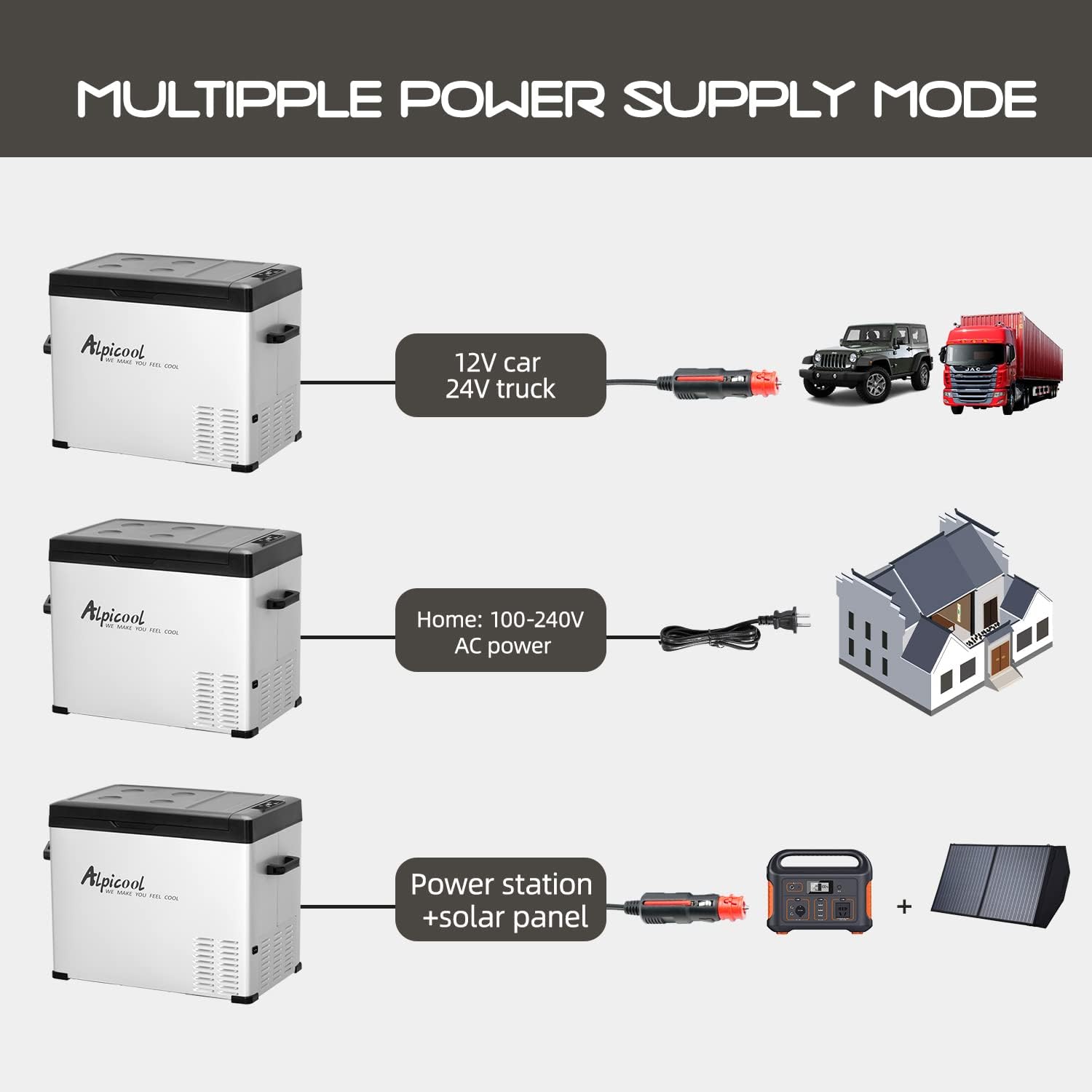
Figure 4: Illustration of the multiple power supply options: 12V/24V DC for car/truck, 100-240V AC for home, and compatibility with power stations and solar panels.
- Initial Cleaning: Before first use, wipe the interior and exterior with a damp cloth.
Operating Instructions
Control Panel Functions:
- Power Button: Press to turn the unit ON/OFF.
- SET Button: Press to enter temperature setting mode or switch between MAX/ECO modes.
- +/- Buttons: Adjust the temperature setting.
- Battery Protection Setting: Press and hold the SET button for 3 seconds to enter battery protection mode (H/M/L - High, Medium, Low). This prevents your vehicle battery from draining completely.

Figure 5: Display showing the digital control panel for intelligent temperature control, allowing adjustment for freezer or fridge use, suitable for items like ice cream, beef, fruit, skin care products, and beer.
Temperature Control:
The Alpicool C50 can function as both a refrigerator and a freezer, with a temperature range from -4°F (-20°C) to 68°F (20°C). Use the +/- buttons to set your desired temperature. The unit will automatically adjust to maintain the set temperature.
Cooling Modes (MAX/ECO):
- MAX Mode: Provides faster cooling performance, ideal for quickly chilling contents.
- ECO Mode: Energy-saving mode, suitable for maintaining temperature over longer periods with lower power consumption.

Figure 6: Graph illustrating the advanced cooling technology, showing the time taken to reach various temperatures: 77°F to 32°F in 32 minutes, 32°F to 10°F in 49 minutes, and 10°F to -4°F in 76 minutes.
Capacity and Storage:
The C50 model offers a 53-quart (50-liter) capacity, capable of holding approximately 68 x 12oz cans of cola, 37 x 18oz water bottles, or 20 x 25oz wine bottles. Its internal dimensions are designed for efficient storage of various items.

Figure 7: Diagram showing the internal dimensions (13x11x16.2 inches and 4.8x11x9.4 inches for different sections) and external dimensions (22.6x14.4x19.3 inches), along with examples of capacity for cans, water bottles, and wine bottles.
Maintenance
- Cleaning: Regularly clean the interior and exterior of the refrigerator with a damp cloth and mild detergent. Do not use abrasive cleaners or solvents. Use the drain plug to easily remove any accumulated water.
- Defrosting: If a thick layer of ice forms on the interior walls, defrost the unit. Turn off the power, remove all contents, and leave the lid open until the ice melts. Wipe dry before restarting.
- Ventilation: Ensure the ventilation grilles are clear of dust and debris to maintain efficient cooling. Periodically clean them with a soft brush or vacuum cleaner.
- Storage: When storing the refrigerator for an extended period, ensure it is clean, dry, and the lid is slightly ajar to prevent odors and mold growth.
Troubleshooting
| Problem | Possible Cause | Solution |
|---|---|---|
| Unit not turning on | No power supply; loose connection; blown fuse. | Check power cable connection; check vehicle's fuse or wall outlet. |
| Cooling performance is poor | Insufficient ventilation; excessive ambient temperature; lid not closed properly; too much content. | Ensure proper clearance around vents; move to a cooler environment; close lid tightly; do not overfill. |
| Unit making unusual noise | Unit not level; fan obstruction; compressor issue. | Place on a level surface; check for obstructions in fan area; if noise persists, contact support. |
| Display shows error code | Specific internal fault. | Refer to the specific error code in the full manual (if available) or contact customer support. |
Specifications
| Feature | Detail |
|---|---|
| Brand | Alpicool |
| Model | C50 |
| Capacity | 53 Quart (50 Liters) |
| Temperature Range | -4°F to 68°F (-20°C to 20°C) |
| Power Input | 12V/24V DC, 110-240V AC |
| Rated Power | 45 Watts |
| Item Weight | 36.4 Pounds |
| Product Dimensions (L x W x H) | 22.6" x 14.4" x 19.3" |
| Defrost System | Automatic |
| Material Type | Metal (Stainless Steel case) |
Product Video
Video: An overview of the Alpicool C30/C40/C50 Car Fridge Freezer, demonstrating its features, capacity, and various uses in different environments.
Warranty and Support
Alpicool products come with a manufacturer's warranty. Please refer to the warranty card included with your purchase for specific terms and conditions. For technical support, troubleshooting assistance, or warranty claims, please contact Alpicool customer service through their official website or the retailer where you purchased the product. Ensure you have your model number (C50) and purchase details ready when contacting support.
For more information, visit the Alpicool Store on Amazon.
Related documentsC50


Ask a question about this manual
Ask about setup, troubleshooting, compatibility, parts, safety, or missing instructions. Manuals+ will review the question and use this page’s manual context to help answer it.