
Mackie MR824
Contents
Mackie MR824 8-inch Powered Studio Monitor User Manual
Model: MR824
Introduction
The Mackie MR824 8-inch Powered Studio Monitors are designed to provide professional performance, clarity, and superior mix translation. These monitors are precision-tuned to ensure your audio sounds accurate, whether you are working with dialogue, hip-hop, rock, or other genres. Featuring Mackie's proven logarithmic waveguide, they offer an ultra-wide listening sweet spot and enhanced stereo imaging. Acoustic Space controls allow for frequency response adjustments to match your specific studio environment.
What's in the Box
Upon unboxing your Mackie MR824 monitor, please ensure all the following components are present:
- Mackie MR824 8-inch Powered Studio Monitor
- Power Cord
- Pro Tools® | First Software (download code)
- Quick Start Guide
Product Overview
Front Panel
The front panel of the MR824 features the main speaker components and the Mackie running man logo, which also serves as a power indicator.

Image: Front view of the Mackie MR824 Studio Monitor, showcasing the woofer, tweeter, and power indicator.
Rear Panel
The rear panel provides all the necessary input connections and acoustic adjustment controls for optimal performance in your studio environment.
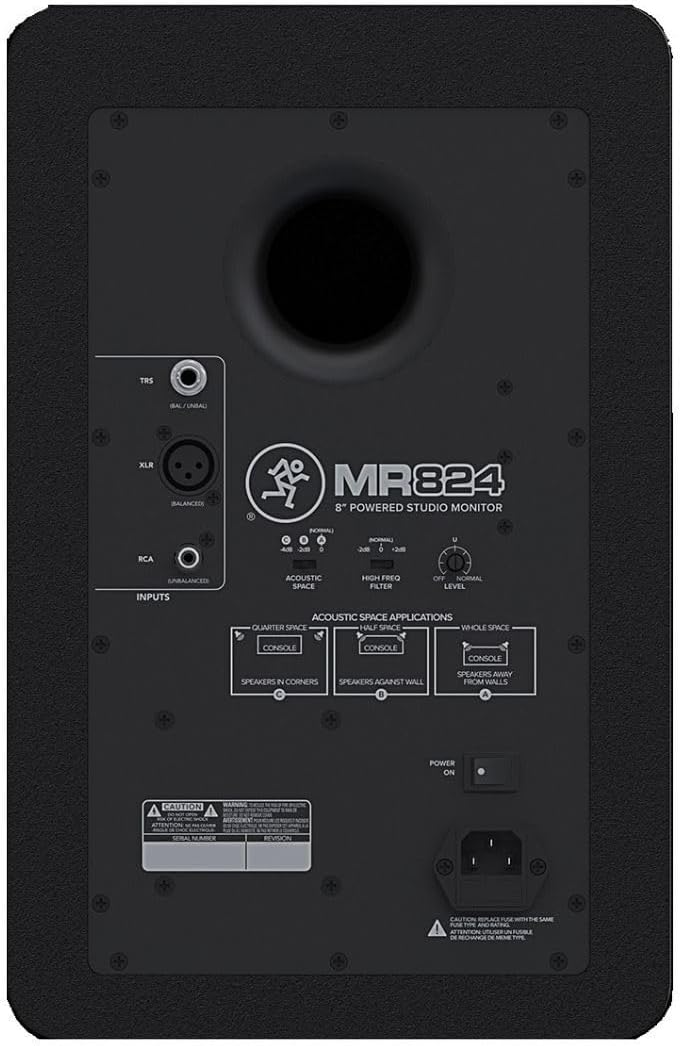
Image: Rear view of the Mackie MR824 Studio Monitor, detailing the TRS, XLR, and RCA inputs, along with Acoustic Space and High Freq Filter controls.
Setup and Connections
Initial Placement
Proper placement of your studio monitors is crucial for accurate sound reproduction. Position the monitors to form an equilateral triangle with your listening position. Ensure they are at ear level and equidistant from your ears.

Image: A Mackie MR824 monitor positioned on a desk in a studio environment, next to a computer monitor.
Input Connections
The MR824 offers versatile input options to connect to your audio interface, mixer, or other sound sources:
- TRS (Balanced): For professional audio connections, offering noise rejection over longer cable runs.
- XLR (Balanced): Another professional standard for balanced audio signals, ideal for studio environments.
- RCA (Unbalanced): Suitable for consumer-grade audio equipment.
Connect the appropriate cable from your audio source to the desired input on the rear panel of the MR824.
Acoustic Space Optimization
The MR824 features Acoustic Space controls on the rear panel to optimize the monitor's frequency response for your specific room acoustics. This helps to compensate for bass buildup that can occur when monitors are placed near walls or in corners.
Video: An overview of the Mackie MR Series Studio Monitors, demonstrating the Acoustic Space controls and their application for room optimization. This video highlights how these controls help maintain a flat frequency response regardless of monitor placement.
- Quarter Space: Use when monitors are in corners.
- Half Space: Use when monitors are against a wall.
- Whole Space: Use when monitors are away from walls (normal placement).
Adjust the High Freq Filter and Input Level knobs as needed to fine-tune the sound to your preference and room characteristics.
Operation
Logarithmic Waveguide
The MR824 features a proven logarithmic waveguide that provides an ultra-wide listening sweet spot and enhanced stereo imaging. This design ensures increased clarity and consistent sound across a wider area of your room, allowing for more flexible listening positions without compromising audio accuracy.
Driver Technology
The MR824 is equipped with high-quality drivers for precise audio reproduction:
- 1" Silk Dome Tweeter: Delivers smooth, accurate high frequencies.
- 8" Ultra-Responsive Woofer: Provides dynamic, punchy low-frequency reproduction, capable of handling heavy beats and complex synth sounds with clarity.
Pairing with MRS10 Subwoofer (Optional)
For extended low-end response, the MR824 can be paired with the Mackie MRS10 10-inch Studio Subwoofer. The MRS10 features a built-in variable crossover, allowing you to perfectly match its low-frequency output with your MR824 monitors for a seamless full-range sound experience.
Maintenance
To ensure the longevity and optimal performance of your Mackie MR824 monitors, follow these maintenance guidelines:
- Cleaning: Use a soft, dry cloth to wipe down the exterior of the monitors. Avoid using abrasive cleaners, solvents, or waxes, as these can damage the finish.
- Environment: Keep the monitors in a clean, dry environment away from excessive dust, moisture, and extreme temperatures.
- Ventilation: Ensure proper ventilation around the monitors to prevent overheating. Do not block the rear port or any ventilation grilles.
- Cables: Periodically check all cable connections for secure fit and signs of wear.
Troubleshooting
If you encounter issues with your Mackie MR824 monitors, consider the following common troubleshooting steps:
- No Sound: Check power connections, input cables, and ensure the input level knob on the rear panel is not set to minimum. Verify your audio source is active and sending a signal.
- Distorted Sound: Reduce the input level from your source or the monitor's input level knob. Check for damaged cables. Ensure the Acoustic Space and High Freq Filter settings are appropriate for your room.
- Hum or Hiss: Ensure all connections are secure. Try using balanced cables (TRS or XLR) if possible. Check for ground loops or interference from other electronic devices.
- Intermittent Sound: Inspect cables for damage or loose connections.
- Rattling Noise: As noted in some user experiences, a rattling noise at certain frequencies might indicate a defective unit. If troubleshooting steps do not resolve the issue, contact Mackie support.
For more detailed troubleshooting or issues not covered here, please refer to the official user manual PDF or contact Mackie customer support.
Specifications
| Feature | Specification |
|---|---|
| Brand | Mackie |
| Model Name | MR824 |
| Speaker Size | 8 Inches |
| Woofer Diameter | 8 Inches |
| Tweeter Size | 1 Inch (Silk Dome) |
| Speaker Amplification Type | Active (Bi-amplified) |
| Speaker Maximum Output Power | 85 Watts |
| Frequency Response | 20 KHz (Upper limit) |
| Connectivity Technology | Auxiliary, TRS, XLR, RCA |
| Product Dimensions | 13.1"D x 16.5"W x 19.2"H |
| Item Weight | 25.5 Pounds |
| Material | Polypropylene, Silk |
| Color | Black |
| Power Source | Corded Electric |
| Warranty Type | Full Warranty |
Warranty and Support
For detailed warranty information, please refer to the full warranty documentation included with your product or visit the official Mackie website. For additional support, technical assistance, or to download the complete user manual in PDF format, please visit the Mackie support page or use the link below:
Download Official User Manual (PDF)
You can also visit the official Mackie Store on Amazon for more products and information: Mackie Store
Documents and downloads
Ask a question about this manual
Ask about setup, troubleshooting, compatibility, parts, safety, or missing instructions. Manuals+ will review the question and use this page’s manual context to help answer it.