
echosari P021044483
echosari Control Handle Kit P021044483 Instruction Manual
Model: P021044483
Introduction
This manual provides essential instructions for the installation, operation, and maintenance of the echosari Control Handle Kit, model P021044483. This genuine Echo OEM part is designed for specific outdoor power tools, including PAS225, PAS225B, SHC225, and GT225L models. Please read this manual thoroughly before installation and use to ensure proper function and safety.
Safety Information
Always prioritize safety when working with power tools and replacement parts. Failure to follow safety instructions can result in serious injury or damage to equipment.
- Ensure the power tool is turned off and disconnected from its power source before beginning any installation or maintenance.
- Wear appropriate personal protective equipment (PPE), such as gloves and eye protection.
- If you are unsure about any step, consult a qualified service technician.
- Keep children and bystanders away from the work area.
Kit Components
The echosari Control Handle Kit P021044483 typically includes the following:
- Control Handle Assembly
- Mounting Screw(s)
- Wiring harness (integrated)
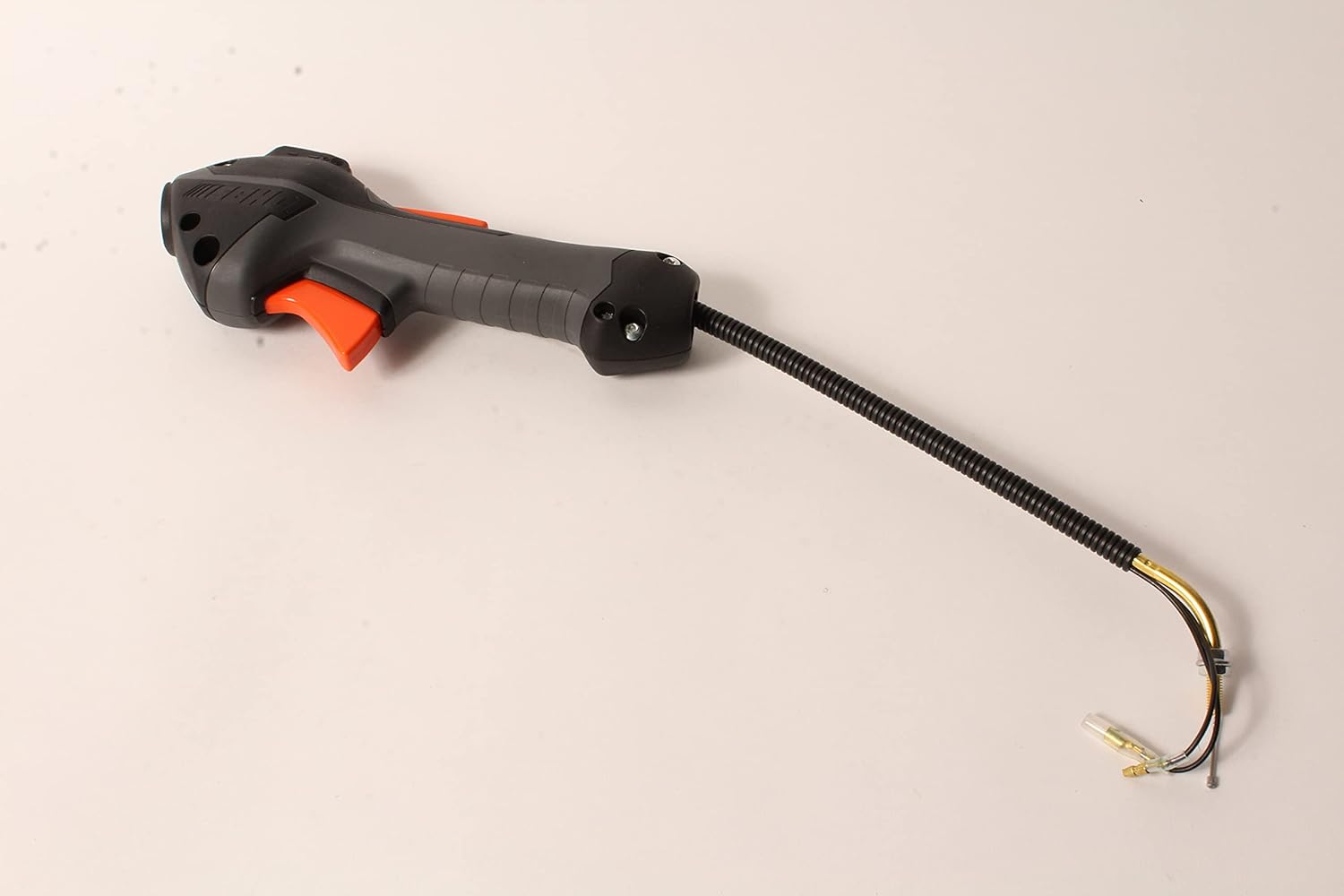
Image 1: Overview of the echosari Control Handle Kit P021044483. This image displays the complete control handle assembly, featuring the ergonomic grip, orange trigger, and integrated wiring harness extending from the base.
Installation Instructions
This section outlines the general steps for installing the control handle kit. Specific procedures may vary slightly depending on your power tool model (PAS225, PAS225B, SHC225, GT225L).
- Preparation: Ensure the power tool is completely off and disconnected from any fuel or electrical source. Place the tool on a stable, flat surface.
- Remove Old Handle (if applicable): Carefully disconnect any wiring from the existing control handle. Unscrew and remove the old handle assembly from the tool's shaft. Note the routing of the wires for reinstallation.
- Position New Handle: Slide the new echosari Control Handle Kit onto the tool's shaft. Ensure it is oriented correctly for comfortable operation.
- Secure Handle: Use the provided screw(s) or existing hardware to firmly attach the control handle to the shaft. Do not overtighten.
- Connect Wiring: Carefully connect the wiring harness from the new control handle to the corresponding connections on the power tool. Refer to your power tool's specific wiring diagram if necessary. Ensure all connections are secure and properly insulated.
- Test Functionality: Once installed, reconnect the power tool to its power source. Perform a functional test to ensure the throttle trigger, stop switch, and any other controls on the handle operate correctly before using the tool for work.

Image 2: Close-up view of the echosari Control Handle Kit, highlighting the ergonomic grip and trigger mechanism. This perspective shows the details of the control buttons and the textured surface for improved handling.
Operating Instructions
The control handle provides the primary interface for operating your power tool. Familiarize yourself with its functions before use.
- Throttle Trigger: The orange lever controls the engine speed or motor power. Squeeze to increase speed, release to decrease.
- Stop Switch: Located on the handle, this switch is used to immediately shut off the engine/motor. Always ensure it is functioning correctly before starting the tool.
- Throttle Lock (if applicable): Some models may include a throttle lock or cruise control feature. Refer to your power tool's main manual for specific instructions on its use.
Always hold the tool firmly with both hands, maintaining a balanced stance. Do not operate the tool if the control handle feels loose or damaged.
Maintenance
Regular inspection and minor maintenance will extend the life of your control handle kit.
- Cleaning: Keep the handle clean from dirt, debris, and oil. Use a damp cloth to wipe surfaces. Avoid using harsh chemicals that could damage the plastic.
- Inspection: Periodically check the handle for any signs of damage, cracks, or loose components. Ensure the throttle trigger moves freely and returns to its idle position.
- Wiring: Inspect the wiring harness for fraying, cuts, or exposed wires. Repair or replace if damage is found.
- Fasteners: Check that all screws securing the handle are tight.
Troubleshooting
If you encounter issues with your control handle, consider the following common problems and solutions:
| Problem | Possible Cause | Solution |
|---|---|---|
| Throttle not responding | Loose or disconnected wiring; damaged throttle cable (if applicable); faulty trigger mechanism. | Check all wiring connections. Inspect throttle cable for kinks or breaks. If trigger is faulty, replacement may be necessary. |
| Engine/Motor does not stop | Faulty stop switch; wiring issue to stop switch. | Inspect stop switch and its wiring. Replace switch if defective. |
| Handle feels loose | Mounting screws are loose. | Tighten mounting screws securely. |
For issues not listed here or if troubleshooting steps do not resolve the problem, contact a qualified service technician or the manufacturer.
Specifications
| Feature | Detail |
|---|---|
| Model Number | P021044483 |
| Brand | echosari (Genuine Echo OEM Part) |
| Compatible Models | PAS225, PAS225B, SHC225, GT225L |
| Product Dimensions | Approximately 1"L x 1"W |
| Item Weight | Approximately 9 ounces |
| Included Components | Control Handle Assembly, Screw(s) |
| Special Feature | Easy to Install |
| UPC | 663151489201 |
Warranty Information
For warranty details regarding the echosari Control Handle Kit P021044483, please refer to the warranty documentation provided with your original power tool or contact the manufacturer directly. Warranty terms typically cover defects in materials and workmanship under normal use.
Customer Support
If you require further assistance or have questions regarding the installation or operation of this control handle kit, please contact your retailer or the manufacturer, Echo, for support.
Manufacturer: Echo
Part Number: P021044483
ASIN: B073VRVXPY
Ask a question about this manual
Ask about setup, troubleshooting, compatibility, parts, safety, or missing instructions. Manuals+ will review the question and use this page’s manual context to help answer it.