Introduction
This manual provides comprehensive instructions for the setup, operation, and maintenance of your Rowin Looper Guitar Pedal LEF-332. This compact pedal offers up to 10 minutes of looping time with unlimited overdubbing, along with undo, redo, and delete functions. It features true bypass for signal integrity and a USB interface for transferring loops to and from a computer.
Product Overview
The Rowin Looper Pedal is designed for guitarists seeking a simple yet powerful looping tool. Its intuitive single-button control and level knob make it accessible for beginners while offering robust features for experienced users.

Figure 1: Front view of the Rowin Looper Guitar Pedal, highlighting the Level knob, Looper indicator, and Bypass footswitch.

Figure 2: Side view of the pedal, illustrating the input and output jacks, and the DC 9V power input.
Setup
Power Requirements
The Rowin Looper Pedal requires a 9V DC power supply with a center-negative polarity. The power supply is not included and must be purchased separately. Ensure the correct polarity to prevent damage to the unit.
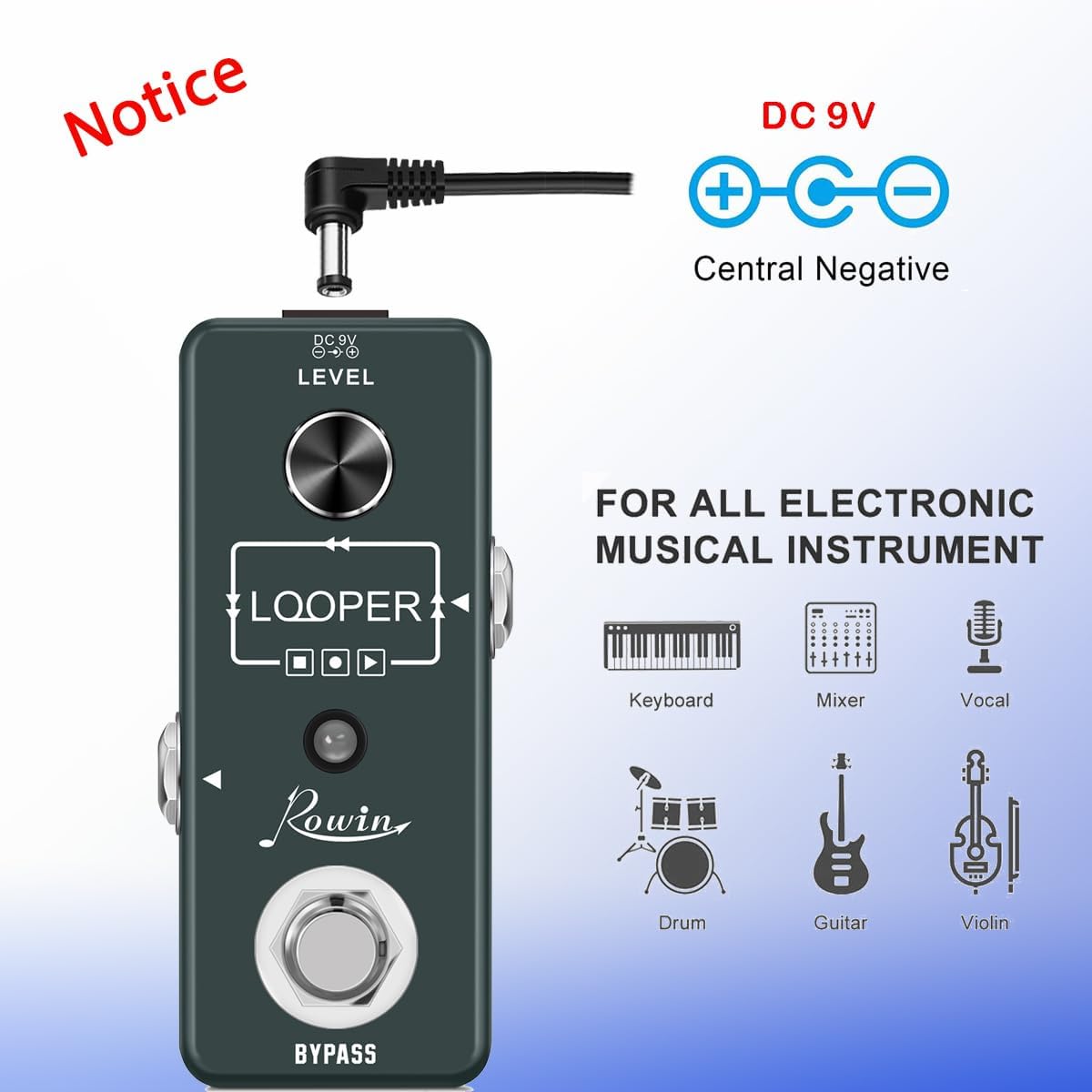
Figure 3: Power connection diagram, emphasizing the required DC 9V center-negative power supply.
Connections
- Connect your guitar to the pedal's input jack.
- Connect the pedal's output jack to your amplifier or the next pedal in your signal chain.
- Connect the 9V DC center-negative power supply to the pedal.
Operating Instructions
The Rowin Looper Pedal features a single footswitch for most operations and a Level knob to control the loop's volume.
Footswitch Functions
- Record: Press the footswitch once to start recording. The LED indicator will turn red.
- Playback: Press the footswitch once while recording to stop recording and start playback. The LED indicator will turn green.
- Overdub: While a loop is playing, press the footswitch once to start overdubbing. The LED will flash red. Press again to stop overdubbing and return to playback (green LED).
- Stop: Double-press the footswitch quickly to stop playback. The LED will flash green.
- Undo/Redo: While a loop is playing, press and hold the footswitch for 2 seconds to undo the last overdub. The LED will flash green rapidly. Repeat to redo.
- Clear: While the loop is stopped (flashing green LED), press and hold the footswitch for 2 seconds to clear the entire loop. The LED will turn off.
Level Knob
The Level knob controls the overall volume of the looped audio. Turn clockwise to increase volume and counter-clockwise to decrease it.
Video 1: Demonstrates the basic operation of the Rowin Looper Pedal, including recording, overdubbing, and clearing loops. It also shows the physical controls and connections.
Video 2: Showcases the Rowin Looper Pedal in a multi-pedal setup, demonstrating its use for creating layered guitar parts and soloing over loops.
USB Connectivity
The pedal features a USB interface for transferring recorded loops to and from your computer. This allows for saving your creations, editing them, or loading pre-recorded tracks onto the pedal.
- Connect the pedal to your computer using a standard USB cable (not included).
- The pedal will appear as a removable storage device.
- Drag and drop audio files (WAV format recommended) to import, or copy files from the pedal to export.
Maintenance
- Keep the pedal clean and free from dust and moisture. Use a soft, dry cloth for cleaning.
- Avoid exposing the pedal to extreme temperatures or direct sunlight.
- Do not attempt to disassemble the pedal or perform repairs yourself, as this may void the warranty.
Troubleshooting
- No Power: Ensure a 9V DC center-negative power supply is correctly connected. Check the power outlet and cable.
- No Sound/Recording: Verify all audio cables are securely connected. Check the guitar, amplifier, and other pedals in the signal chain. Ensure the Level knob is not set to minimum.
- LEDs On, but No Functionality: This could indicate an internal issue. Try disconnecting and reconnecting the power. If the problem persists, contact customer support.
- Loop Quality Issues: Ensure your input signal is not clipping. Adjust the input volume on your guitar or preceding pedals.
Video 3: A short preview video showing the pedal's LEDs, which can be useful for diagnosing power or operational status.
Specifications
- Model: LEF-332
- Looping Time: 10 minutes
- Overdubs: Unlimited
- Audio Quality: 48kHz, 24-bit, uncompressed
- Bypass: True Bypass
- Power Requirement: 9V DC, Center-Negative (Power supply not included)
- Hardware Interface: USB
- Item Weight: 8.9 ounces (253 Grams)
- Product Dimensions: 3.74 x 1.77 x 1.89 inches

Figure 4: The compact size and dimensions of the pedal, highlighting its mini and lightweight design.

Figure 5: A visual comparison demonstrating the small footprint of the Rowin Looper Pedal.
Warranty and Support
For warranty information and customer support, please refer to the documentation included with your purchase or visit the official Rowin website. Keep your proof of purchase for any warranty claims.


