
Rigol DL3031
Rigol DL3031 Programmable DC Electronic Load
Instruction Manual
1. Introduction and Overview
The Rigol DL3031 is a high-performance, single-channel programmable DC electronic load. It is an essential instrument for engineers and technicians involved in power supply testing, battery discharge testing, LED driver testing, and other applications requiring precise load simulation. This manual provides detailed instructions for setting up, operating, and maintaining your DL3031 electronic load.
Key features include:
- Single channel, DC150 V/60 A, total power up to 350 W.
- Dynamic mode: up to 15 kHz.
- Adjustable current rising speed: 0.001 A/µs to 5 A/µs.
- Min. readback resolution: 1 mV, 1 mA.
- 4.3-inch TFT LCD, capable of displaying multiple parameters and states simultaneously.
- Overvoltage/overcurrent/overpower/overtemperature/reverse voltage protection.
- 4 static modes: CC, CV, CR, CP.
- 3 dynamic modes: continuous, pulsed, toggled.
- Built-in RS232/USB/LAN communication interface.
- Battery test function, OCP test, OPP test, factory test function, etc.

Figure 1.1: Front view of the Rigol DL3031 Programmable DC Electronic Load.
2. Setup
2.1 Unpacking and Inspection
Carefully unpack the DL3031 electronic load and all accessories from its packaging. Verify that all components listed below are present and undamaged. If any items are missing or damaged, please contact your Rigol distributor immediately.
- Rigol DL3031 Electronic Load Unit
- Power Cord
- USB Cable
- Quick Guide
- Calibration Certificate

Figure 2.1: Typical package contents for the Rigol DL3031.
2.2 Physical Connections
Before powering on the device, ensure all necessary connections are made securely.
- Power Connection: Connect the supplied power cord to the AC power input on the rear panel and to a suitable AC power outlet. Ensure the voltage selector (if present) matches your local power supply.
- Load Input Terminals: Connect the device under test (DUT) to the red (+) and black (-) input terminals on the front panel. For high current applications, use appropriate gauge wires to minimize voltage drop.
- Sense Terminals (Optional): For precise voltage regulation at the DUT, connect the sense terminals (S+ and S-) to the DUT's output. This compensates for voltage drop across the load wires.
- Communication Interfaces: The DL3031 supports various communication interfaces for remote control and data logging.
- USB Host: Located on the front panel, used for connecting USB storage devices.
- USB Device: Located on the rear panel, used for connecting to a PC for remote control.
- LAN: Located on the rear panel, for network connectivity and remote control.
- RS-232: Located on the rear panel, for serial communication.
- Digital I/O: Located on the rear panel, for external triggering and control signals.
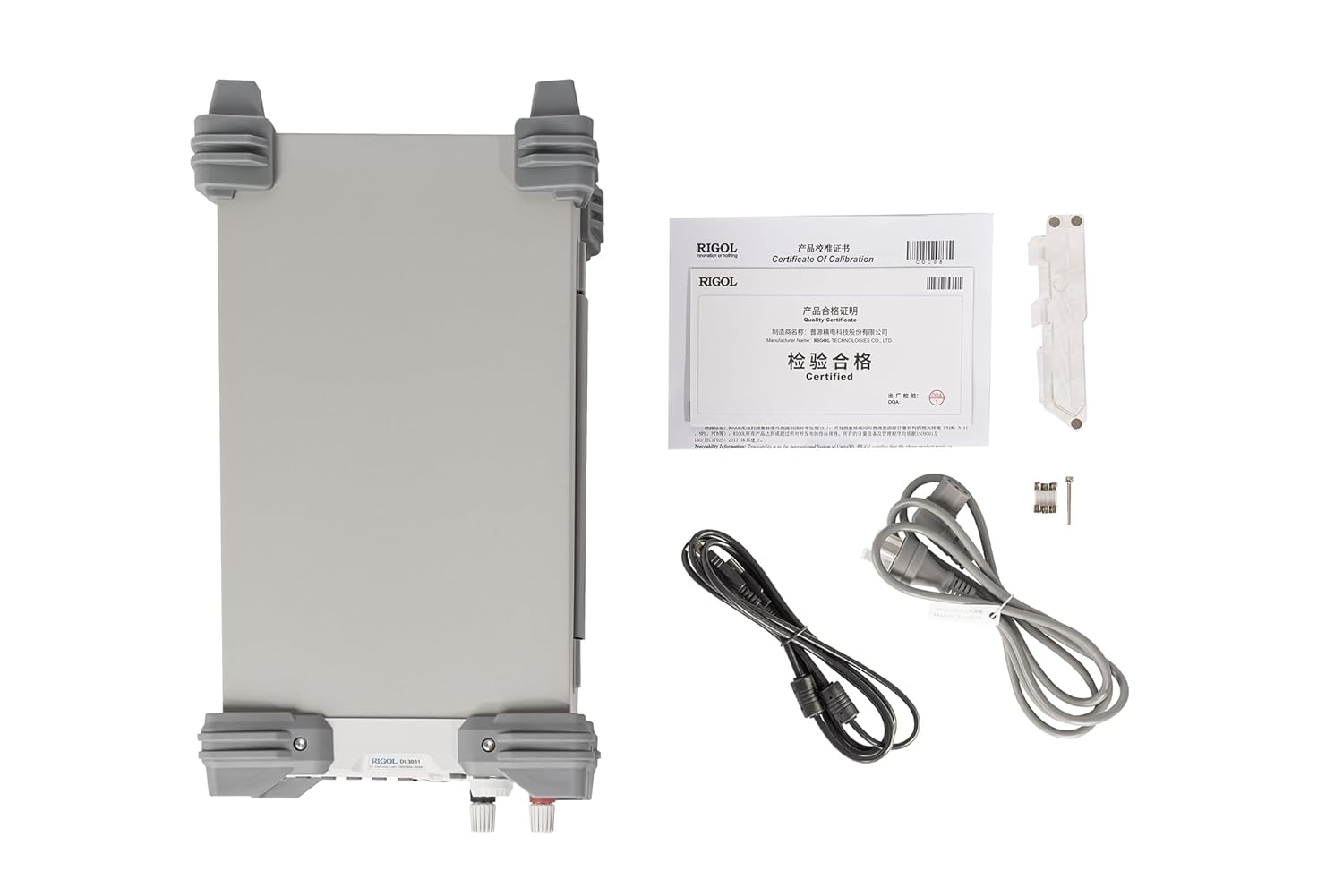
Figure 2.2: Rear panel connections of the Rigol DL3031.
2.3 Initial Power On
After making all physical connections, press the power key on the front panel to turn on the electronic load. The 4.3-inch TFT LCD will display the startup screen, followed by the main measurement interface.
3. Operating the DL3031
3.1 Front Panel Controls
The front panel of the DL3031 is designed for intuitive operation. Familiarize yourself with the various controls and their functions.

Figure 3.1: Labeled front panel of the Rigol DL3031.
- LCD: 4.3-inch TFT display for showing measurement data, settings, and waveforms.
- Function Keys (CC, CV, CR, CP, List): Select the desired operating mode.
- Control Keys (Up, Down, Left, Right, OK): Navigate menus and adjust parameters.
- Input Control Keys (Numeric Keypad): Directly input numerical values.
- Knob: Fine-tune parameter values.
- System Function Keys (Local, Utility, Option, Store, Help): Access system settings, save/recall configurations, and view help information.
- Waveform Display Key: Toggles the waveform display for real-time graphing of parameters.
- Application Key (APP): Accesses specialized application modes like Battery Test, OCP, and OPP.
- USB Host: For connecting USB storage devices.
- Power Key: Turns the unit on/off.
- Channel Terminals (S+, S-, Input +, Input -): Connect the DUT and sense lines.
3.2 Operating Modes
The DL3031 offers a variety of operating modes to suit different testing requirements.
3.2.1 Static Modes
These modes maintain a constant load condition.
- CC (Constant Current): Maintains a constant current draw from the DUT.
- CV (Constant Voltage): Maintains a constant voltage across the DUT.
- CR (Constant Resistance): Maintains a constant resistance load on the DUT.
- CP (Constant Power): Maintains a constant power dissipation from the DUT.
3.2.2 Dynamic Modes
These modes allow for varying load conditions over time.
- Continuous: Provides a continuous dynamic load.
- Pulsed: Generates pulsed load changes.
- Toggled: Switches between two defined load levels.
- List: Allows programming a sequence of up to 512 steps with different load conditions and durations.
3.2.3 Application Modes
Access these specialized tests via the APP key.
- Battery Test: Designed for testing battery discharge characteristics.
- OCP Test (Over Current Protection): Tests the overcurrent protection of a power supply.
- OPP Test (Over Power Protection): Tests the overpower protection of a power supply.
3.3 Waveform Graphing
The DL3031 can display real-time waveforms of current, voltage, resistance, and power over time, similar to an oscilloscope. This feature is useful for analyzing dynamic load responses and identifying transient behaviors.
Video 3.1: Overview of the Rigol DL3000 Series Electronic Load, demonstrating various modes and features including waveform graphing.
4. Maintenance
Proper maintenance ensures the longevity and accuracy of your DL3031 electronic load.
- Cleaning: Regularly clean the exterior of the instrument with a soft, damp cloth. Do not use abrasive cleaners or solvents.
- Ventilation: Ensure the rear exhaust fan and ventilation slots are clear of obstructions to prevent overheating. The fan is crucial for dissipating heat generated during operation.
- Fuse Replacement: If the unit does not power on, check the fuse located near the AC power input on the rear panel. Replace with a fuse of the same type and rating as indicated on the unit (e.g., T 15A/250V for 230V AC, T 30A/250V for 115V AC).

Figure 4.1: Rear panel showing the exhaust fan and fuse location.
5. Troubleshooting
This section provides solutions to common issues you might encounter with the DL3031.
| Problem | Possible Cause | Solution |
|---|---|---|
| Unit does not power on. | No AC power; Blown fuse; Power cord not connected. | Check power outlet; Replace fuse (refer to Section 4); Ensure power cord is securely connected. |
| No load current/voltage. | Input terminals not connected; Load mode not active; Over-protection triggered. | Verify DUT connection; Activate load mode (ON/OFF button); Check for OVP/OCP/OPP warnings on display. |
| Readings are unstable or inaccurate. | Poor connections; External noise; Sense lines not used (for precise voltage). | Ensure all connections are tight; Minimize external interference; Use sense lines for improved accuracy. |
| Communication error with PC. | Incorrect cable; Driver not installed; Wrong communication settings. | Use correct USB/LAN/RS-232 cable; Install Rigol drivers; Verify communication settings (baud rate, IP address). |
If the problem persists after attempting these solutions, please contact Rigol customer support.
6. Specifications
The following table outlines the key technical specifications for the Rigol DL3031 Electronic Load.
| Parameter | Value (DL3031) |
|---|---|
| Power | 350 W |
| Voltage/Current | 150V/60A |
| CC Slew Rate | <2.5 A/µs |
| Dynamic Frequency | Up to 15 kHz |
| Voltage Readback Resolution | 1 mV |
| Current Readback Resolution | 1 mA |
| Product Dimensions (L x W x H) | 9.41 x 17.4 x 6.18 inches |
| Item Weight | 16.71 Pounds (7.58 Kilograms) |
| Power Source | DC Power Supply |
| Communication Interfaces | RS232/USB/LAN |
| Protection Functions | Overvoltage/overcurrent/overpower/overtemperature/reverse voltage |
7. Warranty and Support
7.1 Warranty Information
The Rigol DL3031 Programmable DC Electronic Load is manufactured by RIGOL TECHNOLOGIES USA INC. For specific warranty terms and conditions, please refer to the warranty card included with your product or visit the official Rigol website. Keep your proof of purchase for warranty claims.
Extended protection plans may be available for purchase:
- 3-Year Protection Plan
- 4-Year Protection Plan
- Complete Protect (monthly renewal option)
7.2 Technical Support
For technical assistance, troubleshooting beyond this manual, or service inquiries, please contact Rigol customer support. You can find contact information on the official Rigol website or through your local distributor. When contacting support, please have your product model number (DL3031) and serial number ready.
Related documentsDL3031


Ask a question about this manual
Ask about setup, troubleshooting, compatibility, parts, safety, or missing instructions. Manuals+ will review the question and use this page’s manual context to help answer it.