
1. Introduction
This manual provides essential instructions for the proper installation, operation, and maintenance of your DB Link MANLDFB09X Fuse Holder. Please read this manual thoroughly before installation and retain it for future reference. The MANLDFB09X is designed to provide reliable circuit protection for your automotive electrical systems.
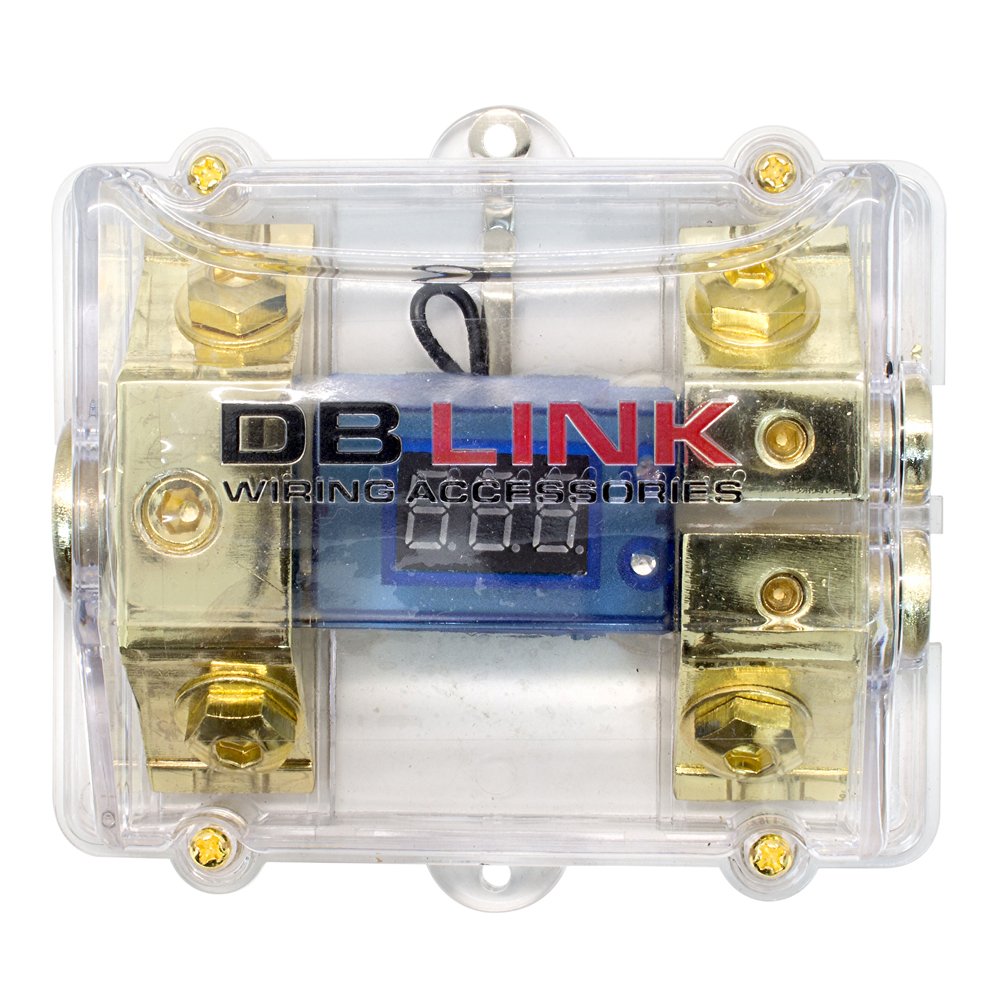
Figure 1: DB Link MANLDFB09X Fuse Holder. This image shows the fuse holder unit with its clear protective cover, input/output terminals, and mounting points.
2. Safety Information
Always observe the following safety precautions to prevent injury or damage to the product and connected equipment:
- Disconnect Power: Before installing or servicing the fuse holder, always disconnect the vehicle's battery to prevent electrical shock or short circuits.
- Correct Fuse Rating: Use only fuses with the correct amperage rating for your application. Using an incorrect fuse can lead to inadequate protection or damage to components.
- Proper Wiring: Ensure all wiring connections are secure and properly insulated to prevent short circuits and fire hazards.
- Ventilation: Install the fuse holder in a location that allows for adequate ventilation and is protected from moisture and extreme temperatures.
- Professional Installation: If you are unsure about any part of the installation process, consult a qualified automotive electrician.
- Grounding: Proper grounding is crucial to prevent ground loop issues and ensure safe operation.
3. Package Contents
Verify that all items are present in the package:
- DB Link MANLDFB09X Fuse Holder Unit
- (Note: Fuses are typically sold separately and are not included with the holder.)
4. Setup & Installation
Follow these steps for proper installation of the MANLDFB09X Fuse Holder:
- Choose a Mounting Location: Select a dry, secure location close to the power source (e.g., vehicle battery) for the main fuse holder, or near the component it is protecting. Ensure the location is easily accessible for fuse inspection and replacement.
- Mount the Fuse Holder: Securely fasten the fuse holder to a solid surface using appropriate hardware (not included).
- Prepare Wiring: Cut the power wire to the appropriate length. Strip approximately 1/2 inch (1.25 cm) of insulation from the ends of the power wire that will connect to the fuse holder.
- Connect Input Power: Connect the main power wire from the battery (or other power source) to the input terminal of the fuse holder. Ensure a tight and secure connection.
- Connect Output Power: Connect the power wire leading to your amplifier or other electrical component to the output terminal of the fuse holder. Ensure a tight and secure connection.
- Install Fuse: Before connecting the battery, insert the correctly rated fuse into the fuse holder. Ensure it is seated firmly.
- Ground Loop Management: The MANLDFB09X is designed to help manage earth loops. Ensure all components in your audio system are properly grounded to a common, clean ground point to minimize noise.
- Adjustable Level Control (if applicable): While primarily a fuse holder, some advanced models may incorporate adjustable input/output level controls for specific applications. Refer to your system's overall design for proper integration and adjustment.
- Reconnect Power: Once all connections are secure and the fuse is installed, reconnect the vehicle's battery.
- Test System: Power on your electrical system and verify proper operation.
Important: Always use appropriate gauge wiring for your application to prevent overheating and ensure optimal performance.
5. Operation
The DB Link MANLDFB09X Fuse Holder operates as a passive safety device. Its primary function is to house a fuse that protects your electrical circuit from overcurrent conditions. When an overcurrent occurs, the fuse inside the holder will blow, breaking the circuit and preventing damage to your components or wiring.
- Circuit Protection: The fuse holder continuously protects the connected circuit as long as a functional fuse is installed.
- Visual Inspection: The clear cover allows for easy visual inspection of the fuse to determine if it has blown.
6. Maintenance
Regular maintenance ensures the longevity and reliable performance of your fuse holder.
- Periodic Inspection: Periodically inspect the fuse holder and its connections for any signs of corrosion, loose wiring, or physical damage.
- Fuse Replacement: If a fuse blows, always disconnect power first. Carefully remove the blown fuse and replace it with a new fuse of the exact same amperage rating and type. Never use a fuse with a higher rating or bypass the fuse.
- Cleaning: Keep the fuse holder clean and free of dust and debris. Use a dry cloth for cleaning. Avoid using harsh chemicals.
7. Troubleshooting
If you experience issues with your electrical system, consider the following troubleshooting steps related to the fuse holder:
| Problem | Possible Cause | Solution |
|---|---|---|
| No power to connected component | Blown fuse | Inspect the fuse. If blown, replace with a fuse of the correct amperage rating. Investigate the cause of the overcurrent. |
| Loose connections | Check all wiring connections to the fuse holder. Tighten any loose terminals. | Ensure all connections are secure and properly insulated. |
| Fuse blows repeatedly | Overcurrent condition, short circuit, or incorrect fuse rating | Verify the fuse rating matches the circuit requirements. Inspect wiring for short circuits. Reduce load on the circuit if possible. Consult a professional if the issue persists. |
| Noise or interference in audio system | Ground loop issues | Ensure all components are properly grounded to a common point. Check for proper insulation of power and signal cables. |
8. Specifications
Key specifications for the DB Link MANLDFB09X Fuse Holder:
- Model Number: MANLDFB09X
- Brand: DB Link
- Manufacturer: DB Research L.L.P.
- Product Dimensions: 38 x 24.99 x 22.99 cm (14.96 x 9.84 x 9.05 inches)
- Product Weight: 12 kg (26.45 pounds)
- Included Accessories: Fuse Holder Unit (fuses sold separately)
- Features: Adjustable Input Level Control (Note: This feature typically refers to the ability to select different fuse ratings or circuit protection levels, or may apply to other products in the DB Link line. For a standard fuse holder, this refers to selecting the appropriate fuse.), Earth Loop Management, Adjustable Output Level Control (Similar note as Input Level Control)
9. Warranty Information
DB Link products are manufactured to high-quality standards. For specific warranty terms and conditions, please refer to the warranty card included with your purchase or visit the official DB Link website. Keep your proof of purchase for warranty claims.
10. Customer Support
If you have any questions, require technical assistance, or need further support regarding your DB Link MANLDFB09X Fuse Holder, please contact DB Link customer service through their official website or the contact information provided with your product documentation.
Website: www.dblink.com (Example URL, please refer to actual product documentation for correct website)
Email: support@dblink.com (Example Email, please refer to actual product documentation for correct email)