
ADAX 810043
Contents
ADAX CLea H Smart WiFi Wall Heater Instruction Manual
Model: CLea H (810043)
Introduction
This manual provides comprehensive instructions for the safe and efficient operation, installation, and maintenance of your ADAX CLea H Smart WiFi Wall Heater. Please read this manual thoroughly before installation and use, and retain it for future reference.
The ADAX CLea H is a modern, energy-efficient electric convector heater designed for indoor use, featuring smart control via smartphone or tablet and compliance with EcoDesign directives.

Image: The ADAX CLea H Smart WiFi Wall Heater, showcasing its minimalist white panel design.
Important Safety Information
- Always disconnect the heater from the power supply before cleaning or performing any maintenance.
- Do not cover the heater. Covering the heater can cause overheating and fire.
- Do not use this heater in the immediate vicinity of a bath, shower, or swimming pool.
- Ensure the power outlet is properly grounded and rated for the heater's power consumption (800W, 230V).
- Keep children and pets away from the heater, especially when it is operating.
- Do not insert any objects into the heater's openings.
- If the supply cord is damaged, it must be replaced by the manufacturer, its service agent, or similarly qualified persons to avoid a hazard.
- This appliance is not intended for use by persons (including children) with reduced physical, sensory or mental capabilities, or lack of experience and knowledge, unless they have been given supervision or instruction concerning use of the appliance by a person responsible for their safety.
Package Contents
Verify that all components are present and undamaged:
- ADAX CLea H Smart WiFi Wall Heater unit
- Wall mounting brackets
- 1.2m power cable with plug
- Instruction Manual (this document)
Note: Optional floor stands (P feet) are sold separately and are required if you intend to use the heater as a freestanding unit.
Setup and Installation
1. Choosing a Location
The ADAX CLea H heater is designed for wall mounting. Ensure the chosen location allows for proper air circulation and adheres to the following minimum clearances:
- Below the heater: Minimum 50 mm (2 inches)
- Above the heater: Minimum 150 mm (6 inches)
- Sides: Maintain adequate clearance for heat dissipation.
Avoid installing the heater directly below an electrical outlet. The heater must be mounted horizontally.
2. Wall Mounting
- Carefully unpack the heater and its components.
- Using the provided mounting brackets, mark the drilling points on the wall. Ensure the marks are level and correctly spaced for the heater's dimensions (8.7 x 76 x 34 cm).
- Drill holes and insert appropriate wall plugs (not included, choose based on wall material).
- Secure the mounting brackets to the wall using screws.
- Carefully hang the heater onto the secured mounting brackets. Ensure it is firmly seated and stable.
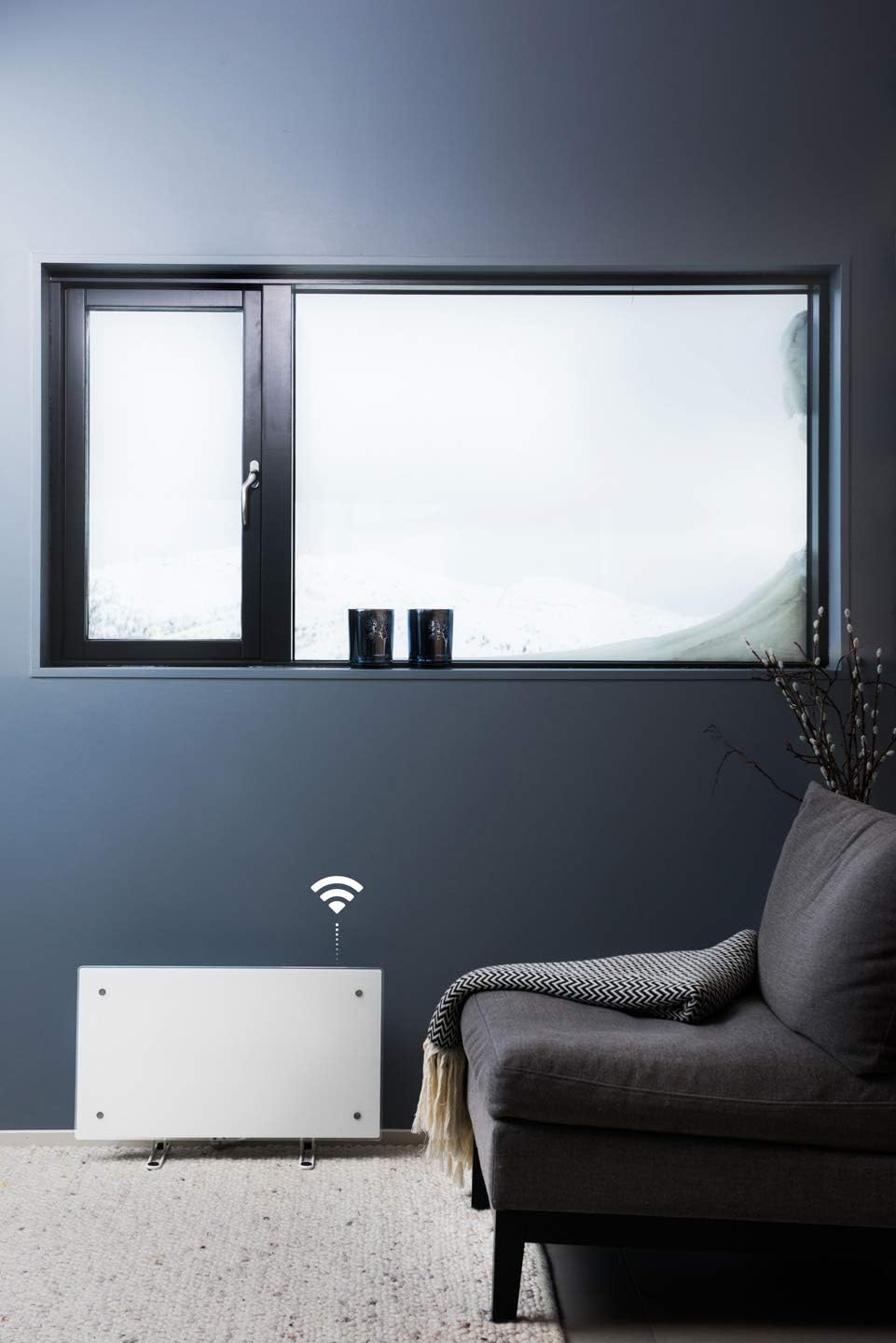
Image: The ADAX CLea H heater installed horizontally on a wall, demonstrating typical placement in a living space.
3. Power Connection
Plug the 1.2m power cable into a suitable 230V electrical outlet. The heater is now ready for initial operation.
Operating Instructions
1. Initial Power-On and Basic Control
Locate the On/Off switch on the right side of the heater. Flip the switch to the 'On' position. The LCD display on the control panel will illuminate.

Image: The heater's control panel, showing the LCD display and control buttons for manual temperature adjustment.
When not connected to a mobile device, the thermostat functions as a standard electronic thermostat, maintaining the manually set continuous temperature. Use the '+' and '-' buttons on the control panel to adjust the desired temperature.
2. WiFi and Smartphone Control
The ADAX CLea H features a programmable WiFi thermostat, allowing control via a smartphone or tablet application. The application is available for iOS devices and is in English only.
- Download the App: Search for the official ADAX control app on your device's app store (e.g., Apple App Store for iOS).
- Connect to WiFi: Follow the in-app instructions to connect your heater to your home WiFi network. This typically involves putting the heater into pairing mode and selecting your network.
- Program Settings: Once connected, you can program 24-hour daily or weekly heating schedules, adjust temperatures, and monitor your heater from anywhere via the internet or directly when in range.

Image: A smartphone showing the ADAX control application, illustrating remote control capabilities, including integration with Google Assistant.
The heater is compatible with Google Assistant for voice control, enhancing convenience.
3. EcoDesign Features
- Open Window Detection: The heater automatically detects sudden drops in room temperature (e.g., when a window or door is opened for ventilation) and temporarily switches off to avoid unnecessary heating. It will resume operation once the temperature stabilizes.
- Adaptive Start Control: The heater learns the optimal time to start heating to reach the desired temperature at the programmed time, improving energy efficiency.
Maintenance
Regular maintenance ensures optimal performance and longevity of your ADAX CLea H heater.
- Cleaning: Before cleaning, always unplug the heater from the power outlet and allow it to cool completely. Wipe the exterior surfaces with a soft, damp cloth. Do not use abrasive cleaners, solvents, or immerse the heater in water.
- Dust Removal: Periodically use a soft brush or vacuum cleaner with a brush attachment to remove dust from the air inlets and outlets to maintain efficient airflow.
- Storage: If storing the heater for an extended period, ensure it is clean and dry. Store it in a cool, dry place, preferably in its original packaging.
Troubleshooting
| Problem | Possible Cause | Solution |
|---|---|---|
| Heater does not turn on. | No power supply; On/Off switch is off; Overheat protection activated. | Check power cable connection and wall outlet. Ensure the On/Off switch is in the 'On' position. Unplug the heater, let it cool for 30 minutes, then plug it back in. |
| Heater is on but not heating. | Temperature setting is too low; Open window detection activated; WiFi thermostat issue. | Increase the set temperature. Close any open windows or doors. Check the app for programmed schedules or error messages. |
| WiFi connection issues. | Incorrect WiFi password; Router too far; App issues. | Ensure correct WiFi password. Move heater closer to router or use a WiFi extender. Restart the app and your mobile device. Refer to the app's help section for specific connection steps. |
| Heater makes unusual noises. | Normal expansion/contraction sounds; Foreign object inside. | Minor clicking sounds are normal as the metal heats and cools. If noises are loud or persistent, disconnect power and contact customer support. |
If the problem persists after attempting these solutions, please contact ADAX customer support.
Specifications
| Brand | ADAX |
| Model Name | CLea H |
| Model Number | 810043 |
| Color | White |
| Power | 800 Watts |
| Voltage | 230 Volts |
| Product Dimensions (D x W x H) | 8.7 x 76 x 34 cm |
| Item Weight | 6.6 Kilograms |
| Form Factor | Wall-mounted (Optional floor stands available separately) |
| Heating Method | Convection (X-shaped aluminum heating element) |
| Special Features | Smart WiFi control, LCD display, EcoDesign compliant, Open Window Detection, Adaptive Start Control, Overheat Protection, Glass front panel. |
| Power Cord Length | 1.2 meters |
Recommended Heating Area
The following table provides guidance on the recommended heating area based on the heater's wattage and insulation levels. This is a general guide; actual performance may vary based on room insulation, ceiling height, and external temperatures. (Note: Maximum ceiling height for this guide is 2.5m).

Image: Table illustrating recommended heating area in square meters for various heater wattages and insulation conditions. For an 800W heater, it suggests 14-20 m² for good insulation, 12-14 m² for average, and 6-9 m² for poor insulation.
| Heater Power (Watts) | Heating Area (Good Insulation: up to 50 W/m²) | Heating Area (Average Insulation: 50-100 W/m²) | Heating Area (Poor Insulation: over 100 W/m²) |
|---|---|---|---|
| 250 | 5 - 6 m² | 2 - 4 m² | 2 - 3 m² |
| 400 | 6 - 10 m² | 5 - 7 m² | 3 - 5 m² |
| 600 | 10 - 14 m² | 8 - 10 m² | 4 - 7 m² |
| 800 | 14 - 20 m² | 12 - 14 m² | 6 - 9 m² |
| 1000 | 18 - 26 m² | 14 - 16 m² | 8 - 12 m² |
| 1200 | 24 - 30 m² | 17 - 20 m² | 10 - 14 m² |
| 1400 | 28 - 35 m² | 21 - 25 m² | 12 - 17 m² |
| 2000 | 32 - 50 m² | 26 - 34 m² | 17 - 24 m² |
Note: Ceiling height up to 2.5 meters.
Warranty and Support
Manufacturer's Warranty
The ADAX CLea H heater comes with a 5-year manufacturer's warranty. This warranty covers defects in materials and workmanship under normal use. Please retain your proof of purchase for warranty claims.
The warranty does not cover damage resulting from improper installation, misuse, neglect, unauthorized repairs, or normal wear and tear.
Customer Support
For technical assistance, warranty claims, or inquiries regarding your ADAX CLea H heater, please contact ADAX customer support through their official website or the contact information provided with your purchase documentation.
Before contacting support, please have your model number (CLea H, 810043) and purchase date available.
Documents and downloads
Ask a question about this manual
Ask about setup, troubleshooting, compatibility, parts, safety, or missing instructions. Manuals+ will review the question and use this page’s manual context to help answer it.