
Introduction
The eSynic 192KHz Optical to 3.5mm/Aux DAC Converter is designed to convert digital optical audio signals to analog 3.5mm audio output. This device is ideal for connecting modern digital audio sources like HDTVs, Blu-ray players, and gaming consoles to analog headphones or speakers. It features a built-in amplifier chip and volume control for enhanced audio experience.

Image: The eSynic DAC converter illustrating its function of converting optical input from devices like TVs, DVD/Blu-ray players, set-top boxes, HDTVs, and game consoles to 3.5mm output for headphones and speakers.
Package Contents
Please verify that all items listed below are included in your package:
- 1 x eSynic Optical to 3.5mm Audio Converter (Model ESY237)
- 1 x USB Power Cable
- 1 x User Manual

Image: Contents of the eSynic DAC Converter package, showing the main unit with integrated optical and 3.5mm cables, a separate USB power cable, and the user manual.
Setup Instructions
- Connect the Optical Cable: Plug the optical cable from your source device (e.g., TV, Blu-ray player, gaming console) into the optical input port of the eSynic DAC converter.
- Connect the 3.5mm Audio Cable: Connect the 3.5mm audio output from the converter to your headphones or speakers.
- Provide Power: Connect the USB power cable to the converter and then to a 5V/1A USB power adapter (not included) or a USB port on your TV/device.
- Configure Source Device Audio Output: This converter supports PCM 2.0 audio format ONLY. It is not compatible with Dolby/DTS 5.1/7.1 channel signals. You must set your source device's digital audio output to PCM mode. For most TVs (Samsung/LG/Sony), navigate to: Settings → Sound → Digital Audio Output → PCM. This step is crucial for proper functionality and to avoid 'no sound' issues.
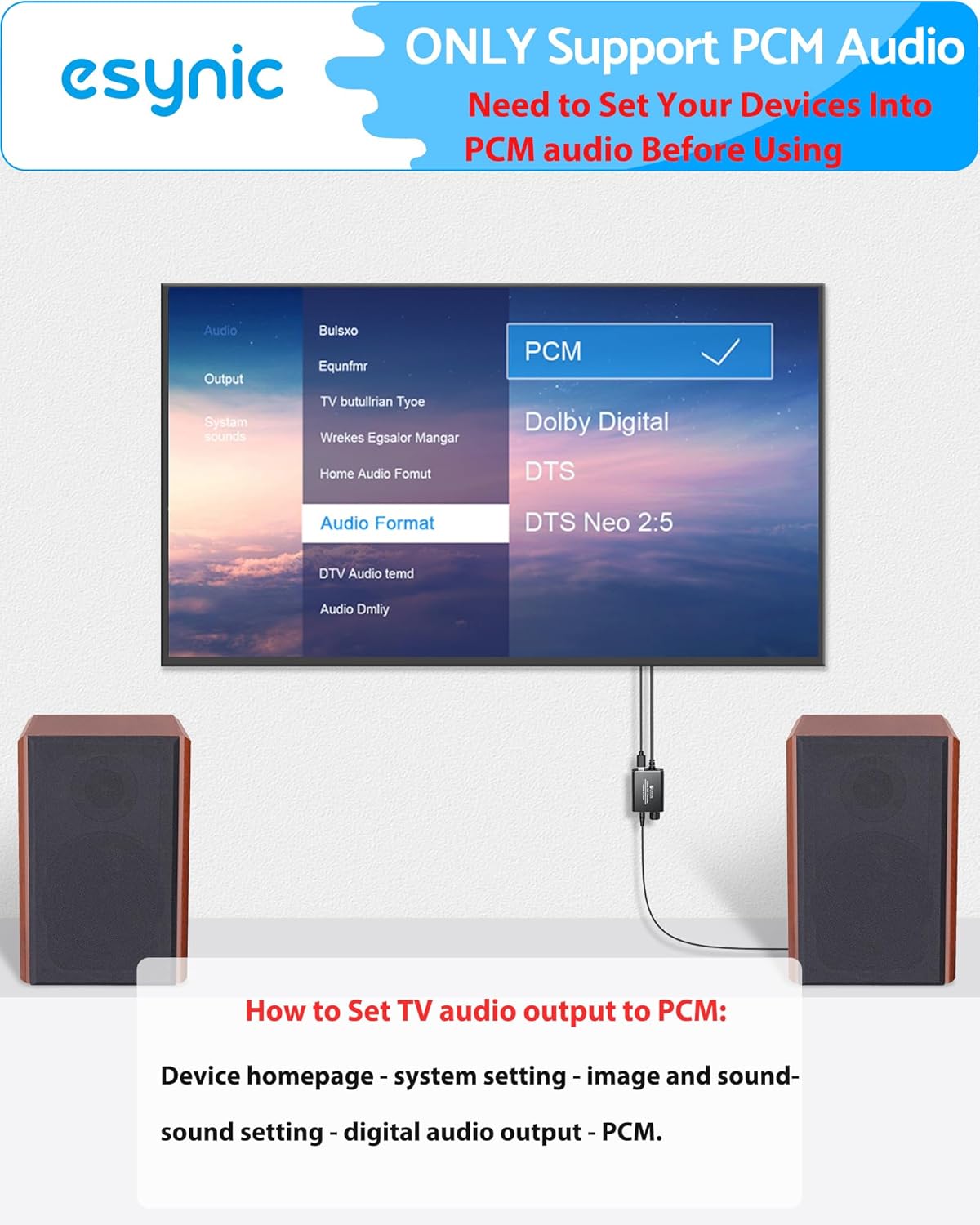
Image: A television screen displaying the audio output settings, with the 'PCM' option highlighted, indicating the necessary configuration for the DAC converter.
For a visual guide on setting up the converter, please refer to the official product video below:
Video: Official eSynic product video demonstrating the setup and functionality of the Professional Optical to 3.5mm Adapter.
Operating Instructions
- Power On: Once all connections are secure and the source device is playing audio, the converter will automatically power on if connected to a TV USB port.
- Adjust Volume: Use the built-in volume control knob on the converter to adjust the output volume to your headphones or speakers. Note that the TV remote will not control the volume of the output from the converter.
- Enjoy Audio: Experience clear, amplified 192KHz/24bit audio from your connected analog devices.

Image: A user enjoying audio through headphones connected to the eSynic DAC converter, which is linked to a television, demonstrating the product in use.
Troubleshooting
- No Sound:
- Ensure all cables are securely connected.
- Verify that your TV's digital audio output is set to PCM mode (not Dolby/DTS). Refer to your TV's sound settings.
- Check if the converter is receiving power from the USB cable.
- Noise/Crackling Sound:
- Ensure all connections are firm.
- Try a different USB power source (e.g., a dedicated 5V/1A wall adapter instead of a TV USB port).
- Low Sound:
- Adjust the volume knob on the converter.
- If using high-impedance headphones, an additional headphone amplifier may be required.
- Not working with streaming apps (YouTube, Netflix, etc.):
- Many streaming services output Dolby Digital 5.1 audio, which this converter does not support. Ensure your TV's audio output is set to PCM 2.0.
Specifications
| Brand | eSynic |
| Model | ESY237 |
| Input | Optical (Toslink) |
| Output | 3.5mm Aux |
| Sampling Rate | Up to 192KHz/24bit |
| Audio Format Support | PCM 2.0 (Stereo) ONLY |
| Power Supply | 5V/1A USB (adapter not included) |
| Material | Aluminum Alloy |
| Dimensions (Converter Body) | Approx. 4.3cm / 1.691in (length) |
| Weight | Approx. 0.14 lbs (65g) |
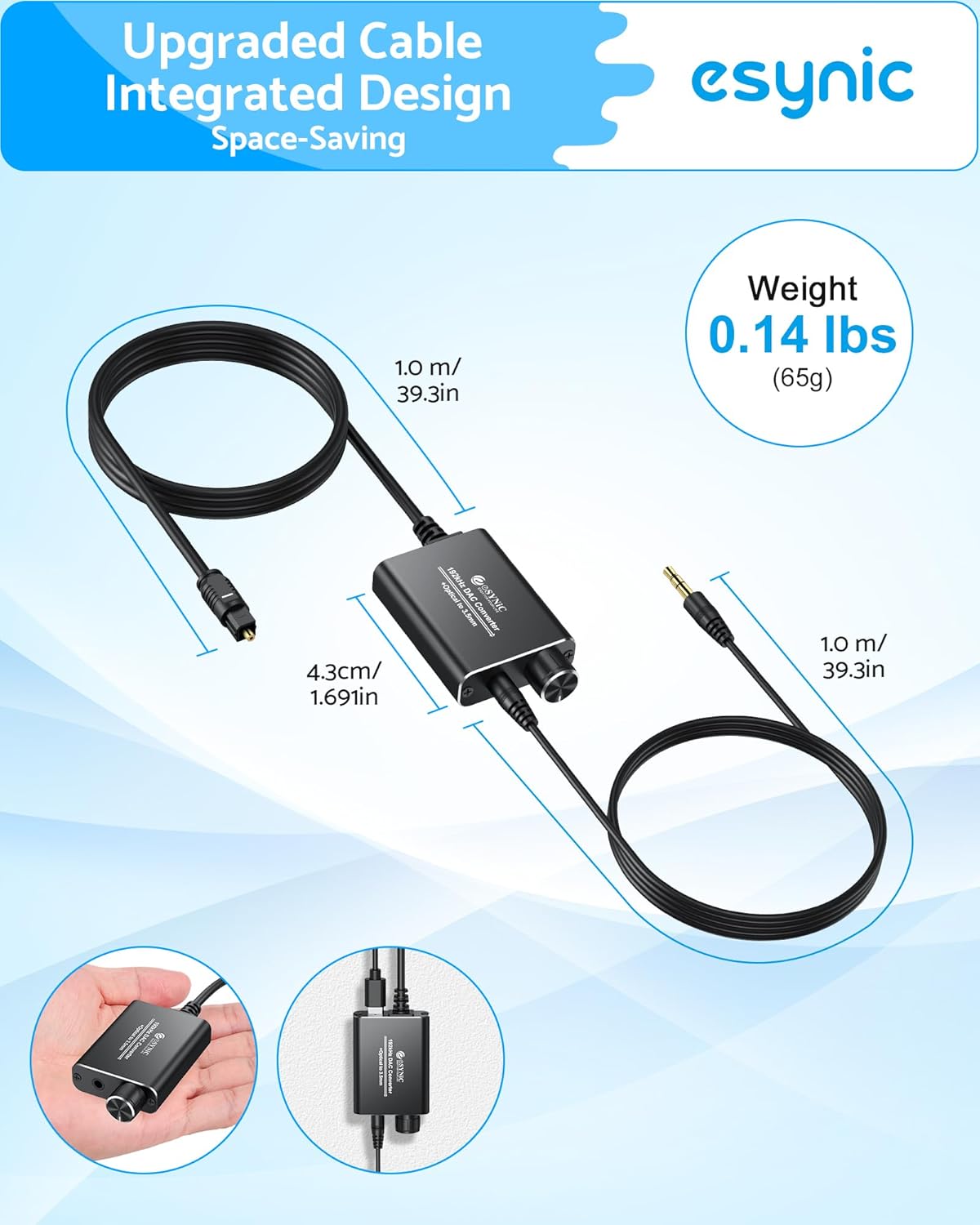
Image: The eSynic DAC converter displaying its compact dimensions and lightweight design, highlighting its portability.
Maintenance
To ensure the longevity and optimal performance of your eSynic DAC Converter, follow these maintenance guidelines:
- Keep the device in a dry environment, away from moisture and extreme temperatures.
- Clean the exterior with a soft, dry cloth. Do not use liquid cleaners or aerosols.
- Avoid dropping or subjecting the device to strong impacts.
- Ensure proper ventilation to prevent overheating. The aluminum alloy shell is designed for good heat dissipation.
Warranty and Support
All eSynic products come with an 18-month warranty from the date of purchase. If you encounter any issues or require technical assistance, please contact eSynic customer support through the retailer where you purchased the product or visit the official eSynic website for support resources.
For further information and product registration, please visit: eSynic Official Store