1. Introduction
Thank you for choosing the Billboard Wireless Bluetooth Earbuds. These earbuds are designed to provide high-quality audio and hands-free communication with your Bluetooth-enabled devices. Featuring a durable metal design and comfortable fit, they are perfect for on-the-go listening.

Image: Front view of the Billboard Wireless Bluetooth Earbuds, showcasing the silver metal design and inline control module.
2. Safety Information
Please read all safety warnings carefully before using this product to ensure proper operation and to prevent injury.
- WARNING: CHOKING HAZARD – Small parts. Not for children under 3 years. Keep out of reach of small children.
- Do not expose the earbuds to extreme temperatures, moisture, or direct sunlight.
- Avoid dropping or subjecting the earbuds to strong impacts.
- Do not attempt to disassemble or modify the earbuds. This will void the warranty.
- Use only the provided charging cable or a certified equivalent.
- Prolonged listening at high volumes may cause hearing damage. Adjust volume to a safe level.
3. Package Contents
Verify that all items are present in your package:
- Billboard Wireless Bluetooth Earbuds
- MicroUSB Charging Cable
- Extra Ear Cushions (various sizes)

Image: The Billboard Wireless Bluetooth Earbuds shown within their retail packaging.
4. Setup
4.1 Charging the Earbuds
Before first use, fully charge your earbuds. A full charge provides approximately 3-4 hours of playtime.
- Connect the MicroUSB end of the charging cable to the charging port on the earbud's control module.
- Connect the USB-A end of the charging cable to a USB power source (e.g., computer USB port, USB wall adapter).
- The LED indicator light will illuminate during charging and turn off when charging is complete.
4.2 Pairing with a Bluetooth Device
To connect your earbuds to a smartphone or tablet:
- Ensure the earbuds are fully charged and turned off.
- Press and hold the multi-function button (power button) on the control module until the LED indicator light flashes blue and red, indicating pairing mode.
- On your device, enable Bluetooth and search for new devices.
- Select "BB487" or similar (e.g., "Billboard Earbuds") from the list of available devices.
- Once connected, the LED indicator will flash blue slowly or turn off, and you may hear an audible confirmation.
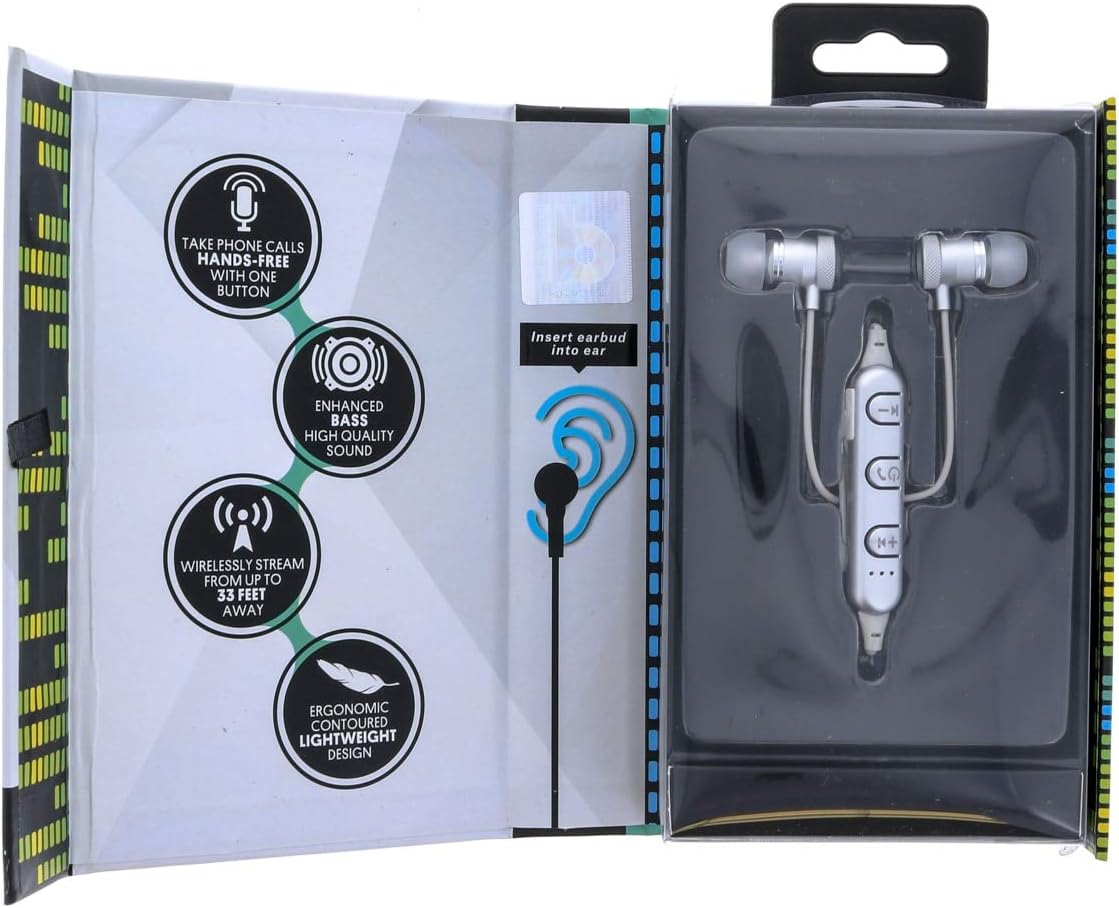
Image: An illustration demonstrating the correct way to insert the earbud into the ear, alongside icons highlighting key features like hands-free calls, enhanced bass, wireless streaming up to 33 feet, and ergonomic design.
5. Operating
5.1 Controls Overview
The inline control module allows you to manage music playback and calls.
| Button/Action | Function |
|---|---|
| Multi-function Button (Power/Call) | Press and hold to Power ON/OFF; Short press to Play/Pause music; Short press to Answer/End call; Long press to Reject call. |
| Volume Up (+) / Next Track | Short press for Volume Up; Long press for Next Track. |
| Volume Down (-) / Previous Track | Short press for Volume Down; Long press for Previous Track. |
5.2 Making and Receiving Calls
- Answering a Call: When a call comes in, press the multi-function button once.
- Ending a Call: During a call, press the multi-function button once.
- Rejecting a Call: When a call comes in, press and hold the multi-function button for 2 seconds.
- Redialing Last Number: Double-press the multi-function button.
5.3 Listening to Music
- Play/Pause: Press the multi-function button once.
- Next Track: Long press the Volume Up (+) button.
- Previous Track: Long press the Volume Down (-) button.
- Volume Adjustment: Short press the Volume Up (+) or Volume Down (-) buttons.

Image: The back of the product packaging, detailing features such as hands-free calls, enhanced bass, tough metal design, 3-4 hours battery life, clear sound with passive noise cancelling, and music controls at your fingertips. It also highlights the inclusion of extra ear cushions and a MicroUSB charge cable.
6. Maintenance
Proper care will extend the life of your earbuds.
- Cleaning: Use a soft, dry cloth to wipe the earbuds. Do not use harsh chemicals or abrasive materials.
- Storage: When not in use, store the earbuds in a cool, dry place, away from direct sunlight and extreme temperatures.
- Ear Tips: Regularly remove and clean the silicone ear tips with mild soap and water. Ensure they are completely dry before reattaching.
7. Troubleshooting
If you encounter issues with your earbuds, try the following solutions:
- Earbuds won't turn on: Ensure the earbuds are fully charged.
- Cannot pair with device:
- Make sure Bluetooth is enabled on your device.
- Ensure the earbuds are in pairing mode (flashing blue and red LED).
- Move the earbuds closer to your device (within 33 feet).
- Forget/remove the earbuds from your device's Bluetooth list and try pairing again.
- Restart both the earbuds and your device.
- No sound or low volume:
- Check the volume levels on both the earbuds and your connected device.
- Ensure the earbuds are properly connected to your device.
- Try playing different audio sources.
- Poor sound quality:
- Ensure there are no obstructions between the earbuds and your device.
- Move away from other wireless devices that might cause interference.
- Check if the ear tips are properly seated in your ears.
8. Specifications
| Model Name | BB487 |
| Brand | Billboard |
| Color | SILVER |
| Ear Placement | In Ear |
| Form Factor | In Ear |
| Product Dimensions | 10.16 x 3.18 x 19.05 cm; 57 g |
| Battery Life (Approx.) | 3-4 hours playtime |
| Wireless Range (Approx.) | Up to 33 feet (10 meters) |
9. Warranty and Support
This product is manufactured by Billboard. For warranty information and customer support, please refer to the contact details provided on your product packaging or visit the official Billboard website. Please retain your proof of purchase for warranty claims.
For further assistance, you may contact the manufacturer directly. Contact information is typically found on the product packaging or the manufacturer's official website.


