
1. Introduction
This manual provides comprehensive instructions for the installation, operation, and maintenance of your Global Door Controls TC2204-BC Commercial Door Closer. This door closer is designed for commercial applications, offering reliable door control and enhanced safety. Please read this manual thoroughly before installation and use to ensure proper function and longevity of the product.
The TC2204-BC series features a size 4 spring and includes a backcheck function to prevent damage from forceful opening. It is suitable for aluminum storefront doors, wood, and hollow metal commercial doors weighing up to 137 lbs.
2. Safety Information
WARNING: Improper installation or adjustment can lead to injury or property damage. Always follow instructions carefully.
- Always wear appropriate personal protective equipment (PPE) during installation, including safety glasses and gloves.
- Ensure the door and frame are structurally sound and capable of supporting the door closer's weight and operational forces.
- Do not attempt to modify the door closer. Unauthorized modifications will void the warranty and may compromise safety.
- Keep children and pets away from the installation area.
- After installation, test the door closer's function to ensure smooth and controlled operation.
3. Package Contents
Verify that all components are present before beginning installation:
- 1 x Global Door Controls TC2204-BC Door Closer Body
- 1 x Main Arm Assembly
- 1 x Parallel Arm Bracket (for parallel arm installation)
- 1 x Mounting Hardware Kit (screws, bolts, washers)
- 1 x Instruction Manual (this document)
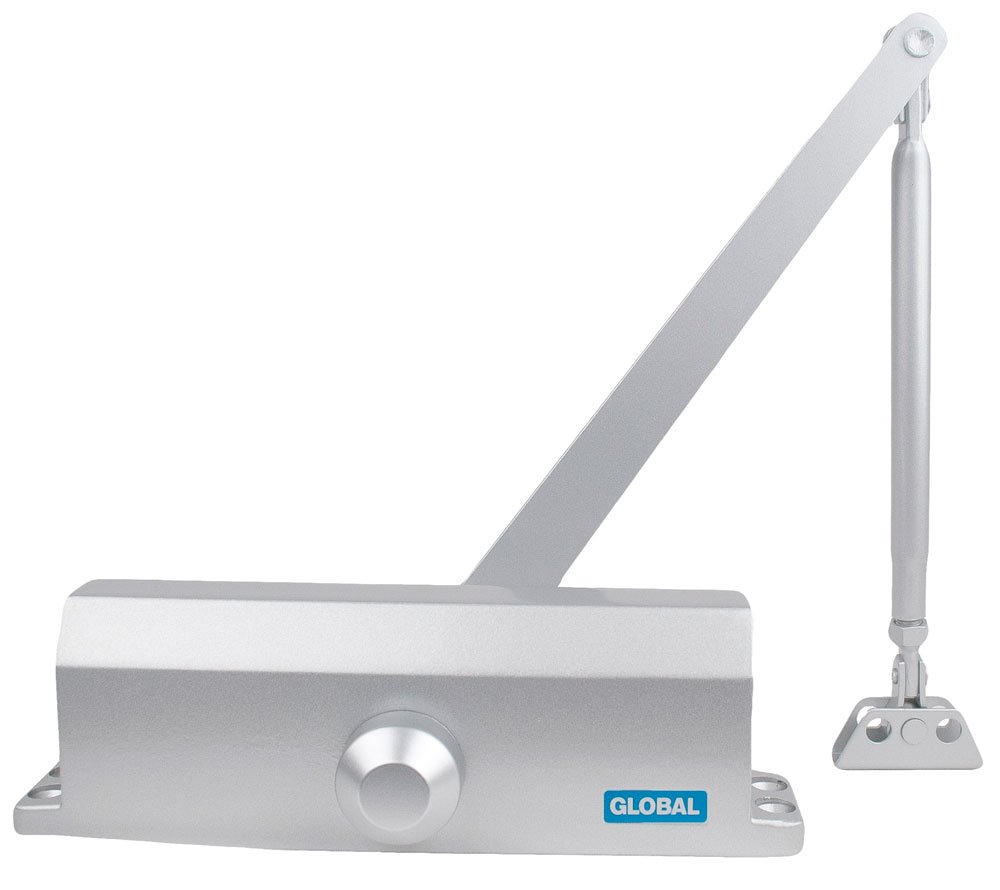
Image 1: Overview of the Global Door Controls TC2204-BC Commercial Door Closer and its main components. This image shows the closer body, main arm, and associated hardware.
4. Setup & Installation
The TC2204-BC door closer is non-handed and reversible, allowing for installation on both right- and left-handed doors. It supports standard and top jamb mounting configurations.
4.1 Tools Required
- Drill with appropriate drill bits
- Screwdriver (Phillips and/or flathead)
- Measuring tape
- Pencil or marker
- Level
- Wrench set
4.2 Mounting Options
This door closer can be installed in three common configurations:
- Standard (Regular) Arm Installation: Closer body mounted on the pull side of the door.
- Top Jamb Installation: Closer body mounted on the push side of the door frame.
- Parallel Arm Installation: Closer body mounted on the push side of the door, with the arm parallel to the door frame.
Refer to the included drilling template for precise hole placement for your chosen mounting method. The template will specify dimensions for the door and frame.
4.3 General Installation Steps (Standard Arm Example)
- Prepare the Door and Frame:
- Determine the desired mounting location based on the template.
- Mark the drilling points accurately on the door and frame.
- Drill pilot holes as indicated by the template for the closer body and arm bracket.
- Mount the Closer Body:
- Attach the closer body to the door using the provided screws/bolts. Ensure it is level and securely fastened.
- Install the Main Arm:
- Attach the main arm to the closer's spindle.
- Secure the shoe of the main arm to the door frame using the appropriate screws/bolts.
- Connect the Arm Sections:
- Connect the two sections of the arm using the provided screw and nut. Adjust the arm length as necessary to achieve a 90-degree angle between the door and the arm when the door is closed.
- Initial Adjustment:
- Perform initial adjustments as described in the "Operation & Adjustment" section to ensure the door closes smoothly without slamming.

Image 2: Illustrative diagram of a standard arm installation. This diagram shows the door closer body mounted on the door and the arm connected to the frame.
5. Operation & Adjustment
The TC2204-BC door closer features two independent regulating valves for sweep and latch speeds, and a backcheck function.
5.1 Adjustment Valves
Locate the two adjustment valves on the closer body. These are typically labeled or positioned near the arm spindle.
- Sweep Speed Valve (Valve 1): Controls the door's closing speed from its fully open position until approximately 15 degrees from the closed position.
- Turn clockwise to decrease speed (slower).
- Turn counter-clockwise to increase speed (faster).
- Latch Speed Valve (Valve 2): Controls the door's closing speed for the final 15 degrees of closing, ensuring the door latches securely.
- Turn clockwise to decrease speed (slower).
- Turn counter-clockwise to increase speed (faster).
Important: Make small adjustments (quarter turns) at a time and test the door's operation after each adjustment. Do not overtighten valves.
5.2 Backcheck Function
The backcheck function slows the door's opening swing when it reaches a certain angle (typically 70-85 degrees), preventing it from slamming into the wall or frame. This feature is factory-set and generally does not require adjustment. If the backcheck resistance is too weak or too strong, consult a qualified technician.
6. Maintenance
Regular maintenance ensures optimal performance and extends the lifespan of your door closer.
- Monthly: Check all mounting screws and bolts for tightness. Retighten if necessary.
- Quarterly: Inspect the door closer body and arm for any signs of damage, leaks, or excessive wear.
- Annually: Test the sweep and latch speeds. Readjust if the door is closing too fast or too slow.
- Clean the door closer body with a soft, damp cloth. Avoid abrasive cleaners or solvents.
- Do not lubricate the internal mechanisms of the door closer. It is a sealed unit.
7. Troubleshooting
| Problem | Possible Cause | Solution |
|---|---|---|
| Door slams shut. | Latch speed too fast. | Turn Latch Speed Valve (Valve 2) clockwise in small increments. |
| Door closes too slowly. | Sweep speed too slow. | Turn Sweep Speed Valve (Valve 1) counter-clockwise in small increments. |
| Door does not close completely. | Latch speed too slow or arm length incorrect. | Turn Latch Speed Valve (Valve 2) counter-clockwise. Check arm length adjustment. |
| Oil leakage from closer body. | Damaged seals or closer body. | Contact Global Door Controls support for replacement. Do not attempt to repair. |
| Door closer makes excessive noise. | Loose mounting screws or worn components. | Check and tighten all mounting screws. If noise persists, contact support. |
8. Specifications
- Model: TC2204-BC
- Series: TC2200 Series
- Closer Size: 4
- Material: Aluminum
- Finish: White (Note: Other finishes may be available for different models)
- Backcheck: Included
- Handing: Non-handed, reversible
- Mounting: Standard, Top Jamb, Parallel Arm
- Door Weight Capacity: Up to 137 lbs (approximate, depending on door width and closer location)
- Certifications: Grade 3 certified (ANSI/BHMA A156.4)
- Item Weight: 5 pounds
- UPC: 704780172567
9. Warranty & Support
Global Door Controls products are manufactured to high-quality standards. For specific warranty information, please refer to the warranty card included with your product or visit the official Global Door Controls website. Keep your proof of purchase for warranty claims.
For technical assistance, replacement parts, or warranty inquiries, please contact Global Door Controls customer support:
- Website: www.globaldoorcontrols.com (Note: This is a placeholder URL, please verify the actual manufacturer's website.)
- Phone: Refer to the website for current contact numbers.
- Email: Refer to the website for current contact email.
When contacting support, please have your model number (TC2204-BC) and purchase date available.


