
Introduction
This manual provides essential instructions for the safe and efficient operation, maintenance, and care of your Weston Pro Series Digital Dehydrator, Model 28-0301-W. Please read all instructions thoroughly before using the appliance to ensure proper function and to prevent injury or damage.
Important Safety Instructions
When using electrical appliances, basic safety precautions should always be followed to reduce the risk of fire, electric shock, and injury to persons, including the following:
- Read all instructions.
- Do not touch hot surfaces. Use handles or knobs.
- To protect against electrical shock, do not immerse cord, plugs, or appliance in water or other liquid.
- Close supervision is necessary when any appliance is used by or near children.
- Unplug from outlet when not in use and before cleaning. Allow to cool before putting on or taking off parts.
- Do not operate any appliance with a damaged cord or plug or after the appliance malfunctions or has been damaged in any manner. Return appliance to the nearest authorized service facility for examination, repair, or adjustment.
- The use of accessory attachments not recommended by the appliance manufacturer may cause injuries.
- Do not use outdoors.
- Do not let cord hang over edge of table or counter, or touch hot surfaces.
- Do not place on or near a hot gas or electric burner, or in a heated oven.
- Extreme caution must be used when moving an appliance containing hot oil or other hot liquids.
- Always attach plug to appliance first, then plug cord into the wall outlet. To disconnect, turn any control to "off", then remove plug from wall outlet.
- Do not use appliance for other than intended use.
Product Overview
The Weston Pro Series Digital Dehydrator is designed for efficient food preservation, featuring a commercial-style steel alloy cabinet and a large drying capacity.

Image: Front-side view of the Weston Pro Series Digital Dehydrator, showcasing its stainless steel finish and control panel.
Key Features:
- Commercial Style Cabinet: Constructed from durable steel alloy.
- Large Capacity: Up to 28 square feet of drying space with 12 trays.
- Powerful Heating: 1600 watt heating element (110 volt, 60 Hz).
- Digital Timer: 12-hour digital timer with automatic shut-off.
- Adjustable Thermostat: Temperature control up to 160°F.
- Interior Lights: For monitoring drying progress without opening the door.
- Drip Reservoir: Collects moisture and drips for easier cleaning.

Image: The dehydrator with its door open, revealing the 12 removable drying trays and the interior heating element.
Setup
- Unpacking: Carefully remove the dehydrator and all its components from the packaging. Retain packaging for future storage or shipping.
- Initial Cleaning: Before first use, wash all removable parts (trays, drip tray) in warm, soapy water. Wipe the interior and exterior of the dehydrator with a damp cloth. Ensure all parts are completely dry before assembly.
- Placement: Place the dehydrator on a stable, level, heat-resistant surface. Ensure there is adequate air circulation around the unit, at least 6 inches (15 cm) from walls or other appliances. Do not place near heat sources or in direct sunlight.
- Tray Installation: Insert the 12 drying trays into the designated slots inside the dehydrator. Ensure they are seated correctly.
- Power Connection: Plug the power cord into a grounded 110-volt, 60 Hz electrical outlet.
Operating Instructions
Preparing Food for Dehydration:
- Wash and prepare food items as desired (e.g., slice fruits and vegetables evenly, marinate jerky).
- Arrange food in a single layer on the drying trays, ensuring there is space between pieces for air circulation. Do not overlap food.

Image: The dehydrator loaded with various sliced fruits and vegetables on its trays, ready for the dehydration process.
Using the Control Panel:
The control panel is located at the top of the unit and features digital controls for time, temperature, power, and interior lights.
- Power On/Off: Press the POWER button to turn the unit on or off.
- Set Temperature: Press the TEMP button, then use the UP and DOWN buttons to adjust the desired drying temperature (up to 160°F).
- Set Timer: Press the TIME button, then use the UP and DOWN buttons to set the drying duration (up to 12 hours). The unit will automatically shut off when the timer expires.
- Interior Lights: Press the LIGHTS button to turn the interior illumination on or off, allowing you to monitor progress without opening the door.
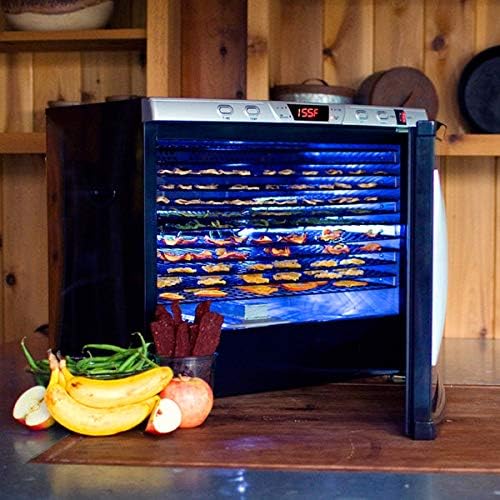
Image: The dehydrator with its interior lights activated, providing visibility of the food drying on the trays.
Drying Process:
Once temperature and time are set, the dehydrator will begin operation. Periodically check the food for desired dryness. Drying times vary based on food type, thickness, and moisture content.
Maintenance and Cleaning
Regular cleaning ensures optimal performance and extends the life of your dehydrator.
- Always unplug the unit from the power outlet and allow it to cool completely before cleaning.
- Trays and Drip Tray: Remove the drying trays and drip tray. Wash them in warm, soapy water. Rinse thoroughly and dry completely. Note: These parts are not dishwasher safe.
- Interior: Wipe the interior surfaces with a damp cloth. For stubborn residue, use a mild detergent solution, then wipe with a clean, damp cloth. Ensure the interior is completely dry before next use.
- Exterior: Wipe the exterior cabinet with a soft, damp cloth. Do not use abrasive cleaners or scouring pads, as they may damage the finish.
- Storage: Store the dehydrator in a clean, dry place when not in use.
Troubleshooting
If you encounter issues with your dehydrator, refer to the following common problems and solutions:
| Problem | Possible Cause | Solution |
|---|---|---|
| Dehydrator does not turn on. |
|
|
| Unit not heating or not holding set temperature. |
|
|
| Food not drying evenly. |
|
|
If the problem persists after attempting these solutions, contact customer support.
Specifications
| Brand | Weston |
| Model Number | 28-0301-W |
| Material | Alloy Steel (cabinet), Food Safe (trays) |
| Color | Silver |
| Wattage | 1600 Watts (110 Volt, 60 Hz) |
| Item Weight | 71.4 Pounds |
| Product Dimensions | 23.75 x 28 x 26 inches |
| Number of Trays | 12 |
| Temperature Range | Up to 160°F |
| UPC | 812830022882 |
Warranty Information
The Weston Pro Series Digital Dehydrator Model 28-0301-W comes with a 5-year manufacturer's warranty. This warranty covers defects in materials and workmanship under normal household use. Please retain your proof of purchase for warranty claims.
For detailed warranty terms and conditions, please refer to the documentation included with your product or contact Weston customer support.
Customer Support
For technical assistance, parts, or warranty inquiries, please contact Weston customer support.
- Website: Visit the official Weston website for support resources and contact information.
- Online Store: You can also find more information and products at the Weston Store on Amazon.


