Introduction
This manual provides detailed instructions for the installation, operation, and maintenance of your Sricam SP012 720P Pan/Tilt Indoor Wireless IP Camera. This device is designed for home security monitoring, offering features such as 720P HD video, pan/tilt control, night vision, two-way audio, and motion detection. Please read this manual thoroughly before using the product to ensure proper setup and functionality.
Product Overview
The Sricam SP012 is a versatile indoor IP camera equipped with various components for comprehensive surveillance.
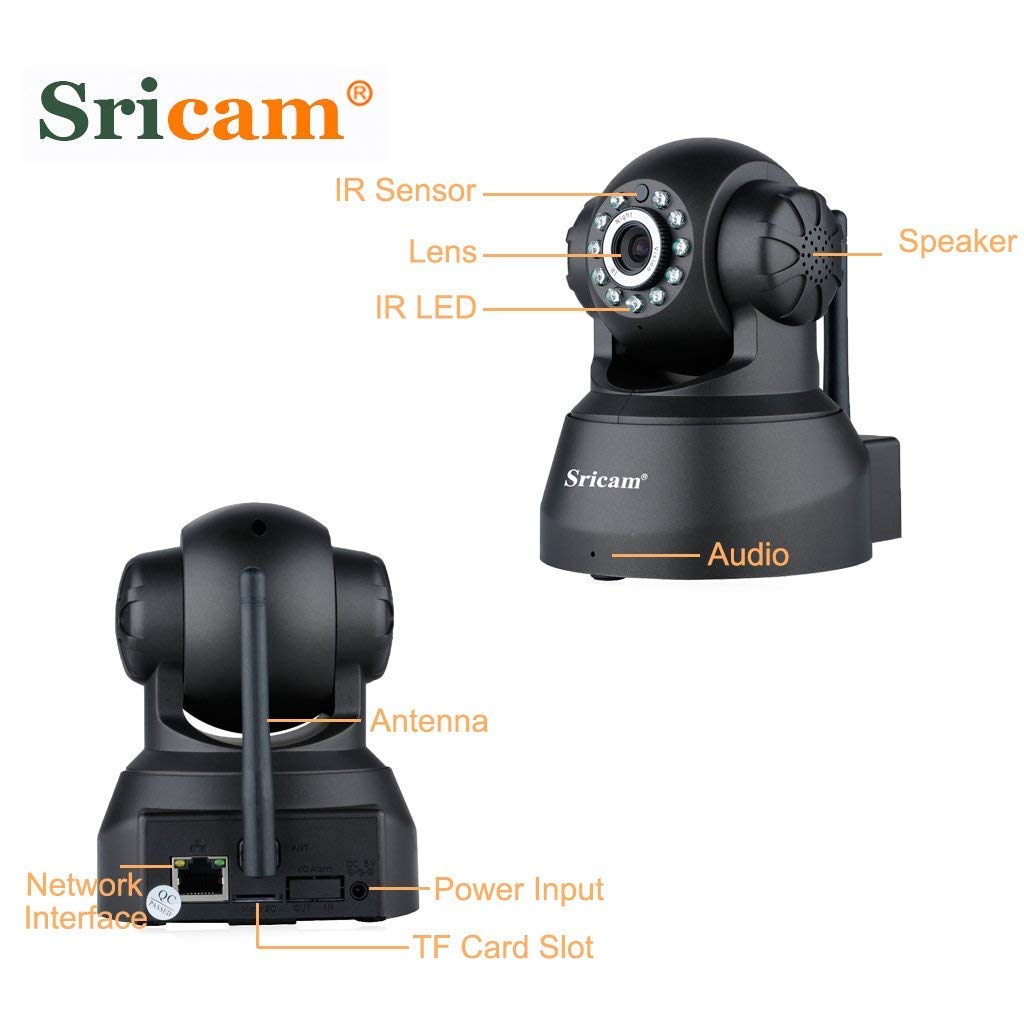
Image: Front and rear view of the Sricam SP012 camera with labels pointing to its components including IR Sensor, Lens, IR LED, Speaker, Audio port, Antenna, Network Interface, Power Input, and TF Card Slot.
Key Features:
- 720P HD Video: Provides clear 1280 x 720 high-definition video.
- Pan/Tilt Functionality: Remotely control horizontal angle 355° and vertical angle 90° via smartphone.
- Night Vision: Equipped with IR LEDs for clear surveillance up to 20 meters in low light or darkness.
- Two-Way Audio: Built-in microphone and speaker allow for real-time communication.
- Motion Detection: Configurable function to trigger instant alerts and recording upon detecting movement.
- Local Storage: Supports MicroSD card up to 128GB for video and picture storage.
- Wireless Connectivity: Connects to 2.4GHz Wi-Fi networks.
- ONVIF Protocol: Compatible with third-party ONVIF platform software and NVRs (above Onvif version 2.4.2).
Package Contents
Please verify that all items listed below are included in your package:
- 1 x Sricam SP012 720P Wireless Wifi WLAN IP Camera
- 1 x Power Adapter (US Plug)
- 1 x Wifi Antenna
- 1 x Holder
- 1 x User Manual
- 1 x Mounting Screws
Setup Instructions
1. Initial Hardware Setup
- Attach Antenna: Screw the Wi-Fi antenna securely into the designated port on the back of the camera.
- Insert MicroSD Card (Optional): If you plan to use local storage, gently insert a MicroSD card (up to 128GB) into the TF Card Slot. Ensure the camera is powered off before inserting or removing the card.
- Power On: Connect the power adapter to the camera's power input port and then plug it into an electrical outlet. The camera will initiate its startup sequence.
- Network Connection Options:
- Wireless (Wi-Fi): The camera supports 2.4GHz Wi-Fi networks only. Ensure your router is configured for 2.4GHz.
- Wired (Ethernet): For initial setup or a more stable connection, you can connect an Ethernet cable from your router to the camera's network interface port.

Image: Diagram illustrating two connection methods: Wired connection from camera to router to computer, and Wireless connection from camera to router to phone/tablet/notebook.
2. App Installation and Device Pairing
- Download the App: Search for the "Sricam" app on the Apple App Store (for iOS devices) or Google Play Store (for Android devices) and install it.
- Register/Login: Open the Sricam app and follow the on-screen instructions to register a new account or log in if you already have one.
- Add Device:
- Tap the "+" icon or "Add Device" option in the app.
- Select the option to add a new camera.
- Follow the in-app wizard to connect the camera to your Wi-Fi network. This typically involves scanning a QR code on the camera or entering your Wi-Fi credentials.
- Ensure your smartphone is connected to the same 2.4GHz Wi-Fi network as the camera during the setup process.
- Complete Setup: Once the camera is successfully added, you should see it listed in your app and be able to view the live feed.
Operating Instructions
1. Live View Monitoring
Open the Sricam app and select your camera from the device list to access the live video feed. You can view the feed from anywhere in the world with an internet connection.
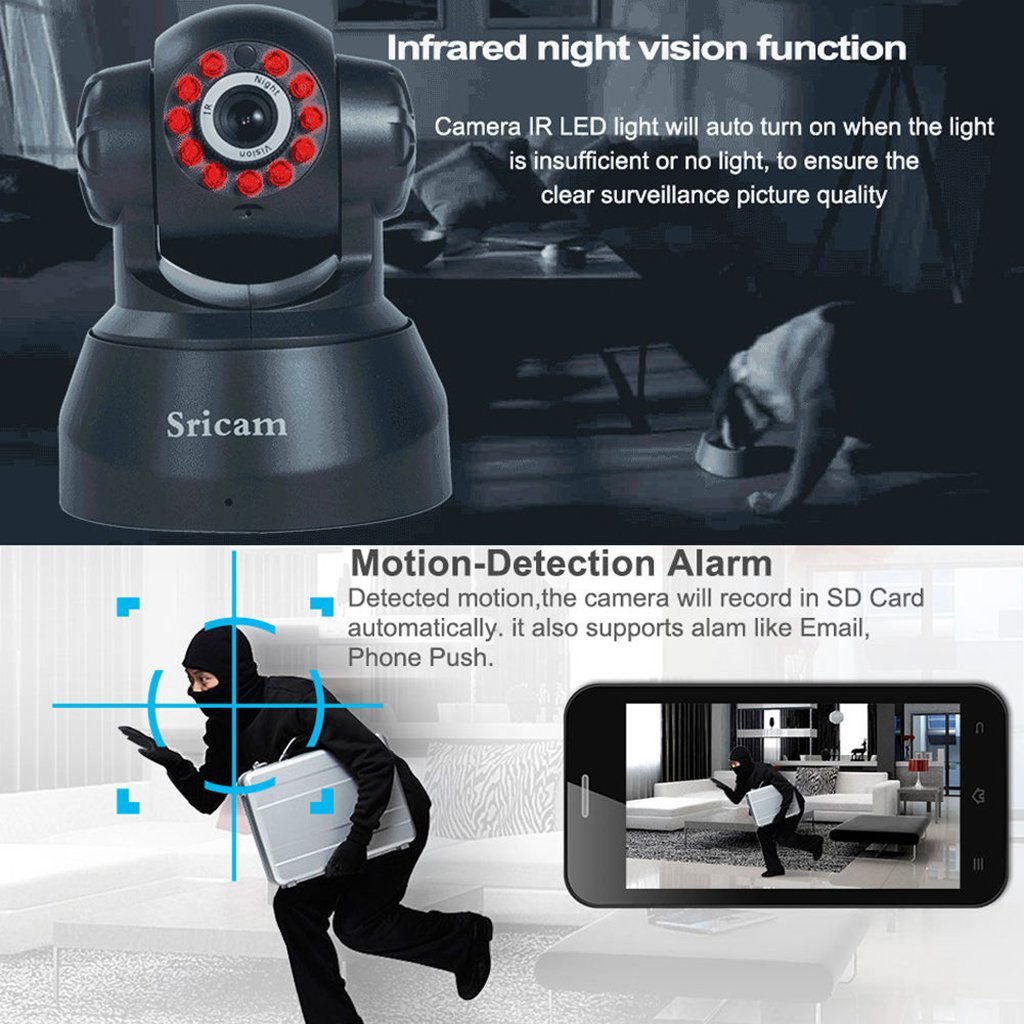
Image: A smartphone screen showing a live video feed from the Sricam SP012 camera, demonstrating remote monitoring capabilities.
2. Pan and Tilt Control
Within the live view interface of the app, use the on-screen controls to remotely adjust the camera's viewing angle. The camera supports 355° horizontal pan and 90° vertical tilt.

Image: The Sricam SP012 camera illustrating its 355° pan and 90° tilt capabilities, with an inset showing a smartphone displaying the camera's view.
3. Two-Way Audio
To use the two-way audio feature, tap the microphone icon in the app's live view. You can speak into your phone, and your voice will be transmitted through the camera's speaker. Similarly, the camera's built-in microphone will pick up sounds from the monitored area.
Image: A child communicating with a parent via the camera's two-way audio function, with a smartphone displaying the microphone icon.
4. Night Vision
The camera automatically activates its infrared (IR) LEDs when ambient light is insufficient, providing clear black-and-white video in dark conditions. This ensures continuous surveillance day and night.

Image: The Sricam SP012 camera with its IR LEDs illuminated, indicating active night vision functionality.
5. Motion Detection and Recording
Configure motion detection settings within the app. When motion is detected, the camera can automatically record video to the inserted MicroSD card and send instant alerts (e.g., email, push notifications) to your smartphone.
6. Remote Access
The Sricam app allows you to access your camera's live feed and recorded footage from any location with an internet connection, using your smartphone, tablet, or PC.

Image: Various devices including smartphones, tablets, and desktop computers displaying live feeds from multiple Sricam cameras, illustrating remote access capabilities.
Maintenance
- Cleaning: Use a soft, dry cloth to clean the camera lens and body. Avoid using harsh chemicals or abrasive materials.
- Firmware Updates: Periodically check the Sricam app for available firmware updates to ensure optimal performance and security.
- Placement: Ensure the camera is placed in a stable, dry indoor environment, away from direct sunlight, extreme temperatures, and strong electromagnetic fields.
- Network Security: Regularly update your Wi-Fi password and ensure your network is secure to prevent unauthorized access.
Troubleshooting
| Problem | Possible Solution |
|---|---|
| Camera fails to connect to Wi-Fi. |
|
| No live video feed. |
|
| Two-way audio not working. |
|
| Motion detection alerts not received. |
|
Specifications
| Feature | Detail |
|---|---|
| Model Number | SP012 |
| Resolution | 720P (1280 x 720) |
| Pan/Tilt Angle | Horizontal 355°, Vertical 90° |
| Lens | 3.6mm Wide Angle Lens |
| Night Vision Distance | Up to 20 meters (IR LEDs) |
| Audio | Built-in Microphone and Speaker (Two-Way Audio) |
| Storage | MicroSD Card Slot (Max. 128GB) |
| Connectivity | Wireless (2.4GHz Wi-Fi), Wired (Ethernet) |
| Connectivity Protocol | ONVIF, Wi-Fi |
| Indoor/Outdoor Usage | Indoor |
| Power Source | AC Power Adapter |
| Product Dimensions | 19.56 x 11.18 x 16.76 cm |
| Item Weight | 567 g |
Warranty and Support
For information regarding warranty coverage and customer support, please refer to the warranty policy provided with your purchase or visit the official Sricam website. Keep your purchase receipt as proof of purchase for warranty claims.
For technical assistance or further inquiries, please contact Sricam customer support.


