Introduction
This manual provides detailed instructions for the setup, operation, and maintenance of your Oklahoma Sound PRA-8000/PRA8-6 Wireless PA System. This system is designed for clear audio amplification in various settings, featuring a 40-watt solid-state amplifier, an 8-inch speaker, and multiple connectivity options.
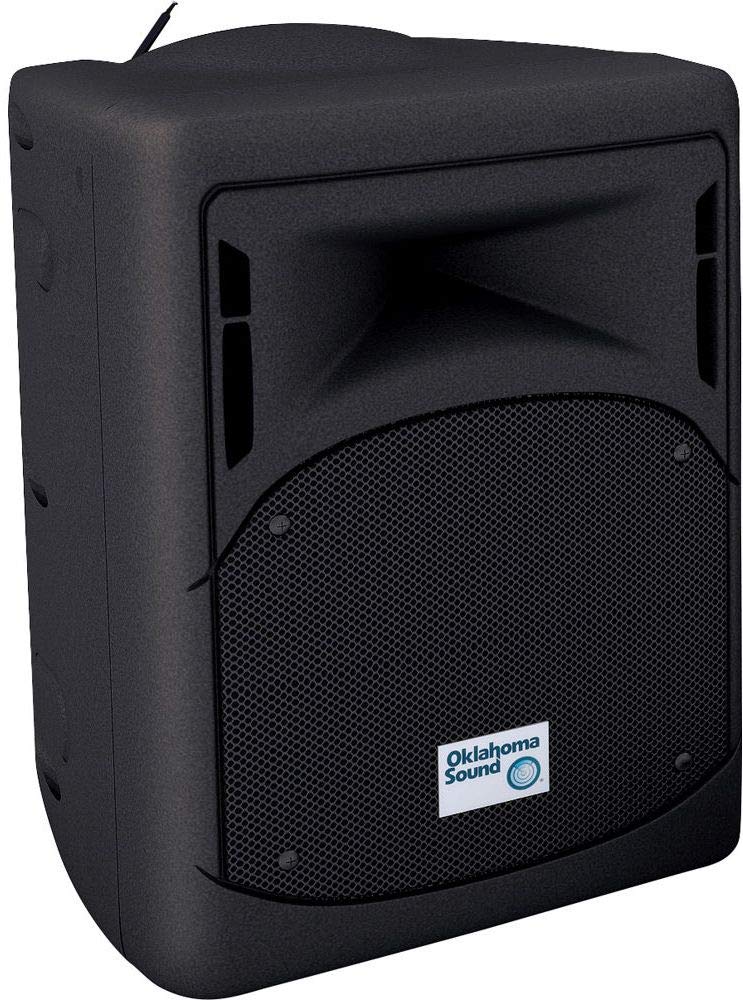
Figure 1: Front view of the Oklahoma Sound PRA-8000/PRA8-6 Wireless PA System.
Package Contents
Verify that all items listed below are present in your package:
- Oklahoma Sound PRA-8000/PRA8-6 PA System Unit
- Wireless Lapel Microphone with Transmitter
- AC Power Cable
- User Manual (this document)

Figure 2: Wireless lapel microphone and transmitter included with the system.
Features
- 40-Watt Solid State Amplifier for clear sound output.
- Integrated 8-inch speaker.
- Lightweight design, approximately 19 lbs, with a built-in handle for portability.
- Wireless microphone functionality with a range of up to 100 feet.
- Auxiliary inputs (1/4" and 1/8") for connecting MP3 players and other media devices.
- Bluetooth connectivity for wireless audio streaming from smartphones.
- Built-in USB port for MP3 file playback.
- SD/MMC Port for media playback.
- Internal rechargeable lead-acid battery providing up to five hours of remote operation.
- Underside receptacle for tripod mounting.
Setup
- Unpacking: Carefully remove all components from the packaging. Retain packaging for future transport or storage.
- Placement: Place the PA system on a stable, flat surface. Ensure adequate ventilation around the unit. The system can also be mounted on a compatible tripod using the underside receptacle.
- Power Connection: Connect the AC power cable to the power input on the rear panel of the PA system and then to a standard electrical outlet. The unit will begin charging its internal battery.
- Initial Charge: For optimal battery life, fully charge the unit before its first remote use. The charge indicator light will show charging status.

Figure 3: Rear control panel showing power input, various audio inputs, and controls.
Operating Instructions
- Power On/Off: Locate the POWER switch on the rear panel. Flip it to the 'ON' position to power on the unit. Flip to 'OFF' to power down.
- Master Volume: Adjust the MASTER volume knob to control the overall output level of the PA system. Start with a low setting and gradually increase.
- Equalizer (EQ): Use the LOW, MID, and HIGH EQ knobs to adjust the tonal characteristics of the audio output.
Connectivity
Bluetooth Pairing
- Ensure the PA system is powered on.
- On your smartphone or Bluetooth-enabled device, enable Bluetooth and search for available devices.
- Select "Oklahoma Sound" or a similar identifier from the list of devices.
- Once paired, audio from your device will play through the PA system. Adjust volume on both your device and the PA system.
Auxiliary Inputs (1/4" & 1/8")
Connect external audio sources such as MP3 players, laptops, or other media devices to the 1/4" or 1/8" AUX IN jacks on the rear panel. Adjust the AUX volume knob to control the input level.
USB/SD/MMC Playback
Insert a USB drive, SD card, or MMC card containing MP3 audio files into the respective port on the rear panel. The system will automatically detect and begin playing compatible files. Use the control buttons near the display for playback control (play/pause, skip tracks).
Microphone Usage
Wireless Lapel Microphone
- Insert batteries into the wireless microphone transmitter (if not already installed).
- Power on the transmitter.
- Ensure the WIRELESS MIC volume knob on the PA system is set to a low level.
- The PA system will automatically detect and connect to the wireless microphone. Speak into the lapel microphone and gradually increase the WIRELESS MIC volume to the desired level.
Wired Microphones
Connect up to two wired microphones to the 1/4" MIC 1 and MIC 2 inputs on the rear panel. Adjust the corresponding MIC 1/2 volume knobs to control their input levels.
Power and Battery
The PRA-8000/PRA8-6 system can operate using AC power or its internal rechargeable lead-acid battery. When connected to AC power, the battery will automatically charge. A full charge provides approximately five hours of continuous operation, depending on usage and volume levels.
- Charging: Connect the AC power cable to charge the internal battery. The CHARGE indicator light will illuminate.
- Battery Life: To maximize battery life, avoid fully discharging the battery frequently. Recharge the unit after each use.
Maintenance
- Cleaning: Disconnect the power before cleaning. Use a soft, dry cloth to wipe the exterior surfaces. Do not use liquid cleaners or abrasive materials.
- Storage: Store the unit in a cool, dry place away from direct sunlight and extreme temperatures. If storing for extended periods, ensure the battery is fully charged and recharge it every 3-6 months to prevent deep discharge.
- Battery Replacement: The internal battery is designed for long-term use. If battery performance significantly degrades, contact Oklahoma Sound customer support for service or replacement options.
Troubleshooting
| Problem | Possible Cause | Solution |
|---|---|---|
| No sound output | Power not on; Master volume low; Input volume low; Incorrect input selected; Cables not connected properly. | Ensure unit is powered on. Increase Master volume and relevant input volume. Select correct input source. Check all cable connections. |
| Wireless microphone not working | Microphone transmitter off; Low batteries in transmitter; Transmitter out of range; Wireless volume low. | Power on transmitter. Replace batteries. Move closer to PA system. Increase WIRELESS MIC volume. |
| Bluetooth connection issues | Bluetooth not enabled on device; Device too far; Already connected to another device. | Ensure Bluetooth is enabled on your device. Move device closer to PA system. Disconnect from other Bluetooth devices and try pairing again. |
| Battery not charging | AC cable not connected; Power outlet faulty; Battery fault. | Ensure AC cable is securely connected. Test power outlet with another device. If problem persists, contact support. |
Specifications
- Model Number: PRA-8000/PRA8-6
- Amplifier Output: 40 Watts (Solid State)
- Speaker: 8-inch
- Connectivity: Bluetooth, 1/4" Mic Input (x2), 1/4" Aux Input, 1/8" Aux Input, USB, SD/MMC Port
- Wireless Microphone Range: Up to 100 feet
- Power Source: AC (wall plug) or Internal Rechargeable Lead-Acid Battery
- Battery Life: Up to 5 hours (remote use)
- Dimensions: Approximately 17" Height x 11" Wide x 11" Length
- Weight: Approximately 19 lbs
- Color: Black
- Mounting Type: Tabletop, Tripod (underside receptacle)
Safety Information
- Do not expose the unit to rain or moisture.
- Do not block ventilation openings.
- Ensure the power cord is not pinched or walked on.
- Do not attempt to service the unit yourself. Refer all servicing to qualified personnel.
- Dispose of batteries according to local regulations.
Warranty and Support
For warranty information, technical support, or service inquiries, please contact Oklahoma Sound customer service. Keep your purchase receipt as proof of purchase.
Manufacturer: Oklahoma Sound


