
1. Introduction
The Seasonic FOCUS Plus 550 Gold SSR-550FX is a high-performance, fully modular power supply designed for personal computers. This unit delivers 550W of stable power with an 80 PLUS Gold efficiency rating, ensuring reliable operation and reduced energy consumption. Its compact 140mm depth allows for easier installation in various PC cases, while the full modular design helps minimize cable clutter and improve airflow within your system.
Key features include:
- Compact Size: 140mm deep for high power output to size ratio.
- Full Modular Design: Use only necessary cables to reduce clutter and enhance airflow.
- 80 PLUS Gold Certified: Achieves 87% efficiency at 20% load, 90% at 50% load, and 87% at 100% load.
- Hybrid Silent Fan Control: Seasonic's patented three-phased thermal control for optimal balance between silence and cooling, featuring Fanless Mode, Silent Mode, and Cooling Mode.
- 10-Year Warranty: Reflects a commitment to superior quality and reliability.
2. What's in the Box
The Seasonic FOCUS Plus 550 Gold SSR-550FX package includes the following items:
- Seasonic Focus Plus SERIES SSR-550FX 550W 80+ GOLD ATX12V & EPS12V FULL MODULAR Power Supply
- User's Manual
- AC Power Cord
- Modular Cable Set (Motherboard, CPU, PCIe, SATA, Molex, SATA 3.3)
- PSU Tester
- Mounting Screws
- Cable Ties
- Carrying Bag for cables
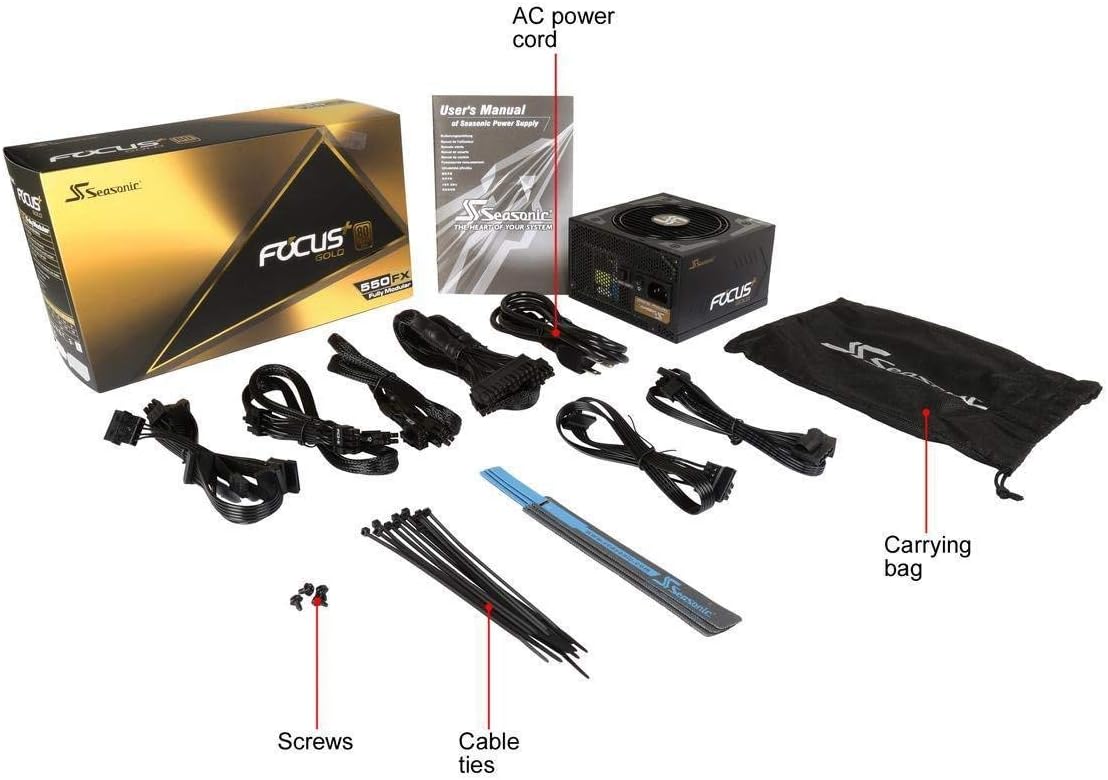
Figure 2.1: All components included in the Seasonic FOCUS Plus 550 Gold SSR-550FX package.
3. Product Overview
Familiarize yourself with the various parts and connections of your Seasonic FOCUS Plus 550 Gold power supply.

Figure 3.1: Front-angled view of the power supply unit.

Figure 3.2: Rear panel of the power supply, featuring the AC input, main power switch, and the Hybrid Mode switch for fan control.

Figure 3.3: Top view showing the 120mm Fluid Dynamic Bearing (FDB) fan.
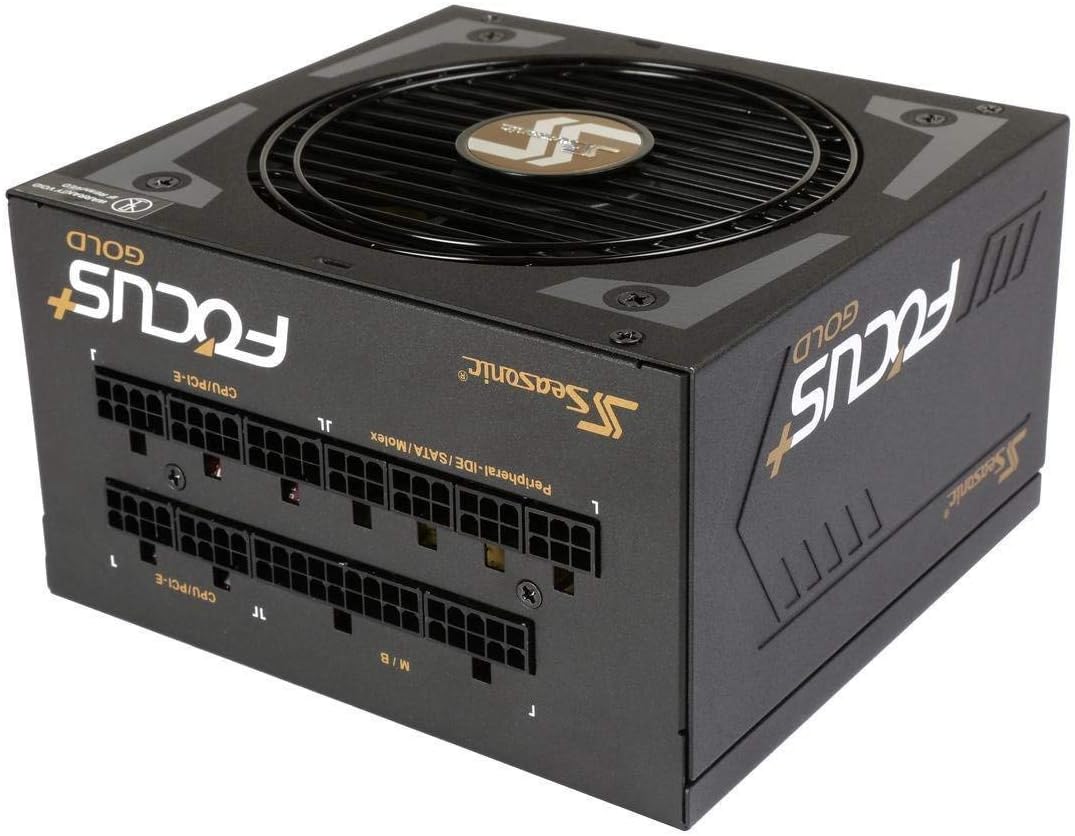
Figure 3.4: Modular cable connection panel, clearly labeled for easy installation.

Figure 3.5: Example of the included modular cables.
4. Installation Guide
Proper installation is crucial for the optimal performance and longevity of your power supply. Please follow these general steps. Refer to your PC case and motherboard manuals for specific instructions.
- Prepare Your System: Ensure your computer is powered off and unplugged from the wall outlet. Open your PC case.
- Mount the Power Supply: Carefully place the Seasonic FOCUS Plus 550 Gold into the designated PSU bay in your PC case. Secure it with the provided mounting screws. Ensure the fan is oriented correctly for optimal airflow (typically facing down if there's a bottom vent, or up if not).
- Connect Essential Cables:
- 24-pin ATX Motherboard Cable: Connect the main 24-pin cable to your motherboard.
- CPU Power Cable(s): Connect the 4+4 pin or 8-pin EPS12V CPU power cable(s) to your motherboard.
- PCIe Power Cable(s): Connect the 6+2 pin PCIe power cable(s) to your graphics card(s) as required.
- Connect Peripheral Cables: Attach SATA power cables to your SSDs, HDDs, and optical drives. Use Molex cables for any other peripherals that require them.
- Cable Management: Utilize the full modular design to connect only the cables you need. Route cables neatly behind the motherboard tray or in other designated areas to improve airflow and aesthetics. Use the included cable ties to secure bundles.
- Close Case and Connect AC Power: Once all connections are secure, close your PC case. Connect the AC power cord to the power supply and then to a wall outlet.
- Power On: Flip the power switch on the back of the PSU to the 'On' position. Power on your computer.
Important: This power supply is only compatible with cables provided by Seasonic. Any other cables not approved by Seasonic will result in item malfunction and may void your warranty.
Video 4.1: An unboxing video for the FOCUS GX series power supply, which shares similar components and packaging to the FOCUS Plus series, demonstrating the included items and initial presentation.
5. Operating Instructions
The Seasonic FOCUS Plus 550 Gold is designed for straightforward operation. After successful installation, ensure the power switch on the rear of the unit is in the 'On' position. Your computer can then be powered on via its case power button.
Hybrid Silent Fan Control
This power supply features Seasonic's Hybrid Silent Fan Control, which allows for quiet operation under low loads. A switch on the rear of the power supply (refer to Figure 3.2) enables or disables this feature.
- Fanless Mode: When enabled, the fan will remain off under low power loads, providing silent operation. The fan will automatically activate as the load increases to maintain optimal temperatures.
- Silent Mode / Cooling Mode: As the system load increases, the fan speed will gradually increase to provide necessary cooling. The Hybrid Silent Fan Control intelligently adjusts fan speed to balance noise levels and cooling efficiency.
To switch between Hybrid Mode (fanless at low loads) and normal fan operation, use the dedicated switch on the rear of the power supply. It is recommended to keep Hybrid Mode enabled for quieter operation unless specific cooling requirements dictate otherwise.
6. Maintenance
Regular maintenance helps ensure the longevity and efficiency of your power supply.
- Dust Cleaning: Periodically clean dust from the power supply's fan and vents. Use compressed air to gently blow dust out of the unit. Ensure the system is powered off and unplugged before cleaning. Avoid using liquid cleaners.
- Cable Management: Ensure all modular cables are securely connected and neatly routed to prevent obstruction of airflow within the PC case.
- Environmental Conditions: Operate the power supply in a well-ventilated environment. Avoid exposing it to extreme temperatures, humidity, or direct sunlight.
7. Troubleshooting
If you encounter issues with your Seasonic FOCUS Plus 550 Gold power supply, consider the following troubleshooting steps:
- No Power:
- Check if the AC power cord is securely connected to both the power supply and the wall outlet.
- Ensure the power switch on the rear of the PSU is in the 'On' position.
- Verify all modular cables (especially the 24-pin ATX and CPU power cables) are firmly seated in both the PSU and motherboard.
- Test the wall outlet with another device to confirm it has power.
- System Instability/Random Shutdowns:
- Ensure the power supply is adequately rated for your system's components.
- Check for loose cable connections.
- Monitor system temperatures to ensure components are not overheating.
- If possible, test the power supply with the included PSU tester to confirm basic functionality.
- Fan Not Spinning (Hybrid Mode):
- If Hybrid Mode is enabled, the fan is designed to remain off under low loads. This is normal operation.
- If the fan does not spin even under heavy load, or if Hybrid Mode is disabled and the fan still doesn't spin, contact Seasonic support.
If these steps do not resolve your issue, please contact Seasonic customer support for further assistance.
8. Specifications
| Feature | Detail |
|---|---|
| Model Name | FOCUS Plus 550 Gold |
| Brand | Seasonic |
| Compatible Devices | Personal Computer |
| Connector Type | ATX, EPS |
| Output Wattage | 550W |
| Form Factor | ATX12V |
| Cooling Method | Air |
| Item Dimensions (L x W x H) | 5.9 x 5.5 x 3.4 inches (150 x 140 x 86 mm) |
| Item Weight | 1.5 Kilograms |
| Power Supply Design | Full Modular |
| Number of Fans | 1 |
| Fan Size | 120 Millimeters |
| Maximum Input Voltage | 120 Volts (AC) |
| Minimum Input Voltage | 120 Volts (AC) |
| Model Number | SSR-550FX |
9. Important Safety Information
Please read and adhere to the following safety guidelines:
- This power supply is only compatible with cables provided by Seasonic. Any other cables not approved by Seasonic will result in item malfunction.
- Do not open the power supply unit. High voltages are present inside, and there are no user-serviceable parts. Opening the unit will void the warranty.
- Ensure proper grounding of your computer system.
- Avoid installing the power supply in areas with excessive heat, humidity, or dust.
- Always disconnect the AC power cord from the wall outlet before installing, removing, or cleaning the power supply or any other internal components.
10. Warranty and Support
The Seasonic FOCUS Plus 550 Gold SSR-550FX comes with a 10-year manufacturer direct warranty. This warranty covers defects in materials and workmanship under normal use.
For warranty claims, technical support, or further inquiries, please visit the official Seasonic website or contact their customer service department. Keep your proof of purchase for warranty validation.
You can find more information and support resources at the Seasonic Store on Amazon.


