1. Introduction
This manual provides detailed instructions for the assembly, installation, operation, and maintenance of your MaxxHaul 70115 Roof Rack Cargo Carrier. Please read this manual thoroughly before use to ensure proper function and safety.
The MaxxHaul 70115 roof rack is constructed from durable steel with a powder coat finish, designed to provide instant cargo space for vehicles equipped with crossbars. It includes rubber gaskets to prevent internal rusting and U-bolts with rubber caps to protect transported cargo.
2. Important Safety Information
WARNING: Failure to follow these safety instructions may result in property damage or personal injury.
- Do not exceed the maximum load capacity of 150 pounds (68 kg). Ensure weight is distributed evenly.
- Always ensure the cargo carrier is securely attached to your vehicle's crossbars before driving.
- Regularly check all bolts, nuts, and connections for tightness, especially before and after long trips.
- Do not overload the carrier. Secure all cargo properly with appropriate tie-downs or cargo nets.
- Be aware of increased vehicle height and width when the cargo carrier is installed, especially when entering garages, car washes, or low-clearance areas.
- Adjust driving speed according to road conditions and cargo load. High speeds with a loaded roof rack can affect vehicle stability and fuel efficiency.
- This product contains chemicals known to the State of California to cause cancer and birth defects or other reproductive harm (Proposition 65 warning).
3. Package Contents
Verify that all components are present before beginning assembly:
- 1 Steel Roof Rack (consisting of Front, Middle, and Rear sections)
- Assembly and Mounting Hardware (including U-bolts, rubber caps, washers, screws, and gaskets)

Image: All components and hardware included with the MaxxHaul 70115 Roof Rack.
4. Specifications
| Model Number | 70115 |
| Dimensions (L x W x H) | 46 x 36 x 4.5 inches (116.8 x 91.4 x 11.4 cm) |
| Load Capacity | 150 pounds (68 kg) |
| Material | Steel with Powder Coat Finish |
| Mounting Type | Roof Mount, Crossbar Mount |
| Automotive Fit Type | Universal Fit (for most crossbars) |
| Item Weight | 25 pounds (11.3 kg) |

Image: MaxxHaul 70115 Roof Rack with indicated dimensions: 46 inches length, 36 inches width, 4.5 inches height.
5. Assembly and Installation
Follow these steps for proper assembly and installation of your MaxxHaul 70115 Roof Rack. Refer to the assembly diagram for visual guidance.

Image: Detailed assembly guide for the MaxxHaul 70115 Roof Rack, showing four steps.
5.1. Rack Assembly
- Step 1: Connect Rack Sections
Place the three sections of the basket (Front Rack Section #4, Middle Rack Section #7, Rear Rack Section #8) on a flat surface. Match the ends with Marking "A" and "B" as indicated in the diagram. Ensure the sections align correctly.
- Step 2: Install Gaskets
Lubricate the inside of the Large Gasket (#5) and Small Gasket (#6) with grease. Slide these gaskets onto the four ends of the Middle Rack Section (#7). These gaskets help prevent internal rusting.
- Step 3: Secure Connections
Ensure the "A" marking end in the front section connects to the "A" marking end in the middle section. Similarly, ensure the "B" marking end in the rear section connects to the "B" marking end in the middle section. Align the holes and secure the connections using the provided Washers (#2) and Screws (#1). Attach the Rear Section to the Middle Section, then the Front Section to the Middle Section, aligning holes and securing with washers and screws.
- Step 4: Final Tightening
Slide the remaining gaskets next to the Screws (#1) and Washers (#2). Tighten all connections securely. Do not overtighten.
5.2. Mounting to Vehicle Crossbars
The MaxxHaul 70115 attaches to most factory and aftermarket crossbars using easy-to-use U-bolts. Ensure your vehicle's crossbars meet the following requirements:
- Minimum height of crossbar: 3/4 inch
- Maximum height of crossbar: 1-3/4 inches
- Maximum width of crossbar: 6 inches
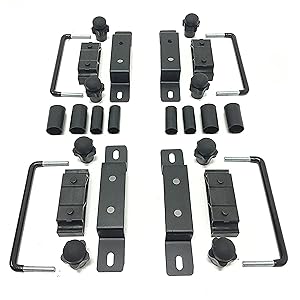
Image: Close-up of the universal mounting bracket used to attach the roof rack to crossbars.
- Position the assembled cargo carrier centrally on your vehicle's crossbars.
- Place the universal mounting brackets over the crossbars and align them with the pre-drilled holes on the cargo carrier.
- Insert the U-bolts from underneath the crossbars, through the mounting brackets, and into the cargo carrier frame.
- Thread the rubber caps onto the exposed ends of the U-bolts inside the cargo carrier. These caps protect your cargo from sharp edges.
- Hand-tighten the nuts onto the U-bolts, ensuring the carrier is firmly secured to the crossbars.
- Verify that the carrier is stable and does not wobble. Adjust and tighten as necessary.
6. Operation Guidelines
6.1. Loading Cargo
- Do not exceed the maximum load capacity of 150 pounds (68 kg).
- Distribute cargo weight as evenly as possible across the carrier. Place heavier items at the bottom and center.
- Secure all items within the basket using appropriate cargo nets, straps, or tie-downs to prevent shifting or falling during transit.
- Ensure no items obstruct your view or interfere with vehicle operation.

Image: A vehicle equipped with the MaxxHaul roof rack, demonstrating its use for carrying luggage and other items.
6.2. Driving with a Loaded Carrier
- Drive cautiously, especially when cornering, braking, or in windy conditions.
- Be mindful of increased vehicle height and potential wind resistance, which may affect fuel economy.
- Periodically check cargo security and carrier attachment during long journeys.
7. Care and Maintenance
- Regular Inspection: Before each use, inspect the carrier for any signs of damage, loose connections, or wear.
- Cleaning: Clean the carrier with mild soap and water. Avoid abrasive cleaners that could damage the powder coat finish.
- Rust Prevention: The carrier features a powder coat finish for rust resistance. However, to prolong its lifespan, especially in harsh environments, consider storing the rack indoors when not in use. Applying a truck bed liner paint or similar protective coating can further enhance rust protection.
- Hardware: Ensure all U-bolts and other fasteners remain tight. Replace any worn or damaged hardware immediately.
8. Troubleshooting
| Problem | Possible Cause | Solution |
|---|---|---|
| Rack feels loose or wobbles after installation. | U-bolts or assembly screws are not sufficiently tightened. | Re-check and securely tighten all U-bolts and assembly screws. Ensure mounting brackets are correctly positioned. |
| Excessive wind noise during driving. | Airflow over the rack, especially when empty. | Ensure the wind deflector is properly installed. Consider adding a fairing if noise persists (not included). Reduce speed. |
| Cargo shifting during transit. | Cargo not adequately secured. | Always use appropriate cargo nets, straps, or tie-downs to firmly secure all items within the carrier. Distribute weight evenly. |
| Rust spots appearing on the rack. | Exposure to harsh weather conditions; damage to powder coat. | Clean affected areas, sand lightly, and apply rust-inhibiting paint or truck bed liner paint. Store indoors when possible. |
9. Warranty and Customer Support
For specific warranty information regarding your MaxxHaul 70115 Roof Rack Cargo Carrier, please refer to the documentation included with your purchase or contact MaxxHaul customer support directly.
If you have questions about assembly, installation, or require technical assistance, please visit the official MaxxHaul website or contact their customer service department. Contact information is typically available on the product packaging or the manufacturer's website.
Manufacturer: MAXXHAUL
For more information, you may visit the MAXXHAUL Store on Amazon.


