
Mount-It! MI-2042
Mount-It! Full Motion TV Wall Mount (MI-2042) Instruction Manual
Model: MI-2042 | Brand: Mount-It!
Introduction
This manual provides detailed instructions for the safe and proper installation, operation, and maintenance of your Mount-It! MI-2042 Full Motion TV Wall Mount. This universal wall mount is designed for 19 to 40-inch TVs and computer monitors, supporting VESA 75x75mm and 100x100mm patterns. It offers full motion capabilities including tilt, swivel, and extension up to 15 inches, allowing for optimal viewing angles.

Figure 1: Mount-It! MI-2042 Full Motion TV Wall Mount with a television attached.
Safety Information
- Read all instructions before installation. If you have any questions, contact customer support.
- Ensure the mounting surface can safely support the combined weight of the mount and the display.
- Do not exceed the maximum weight capacity of 33 lbs (15 kg).
- Use only the provided hardware. Do not use parts not supplied by the manufacturer.
- Improper installation may result in property damage or personal injury.
- Always have two people for installation to prevent injury or damage.
- This product is intended for indoor use only.
Package Contents
Verify that all components are present and undamaged before beginning installation. If any parts are missing or defective, contact Mount-It! customer service.
| Component | Quantity |
|---|---|
| Wall Plate Assembly | 1 |
| VESA Plate | 1 |
| Mounting Hardware (screws, anchors, washers) | Assorted |
| Instruction Manual | 1 |
Video 1: Official product video demonstrating the features and installation of the Mount-It! MI-2042 Full Motion TV Wall Mount.
Setup and Installation
Follow these steps for secure installation of your wall mount. It is recommended to have two people for this process.
- Verify VESA Compatibility: Check the back of your TV or monitor for the four mounting holes. Measure the horizontal and vertical distance between these holes. This mount supports VESA patterns of 75x75mm and 100x100mm (3x3 inches or 4x4 inches).
- Attach VESA Plate to Display: Secure the VESA plate to the back of your TV or monitor using the appropriate screws and washers from the provided hardware kit. Ensure a snug fit without overtightening.
- Mount Wall Plate to Wall:
- Locate a suitable mounting position on a wall stud or solid concrete/brick wall.
- Mark the drill holes for the wall plate.
- Drill pilot holes according to the instructions for your wall type (wood stud or concrete).
- Secure the wall plate to the wall using the provided lag bolts and washers. Ensure it is level and firmly attached.
- Attach Display to Wall Mount: Carefully lift the TV/monitor (with the VESA plate attached) and slide it onto the articulating arm's socket on the wall plate assembly. Ensure it clicks securely into place.
- Adjust Tilt Angle: Loosen the tilt adjustment knob, set the desired tilt angle, and then tighten the knob to secure the display.

Figure 2: VESA compatibility check for your display.

Figure 3: Attaching the VESA plate to the display.
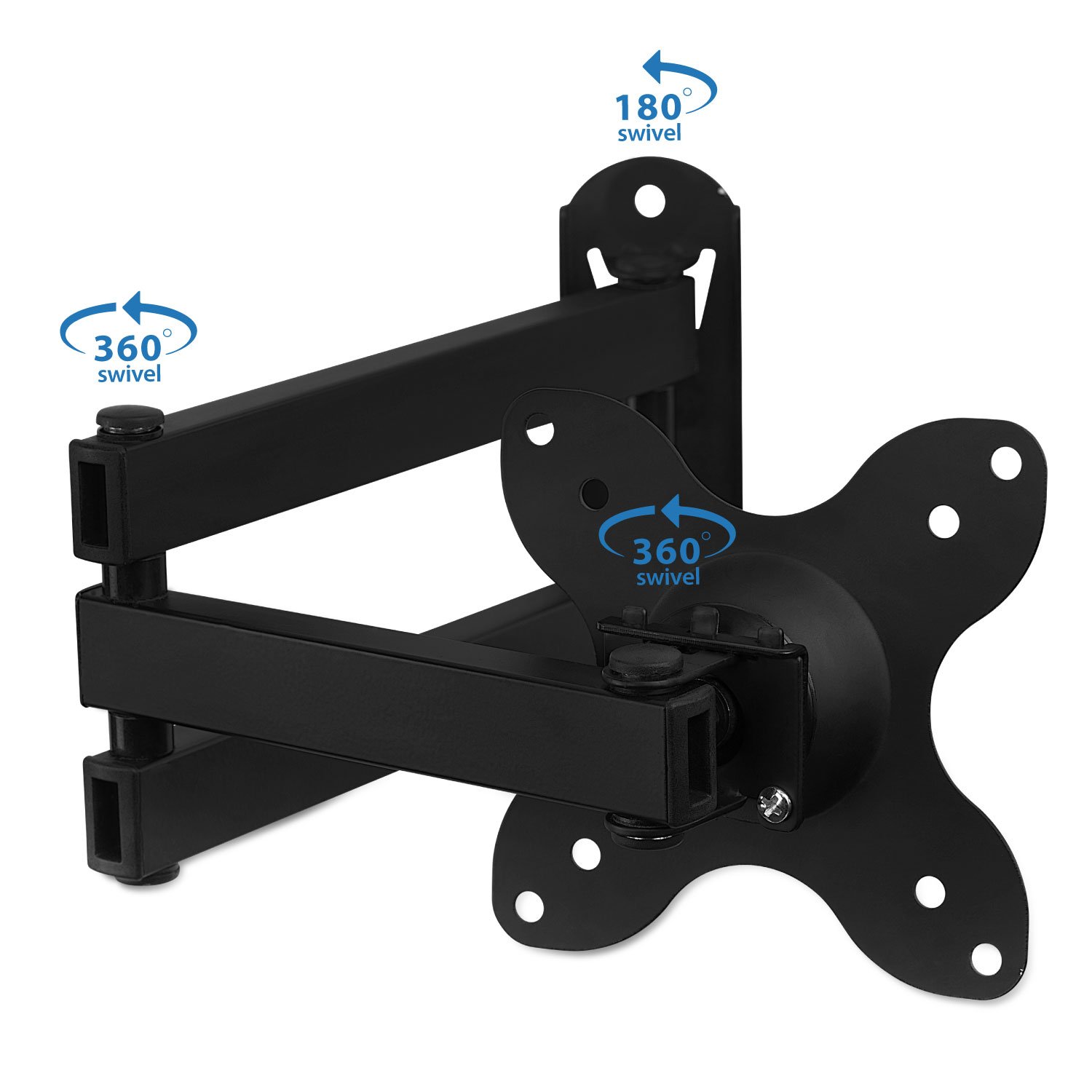
Figure 4: Attaching the display to the wall mount.
Operating Instructions (Adjustments)
The Mount-It! MI-2042 offers versatile adjustments for optimal viewing.
- Extension: The articulating arm allows the display to extend from 1.75 inches (minimum) to 15 inches (maximum) from the wall. Gently pull or push the display to achieve the desired distance.
- Tilt: The mount allows for a tilt range of up to 15 degrees up or down. Loosen the tilt knob, adjust the screen to your preferred vertical angle, and then re-tighten the knob.
- Swivel: The mount provides 180 degrees of swivel at each joint, allowing you to angle the screen left or right. Gently push the display to the desired horizontal viewing position.
- Rotation: The VESA plate can rotate 360 degrees, enabling you to switch between landscape and portrait orientation for your display.

Figure 5: Display extension from the wall.

Figure 6: Tilt and rotation capabilities.
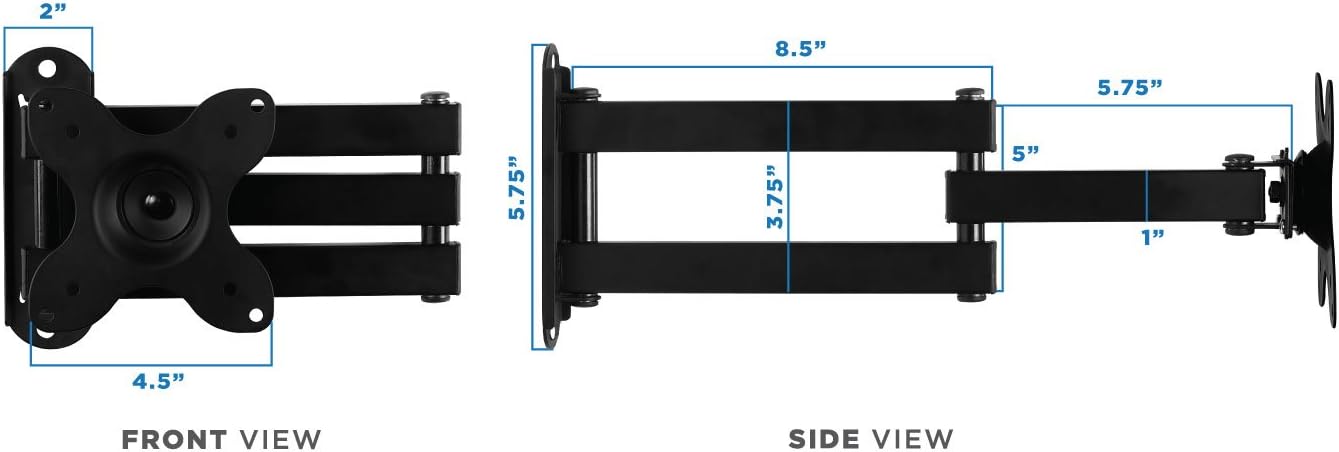
Figure 7: Swivel and rotation points on the mount.
Maintenance
Regular maintenance ensures the longevity and safe operation of your wall mount.
- Cleaning: Wipe the mount with a soft, damp cloth to remove dust and dirt. Avoid harsh chemicals or abrasive cleaners.
- Inspection: Periodically check all screws and connections to ensure they are tight and secure. Re-tighten if necessary.
- Lubrication: If joints become stiff, apply a small amount of silicone-based lubricant to the moving parts.
Troubleshooting
If you encounter issues, refer to the following common problems and solutions.
| Problem | Possible Cause | Solution |
|---|---|---|
| TV/Monitor is wobbly or not secure. | Loose mounting screws or incorrect installation. | Ensure all wall plate and VESA plate screws are tightened. Verify the wall mount is properly secured to a stud or solid wall. |
| Display tilts forward or does not hold position. | Tilt adjustment knob is loose. | Tighten the tilt adjustment knob located on the VESA plate connection point. |
| Difficulty moving the articulating arm. | Joints are stiff or need lubrication. | Apply a small amount of silicone-based lubricant to the arm joints. |
| Missing parts from package. | Packaging error or parts lost during transit. | Contact Mount-It! customer support for replacement parts. |
Specifications
- Model Number: MI-2042
- Compatible TV/Monitor Sizes: 19 to 40 inches
- VESA Compatibility: 75x75mm, 100x100mm
- Weight Capacity: 33 lbs (15 kg)
- Extension from Wall: 1.75 inches (min) to 15 inches (max)
- Tilt Angle: Up to 15 degrees (up/down)
- Swivel: 180 degrees at each joint
- Rotation: 360 degrees (landscape to portrait)
- Material: Iron
- Color: Black
- Item Weight: 2.52 pounds
- Package Dimensions: 12.6 x 9.17 x 1.65 inches

Figure 8: Dimensional specifications of the wall mount.
Warranty Information
For detailed warranty information regarding your Mount-It! MI-2042 Full Motion TV Wall Mount, please refer to the official Mount-It! website or contact their customer support directly. Keep your purchase receipt as proof of purchase.
Customer Support
If you require further assistance, have questions about installation, or need to report a missing/defective part, please visit the official Mount-It! website for contact information or their support portal.
Related documentsMI-2042


Ask a question about this manual
Ask about setup, troubleshooting, compatibility, parts, safety, or missing instructions. Manuals+ will review the question and use this page’s manual context to help answer it.