
Introduction
Thank you for choosing the Billboard Bluetooth Wireless Around the Head Headphones. This manual provides essential information for setting up, operating, and maintaining your new headphones. Please read it thoroughly before use.
These headphones are designed for wireless audio enjoyment and hands-free communication, featuring a lightweight and flexible design suitable for active lifestyles.
What's in the Box
- Billboard Bluetooth Wireless Headphones
- USB Charging Cable
- User Manual
- Multiple sizes of ear tips
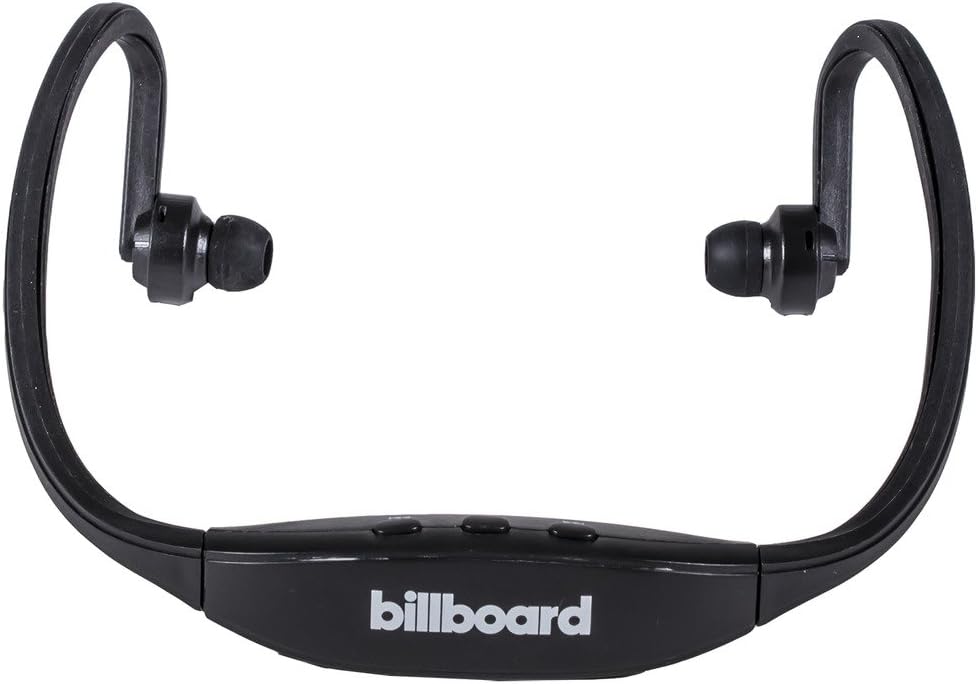
Figure 1: Front view of the Billboard Bluetooth Wireless Around the Head Headphones, highlighting the ear hooks and the central band with the Billboard logo.

Figure 2: The USB charging cable and various sizes of silicone ear tips that come with the headphones.
Product Overview
Familiarize yourself with the components and controls of your headphones.

Figure 3: Back view of the headphones, revealing the control panel with buttons.
Controls
- Power Button / Multi-function Button: Used for powering on/off, play/pause, answering/ending calls, and Bluetooth pairing.
- Volume Up / Next Track Button: Increases volume with a short press, skips to the next track with a long press.
- Volume Down / Previous Track Button: Decreases volume with a short press, goes to the previous track with a long press.
- Microphone: Built-in for hands-free calls.
- Charging Port: Micro USB port for charging the headphones.
- LED Indicator: Displays power, charging, and pairing status.
Setup
Charging the Headphones
- Connect the small end of the included USB charging cable to the charging port on your headphones.
- Connect the larger end of the USB cable to a USB power source (e.g., computer USB port, USB wall adapter).
- The LED indicator will illuminate (typically red) during charging.
- Once fully charged (approximately 1-2 hours), the LED indicator will change color or turn off (typically blue or off).
- A full charge provides up to 6 hours of music and talk time, and up to 60 hours of standby time.
Bluetooth Pairing
- Ensure the headphones are turned off.
- Press and hold the Power/Multi-function button for approximately 5-7 seconds until the LED indicator flashes red and blue alternately. This indicates pairing mode.
- On your Bluetooth-enabled device (smartphone, tablet, computer), go to the Bluetooth settings and ensure Bluetooth is enabled.
- Search for available devices. You should see "BB787" or "Billboard Headphones" in the list.
- Select the headphones from the list to connect.
- Once successfully paired, the LED indicator will typically flash blue slowly or turn solid blue, and you may hear an audible confirmation.
- If prompted for a password, enter "0000".
Note: The headphones will automatically attempt to reconnect to the last paired device when powered on, if that device's Bluetooth is active and within range.
Operating Instructions
Power On/Off
- Power On: Press and hold the Power/Multi-function button for about 3 seconds until the LED indicator flashes blue and you hear a power-on tone.
- Power Off: Press and hold the Power/Multi-function button for about 3 seconds until the LED indicator flashes red and you hear a power-off tone.
Music Playback
- Play/Pause: Short press the Power/Multi-function button.
- Volume Up: Short press the Volume Up (+) button.
- Volume Down: Short press the Volume Down (-) button.
- Next Track: Long press the Volume Up (+) button.
- Previous Track: Long press the Volume Down (-) button.
Phone Calls
- Answer Call: Short press the Power/Multi-function button when a call comes in.
- End Call: Short press the Power/Multi-function button during a call.
- Reject Call: Long press the Power/Multi-function button when a call comes in.
- Redial Last Number: Double-press the Power/Multi-function button.
Maintenance
- Cleaning: Use a soft, dry cloth to clean the headphones. Do not use abrasive cleaners or solvents.
- Storage: Store the headphones in a cool, dry place away from direct sunlight and extreme temperatures.
- Battery Care: To prolong battery life, avoid fully discharging the battery frequently. Charge the headphones regularly, even if not in use for extended periods.
- Water Resistance: These headphones are not water-resistant. Avoid exposure to water, rain, or excessive moisture.
Troubleshooting
| Problem | Possible Solution |
|---|---|
| Headphones do not power on. | Ensure the headphones are fully charged. Connect to a power source and check the charging indicator. |
| Cannot pair with device. |
|
| No sound or low volume. |
|
| Poor sound quality or disconnections. |
|
Specifications
| Feature | Detail |
|---|---|
| Model Number | BB787 |
| Brand | Billboard |
| Connectivity | Bluetooth 5.0 |
| Wireless Range | Up to 10 meters (33 feet) |
| Battery Life (Music/Talk) | Up to 6 hours |
| Battery Life (Standby) | Up to 60 hours |
| Charging Time | Approx. 1-2 hours |
| Material | Memory Alloy |
| Dimensions | 2.5 x 8 x 8 inches |
| Weight | 4 ounces |
| Microphone | Built-in |
| Water Resistance | Not Water Resistant |
Warranty and Support
Billboard products are manufactured to high quality standards. For information regarding warranty coverage and support, please refer to the warranty card included with your purchase or visit the official Billboard website. Please retain your proof of purchase for any warranty claims.
For technical assistance or customer service inquiries, please contact the retailer where you purchased the product or refer to the manufacturer's support channels.