
Cambridge Soundworks SWOA3UBLK
OontZ Angle 3 Ultra Portable Bluetooth Speaker User Manual
Model: SWOA3UBLK
Introduction
Thank you for purchasing the OontZ Angle 3 Ultra Portable Bluetooth Speaker by Cambridge Soundworks. This manual provides essential information for setting up, operating, maintaining, and troubleshooting your speaker. Designed for superior sound quality and durability, the OontZ Angle 3 Ultra features a 14-watt output, rich bass, IPX7 waterproofing, and an impressive 30-meter Bluetooth range. Enjoy up to 20 hours of playtime on a single charge.

Image: The OontZ Angle 3 Ultra Portable Bluetooth Speaker, showcasing its sleek black, triangular design with control buttons on one end.
Setup
1. Included Items
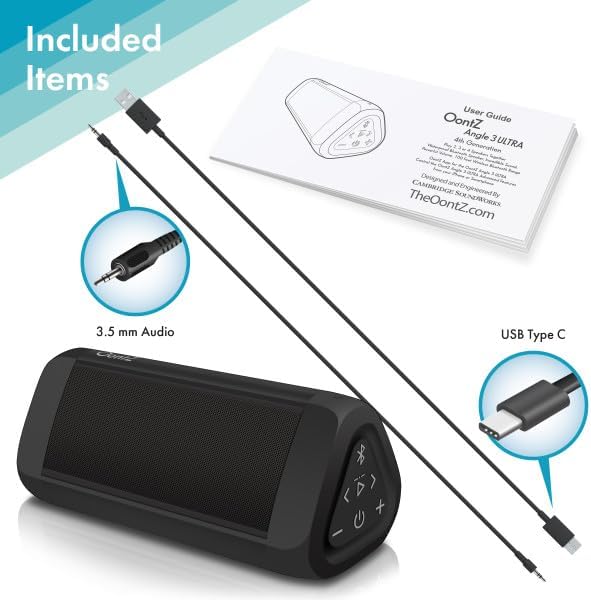
Image: The OontZ Angle 3 Ultra speaker along with its accessories: a Quick Start Guide, a 3.5mm audio cable, and a USB Type-C charging cable.
Before first use, ensure all components are present:
- OontZ Angle 3 Ultra Bluetooth Speaker
- Quick Start Guide (Full manual available online)
- 3.5mm Audio Cable
- USB Type-C Charging Cable
2. Charging the Speaker
The speaker comes with a built-in rechargeable Lithium-ion battery. For optimal performance, fully charge the speaker before first use.
- Locate the charging port on the side of the speaker, protected by a rubber flap.
- Connect the supplied USB Type-C charging cable to the speaker's charging port.
- Connect the other end of the USB cable to a USB wall charger (not included) or a computer USB port.
- The charging indicator light will illuminate. A full charge takes approximately 20 hours for the first charge, and subsequent charges will be faster.

Image: A close-up view of the speaker's side, showing the 3.5mm AUX input and the USB-C charging port, typically protected by a waterproof flap.
3. Bluetooth Pairing
Pair your OontZ Angle 3 Ultra with your Bluetooth-enabled device (smartphone, tablet, laptop).
- Turn on the speaker by pressing and holding the Power button (⏻) until the indicator light flashes blue.
- On your device, go to Bluetooth settings and ensure Bluetooth is enabled.
- Look for "OontZ Angle 3 Ultra" in the list of available devices and select it.
- Once paired, the speaker will emit a confirmation tone, and the indicator light will turn solid blue.
4. Connecting via AUX Input
You can connect non-Bluetooth devices using the 3.5mm audio cable.
- Connect one end of the 3.5mm audio cable to the AUX IN port on the speaker.
- Connect the other end to the headphone jack or audio output of your device.
- The speaker will automatically switch to AUX mode.
5. Pairing Two Speakers for Stereo Sound (OontZ Dual Wireless Stereo)
Enhance your audio experience by wirelessly connecting two OontZ Angle 3 Ultra speakers for impressive stereo separation.

Image: Two OontZ Angle 3 Ultra speakers positioned to provide stereo sound, with two individuals enjoying music in an outdoor setting.
- Ensure both OontZ Angle 3 Ultra speakers are charged and powered on.
- Disconnect both speakers from any previously paired Bluetooth devices.
- On one speaker (this will be the Left Channel), press and hold the Bluetooth button (Ⓑ) for 3 seconds until you hear a tone.
- On the second speaker (this will be the Right Channel), press and hold the Bluetooth button (Ⓑ) for 3 seconds until you hear a tone.
- The speakers will automatically connect to each other. Once connected, you will hear a confirmation tone, and the indicator lights on both speakers will turn solid blue.
- Now, connect your audio device to the Left Channel speaker via Bluetooth as described in "Bluetooth Pairing" above.
- For video audio, connect your device or TV to the Left Channel speaker using the 3.5mm audio cable.
Operating Instructions
1. Controls Overview
| Button/Indicator | Function |
|---|---|
| ⏻ (Power) | Press and hold to Power On/Off. |
| + (Volume Up) | Press to increase volume. |
| - (Volume Down) | Press to decrease volume. |
| ▷ (Play/Pause) | Press to Play/Pause music. |
| < (Previous Track) | Press to go to the previous track. |
| > (Next Track) | Press to go to the next track. |
| Ⓑ (Bluetooth) | Press to disconnect current Bluetooth device and enter pairing mode. Press and hold for 3 seconds to initiate OontZ Dual Wireless Stereo pairing. |
| Indicator Light | Flashes blue for pairing, solid blue for connected, red for charging. |
2. Hands-Free Calling
The OontZ Angle 3 Ultra has a built-in microphone for hands-free calls.
- When a call comes in, the music will pause. Press the ▷ button to answer the call.
- To end a call, press the ▷ button again.
- To reject a call, press and hold the ▷ button for 2 seconds.
- To activate Siri or Google Assistant, press and hold the ▷ button for 2 seconds when not on a call.
3. Waterproof Features (IPX7)
The OontZ Angle 3 Ultra is IPX7 certified, meaning it is fully waterproof and can be immersed in water up to 1 meter (3.3 feet) for up to 30 minutes.
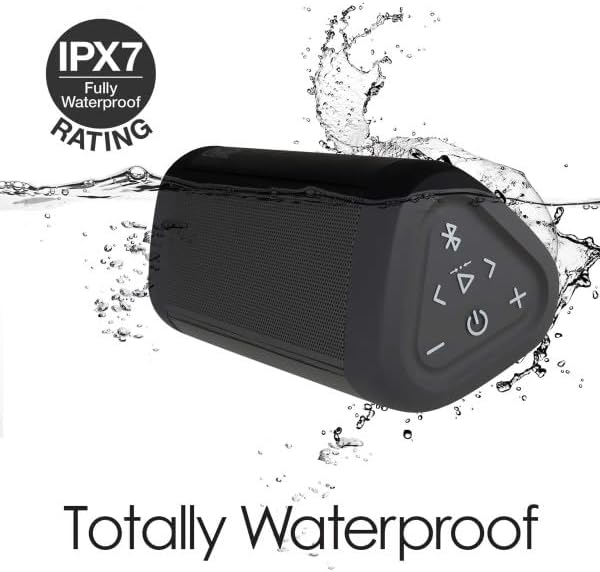
Image: The OontZ Angle 3 Ultra speaker shown partially submerged in water, illustrating its IPX7 waterproof capability.
- Ensure the rubber flap covering the charging and AUX ports is securely closed before exposing the speaker to water.
- Ideal for use by the pool, at the beach, or in the shower.
- Do not expose to salt water or chemicals. Rinse with fresh water after exposure to chlorinated water.
Maintenance
1. Cleaning
To clean your speaker, use a soft, damp cloth. Do not use abrasive cleaners or solvents.
2. Storage
Store the speaker in a cool, dry place away from direct sunlight and extreme temperatures.
3. Battery Care
To prolong battery life:
- Avoid fully discharging the battery frequently.
- Charge the speaker regularly, even if not in use, to maintain battery health.
- Do not expose the speaker to temperatures above 60°C (140°F).
Troubleshooting
| Problem | Solution |
|---|---|
| Speaker will not turn on. | Ensure the battery is charged. Connect the speaker to a power source using the USB-C cable. |
| No sound or low volume. | Check the volume level on both the speaker and your connected device. Ensure the speaker is properly paired via Bluetooth or connected via AUX. |
| Cannot pair via Bluetooth. | Ensure the speaker is in pairing mode (flashing blue light). Turn off and on Bluetooth on your device. Move the speaker closer to your device. Disconnect from other Bluetooth devices. |
| Sound distortion at high volume. | Reduce the volume on the speaker or your connected device. Ensure the audio source is not distorted. |
| OontZ Dual Wireless Stereo not connecting. | Ensure both speakers are disconnected from other Bluetooth devices. Follow the pairing steps carefully, ensuring both speakers are in pairing mode for stereo connection. |
Specifications
Key technical specifications for the OontZ Angle 3 Ultra Portable Bluetooth Speaker:
- Model Number: SWOA3UBLK
- Dimensions (L x W x H): 16.26 x 7.11 x 7.11 cm (6.4 x 2.8 x 2.8 inches)
- Weight: 480 grams (1.06 lbs)
- Speaker Output Power: 14 Watts
- Bluetooth Version: 4.2
- Wireless Range: Up to 30 meters (100 feet) unobstructed
- Battery Life: Up to 20 hours (at 2/3 volume)
- Waterproof Rating: IPX7 (Submersible up to 1 meter for 30 minutes)
- Connectivity: Bluetooth, 3.5mm AUX Input, USB-C Charging
- Components Included: Speaker, 3.5mm Audio Cable, USB-C Charging Cable, Quick Start Guide

Image: Diagram showing the dimensions of the OontZ Angle 3 Ultra speaker: 6.5 inches in length, 3 inches in width, and 2.75 inches in height.
Warranty and Support
For detailed warranty information and customer support, please visit the official OontZ website. The full localized manual is also available there.
Official Website: www.theoontz.com
Cambridge Soundworks is committed to providing high-quality audio products and customer satisfaction.
Related documentsSWOA3UBLK


Ask a question about this manual
Ask about setup, troubleshooting, compatibility, parts, safety, or missing instructions. Manuals+ will review the question and use this page’s manual context to help answer it.