
1. Introduction
This user manual provides detailed instructions for the operation and maintenance of your Godox TT350F 2.4G HSS TTL Camera Flash Speedlite. This compact and versatile flash unit is specifically designed for use with Fujifilm cameras, offering advanced features such as High-Speed Sync (HSS) and Through-The-Lens (TTL) metering for optimal lighting control. Please read this manual thoroughly before use to ensure proper functionality and to maximize your photographic potential.

Image 1.1: The Godox TT350F Camera Flash Speedlite.
2. Key Features
- Full TTL Functions: Supports HSS (Max. 1/8000s), Front & Rear Curtain Sync, Flash Exposure Compensation (FEC), Multi Flash, and Manual Flash modes.
- High Performance: Guide Number (GN) 36 (m ISO 100, @105mm), 22 steps of power output (1/1-1/128).
- Fast Recycle Time: Approximately 0.1-2.2 seconds recycle time, providing up to 210 full power flashes with 2500mAh Ni-MH batteries.
- Flexible Zoom Range: 24-105mm auto/manual zooming flash head.
- 2.4G Wireless Transmission: Offers stable output and up to 100 meters transmission distance for wireless control.
- User-Friendly Interface: Dot-matrix LCD panel for clear display and easy operation with 4 function buttons for various settings.
- Master & Slave Capability: Can function as a master unit to control other Godox slave units (AD600, AD600M, AD360II-C, AD360II-N, AD200) or as a slave unit controlled by the X1T-F transmitter (sold separately).
3. What's in the Box
Upon opening the package, please verify that all the following items are included:
- 1 x Godox TT350F Camera Flash
- 1 x Mini Stand
- 1 x Protection Bag
- 1 x Diffuser
- 1 x User Manual
- 1 x EACHSHOT Color Filter Set

Image 3.1: Godox TT350F and its standard accessories.
4. Setup
4.1. Battery Installation
The TT350F flash unit operates on two AA batteries. For optimal performance and recycle times, it is recommended to use 2500mAh Ni-MH rechargeable batteries. Alkaline batteries are also compatible.
- Open the battery compartment cover located on the side of the flash unit.
- Insert two AA batteries according to the polarity indicators (+/-) inside the compartment.
- Close the battery compartment cover securely.

Image 4.1: Battery compartment and recommended AA batteries.
4.2. Mounting the Flash on Camera
To attach the TT350F to your Fujifilm camera's hot shoe:
- Slide the flash's mounting foot into the camera's hot shoe.
- Rotate the locking wheel on the flash unit clockwise until it is securely tightened. Do not overtighten.

Image 4.2: TT350F mounted on a Fujifilm camera.
5. Operating the Flash
5.1. Power On/Off
Press the power button to turn the flash on or off. The LCD panel will illuminate upon activation.
5.2. LCD Panel and Control Buttons
The dot-matrix LCD panel displays current settings, including flash mode, power output, zoom position, and battery status. Use the four function buttons (MODE, ZOOM/C.Fn, SYNC, SLAVE/GR/CH) and the SET dial to navigate and adjust settings.

Image 5.1: LCD panel and control interface.
5.3. Flash Modes and Functions
Press the MODE button to cycle through various flash modes:
- TTL (Through-The-Lens): Automatic flash exposure. Supports HSS (High-Speed Sync up to 1/8000s), Front Curtain Sync, Rear Curtain Sync, and FEC (Flash Exposure Compensation).
- M (Manual): Manually set flash power output from 1/1 to 1/128.
- Multi (Stroboscopic): Fires a series of rapid flashes within a single exposure to capture multiple movements.

Image 5.2: Visual representation of various TTL flash functions.
5.4. Zoom Function
The flash head's zoom position can be set automatically or manually to match the lens focal length. Press the ZOOM/C.Fn button to adjust the zoom.
5.5. Wireless Transmission (2.4G)
The TT350F features a built-in 2.4G wireless X system, allowing it to function as both a master and slave unit. This system enables reliable wireless communication over distances up to 100 meters.

Image 5.3: The compact size of the TT350F.
5.6. Master & Slave Flash Functionality
When configured as a master unit, the TT350F can control other Godox slave units such as AD600, AD600M, AD360II-C, AD360II-N, and AD200. When set as a slave unit, it can be controlled by a Godox X1T-F wireless flash transmitter (sold separately).

Image 5.4: Master and Slave flash configurations.
5.7. Flash Head Rotation
The flash head can be rotated horizontally and vertically to allow for bounce flash photography, providing softer and more natural lighting.
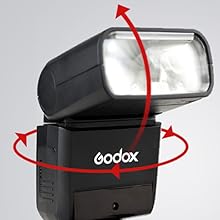
Image 5.5: Flash head rotation for bounce lighting.
5.8. Custom Function Settings (C.Fn)
The TT350F includes custom function settings (C.Fn) that allow users to personalize various flash parameters to suit their specific shooting preferences. Refer to the detailed C.Fn menu in the full manual for available options.
6. Compatible Camera Models
The Godox TT350F is compatible with various Fujifilm camera models. Compatibility may vary based on specific functions. Please refer to the table below for details:
| Camera Series | Models |
|---|---|
| A | X-Pro2, X-T20, X-T2, X-T1 |
| B | X-Pro1, X-T10, X-E1, X-A3 |
| C | X100F, X100T |
Note: X100T models do not have the second curtain sync (REAR) function. The AF assist beam will light up when the shutter speed is low (<200).

Image 6.1: Compatible camera models and function support table.
7. Firmware Upgrade
The Godox TT350F supports firmware upgrades via a USB port. This allows for improvements in performance and compatibility with future camera models. To upgrade the firmware:
- Visit the official Godox website to download the latest firmware for the TT350F.
- Connect the flash unit to your computer using a USB cable.
- Follow the instructions provided with the firmware download to complete the upgrade process.

Image 7.1: USB Firmware Upgrade process.
8. Maintenance
- Keep the device dry. Do not handle with wet hands or immerse in water.
- Use only a soft, dry cloth to clean the product. Avoid harsh chemicals or abrasive cleaners.
- Store the flash unit in a cool, dry place, away from direct sunlight and extreme temperatures.
- Remove batteries if the flash will not be used for an extended period to prevent leakage.
9. Troubleshooting
If you encounter issues with your Godox TT350F, please refer to the following common problems and solutions:
- Flash not firing: Ensure batteries are correctly inserted and charged. Check that the flash is securely mounted on the camera's hot shoe. Verify camera and flash settings are compatible.
- Slow recycle time: This may indicate low battery power. Replace or recharge batteries. Ensure you are using recommended Ni-MH batteries for optimal performance.
- Inconsistent exposure: Check flash mode (TTL/Manual) and adjust settings accordingly. Ensure Flash Exposure Compensation (FEC) is set correctly.
- Wireless communication issues: Verify that both master and slave units are set to the same channel and group. Ensure there are no obstructions between units and that they are within the effective range.
10. Specifications
| Feature | Detail |
|---|---|
| Product Dimensions | 1.5 x 5.51 x 5.51 inches |
| Item Weight | 7.1 ounces |
| Guide Number (GN) | 36 (m ISO 100, @105mm) |
| Power Output | 1/1 to 1/128 (22 steps) |
| Recycle Time | Approx. 0.1-2.2s |
| Full Power Flashes | Approx. 210 (using 2500mAh Ni-MH batteries) |
| Flash Coverage | 24-105mm (Auto/Manual Zoom) |
| Flash Sync Speed | Up to 1/8000s (HSS) |
| Wireless Function | Master, Slave, Off |
| Wireless Range | Approx. 100 meters (2.4G) |
| Power Source | 2 x AA batteries (Ni-MH or Alkaline recommended) |
| Included Components | Flash unit, Mini stand, Protection bag, Diffuser, User Manual, Color Filter Set |
11. Warranty and Support
For warranty information, technical support, or service inquiries, please refer to the warranty card included with your product or visit the official Godox website. Keep your purchase receipt as proof of purchase for warranty claims.