1. Introduction
Thank you for purchasing the zmart JSD-520 Bluetooth Car Stereo Receiver. This manual provides essential information for the safe and efficient operation of your new car audio system. Please read it thoroughly before installation and use, and keep it for future reference.
2. Safety Information
- Power Supply: This unit is designed for 12V DC power supply only. Do not connect to a 24V power source. Incorrect voltage can cause damage.
- Installation: Ensure proper wiring and secure mounting to prevent short circuits or malfunctions. Consult a professional if you are unsure about the installation process.
- Operation: Do not operate the unit in a way that distracts you from driving. Always prioritize road safety.
- Temperature: Operating temperature range is -20°C to 60°C. Avoid extreme temperatures.
- Moisture: Keep the unit dry. Exposure to moisture can cause damage or electric shock.
3. Package Contents
Verify that all items are present in the package:
- 1 x JSD-520 FM Radio Unit
- 1 x Remote Control (CR2025 3V battery not included)
- 1 x Wiring Harness
- 1 x Installation Tool Set
- 1 x User Manual (English)

Image: The package includes the JSD-520 main unit, a remote control, wiring, installation tools, and the user manual.
4. Product Overview
4.1 Front Panel
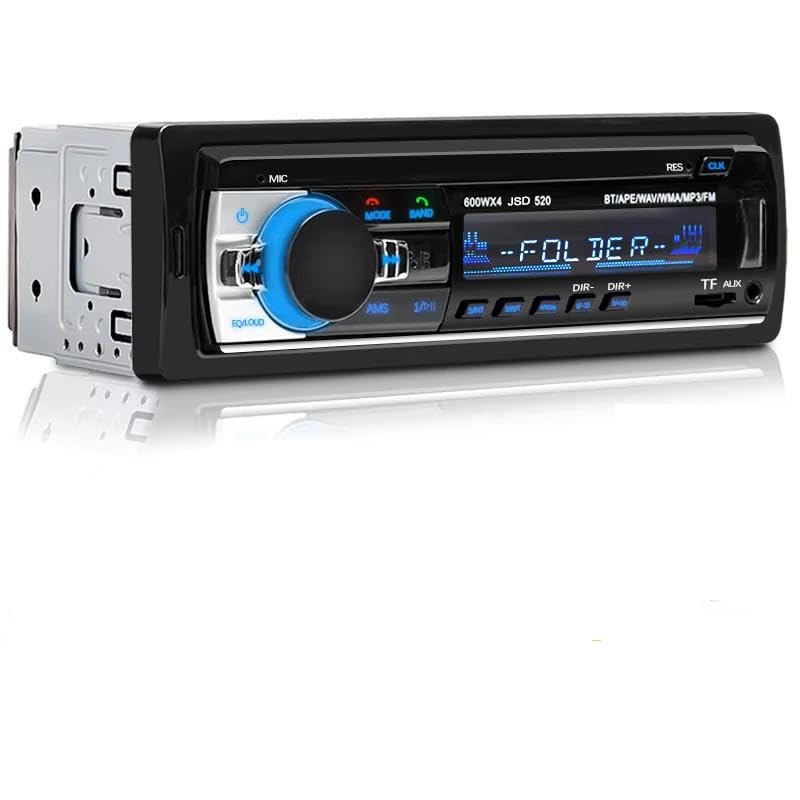
Image: Front view of the JSD-520 unit, highlighting the main controls and input ports.
- Power Button (①): Press to turn the unit ON/OFF.
- Mode Button (MODE): Switches between FM, Bluetooth, USB, SD, and AUX modes.
- Band Button (BAND): Selects FM radio bands (FM1, FM2, FM3).
- Volume Knob: Rotates to adjust volume. Press to access audio settings (Bass, Treble, Balance, Fader, EQ).
- USB Port: For connecting USB flash drives.
- SD/MMC Card Slot (TF): For inserting SD/MMC memory cards.
- AUX Input: 3.5mm jack for external audio devices.
- Display: Shows current mode, frequency, track information, and time.
- EQ/LOUD Button: Activates Loudness function or cycles through EQ presets.
- AMS Button: Automatic Memory Store for FM radio.
- DIR-/DIR+ Buttons: Folder navigation for USB/SD playback.
4.2 Rear Connections

Image: Rear connections of the JSD-520, including RCA audio outputs and the main power/speaker harness.
- RCA Audio Output Terminals: L/R outputs for connecting to external amplifiers.
- Power/Speaker Harness Connector: Main connector for vehicle power and speaker wiring.
- Fuse: Protects the unit from power surges.
5. Setup and Installation
5.1 Wiring Diagram

Image: Detailed wiring connections for power and speakers. Ensure correct polarity to avoid damage.
- Positive Connection: Connect the red and yellow wires to the positive (+) terminal of your vehicle's power supply.
- Negative Connection: Connect the black wire to the negative (-) terminal (ground) of your vehicle.
- Speaker Connections: Connect the speaker wires according to the color codes provided in the harness. Ensure correct polarity for each speaker.
- Fuse: If the fuse blows due to incorrect wiring, replace it with a new one of the same rating and recheck your connections.
5.2 Physical Installation
The JSD-520 is a 1DIN size unit. Ensure your vehicle's dashboard opening is compatible. Secure the unit using the provided installation tools and brackets.
Image: Product dimensions (187mm x 57mm) indicating a standard 1DIN size for installation.
6. Operating Instructions
6.1 Power On/Off
- Press the Power Button to turn the unit ON.
- Press and hold the Power Button to turn the unit OFF.
6.2 Mode Selection
- Press the MODE Button repeatedly to cycle through available modes: FM Radio, Bluetooth (BT), USB, SD, and AUX.
6.3 FM Radio Operation
- In FM mode, press the BAND Button to select FM1, FM2, or FM3.
- Press the Tune Up/Down Buttons (◀►) to manually search for stations.
- Press and hold the Tune Up/Down Buttons to automatically scan for the next strong station.
- Press the AMS Button to automatically scan and store strong stations into the preset memory.
- Use the numeric buttons (1-6) to select preset stations.
6.4 Bluetooth Operation

Image: Bluetooth connection allows wireless audio streaming and hands-free calls from your smartphone.
- Switch the unit to BT Mode. The display will show 'BT'.
- On your mobile device, enable Bluetooth and search for available devices.
- Select 'JSD-520' from the list to pair. If prompted, enter '0000' as the password.
- Once paired, you can play audio from your device, make/receive hands-free calls, and hear navigation prompts through the car speakers.
6.5 USB/SD Playback

Image: The JSD-520 supports music playback from TF (SD) cards, USB drives, and AUX input.
- Insert a USB flash drive into the USB Port or an SD/MMC card into the TF Slot. The unit will automatically switch to USB/SD mode and begin playback.
- Supported audio formats include MP3, WMA, APE, FLAC, and WAV.
- Use the DIR-/DIR+ Buttons to navigate between folders.
- Use the Track Up/Down Buttons (◀►) to skip tracks.
- The unit supports ID3 tag display for track information.
6.6 AUX Input
- Connect an external audio device (e.g., smartphone, MP3 player) to the AUX Input using a 3.5mm audio cable.
- Switch the unit to AUX Mode. Audio from the external device will play through the car speakers.
6.7 Audio Settings
- Press the Volume Knob to cycle through audio settings: BASS, TREBLE, BALANCE, FADER. Rotate the knob to adjust values.
- Press the EQ/LOUD Button to select from various EQ presets (Jazz, Rock, Pop, Classic) or activate the Loudness function for enhanced bass and treble at low volumes.
- The unit also features Mute control.
7. Specifications
| Feature | Specification |
|---|---|
| Model | JSD-520 |
| Power Supply | DC 12V (11-16V) |
| Output Power | 4 x 60W |
| Speaker Impedance | 4 Ohms |
| Frequency Response | 20Hz - 20kHz |
| SNR (Signal-to-Noise Ratio) | ≥60dB |
| Distortion | ≤0.3% |
| Bluetooth Version | V2.0 |
| FM Tuning Range | 87.5 - 108.0 MHz |
| FM Sensitivity | <20dB |
| FM Stereo Separation | >25dB |
| Supported Audio Formats | MP3, WMA, APE, FLAC, WAV |
| Supported Media | USB Flash Disk, SD/MMC Card, AUX Input |
| Operating Temperature | -20°C to 60°C |
| Dimensions (L x W x H) | Approx. 187 x 57 x 65 mm (1DIN Standard) |
| Package Weight | 0.5 kg |
8. Troubleshooting
If you encounter issues with your JSD-520 unit, please refer to the following common problems and solutions:
| Problem | Possible Cause | Solution |
|---|---|---|
| No power | Blown fuse, incorrect wiring, loose connection | Check fuse and replace if necessary. Verify all power connections are secure and correctly wired (12V DC only). |
| No sound | Volume too low, mute activated, incorrect speaker wiring, faulty speakers | Increase volume. Check if mute is active. Verify speaker connections and polarity. Test with different speakers if possible. |
| Bluetooth not connecting | Bluetooth not enabled on device, unit not in BT mode, device too far | Ensure Bluetooth is enabled on your phone and the unit is in BT mode. Move device closer to the unit. Try unpairing and re-pairing. |
| USB/SD not playing | Unsupported file format, corrupted files, faulty USB/SD card | Ensure files are in MP3, WMA, APE, FLAC, or WAV format. Try a different USB/SD card or reformat the current one. |
| Poor FM reception | Antenna not connected, weak signal area, interference | Ensure car antenna is properly connected. Try scanning for stations again. Move to an area with better signal. |
9. Maintenance
- Cleaning: Use a soft, dry cloth to clean the unit's surface. Do not use abrasive cleaners or solvents.
- Fuse Replacement: If the fuse needs replacement, always use a fuse with the same amperage rating to prevent damage.
- Remote Control Battery: Replace the CR2025 3V battery in the remote control when its range decreases or it stops responding.
10. Warranty and Support
For warranty information or technical support, please refer to the documentation provided at the time of purchase or contact your retailer. Keep your purchase receipt as proof of purchase.


