
Frigidaire FFTR1821TS
Contents
FRIGIDAIRE FFTR1821TS 30 Inch Freestanding Top Freezer Refrigerator User Manual
Model: FFTR1821TS
Brand: Frigidaire
1. Important Safety Information
Before operating your new refrigerator, please read all instructions carefully. This manual contains important safety information, installation instructions, operating procedures, and maintenance tips to ensure safe and efficient use of your appliance.
- Always unplug the refrigerator before cleaning or performing any maintenance.
- Do not store explosive substances such as aerosol cans with a flammable propellant in this appliance.
- Ensure proper ventilation around the appliance to prevent overheating.
- Keep ventilation openings in the appliance enclosure or in the built-in structure clear of obstruction.
2. Setup and Installation
2.1 Unpacking Your Refrigerator
Carefully remove all packaging materials, including tape and temporary labels. Dispose of packaging materials properly. Do not remove the serial plate.
2.2 Placement Considerations
Choose a location with a hard, level floor that can support the refrigerator's weight. Allow adequate clearance for proper air circulation and door opening. Avoid direct sunlight or heat sources.
- Clearance: Allow at least 1 inch (2.54 cm) at the top and sides, and 2 inches (5.08 cm) at the back for proper air circulation.
- Dimensions: The refrigerator measures approximately 32.12 inches deep, 30 inches wide, and 66.12 inches high. Ensure your space accommodates these dimensions.

Figure 2.2.1: Front view of the Frigidaire FFTR1821TS refrigerator, showcasing its stainless steel finish and top freezer design. This image illustrates the overall appearance and size of the appliance.
2.3 Leveling the Refrigerator
Your refrigerator has two front adjustable leveling legs. Turn the legs clockwise to raise the refrigerator, counter-clockwise to lower it. Ensure the refrigerator is level to prevent door alignment issues and proper operation.
2.4 Electrical Connection
Plug the refrigerator into a dedicated 120 Volt, 60 Hz, AC only, 15 Amp fused, grounded electrical outlet. Do not use an extension cord or adapter plug.
2.5 Initial Cleaning
Before storing food, wash the interior surfaces with a mild soap and water solution. Rinse and dry thoroughly.
3. Operating Your Refrigerator
3.1 Temperature Controls
The temperature controls for both the refrigerator and freezer compartments are located inside the fresh food compartment. Adjust the dial to your desired setting. A mid-range setting is usually recommended for normal operation.

Figure 3.1.1: Interior view of the refrigerator and freezer compartments with empty shelves. This image highlights the internal layout, including the location of the temperature control dial in the fresh food section and the various shelving options.
3.2 Adjustable Glass Shelves
The refrigerator features adjustable glass shelves. To adjust, lift the shelf slightly and pull it out. Reinsert at the desired height by aligning it with the shelf supports.
3.3 Store-More® Humidity-Controlled Crisper Drawers
These drawers are designed to keep fruits and vegetables fresh. Adjust the humidity slider to control the moisture level. A higher humidity setting is ideal for leafy greens, while a lower setting is better for fruits.

Figure 3.3.1: Close-up view of the humidity-controlled crisper drawers, shown with fresh fruits and vegetables. This image demonstrates the capacity and functionality of the crisper drawers for optimal produce storage.
3.4 Store-More® Gallon Door Shelf
The door shelves provide convenient storage for larger items, including gallon-sized containers. Ensure items are securely placed to prevent spills when opening and closing the door.
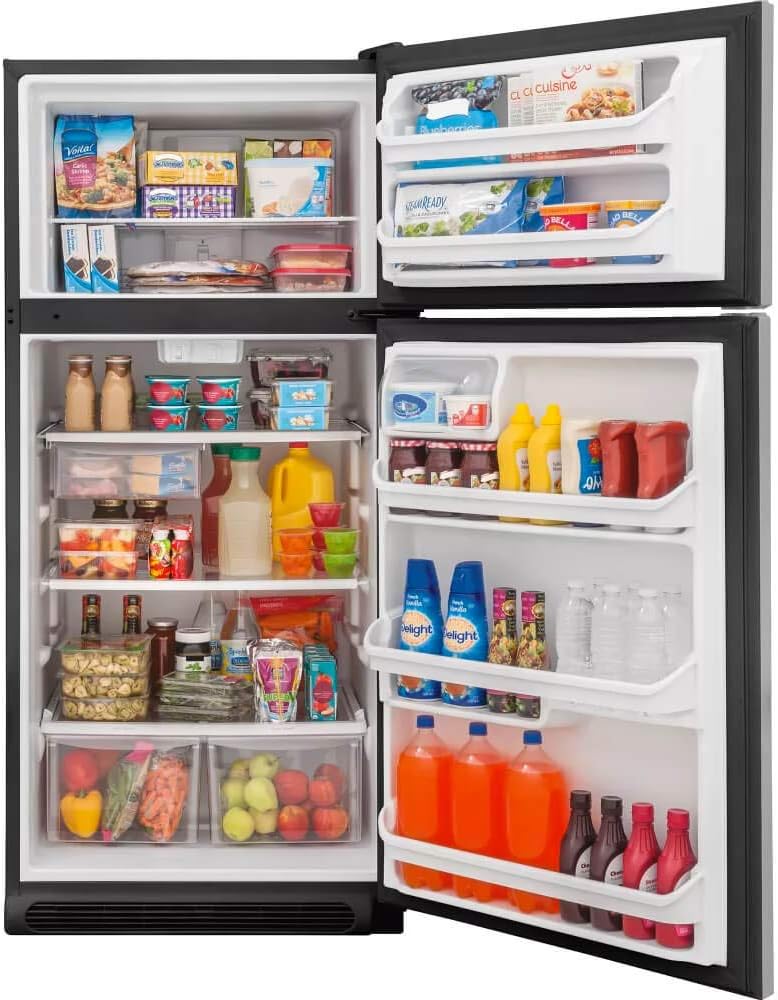
Figure 3.4.1: Interior view of the refrigerator filled with various food items, including gallon containers in the door shelves. This image illustrates the practical storage capacity and organization possibilities within the appliance.
3.5 Deli Drawer (if applicable)
Some models may include a deli drawer, ideal for storing meats and cheeses at a slightly different temperature than the main compartment.

Figure 3.5.1: Close-up view of the deli drawer, containing packaged deli meats and cheeses. This image highlights the dedicated storage space for specific food items, enhancing organization.
4. Maintenance and Cleaning
4.1 Cleaning the Interior
Clean the interior regularly with a solution of 2 tablespoons of baking soda to 1 quart of warm water. Rinse and dry thoroughly. Remove shelves and drawers for easier cleaning.
4.2 Cleaning the Exterior
Wipe the exterior with a clean cloth dampened with warm, soapy water. For stainless steel surfaces, use a stainless steel cleaner and polish. Avoid abrasive cleaners.
4.3 Door Gaskets
Clean door gaskets regularly with mild soap and water to ensure a proper seal. A clean gasket helps maintain energy efficiency.
4.4 Condenser Coils
For optimal performance, clean the condenser coils located at the back or bottom of the refrigerator every 6-12 months. Use a vacuum cleaner with a brush attachment to remove dust and debris.
4.5 Vacation and Moving Care
For short vacations, leave the refrigerator operating. For long vacations or moving, empty the refrigerator, unplug it, clean it thoroughly, and leave the doors ajar to prevent odors.
5. Troubleshooting
Before calling for service, review this section. It may save you time and expense.
| Problem | Possible Cause | Solution |
|---|---|---|
| Refrigerator does not operate. | Not plugged in; circuit breaker tripped; temperature control set to OFF. | Ensure plug is secure; reset breaker; adjust temperature control. |
| Temperature is too warm. | Door opened too frequently; large amount of warm food added; temperature control set too high. | Minimize door openings; allow food to cool before placing in fridge; lower temperature setting. |
| Excessive noise. | Refrigerator not level; items on top of refrigerator vibrating; normal operating sounds. | Level the unit; remove vibrating items; refer to manual for normal sounds (e.g., compressor hum, fan noise). |
| Water on floor. | Drain pan overflowing; clogged defrost drain. | Check and empty drain pan; clear defrost drain with warm water. |
| Door not closing properly. | Food package blocking; refrigerator not level; gasket dirty or damaged. | Rearrange items; level the unit; clean or inspect gasket for damage. |
6. Product Specifications
| Feature | Detail |
|---|---|
| Brand | Frigidaire |
| Model Number | FFTR1821TS |
| Total Capacity | 18 Cubic Feet |
| Installation Type | Freestanding |
| Color | Stainless Steel |
| Product Dimensions (D x W x H) | 32.12 x 30 x 66.12 inches |
| Item Weight | 205 Pounds |
| Voltage | 120 Volts |
| Annual Energy Consumption | 404 Kilowatt Hours Per Year |
| Defrost System | Hot Gas Defrost |
| Number of Doors | 2 |
| Special Features | Store-More® Humidity-Controlled Crisper Drawers, Store-More® Gallon Door Shelf |
7. Warranty and Customer Support
This Frigidaire appliance comes with a limited warranty. Please refer to the warranty card included with your product for specific terms and conditions, including coverage period and what is covered.
For technical assistance, parts, or service, please contact Frigidaire customer support or visit their official website. You can find more information and support resources at the Frigidaire Store on Amazon.
When contacting support, please have your model number (FFTR1821TS) and serial number ready.
Documents and downloads
Ask a question about this manual
Ask about setup, troubleshooting, compatibility, parts, safety, or missing instructions. Manuals+ will review the question and use this page’s manual context to help answer it.