
MELPO MEL-RGBW-E26-A19-3W
MELPO LED Color Changing Light Bulb with Remote Control User Manual
Model: MEL-RGBW-E26-A19-3W | Brand: MELPO
1. Introduction
This manual provides detailed instructions for the MELPO LED Color Changing Light Bulb with Remote Control. This 5W RGBW LED bulb is equivalent to a 40W incandescent bulb, offering 500 lumens of brightness and a 5700K color temperature. It features 12 RGB colors plus white light, timing functions, two dynamic modes (FLASH, SMOOTH), and dual memory for enhanced user experience. Please read this manual thoroughly before use to ensure proper installation and operation.
2. Package Contents
Verify that all items are present in the package:
- LED Color Changing Light Bulb (8 units)
- Remote Controller (4 units)
- User Manual (1 unit)
3. Product Features
- Color Changing Options: Offers 12 distinct RGB colors plus a pure white light (5700K).
- Dynamic Modes: Includes FLASH mode for rapid color changes (5-speed adjustment) and SMOOTH mode for gradual color transitions (2-speed adjustment).
- Timing Functions:
- One-off timing: Set the bulb to turn off after a specified number of hours.
- 24-hour cycle timing: Program the bulb to automatically turn on/off at the same time daily.
- Dual Memory: The bulb remembers the last used static color or dynamic mode setting when turned off and restores it upon reactivation.
- IR Remote Controller: Highly sensitive remote control with a range of up to 19 feet for convenient operation.
- Energy Efficient: 5W LED equivalent to a 40W incandescent bulb, providing 500 lumens.
4. Specifications
| Attribute | Value |
|---|---|
| Brand | MELPO |
| Model Number | MEL-RGBW-E26-A19-3W |
| Light Type | LED |
| Wattage | 5W |
| Incandescent Equivalent | 40W |
| Brightness | 500 Lumens |
| Color Temperature | 5700K (White Light) |
| Bulb Shape Size | A19 |
| Bulb Base | E26 |
| Input Voltage | AC 90-240V |
| Beam Angle | 270° |
| CRI | >85 |
| Control Method | Remote Control |
| Material | Copper |
| Product Dimensions | 1.96"W x 3.15"H |
| Item Weight | 1.28 ounces |
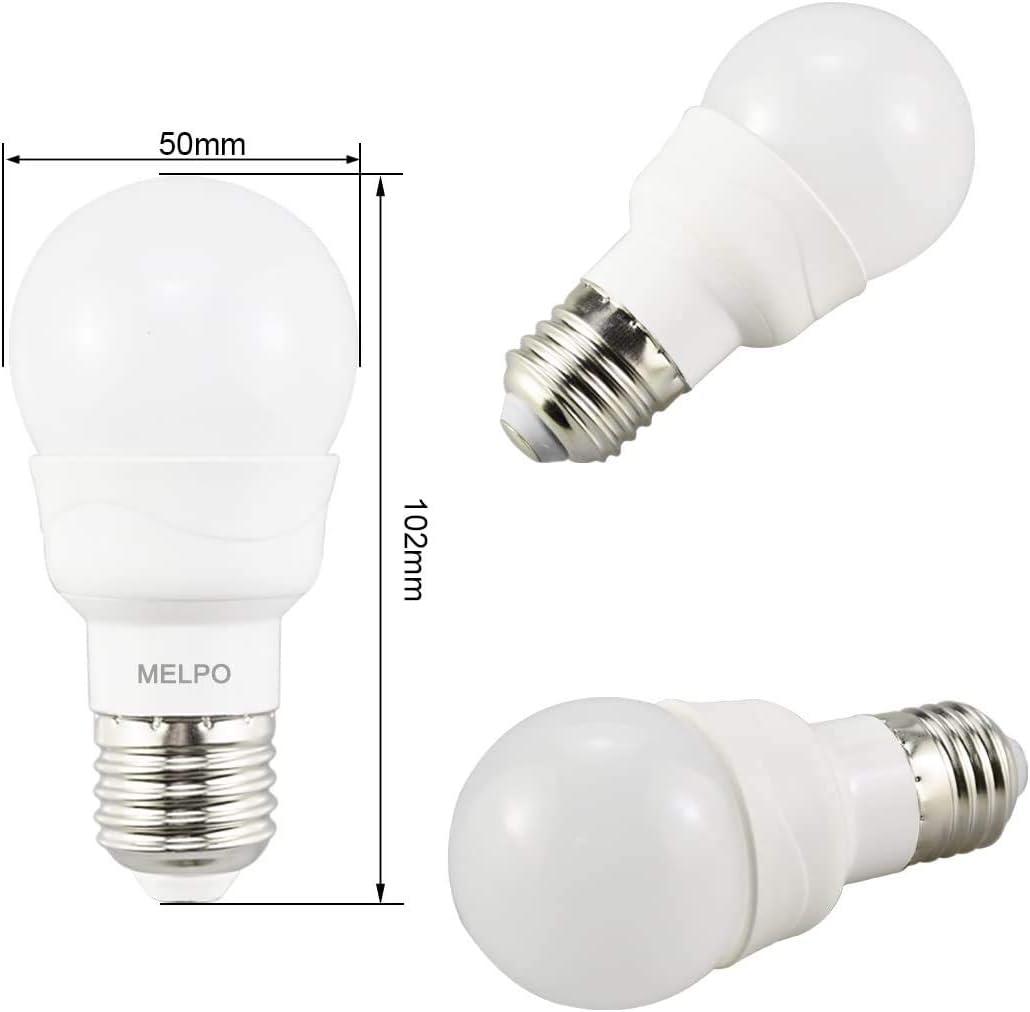
Image: Detailed dimensions of the MELPO LED Color Changing Light Bulb. The bulb measures 50mm in width and 102mm in height.
5. Setup
- Unpack: Carefully remove the LED light bulbs and remote controllers from the packaging.
- Installation: Screw the MELPO LED light bulb into any standard E26 base fixture. Ensure the power is off before installation.
- Power On: Turn on the power to the light fixture. The bulb will illuminate in its default white light mode.
- Remote Activation: Remove any plastic tab from the remote controller's battery compartment (if present) to activate it.

Image: MELPO LED Color Changing Light Bulbs installed in different home and outdoor settings, showcasing various color options.
6. Operating Instructions
The MELPO LED light bulb is controlled using the included IR remote controller. Point the remote directly at the bulb for optimal response.
6.1 Remote Control Functions
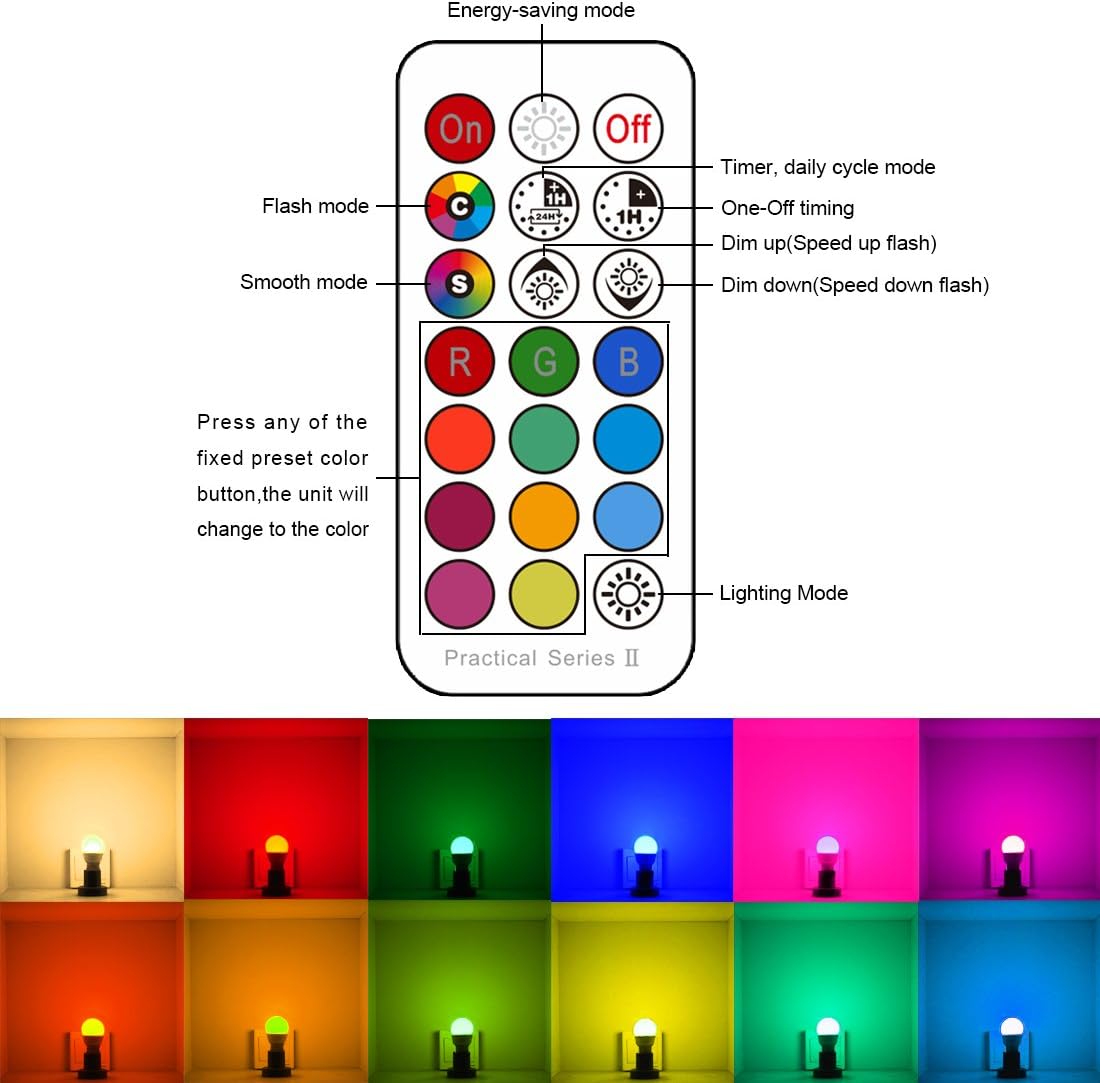
Image: Layout of the MELPO remote control, showing buttons for power, modes, colors, and timing functions. Below the remote, various colored light bulbs are displayed.
- ON/OFF: Press the ON button to turn the light on, and OFF to turn it off.
- Brightness Adjustment: Use the Sun Up and Sun Down buttons to increase or decrease brightness.
- Color Selection: Press any of the 12 colored buttons (e.g., Red, Green, Blue) to change the bulb's static color.
- White Light: Press the W button for pure white light (5700K).
- Dynamic Modes:
- FLASH (C button): Activates a rapid, random color-changing effect. Speed can be adjusted using the dimming buttons.
- SMOOTH (S button): Activates a gradual, smooth transition between colors. Speed can be adjusted using the dimming buttons.
- Timing Functions:
- One-Off Timer (1H, 2H, 3H, 4H): Press the desired hour button to set the bulb to turn off after 1, 2, 3, or 4 hours.
- Daily Cycle Timer (24H): Press the 24H button to set the bulb to automatically turn on/off at the same time every day.
- Dual Memory: The bulb automatically saves the last color or mode setting. When the bulb is turned on again, it will resume the previous setting.
6.2 Understanding RGBW vs. RGB

Image: A side-by-side comparison of an RGBW light bulb and an RGB light bulb, demonstrating the purer white light produced by the RGBW bulb due to its independent white chip.
The MELPO LED Color Changing Light Bulb is an RGBW bulb, meaning it includes a dedicated white LED chip in addition to Red, Green, and Blue chips. This allows for a purer, brighter white light compared to standard RGB-only bulbs which mix colors to create white, often resulting in a less pure hue.
7. Maintenance
- Cleaning: Ensure the bulb is off and cool before cleaning. Wipe with a soft, dry cloth. Do not use liquid cleaners.
- Storage: If storing the bulbs for an extended period, keep them in their original packaging in a cool, dry place.
- Bulb Replacement: Replace bulbs only with MELPO-approved models to ensure compatibility and safety.
8. Troubleshooting
| Problem | Possible Cause | Solution |
|---|---|---|
| Bulb does not turn on. | No power to the fixture; bulb not screwed in properly; bulb is faulty. | Check power supply; ensure bulb is securely screwed in; replace bulb if necessary. |
| Remote control not working. | Remote battery is dead; remote is too far or not pointed at the bulb; IR sensor blocked. | Replace remote battery; ensure remote is within 19ft and pointed at the bulb; clear any obstructions. |
| Colors are not accurate or consistent. | Interference from other devices; bulb malfunction. | Minimize interference; try resetting the bulb by turning it off and on; replace bulb if issue persists. |
9. Warranty and Support
MELPO provides a 2-year warranty for this product, covering manufacturing defects and malfunctions under normal use. Additionally, a 90-day refund guarantee is offered from the date of purchase. For warranty claims, technical support, or any product-related inquiries, please contact MELPO customer service through your retailer or the official MELPO website.
Please retain your proof of purchase for warranty validation.
Ask a question about this manual
Ask about setup, troubleshooting, compatibility, parts, safety, or missing instructions. Manuals+ will review the question and use this page’s manual context to help answer it.