
1. Introduction
The JBL Professional Control 18C/T-BK is a high-performance, two-way 8-inch coaxial ceiling loudspeaker designed for a wide range of commercial audio applications. This full-range speaker features a 200 mm (8.0 inch) high-tech cone driver and a 25 mm (1.0 inch) soft-dome liquid-cooled tweeter, ensuring clear and consistent sound reproduction. Its robust construction includes a UV-resistant baffle and a pre-attached blind-mount back can for simplified installation.
This manual provides essential information for the proper installation, operation, and maintenance of your Control 18C/T-BK loudspeakers.
2. Key Features
- 200 mm (8.0 in) high output driver with polypropylene cone and butyl rubber surround.
- 25 mm (1.0 in) soft-dome liquid-cooled tweeter for extended high-frequency response.
- Blind-mount back can design for quick and easy installation in various ceiling types.
- Dual conduit/cable clamps for secure wiring connections.
- Combined 70V/100V and low impedance (8Ω) direct operation, offering versatility for different audio systems.
- 90 Watts power handling at 8Ω nominal setting; 60W multi-tap at 70V/100V.
3. Package Contents
Verify that all components are present before proceeding with installation:
- 2 x JBL Professional Control 18C/T-BK Ceiling Loudspeakers
- Installation Template (if included)
- User Manual (this document)
4. Setup and Installation
Safety First: Always disconnect power to the installation area before beginning any electrical work. Consult with a qualified electrician or installer if you are unsure about any steps.
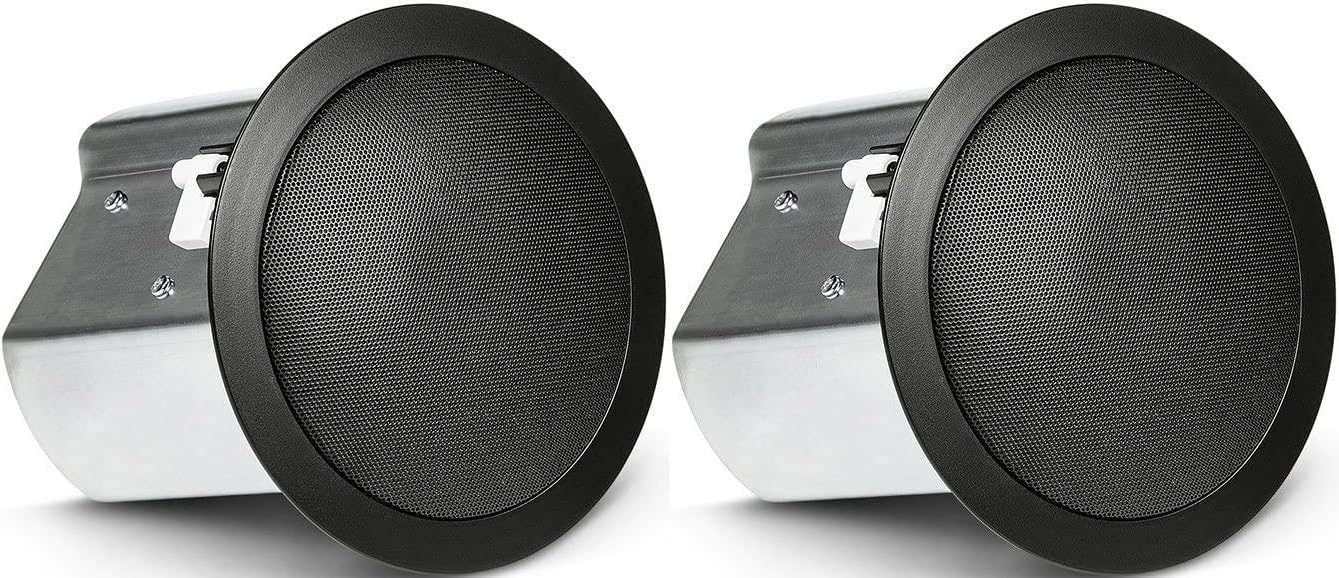
Image: JBL Professional Control 18C/T-BK Ceiling Loudspeakers
4.1 Planning the Installation
- Determine the optimal placement for sound coverage.
- Ensure there is sufficient clearance behind the ceiling surface for the speaker's back can.
- Verify that the ceiling material can support the weight of the speaker.
4.2 Cutting the Ceiling Opening
- Use the provided template (if applicable) or refer to the specifications for the correct cutout diameter.
- Carefully cut the opening in the ceiling using an appropriate tool.
4.3 Wiring the Loudspeaker
- Route the speaker wire from your amplifier to the ceiling opening.
- Connect the speaker wires to the appropriate terminals on the loudspeaker. The Control 18C/T-BK supports both low impedance (8Ω) and 70V/100V constant voltage systems.
- For 70V/100V systems, select the desired wattage tap setting using the rotary switch on the speaker. Ensure the amplifier output matches the selected voltage.
- Utilize the dual conduit/cable clamps to secure the wiring and maintain proper strain relief.
4.4 Mounting the Loudspeaker
- Insert the loudspeaker into the ceiling opening.
- Engage the blind-mount tabs by tightening the screws on the front baffle. These tabs will pivot outwards and clamp onto the ceiling material, securing the speaker in place.
- Ensure the speaker is flush with the ceiling surface and securely fastened.
5. Operating Instructions
Once installed and wired correctly, the Control 18C/T-BK loudspeakers operate passively, receiving audio signals from an external amplifier.
- Power On: Turn on your audio amplifier.
- Volume Control: Adjust the volume level using your amplifier's controls.
- Audio Source: Ensure your audio source is properly connected to the amplifier and playing content.
- Impedance/Voltage Matching: Always ensure your amplifier's output impedance or voltage setting matches the speaker's configuration (8Ω or selected 70V/100V tap). Incorrect matching can lead to poor performance or damage.
6. Maintenance
The JBL Control 18C/T-BK loudspeakers require minimal maintenance.
- Cleaning: Gently wipe the grille and baffle with a soft, dry cloth to remove dust. Avoid using harsh chemicals or abrasive cleaners.
- Inspection: Periodically check the mounting screws to ensure they remain tight and secure.
- Environment: Ensure the speakers are not exposed to excessive moisture or extreme temperatures, as they are designed for indoor use and are not waterproof.
7. Troubleshooting
If you experience issues with your loudspeakers, refer to the following common troubleshooting steps:
- No Sound:
- Check if the amplifier is powered on and functioning correctly.
- Verify all speaker wire connections at both the amplifier and the speaker terminals.
- Ensure the audio source is active and properly connected.
- Confirm the correct impedance or voltage tap setting is selected on the speaker and matched by the amplifier.
- Distorted Sound:
- Reduce the volume level on the amplifier.
- Check for loose wiring connections.
- Ensure the amplifier is not overdriven or clipping.
- Verify the speaker's power handling capacity is not exceeded by the amplifier.
- Intermittent Sound:
- Inspect all wiring for breaks or loose connections.
- Check for any short circuits in the speaker wiring.
If problems persist, contact JBL Professional customer support or a qualified audio technician.
8. Specifications
| Feature | Specification |
|---|---|
| Model Name | Control 18C/T-BK |
| Speaker Type | In-Ceiling, Two-Way Coaxial |
| Woofer Diameter | 200 mm (8 Inches) |
| Tweeter Diameter | 25 mm (1 Inch) |
| Frequency Response | 16 KHz (Upper Limit) |
| Impedance | 8 Ohm (nominal) |
| Input Voltage (70V/100V) | 70 Volts (AC) / 100 Volts (AC) |
| Wattage (8 Ohm) | 90 Watts |
| Speaker Maximum Output Power (70V/100V) | 60 Watts (multi-tap) |
| Mounting Type | Ceiling Mount |
| Material | Plastic |
| Color | Black |
| Product Dimensions (D x W x H) | 29.8"D x 16"W x 15.7"H (Note: These dimensions seem unusually large for a single ceiling speaker and might refer to packaging or a pair. Refer to product diagrams for exact speaker dimensions.) |
| Item Weight | 19.5 Pounds (for the pair) |
| Indoor/Outdoor Usage | Indoor |
| Water Resistance Level | Not Water Resistant |
| Speaker Amplification Type | Passive |
| Connectivity Technology | RCA (Note: Typically refers to input type, actual connection is via speaker wire terminals) |
| UPC | 691991004735 |
9. Warranty and Support
The JBL Professional Control 18C/T-BK loudspeakers come with a Limited Warranty. For detailed warranty terms and conditions, please refer to the warranty card included with your product or visit the official JBL Professional website.
For technical support, service, or further inquiries, please contact JBL Professional customer service through their official channels.


