
1. Introduction
Thank you for purchasing the BOSS Katana Mini 7-Watt Guitar Amplifier. This ultra-compact, battery-powered amplifier delivers authentic Katana tone in a highly portable design, making it ideal for practice, travel, and casual jamming. It features a multi-stage analog gain circuit, a three-band analog EQ, and a built-in tape-style delay. This manual provides essential information for safe and effective use of your amplifier.
2. Safety Precautions
- Power Supply: Use only the specified AC adapter (BOSS PSA-series, sold separately) or AA batteries. Using an incorrect power supply may cause malfunction or damage.
- Battery Usage: Ensure correct polarity when inserting batteries. Do not mix old and new batteries, or different types of batteries. Remove batteries if the unit will not be used for an extended period.
- Ventilation: Do not block ventilation openings. Ensure adequate airflow around the unit to prevent overheating.
- Environment: Avoid using the unit in extreme temperatures, high humidity, or dusty environments. Keep away from direct sunlight and heat sources.
- Handling: Do not drop or subject the unit to strong impacts. Do not attempt to disassemble or modify the unit. Refer all servicing to qualified personnel.
- Volume Levels: Prolonged listening at high volume levels can cause permanent hearing loss. Use caution when adjusting volume.
3. Package Contents
Verify that your package contains the following items:
- BOSS Katana Mini Amplifier
- AA Batteries (6 included)
- Owner's Manual (this document)
4. Part Names and Functions
Familiarize yourself with the controls and connections on your Katana Mini amplifier.

Figure 4.1: Top Panel Controls of the Katana Mini
- INPUT Jack: Connect your guitar here using a standard 1/4-inch instrument cable.
- GAIN Knob: Adjusts the amount of distortion or overdrive. Higher settings produce more aggressive tones.
- AMP TYPE Switch: Selects one of three amplifier voicings:
- BROWN: High-gain, lead tone.
- CRUNCH: Overdriven, bluesy tone.
- CLEAN: Clear, undistorted tone.
- VOLUME Knob: Controls the overall output level of the amplifier.
- BASS Knob: Adjusts the low-frequency response.
- MIDDLE Knob: Adjusts the mid-frequency response.
- TREBLE Knob: Adjusts the high-frequency response.
- TIME Knob (DELAY): Adjusts the delay time for the built-in tape-style delay effect.
- LEVEL Knob (DELAY): Adjusts the mix level of the delay effect.
- POWER Switch: Turns the amplifier on or off. The indicator light illuminates when the unit is on.
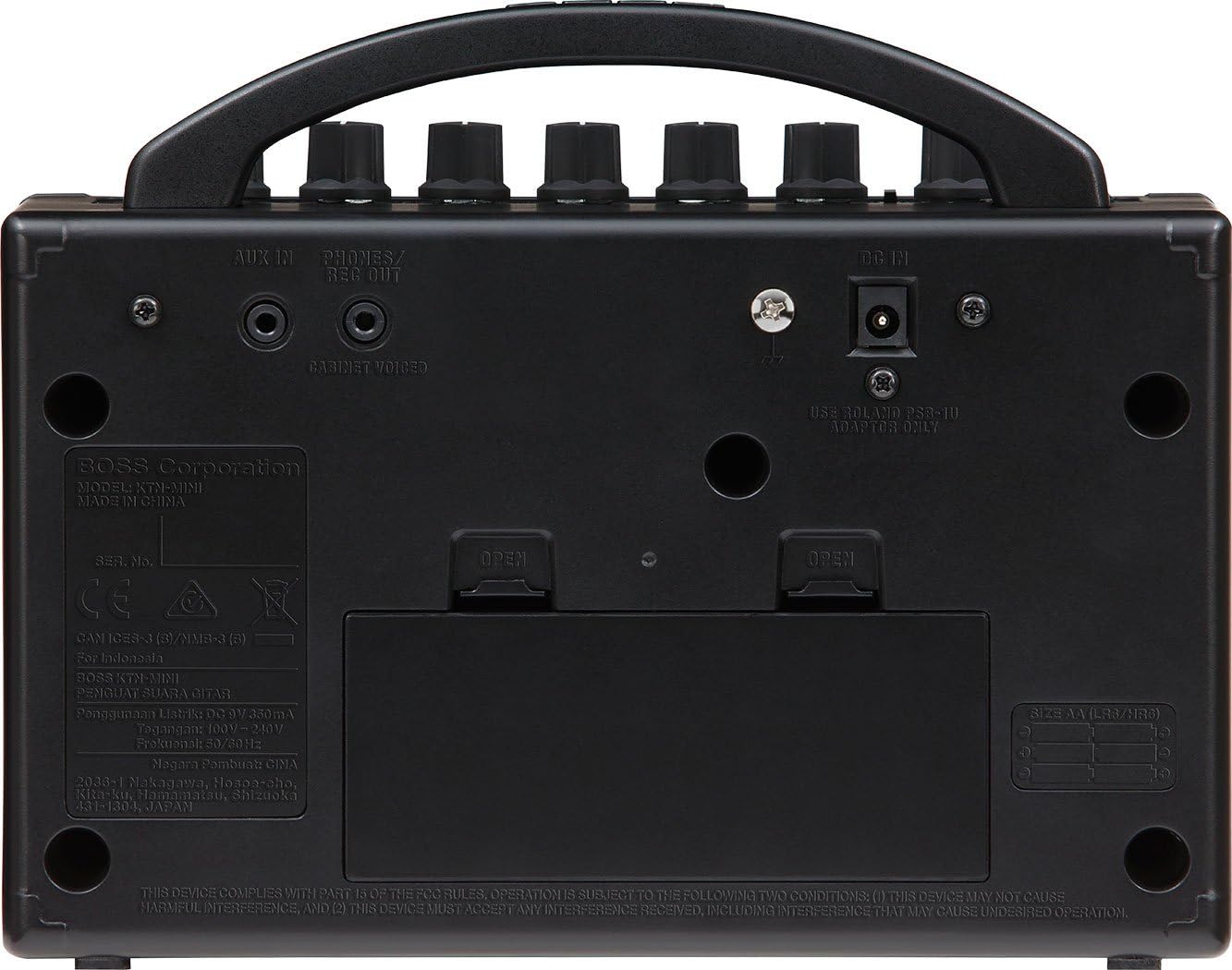
Figure 4.2: Rear Panel Connections of the Katana Mini
- AUX IN Jack: Connect an external audio player (e.g., smartphone, MP3 player) here using a stereo 3.5mm cable to play along with music.
- PHONES/REC OUT Jack: Connect headphones for silent practice or use this output to connect to a recording device. This output includes cabinet voicing for a natural sound.
- DC IN Jack: Connect a BOSS PSA-series AC adapter (sold separately) here to power the unit.
- Battery Compartment: Houses six AA batteries for portable operation.
5. Setup
Follow these steps to set up your Katana Mini amplifier:
- Powering the Unit:
- Batteries: Open the battery compartment on the rear panel. Insert six AA batteries, ensuring correct polarity. Close the compartment securely.
- AC Adapter (Sold Separately): Connect a BOSS PSA-series AC adapter to the DC IN jack on the rear panel. Plug the adapter into a standard AC outlet.
- Connecting Your Guitar: Insert one end of a 1/4-inch instrument cable into your guitar's output jack and the other end into the INPUT jack on the Katana Mini.
- Connecting External Audio (Optional): If you wish to play along with music, connect your audio device to the AUX IN jack using a stereo 3.5mm cable.
- Connecting Headphones/Recording Device (Optional): For silent practice or recording, connect your headphones or recording device to the PHONES/REC OUT jack using a stereo 3.5mm cable.
6. Operating Instructions
Once set up, you can begin using your Katana Mini:
- Turn On the Power: Ensure all connections are secure. Set the VOLUME knob to its minimum position. Flip the POWER switch to the ON position. The power indicator will light up.
- Select Amp Type: Use the AMP TYPE switch to choose between BROWN, CRUNCH, or CLEAN voicings based on your desired tone.
- Adjust Gain: Turn the GAIN knob to control the amount of distortion. Start with lower settings for cleaner tones and increase for more drive.
- Set Volume: Slowly increase the VOLUME knob to your desired listening level.
- Adjust Equalization: Use the BASS, MIDDLE, and TREBLE knobs to shape your tone. Experiment with these controls to find your preferred sound.
- Apply Delay Effect:
- TIME: Adjusts the duration between delay repeats.
- LEVEL: Controls how prominent the delay effect is in the overall sound.
- Playing Along with External Audio: Adjust the volume on your external audio device to balance it with your guitar's volume.
- Turn Off the Power: Before turning off the unit, lower the VOLUME knob to its minimum position. Then, flip the POWER switch to the OFF position.
7. Maintenance
- Cleaning: Wipe the unit with a soft, dry cloth. Do not use abrasive cleaners, waxes, or solvents.
- Battery Replacement: When the sound becomes weak or distorted, or the power indicator dims, it's time to replace the batteries. Always replace all six batteries at once with new ones of the same type.
- Storage: If storing the unit for an extended period, remove the batteries to prevent leakage. Store in a cool, dry place away from direct sunlight.
8. Troubleshooting
| Problem | Possible Cause | Solution |
|---|---|---|
| No sound |
|
|
| Weak or distorted sound |
|
|
| Humming or buzzing noise |
|
|
9. Specifications
| Feature | Detail |
|---|---|
| Model Number | KTN-MINI |
| Output Wattage | 7 Watts |
| Compatible Devices | Guitar |
| Color | Black |
| Product Dimensions | 4.6"D x 9"W x 7"H (11.7 cm D x 22.9 cm W x 17.8 cm H) |
| Item Weight | 3.3 pounds (1.5 kg) |
| Power Supply | 6 x AA batteries or AC adapter (BOSS PSA-series, sold separately) |
| Controls | GAIN, VOLUME, BASS, MIDDLE, TREBLE, TIME (DELAY), LEVEL (DELAY), AMP TYPE switch (BROWN/CRUNCH/CLEAN), POWER switch |
| Connectors | INPUT (1/4-inch), AUX IN (Stereo miniature phone type), PHONES/REC OUT (Stereo miniature phone type), DC IN jack |
| Manufacturer | BOSS |
10. Warranty and Support
For warranty information and customer support, please refer to the warranty card included with your product or visit the official BOSS website. Keep your purchase receipt as proof of purchase for warranty claims.


