
FD iK6630 (K6630PK AU)
Contents
FD iK6630 Wireless Keyboard and Mouse Combo User Manual
Model: K6630PK AU
Introduction
Thank you for choosing the FD iK6630 Wireless Keyboard and Mouse Combo. This 2.4GHz USB cordless set features cute round keys, a quiet and slim design, perfect for laptops, computers, TVs, and Mac devices. This manual provides essential information to help you set up, operate, and maintain your new wireless combo.
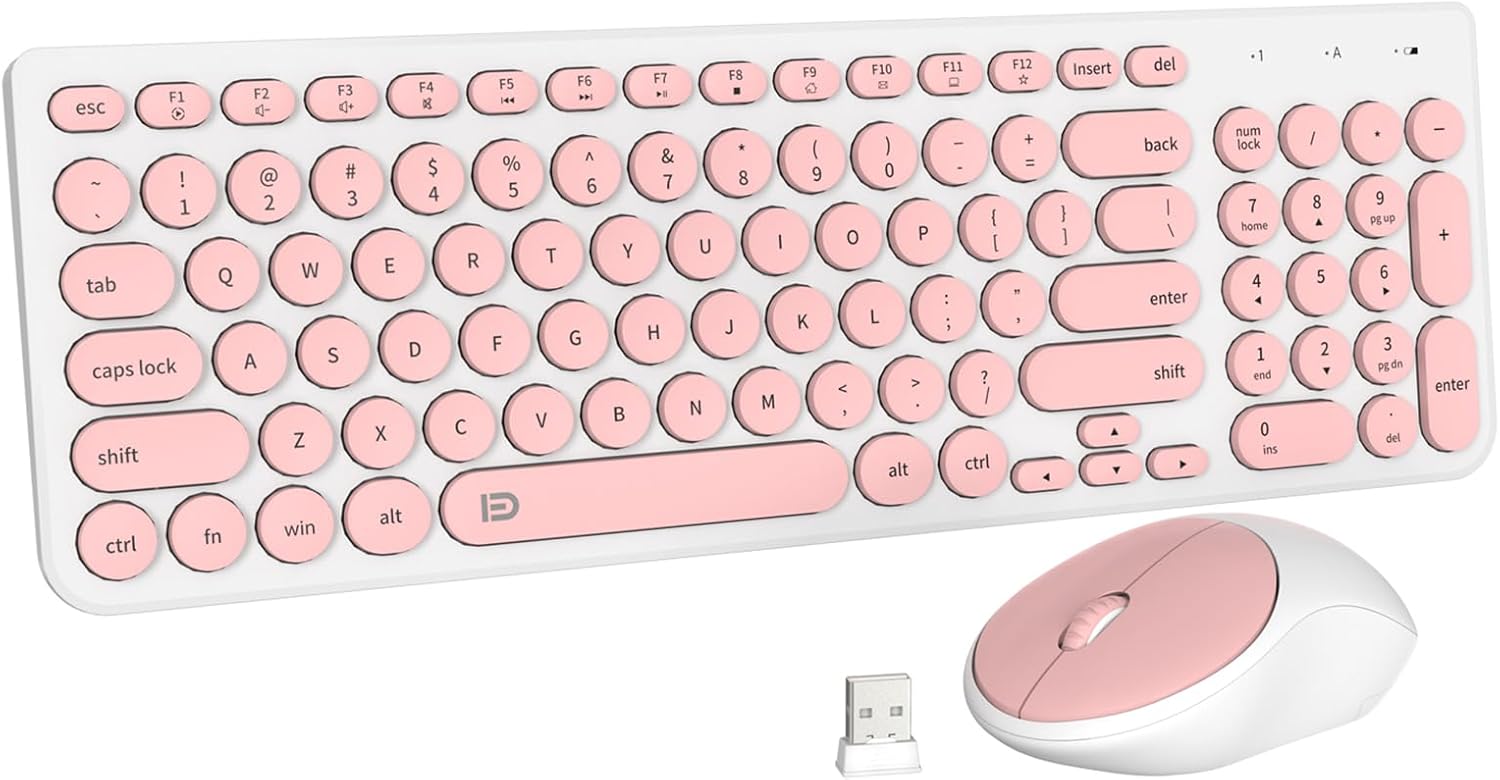
Image: The FD iK6630 Wireless Keyboard and Mouse Combo, showcasing the salmon pink and white color scheme with round keycaps and the compact USB receiver.
Package Contents
- 1 x Wireless Keyboard
- 1 x Wireless Mouse
- 1 x Nano USB Receiver
- 1 x User Manual
Setup Guide
Follow these steps to quickly set up your FD iK6630 Wireless Keyboard and Mouse Combo:
- Install Batteries:
- Open the battery compartment on the underside of the keyboard. Insert 2 x AAA batteries, ensuring correct polarity (+/-).
- Open the battery compartment on the underside of the mouse. Insert 1 x AA battery, ensuring correct polarity (+/-).
- Close both battery compartments securely. (Note: Batteries are not included in the package.)
- Locate USB Receiver: The tiny USB Nano receiver is conveniently stored inside the mouse's battery compartment for safekeeping during transport. Carefully remove it.
- Connect Receiver: Insert the Nano USB receiver into an available USB 2.0 or 3.0 port on your computer, laptop, or smart TV.
- Automatic Connection: The system will automatically recognize the receiver and establish a connection with the keyboard and mouse. No additional drivers or software installation is required.
- Start Using: Once the connection is established, you can immediately begin using your wireless keyboard and mouse combo.

Image: Close-up view showing the USB Nano receiver stored within the battery compartment of the wireless mouse, indicating its location for initial setup.

Image: Illustration of the 2.4GHz wireless connection, showing the keyboard and mouse wirelessly connected to a laptop via the USB receiver.
Operating Instructions
2.4GHz Wireless Connection
The combo utilizes reliable 2.4GHz wireless technology, providing a stable and uninterrupted connection within a range of up to 10 meters (32.81 feet). This ensures smooth operation without delays or dropouts.
Hot Keys / Function Keys
The keyboard is equipped with 12 easy-to-reach function keys (F1-F12) that provide quick access to multimedia controls and common tasks. These include:
- Media playback controls (Play/Pause, Stop, Previous, Next)
- Volume control (Mute, Volume Down, Volume Up)
- Web browser launch
- Email client launch
- Search function
- Home page

Image: Overhead view of the keyboard, with the top row of function keys highlighted to show their multimedia and shortcut capabilities.
Automatic Sleep Mode & Energy Saving
To maximize battery life, both the keyboard and mouse feature an automatic sleep mode. If idle for 5 minutes, they will enter sleep mode. To reactivate, simply click any button on the mouse or press any key on the keyboard. This intelligent power management helps achieve up to 6 months of battery life.

Image: A visual representation of the auto-sleep and energy-saving feature, showing the keyboard and mouse on a desk with a monitor, indicating their sleep states after inactivity.

Image: Graphic illustrating the battery life, showing 300 hours of continuous use for the keyboard and 100 hours of working time for the mouse.
Universal Compatibility
The FD iK6630 combo is designed for broad compatibility with various operating systems and devices:
- Operating Systems: Windows 2000/ME/XP (x64)/Vista/7/8/10, Mac OS X (v10.4 and above), Chrome OS, Linux Kernel (2.6 and above).
- Devices: Notebooks, Computers, PCs, Laptops, MacBooks, Chromebooks, Smart TVs, and more.
It works seamlessly with devices equipped with USB 2.0 or 3.0 ports. Please note that this set uses a USB connection and is not compatible with devices that only have Type C ports without an adapter.

Image: A visual guide demonstrating the compatibility of the keyboard and mouse combo with various devices, including Smart TVs, PCs, Laptops, Macs, Workstations, and Projectors.
Maintenance
To ensure the longevity and optimal performance of your FD iK6630 Wireless Keyboard and Mouse Combo, follow these maintenance guidelines:
- Cleaning: Use a soft, dry cloth to wipe down the surfaces of the keyboard and mouse. For stubborn dirt, a slightly damp cloth with mild soap can be used, but ensure no liquid enters the devices. Avoid harsh chemicals or abrasive cleaners.
- Battery Replacement: When performance degrades (e.g., lag, disconnections), it's time to replace the batteries. Refer to the 'Setup Guide' for battery types (AAA for keyboard, AA for mouse) and installation instructions.
- Storage: When not in use for extended periods, remove the batteries to prevent leakage. Store the devices in a cool, dry place away from direct sunlight and extreme temperatures.
- Durability: The keyboard and mouse are constructed from durable ABS plastic with a UV coating for anti-scratch functionality. While robust, avoid dropping the devices or exposing them to excessive force.

Image: Detailed view of the keyboard keys, highlighting the ABS material construction and UV coating for durability and scratch resistance.
Troubleshooting
If you encounter issues with your FD iK6630 Wireless Keyboard and Mouse Combo, please refer to the following common solutions:
| Problem | Possible Cause | Solution |
|---|---|---|
| Keyboard/Mouse not responding | Low or dead batteries; Receiver not properly connected; Out of range. | Replace batteries in both devices. Ensure the USB receiver is firmly plugged into a working USB port. Move devices closer to the receiver (within 10 meters). |
| Lag or intermittent connection | Interference from other wireless devices; Low battery; Obstructions. | Ensure no other 2.4GHz devices are causing interference. Replace batteries. Remove any large metal objects between the devices and the receiver. |
| Some keys or mouse buttons not working | Software conflict; Specific key malfunction. | Restart your computer. Test on another computer to isolate the issue. For Mac OS, some hotkeys may not function as expected due to system differences. |
| Not compatible with my device | Device only has Type C ports. | For devices like MacBook Pro with only Type C ports, a USB-A to Type-C adapter is required. |
If the problem persists after trying these solutions, please contact customer support as detailed in the 'Warranty and Support' section.
Specifications
| Feature | Detail |
|---|---|
| Model Number | K6630PK AU |
| Connectivity Technology | 2.4GHz Wireless, USB Nano Receiver |
| Keyboard Dimensions | 14.96 x 4.7 x 1.1 inches (38 x 11.9 x 2.8 cm) |
| Mouse Dimensions | 4.1 x 2.4 x 1.4 inches (10.4 x 6.1 x 3.6 cm) |
| Item Weight | 1.45 pounds (0.66 kg) |
| Keyboard Battery | 2 x AAA batteries (not included) |
| Mouse Battery | 1 x AA battery (not included) |
| Wireless Range | Up to 10 meters (32.81 feet) |
| Key Type | Round Keycaps, Quiet Low-profile |
| Compatibility | Windows 2000/ME/XP/Vista/7/8/10, Mac OS X (v10.4+), Chrome OS, Linux Kernel (2.6+) |
| Special Features | Automatic Sleep Mode, Energy Saving, Multimedia Hotkeys, Portable, Anti-scratch UV Coating |
Warranty and Support
FD offers a 36-MONTH AFTER-SALE SERVICE for your peace of mind. We are dedicated to fulfilling your requirements and ensuring your satisfaction with the product.
How to Contact Support:
If you encounter any issues or have questions regarding your FD iK6630 Wireless Keyboard and Mouse Combo, please do not hesitate to reach out to us:
- Click on our store name, "FD Tech." (or the brand name 'FD' on the product page).
- Select "Ask a question" to get in touch with our customer service team.
Our team will assist you promptly with any concerns or technical support needs.
Ask a question about this manual
Ask about setup, troubleshooting, compatibility, parts, safety, or missing instructions. Manuals+ will review the question and use this page’s manual context to help answer it.