
PRORECK Freedom-12
PRORECK Freedom 12 Portable PA/DJ Speaker System User Manual
Model: Freedom-12
1. Introduction
Thank you for purchasing the PRORECK Freedom 12 Portable PA/DJ Speaker System. This system is designed to deliver powerful and clear audio for various applications, including parties, karaoke, events, speeches, and outdoor gatherings. It features a 12-inch woofer, 1200W peak power, a built-in rechargeable battery, two wireless microphones, and versatile connectivity options such as Bluetooth, USB, SD card, and FM radio. This manual provides essential information for safe operation, setup, and maintenance of your speaker system.
2. Safety Instructions
WARNING: To reduce the risk of electric shock, do not expose this appliance to rain or moisture. Do not remove cover. No user-serviceable parts inside. Refer servicing to qualified service personnel.
- Read all instructions before operating the appliance.
- Retain these instructions for future reference.
- Heed all warnings on the appliance and in the operating instructions.
- Follow all instructions.
- Do not use this apparatus near water.
- Clean only with a dry cloth.
- Do not block any ventilation openings. Install in accordance with the manufacturer’s instructions.
- Do not install near any heat sources such as radiators, heat registers, stoves, or other apparatus (including amplifiers) that produce heat.
- Do not defeat the safety purpose of the polarized or grounding-type plug. A polarized plug has two blades with one wider than the other. A grounding-type plug has two blades and a third grounding prong. The wide blade or the third prong are provided for your safety. If the provided plug does not fit into your outlet, consult an electrician for replacement of the obsolete outlet.
- Protect the power cord from being walked on or pinched, particularly at plugs, convenience receptacles, and the point where they exit from the apparatus.
- Only use attachments/accessories specified by the manufacturer.
- Use only with the cart, stand, tripod, bracket, or table specified by the manufacturer, or sold with the apparatus. When a cart is used, use caution when moving the cart/apparatus combination to avoid injury from tip-over.
- Unplug this apparatus during lightning storms or when unused for long periods of time.
- Refer all servicing to qualified service personnel. Servicing is required when the apparatus has been damaged in any way, such as power-supply cord or plug is damaged, liquid has been spilled or objects have fallen into the apparatus, the apparatus has been exposed to rain or moisture, does not operate normally, or has been dropped.
- The battery should not be exposed to excessive heat such as sunshine, fire or the like.
- Ensure the battery is connected internally before first use. Refer to the 'Initial Setup' section.
3. Package Contents
Verify that all items listed below are included in your package:
- 1 x PRORECK Freedom 12 PA Speaker
- 2 x Wireless Microphones
- 1 x Tripod Speaker Stand
- 1 x Remote Control
- 1 x Power Cable
- 1 x User Manual

Image: Package contents including the PRORECK Freedom 12 speaker, two wireless microphones, a tripod stand, and a remote control.
4. Product Overview
The PRORECK Freedom 12 is a versatile portable PA system designed for ease of use and powerful sound delivery. Below are key features and components.
4.1 Key Features
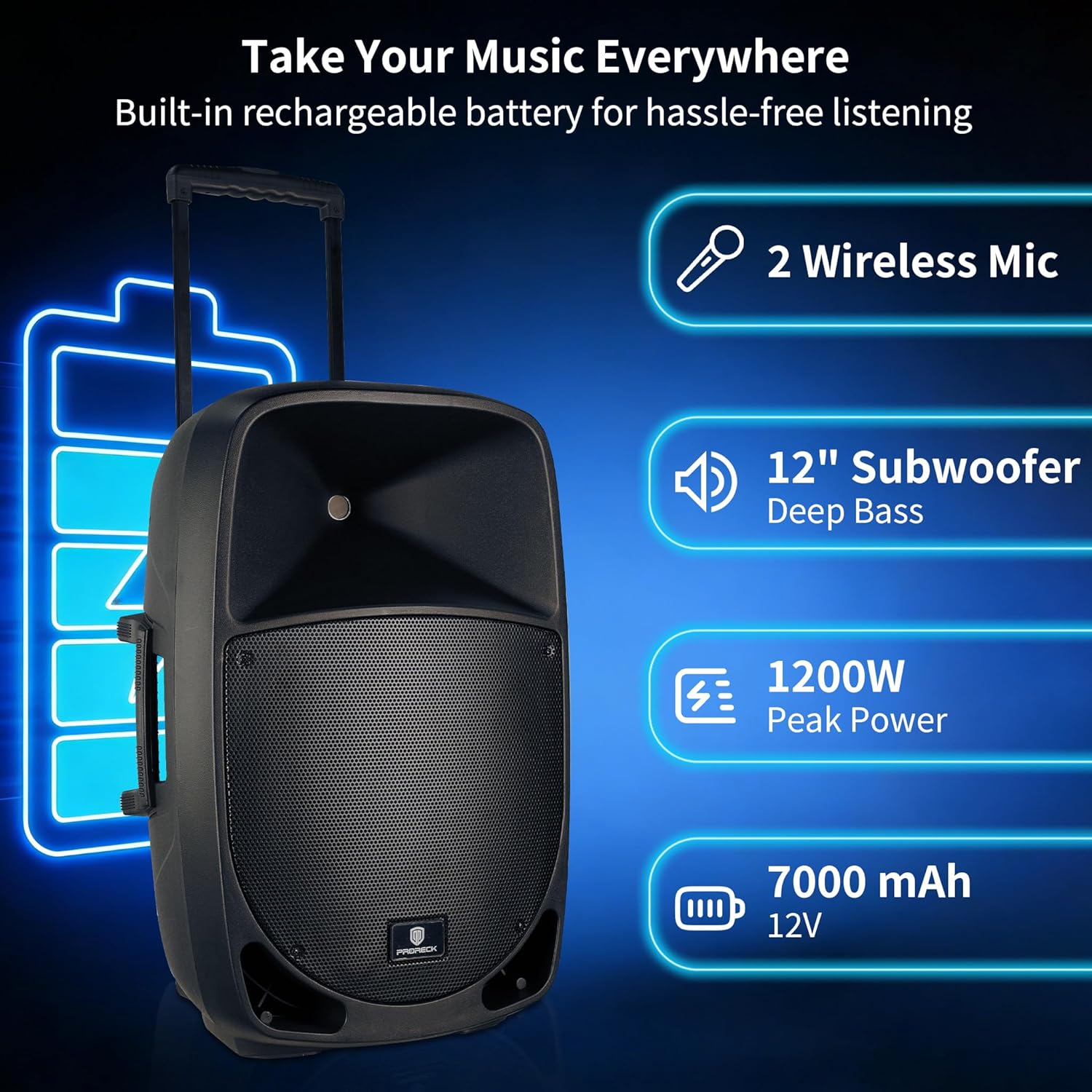
Image: Front view of the PRORECK Freedom 12 speaker, highlighting its main features: 2 wireless microphones, 12-inch subwoofer for deep bass, 1200W peak power, and a 7000 mAh 12V rechargeable battery.
- Powerful Audio: 12-inch woofer and 1-inch titanium diaphragm compression driver with 1200W peak power.
- Wireless Microphones: Includes two wireless microphones for vocal performances and speeches.
- Versatile Connectivity: Bluetooth, USB, SD card, FM radio, XLR, 1/4" mic inputs, and RCA line in/out.
- Portable Design: Built-in telescoping handle and dual transport wheels for easy mobility. Integrated 35mm pole socket for stand mounting.
- Rechargeable Battery: Supports cordless outdoor use with 6-8 hours of playing time on a 3-6 hour charge.
- Full Control System: Digital LCD, master volume, mic volume, echo, and professional equalizer controls.
4.2 Rear Panel Controls and Connections

Image: Detailed view of the PRORECK Freedom 12 rear panel, showing the Media Player section (Bluetooth/USB/SD/FM Radio), MIC/GUITAR IN (XLR and 1/4" inputs), Master Volume, Microphone Volume/Echo Control, Wireless Mic Control, 12V DC Power Supply input, and Power Switch.
- Media Player: Digital LCD display, USB/SD card slots, FM radio controls, Bluetooth pairing.
- MIC 1 IN (XLR): For connecting a wired microphone.
- MIC 2 IN (1/4" / Guitar): For connecting a second wired microphone or a guitar.
- RCA Line In/Out: Stereo RCA inputs for external audio sources and outputs for connecting to other audio equipment.
- Master Volume: Adjusts the overall output volume of the speaker.
- Microphone Volume/Echo Control: Individual volume controls for microphones and an echo effect knob.
- Graphic Equalizer: Adjusts frequency bands for sound customization.
- Wireless Mic Control: Volume controls for the included wireless microphones.
- 12V DC Power Supply: Input for external 12V DC power source.
- Power Switch: Turns the speaker system on or off.
- AC Power Input: For connecting the main power cable for charging and operation.
4.3 Portability Features

Image: The PRORECK Freedom 12 speaker demonstrating its portability with a telescoping handle and transport wheels. A close-up shows the 35mm speaker stand mount at the bottom.
5. Setup
5.1 Initial Battery Connection
Before first use, ensure the internal rechargeable battery is connected. Locate the battery compartment cover on the rear panel (often secured with screws). Open the cover and connect any disconnected battery terminals. Securely close the cover.
5.2 Charging the Speaker
- Connect the provided power cable to the AC Power Input on the rear panel of the speaker.
- Plug the other end of the power cable into a standard wall outlet.
- The charging indicator light (LED) on the rear panel will illuminate.
- A full charge typically takes 3-6 hours. The LED will change color or turn off when charging is complete.
- The speaker can be used while charging.
5.3 Mounting on a Speaker Stand
- Extend the legs of the tripod speaker stand to a stable position.
- Carefully lift the PRORECK Freedom 12 speaker and align the 35mm pole socket on its bottom with the pole of the speaker stand.
- Lower the speaker onto the stand until it is securely seated. Ensure the stand's locking pin is engaged if available.
6. Operating Instructions
6.1 Power On/Off
Locate the Power Switch on the rear panel. Flip it to the 'ON' position to power on the speaker. Flip it to 'OFF' to power off.
6.2 Bluetooth Pairing
- Turn on the PRORECK Freedom 12 speaker. The Media Player LCD will display 'BT' or a Bluetooth icon, indicating it's ready for pairing.
- On your mobile device (smartphone, tablet, etc.), enable Bluetooth and search for available devices.
- Select 'PRORECK Freedom 12' from the list of devices.
- Once paired, the speaker will confirm the connection, and you can stream audio wirelessly.
6.3 USB/SD Card Playback
- Insert a USB flash drive or SD card (pre-loaded with MP3 audio files) into the respective slot on the Media Player.
- The speaker will automatically switch to USB/SD mode and begin playing audio.
- Use the controls on the Media Player or the remote control to navigate tracks, adjust volume, and pause/play.
6.4 FM Radio
- Press the 'MODE' button on the Media Player or remote control until 'FM' is displayed on the LCD.
- Use the 'PLAY/PAUSE' button to initiate an automatic scan for available FM stations.
- Use the 'PREV/NEXT' buttons to cycle through saved stations.
6.5 Microphone Usage
- Wireless Microphones: Ensure the wireless microphones have fresh batteries and are powered on. Adjust their volume using the 'Wireless Mic Control' knobs on the rear panel.
- Wired Microphones: Connect wired microphones to the 'MIC 1 IN' (XLR) or 'MIC 2 IN' (1/4") inputs. Adjust their volume using the 'MIC 1 Level' and 'MIC 2 Level' knobs.
- Echo Effect: Use the 'ECHO' knob to add a reverberation effect to the microphone audio.
- Talkover Function: If available, the 'TALKOVER' switch can automatically lower background music volume when a microphone is in use.
6.6 Equalizer Adjustment
Use the graphic equalizer sliders on the rear panel to fine-tune the audio output. Adjust individual frequency bands (bass, midrange, treble) to suit your preferences or the acoustics of your environment.
6.7 Remote Control
The included remote control allows for convenient operation from a distance. Functions typically include power, mode selection, track navigation, volume control, and EQ presets.

Image: The PRORECK Freedom 12 speaker shown with its two wireless microphones and the remote control, illustrating the auto-pairing and simple control features.
7. Charging and Battery Information
- Battery Type: Rechargeable 12V, 7000 mAh.
- Charging Time: Approximately 3-6 hours for a full charge.
- Playing Time: Up to 6-8 hours on a full charge, depending on volume level and usage.
- Battery Indicators: LEDs on the rear panel indicate charging status and battery level.
- Battery Care: For optimal battery life, avoid completely draining the battery frequently. Charge the speaker regularly, even when not in use for extended periods (e.g., once every 3 months).
8. Maintenance
- Cleaning: Wipe the speaker cabinet with a soft, dry cloth. Do not use abrasive cleaners or solvents.
- Storage: When not in use, store the speaker in a cool, dry place, away from direct sunlight and extreme temperatures.
- Battery: If storing for a long period, ensure the battery is partially charged (around 50%) to prolong its lifespan.
- Ventilation: Ensure ventilation openings are clear and not obstructed during operation.
9. Troubleshooting
| Problem | Possible Cause | Solution |
|---|---|---|
| No sound output |
|
|
| Bluetooth not connecting |
|
|
| Microphones not working |
|
|
| Distorted or static sound |
|
|
10. Specifications
| Feature | Detail |
|---|---|
| Brand | PRORECK |
| Model Number | Freedom-12 |
| Connectivity Technology | Bluetooth, RCA, USB |
| Color | Black |
| Compatible Devices | Radio, Smartphone, Mixers, Laptops, Audio Devices |
| Mounting Type | Floor Standing (with 35mm pole socket) |
| Power Source | Battery Powered, AC Powered |
| Number of Channels | 2 |
| Audio Input | XLR, 1/4 inch, RCA |
| Battery Type | Rechargeable (12V, 7000 mAh) |
| Output Wattage | 500 watts (RMS), 1200 watts (Peak) |
| Item Weight | Approx. 41 lbs (based on product description, '41 g' in specs seems incorrect for a speaker) |
| Enclosure Material | Metal, Plastic |
| UPC | 799355095204 |
Note: The 'Item Weight' of '41 g' in the provided specifications appears to be an error. A portable PA speaker of this size typically weighs significantly more. Please refer to the product packaging or official PRORECK website for accurate weight information.
11. Warranty and Support
The PRORECK Freedom 12 Portable PA/DJ Speaker System comes with a 1-year warranty from the date of purchase, covering manufacturing defects. Please retain your proof of purchase for warranty claims.
For technical support, warranty inquiries, or replacement parts, please contact PRORECK customer service through the retailer where you purchased the product or visit the official PRORECK website for contact information.
PRORECK AUDIO
Manufacturer: PRORECK AUDIO
Related documentsFreedom-12


Ask a question about this manual
Ask about setup, troubleshooting, compatibility, parts, safety, or missing instructions. Manuals+ will review the question and use this page’s manual context to help answer it.