
VONDIOR E300
Vondior Digital AM FM Portable Pocket Radio User Manual
Model: E300 | Brand: VONDIOR
Introduction
Thank you for choosing the Vondior Digital AM FM Portable Pocket Radio. This compact and versatile device is designed to provide clear audio reception for both AM and FM bands, featuring a digital tuner, alarm clock, and sleep timer functions. Its portable design makes it ideal for on-the-go listening. This manual provides detailed instructions for setup, operation, maintenance, and troubleshooting to ensure you get the most out of your radio.

Figure 1: Vondior Digital AM FM Portable Pocket Radio (Silver)
What's in the Box
Please check the package contents to ensure all items are present:
- Vondior Digital AM FM Portable Pocket Radio (Model E300)
- Owner's Manual (this document)
- Note: AAA batteries are not included and must be purchased separately.
Parts and Controls
Familiarize yourself with the radio's components and controls for optimal use.

Figure 2: Front and Top View of Radio Controls
- 1. LCD Screen: Displays frequency, time, alarm status, and other information.
- 2. Tuning Buttons (Up/Down Arrows): Adjust frequency manually or navigate menus.
- 3. MODE Button: Cycles through different modes (e.g., Time setting, Alarm setting).
- 4. M- / M+ Buttons: Navigate through saved memory presets.
- 5. MEM Button: Used to save or recall radio stations from memory.
- 6. FM/AM Button: Switches between FM and AM radio bands.
- 7. On/Off Switch: Powers the radio on or off. Located on the side.
- 8. Volume Control: Rotary dial on the side to adjust audio output level.
- 9. Headphone Jack (3.5mm): For connecting stereo headphones.
- 10. Telescopic Antenna: Extends for improved FM reception.
- 11. Battery Compartment: Located on the back, holds 2 AAA batteries.
Setup
1. Battery Installation
- Locate the battery compartment cover on the back of the radio.
- Slide the cover downwards to open it.
- Insert two (2) AAA batteries, ensuring the correct polarity (+/-) as indicated inside the compartment.
- Replace the battery compartment cover by sliding it upwards until it clicks into place.
2. Initial Power On and Time Setting
Upon first power-on or after battery replacement, you may need to set the time.
- Slide the On/Off switch to the "On" position.
- Press and hold the MODE button until the time display starts flashing.
- Use the Tuning Up/Down Arrows to adjust the hour. Press MODE again to confirm the hour and move to minutes.
- Use the Tuning Up/Down Arrows to adjust the minutes. Press MODE again to confirm and exit time setting mode.
Note: Some users have reported that the "MEM" button functions as "MODE" for time setting. If "MODE" does not work, try pressing and holding the "MEM" button instead.
Operating Instructions
1. Power On/Off
Slide the On/Off switch located on the side of the radio to turn it on or off.
2. Adjusting Volume
Rotate the Volume Control dial on the side of the radio to increase or decrease the sound level.

Figure 3: Powerful Volume Output
3. Switching Bands (AM/FM)
Press the FM/AM button to switch between the Frequency Modulation (FM) and Amplitude Modulation (AM) bands.
4. Tuning to Stations
- Manual Tuning: Press the Tuning Up/Down Arrows briefly to adjust the frequency step by step.
- Auto Scan: Press and hold the Tuning Up/Down Arrows for a few seconds. The radio will automatically scan for the next strong station and stop.

Figure 4: Long Range Reception with DSC Chip
5. Saving and Recalling Presets
- To Save a Station:
- Tune to the desired station.
- Press the MEM button once. The preset number will flash on the display.
- Use the Tuning Up/Down Arrows or M-/M+ buttons to select the desired preset number (e.g., P01, P02).
- Press the MEM button again to confirm and save the station.
- To Recall a Station:
- Press the M- or M+ buttons to cycle through your saved preset stations.
6. Setting the Alarm Clock

Figure 5: Sleep Timer and Alarm Clock Features
- Ensure the radio is turned off.
- Press and hold the MODE button until the alarm time flashes.
- Use the Tuning Up/Down Arrows to set the desired alarm hour. Press MODE to confirm.
- Use the Tuning Up/Down Arrows to set the desired alarm minutes. Press MODE to confirm.
- The alarm icon will appear on the display, indicating the alarm is set.
- To disable the alarm, repeat the steps and set the alarm time to "--:--".
7. Using the Sleep Timer
The sleep timer allows the radio to play for a set duration before automatically turning off.
- With the radio on, press the MODE button repeatedly until "SLEEP" appears on the display.
- Use the Tuning Up/Down Arrows to select the desired sleep duration (e.g., 10, 20, 30, 60, 90 minutes).
- The radio will automatically turn off after the selected time.
- To cancel the sleep timer, set the duration to "OFF" or turn the radio off manually.
8. Lock Function
The lock function prevents accidental button presses.
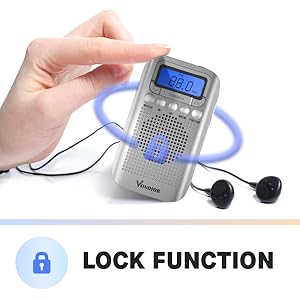
Figure 6: Activating the Lock Function
- To Activate: Press and hold the MEM button for a few seconds until a key icon appears on the display. All buttons will be locked.
- To Deactivate: Press and hold the MEM button again for a few seconds until the key icon disappears. Buttons will be unlocked.
9. Using Headphones
Insert any standard 3.5mm stereo headphones into the Headphone Jack on the top of the radio. The internal speaker will automatically mute when headphones are connected.

Figure 7: Using the Headphone Jack
Maintenance
- Cleaning: Wipe the radio with a soft, dry cloth. Do not use abrasive cleaners or solvents.
- Battery Replacement: Replace batteries when the display dims or audio quality deteriorates. Always replace both AAA batteries at the same time.
- Storage: If storing the radio for an extended period, remove the batteries to prevent leakage and damage. Store in a cool, dry place.
- Water Exposure: This radio is not waterproof. Avoid exposure to water or high humidity.
Troubleshooting
| Problem | Possible Cause | Solution |
|---|---|---|
| Radio does not turn on. | Batteries are dead or incorrectly inserted. | Replace batteries with new AAA batteries, ensuring correct polarity. |
| Poor reception / Static. | Weak signal; antenna not extended; interference. | Extend the telescopic antenna fully for FM. For AM, try rotating the radio for better signal. Move away from electronic devices that may cause interference. |
| No sound from speaker. | Volume too low; headphones connected. | Increase volume. Disconnect headphones if not in use. |
| Buttons are unresponsive. | Lock function is activated. | Press and hold the MEM button for a few seconds to deactivate the lock function. |
| Alarm goes off unexpectedly. | Alarm was previously set and not disabled. | Follow "Setting the Alarm Clock" instructions to disable the alarm by setting its time to "--:--". |
Specifications
| Brand | VONDIOR |
| Model Number | E300 |
| Product Dimensions | 4.21 x 2.4 x 0.91 inches (10.7 x 6.1 x 2.3 cm) |
| Item Weight | 2.08 ounces (59 grams) |
| Power Source | 2 x AAA Batteries (not included) |
| Tuner Technology | AM/FM Digital Tuner |
| Connectivity | 3.5mm Headphone Jack |
| Color | Silver |
| Special Feature | Lightweight, Alarm Clock, Sleep Timer, Lock Function |
Warranty and Support
VONDIOR products are designed for reliability and performance. For warranty information or technical support, please refer to the contact details provided with your purchase or visit the official VONDIOR website. Please retain your proof of purchase for any warranty claims.
Ask a question about this manual
Ask about setup, troubleshooting, compatibility, parts, safety, or missing instructions. Manuals+ will review the question and use this page’s manual context to help answer it.