1. Setup
1.1 Battery Installation
The Insignia NS-RC03A-13 remote control requires two AAA batteries for operation. Follow these steps to install them:
- Locate the battery compartment cover on the back of the remote control.
- Slide the cover downwards or press the latch to open it.
- Insert two AAA batteries, ensuring that the positive (+) and negative (-) terminals align correctly with the markings inside the compartment.
- Slide the battery compartment cover back into place until it clicks securely.
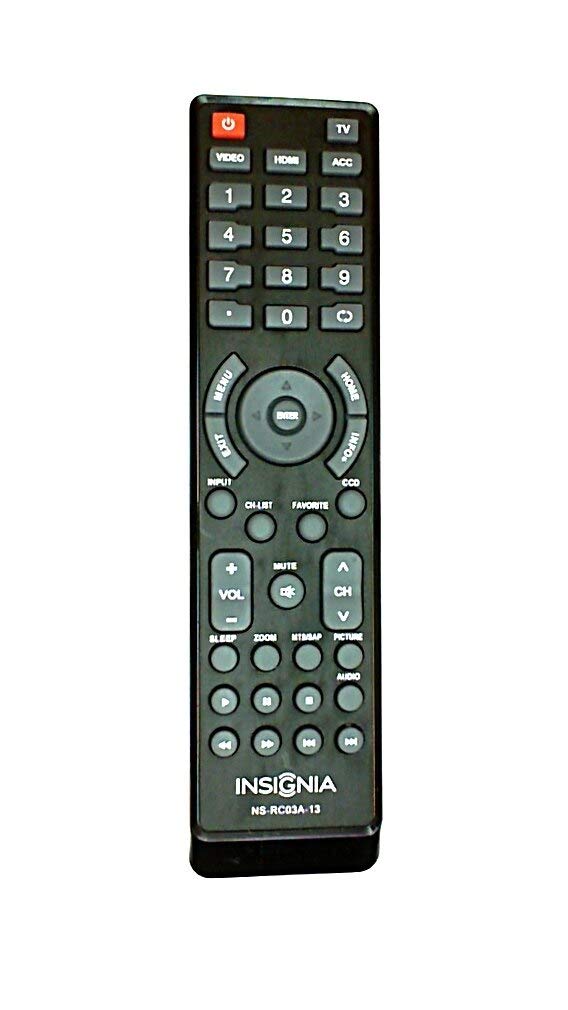
Image: Rear view of the Insignia NS-RC03A-13 remote control, showing the battery compartment open with two AAA batteries inserted. The remote is black with gray buttons.
2. Operating Instructions
This section details the primary functions and usage of your Insignia NS-RC03A-13 remote control.
Image: Front view of the Insignia NS-RC03A-13 remote control, displaying all buttons and their labels. The remote is black with gray buttons and white text.
2.1 Power On/Off
Press the POWER button (usually located at the top left) to turn your television on or off.
2.2 Input Selection
To switch between different video sources (e.g., HDMI 1, HDMI 2, Video), press the INPUT button. Continue pressing to cycle through available inputs until your desired source is selected.
2.3 Channel and Volume Control
- Volume: Use the VOL + and VOL - buttons to increase or decrease the audio volume.
- Mute: Press the MUTE button to instantly silence the television audio. Press it again to restore sound.
- Channels: Use the CH + and CH - buttons to navigate through television channels.
- Number Pad: Directly enter channel numbers using the numeric keypad (0-9).
2.4 Menu Navigation
Use the directional arrow buttons (Up, Down, Left, Right) around the ENTER button to navigate through on-screen menus. Press ENTER to confirm a selection. The MENU button typically opens the main menu, and EXIT closes it.
3. Maintenance
Proper care ensures the longevity and optimal performance of your remote control.
- Cleaning: Wipe the remote control with a soft, dry cloth. Avoid using liquid cleaners, abrasive materials, or chemical solvents, as these can damage the surface or internal components.
- Battery Replacement: Replace batteries when the remote's responsiveness decreases. Always replace both batteries at the same time with new ones of the same type (AAA).
- Storage: Store the remote in a dry place, away from direct sunlight, extreme temperatures, and high humidity.
- Avoid Drops: Protect the remote from physical impact, as drops can damage internal circuitry.
4. Troubleshooting
If you encounter issues with your remote control, try the following solutions:
- Remote not responding:
- Check if the batteries are inserted correctly with the proper polarity.
- Replace old batteries with new AAA batteries.
- Ensure there are no obstructions between the remote control and the TV's infrared (IR) receiver.
- Point the remote directly at the TV's IR receiver.
- Specific buttons not working:
- Clean around the unresponsive buttons with a soft, slightly damp cloth to remove any debris or stickiness.
- If cleaning does not resolve the issue, the button mechanism may be faulty, and the remote might require replacement.
- TV not responding to input changes:
- Ensure the remote is correctly paired or compatible with your Insignia TV model.
- Try pressing the INPUT button multiple times to cycle through all available sources.
5. Specifications
| Model Number | NS-RC03A-13 |
| Brand | INSIGNIA |
| Compatible Devices | Television |
| Max Number of Supported Devices | 1 |
| Batteries Required | 2 AAA batteries |
| Color | Black |
| Special Feature | Ergonomic |
| Item Weight | 2.39 ounces |
| Package Dimensions | 7 x 2 x 1 inches |
6. Warranty and Support
For detailed warranty information, product registration, or technical support, please visit the official Insignia website or contact their customer service department. Keep your purchase receipt as proof of purchase for any warranty claims.
Online Support: www.insigniaproducts.com
Note: Specific warranty terms may vary by region and retailer.


