Introduction
The GlocalMe Triforce Mobile Hotspot (Model U3B-black) is a wireless portable WiFi device designed for seamless internet connectivity across over 200 countries. Utilizing patented Cloud SIM technology, it intelligently selects the best local network, eliminating the need for physical SIM cards and roaming charges. This manual provides comprehensive instructions for setting up, operating, and maintaining your device.
Key Features:
- No SIM Card Needed: Patented Cloud SIM technology for intelligent network selection.
- Global Coverage: Access 4G internet in over 200 countries.
- High-Speed Connectivity: Fast and stable 4G internet for streaming, calls, and navigation.
- Power Bank Function: Built-in 7000 mAh battery provides power for other devices.
- Multi-Device Connection: Connect up to 10 devices simultaneously.

Figure 1: Front and back view of the GlocalMe Triforce Mobile Hotspot, highlighting its sleek design and integrated charging cables. The serial number 012345678912345 is located on the back label.
Setup Guide
1. Charging the Device
Before initial use, fully charge your GlocalMe Triforce device. Use the provided USB cable and a compatible power adapter (not included). The device features a 7000 mAh battery, offering extended usage and power bank capabilities.
2. Powering On/Off
To power on, press and hold the power button located on the side of the device until the screen illuminates. To power off, press and hold the power button until the shutdown prompt appears, then confirm.
3. Initial Activation & Account Setup
Upon first power-on, the device will guide you through the initial setup. You will need to create or log in to your GlocalMe account. This account manages your data packages and device settings.
Video 1: A brief demonstration of the GlocalMe device's physical appearance and power-on sequence.
4. Connecting to the Hotspot
On your smartphone, laptop, or tablet, search for available Wi-Fi networks. Select the network named "GlocalMe_XXXX" (where XXXX is a unique identifier for your device). Enter the default password provided on the device screen or in the user manual. You can change the Wi-Fi name and password later via the device's settings or the GlocalMe app.

Figure 2: The GlocalMe mobile application interface, used for managing device settings and data plans.
Operating Your Device
1. Data Package Management
The GlocalMe Triforce operates on a pay-as-you-go model with no contract or roaming charges. Purchase data packages directly through the device's touchscreen interface or the GlocalMe mobile application. Options include daily, monthly, regional, or global data plans.
2. Intelligent Network Selection
The device automatically selects the strongest and most stable 4G network available in your current location. This ensures optimal connectivity without manual intervention.

Figure 3: The GlocalMe device provides SIM-free Wi-Fi access, ideal for international travel.
3. External SIM Card Compatibility
For specific local data needs, the device supports external SIM cards. Open the SIM card slot cover and insert your micro or nano SIM card. The device will prioritize the external SIM if inserted and active.
Video 2: Official GlocalMe video demonstrating the mobile hotspot's use in various travel scenarios.
Advanced Features
Power Bank Functionality
With its robust 7000 mAh battery, the GlocalMe Triforce can also serve as a power bank to charge your other devices. It includes integrated USB-C, Lightning, and Micro USB cables for convenience.
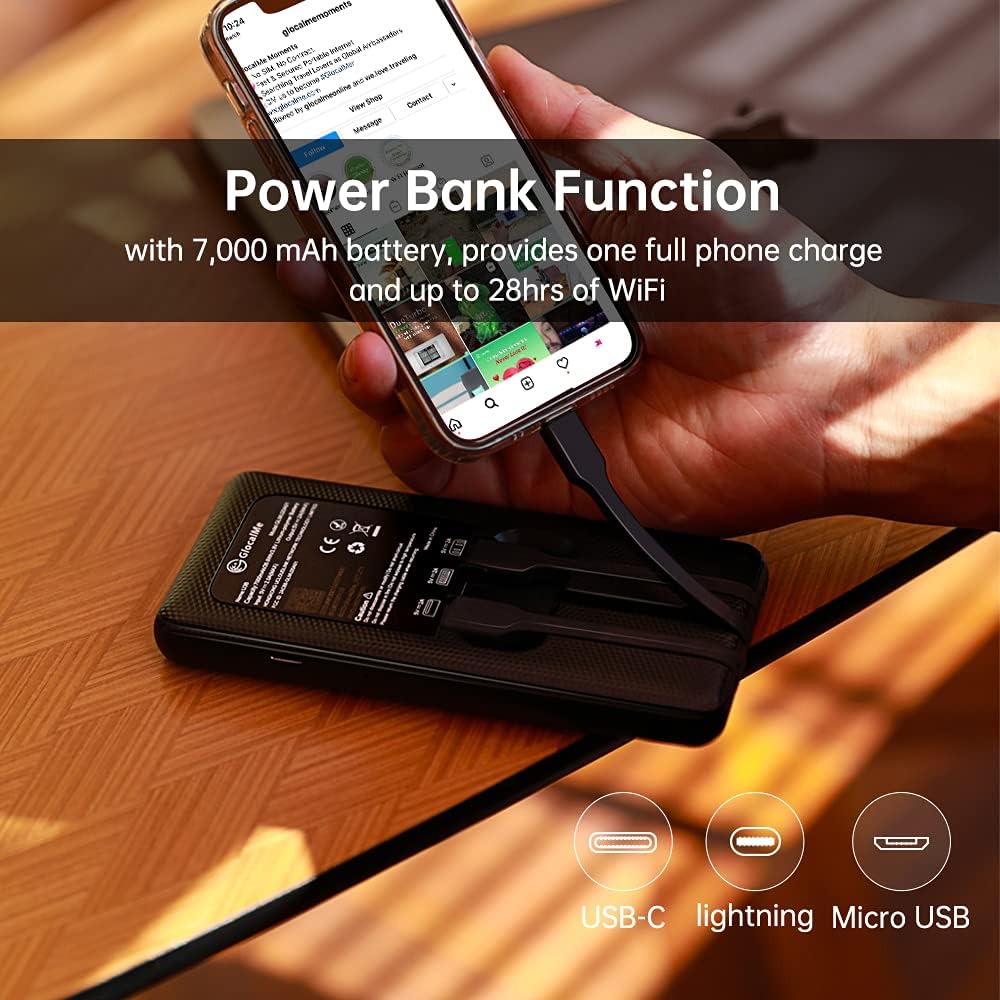
Figure 4: The GlocalMe Triforce functioning as a power bank, charging a smartphone via its built-in cables.
Multi-Device Connectivity
The hotspot supports simultaneous connection for up to 10 devices, including smartphones, tablets, and laptops, making it ideal for group travel or family use.

Figure 5: Illustrates the GlocalMe hotspot's ability to connect multiple devices simultaneously, perfect for shared internet access.
Maintenance and Care
Cleaning
Wipe the device with a soft, dry cloth. Avoid using harsh chemicals or abrasive materials that could damage the surface.
Storage
Store the device in a cool, dry place away from direct sunlight and extreme temperatures. If storing for an extended period, ensure the battery is charged to approximately 50% to prolong its lifespan.
Battery Care
To maximize battery longevity, avoid fully discharging the device frequently. Charge it regularly and avoid leaving it plugged in for prolonged periods after it's fully charged.
Troubleshooting
No Internet Connection
- Ensure your data package is active and has sufficient balance.
- Check the device's signal strength. If the signal is weak, try moving to an area with better network coverage.
- Restart the GlocalMe device and your connected devices.
- If using an external SIM, ensure it is properly inserted and active.
Slow Connection Speed
- Verify that you are in a 4G coverage area.
- Reduce the number of connected devices.
- Check your data plan for any speed limitations after a certain usage threshold.
Device Overheating
- If the device feels warm, it's normal during heavy use. If it becomes excessively hot, disconnect all devices and power off the hotspot. Allow it to cool down before resuming use.
- Ensure the device is not covered or in an enclosed space that prevents proper ventilation.
Technical Specifications
| Feature | Specification |
|---|---|
| Model Name | U3B-black |
| Product Dimensions | 5.83 x 2.72 x 0.62 inches |
| Item Weight | 8.5 ounces |
| Battery | 1 Lithium Ion batteries required (included) |
| Wireless Communication Technologies | 4G, Wi-Fi |
| Connectivity Technologies | Wi-Fi, USB |
| Special Features | Slim, Pocket Size, Power Bank Function |
| Color | Black |
| Manufacturer | GlocalMe |
| Wireless Communication Standard | 802.11a/b/g/n |
| Compatible Devices | Smartphone, Tablets, Laptops |
| Antenna Type | Internal |
Warranty and Support
Warranty Information
GlocalMe products typically come with a standard manufacturer's warranty. Please refer to the warranty card included in your product packaging or visit the official GlocalMe website for detailed warranty terms and conditions.
Customer Support
For technical assistance, troubleshooting, or general inquiries, please contact GlocalMe customer support. Support is available 24/7 via email and hotline.
Official GlocalMe Website: www.GlocalMe.com
For account-related queries or data package purchases, use the GlocalMe mobile application or log in to your account on the official website.


