
Introduction
Thank you for choosing the AVWOO IP67 Waterproof Bluetooth Speaker. This manual provides essential information for setting up, operating, and maintaining your speaker. Please read it carefully before use to ensure optimal performance and longevity of your device.

Image: The AVWOO A021 speaker, highlighting its IP67 waterproof rating.
Package Contents
Please check the box for the following items:
- AVWOO IP67 Waterproof Bluetooth Speaker
- USB Charging Cable
- Audio Cable (AUX)
- Camping Snap Hook (Carabiner)
- English User Manual

Image: All items included in the AVWOO speaker package.
Product Overview
Familiarize yourself with the speaker's controls and features:

Image: A detailed view of the speaker's control buttons and their corresponding functions.
- LED Switch ON/OFF: Controls the speaker's LED lights.
- Power ON/OFF: Turns the speaker on or off.
- Next Track / Volume +: Short press for next track, long press to increase volume.
- Previous Track / Volume -: Short press for previous track, long press to decrease volume.
- Play/Pause / Answer Call: Controls music playback and manages phone calls.
Charging the Speaker
Before first use, fully charge the speaker. A full charge typically takes 3-4 hours.
- Locate the charging port on the side of the speaker, usually protected by a waterproof flap.
- Open the flap and connect the small end of the USB charging cable to the speaker's charging port.
- Connect the larger end of the USB cable to a USB power adapter (not included) or a computer's USB port.
- The LED indicator will show charging status (e.g., red for charging, off when fully charged).
- Once fully charged, disconnect the cable and ensure the waterproof flap is securely closed to maintain water resistance.
Setup
1. Powering On/Off
- To Power On: Press and hold the Power ON/OFF button until you hear an audible prompt and the LED lights activate.
- To Power Off: Press and hold the Power ON/OFF button again until the speaker powers down.
2. Bluetooth Pairing
The speaker will automatically enter pairing mode when powered on for the first time or if no device is connected.
- Ensure the speaker is powered on and in pairing mode (LED lights may flash).
- On your device (smartphone, tablet, laptop), enable Bluetooth and search for available devices.
- Select "AVWOO A021" (or similar name) from the list of devices.
- Once paired, the speaker will indicate a successful connection, and the LED lights may change pattern.
- The speaker will automatically reconnect to the last paired device when in range.

Image: The speaker demonstrating compatibility with various Bluetooth-enabled devices.
3. AUX Connection
For devices without Bluetooth, use the included audio cable.
- Connect one end of the audio cable to the speaker's AUX-in port.
- Connect the other end to the headphone jack of your audio device.
- The speaker will automatically switch to AUX mode.

Image: Instructions for connecting the speaker via AUX cable to a computer or laptop.
4. TF Card Playback
The speaker supports music playback directly from a TF (MicroSD) card.
- Insert a TF card (not included) into the designated slot on the speaker.
- The speaker will automatically detect the card and begin playing music.
- Use the track control buttons to navigate through songs.

Image: How to insert a TF card into the speaker for direct music playback.
Operating Instructions
1. Music Playback
- Play/Pause: Press the Play/Pause button once.
- Next Track: Short press the Next Track / Volume + button.
- Previous Track: Short press the Previous Track / Volume - button.
- Volume Up: Long press the Next Track / Volume + button.
- Volume Down: Long press the Previous Track / Volume - button.
2. Call Management
When connected via Bluetooth, you can manage phone calls directly from the speaker.
- Answer Call: Press the Answer Call button once.
- End Call: Press the Answer Call button once during a call.
- Reject Call: Press and hold the Answer Call button.

Image: The speaker's call answering function, useful for hands-free communication.
3. LED Light Control
The speaker features colorful LED lights.
- Turn Lights On/Off: Press the LED Switch ON/OFF button.
- Change Light Mode: Repeatedly press the LED Switch ON/OFF button to cycle through available light modes (e.g., flashing, solid, off).
Video: A short demonstration of the AVWOO IP67 Waterproof Bluetooth Speaker's LED light features and waterproof capabilities.
Maintenance
Proper care ensures the longevity of your AVWOO speaker.
- Cleaning: Wipe the speaker with a soft, damp cloth. Do not use harsh chemicals or abrasive cleaners.
- Water Resistance: The speaker is IP67 rated, meaning it is protected from dust and can withstand immersion in water up to 1 meter for 30 minutes. Always ensure the charging port flap is securely closed before exposing the speaker to water.
- Storage: Store the speaker in a cool, dry place away from direct sunlight and extreme temperatures.
- Portability: Use the included camping snap hook to securely attach the speaker for outdoor activities.
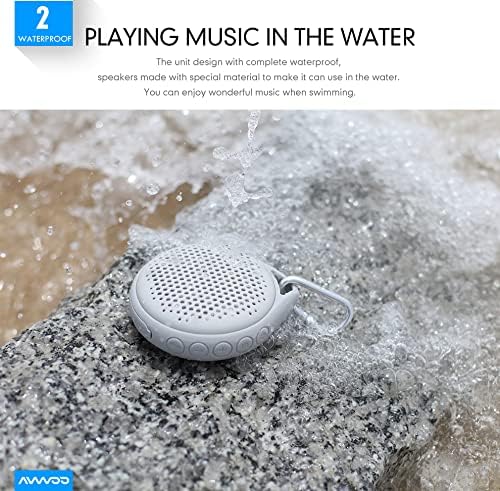
Image: The speaker being used near water, showcasing its waterproof design.

Image: The speaker hanging from a shower rail, ideal for bathroom use.

Image: The speaker attached to a backpack with its carabiner, emphasizing its portability for outdoor use.
Troubleshooting
| Problem | Possible Cause | Solution |
|---|---|---|
| Speaker does not turn on. | Low battery. | Charge the speaker for 3-4 hours. |
| Cannot pair with Bluetooth device. | Bluetooth is off on your device or speaker is not in pairing mode. | Ensure Bluetooth is enabled on your device and the speaker is in pairing mode. Move devices closer. |
| No sound or low volume. | Volume too low on speaker or connected device. | Increase volume on both the speaker and your connected device. |
| Sound distortion. | Volume too high or speaker is too far from the source. | Reduce volume. Ensure speaker is within Bluetooth range (up to 50 feet). |
| LED lights not working. | LED lights are turned off. | Press the LED Switch ON/OFF button to activate or change modes. |
Specifications
| Feature | Detail |
|---|---|
| Model Name | A021-BK |
| Speaker Type | Outdoor |
| Special Feature | Waterproof (IP67) |
| Connectivity Technology | Bluetooth 4.2, USB, AUX |
| Bluetooth Range | Up to 50 feet (15.24 meters) |
| Speaker Maximum Output Power | 5 Watts |
| Battery Capacity | 1000mAh |
| Playtime | Up to 12 hours |
| Control Method | Touch Buttons |
| Product Dimensions | 4 x 4 x 1.6 inches |
| Item Weight | 10.5 ounces |
| Manufacturer | SHENZHEN AVWOO TECHNOLOGY CO., LTD |
Warranty and Support
This AVWOO speaker comes with a limited warranty. For specific warranty terms and conditions, please refer to the warranty card included in your package or contact AVWOO customer support.
For technical support, troubleshooting assistance, or any inquiries regarding your product, please visit the official AVWOO website or contact their customer service team through the contact information provided on the product packaging or their website.
Safety Information
- Do not disassemble, repair, or modify the speaker. This may cause damage, electric shock, or fire.
- Keep the speaker away from extreme temperatures, direct sunlight, and heat sources.
- Do not expose the speaker to open flames.
- Ensure the charging port cover is securely closed when using the speaker near water to maintain its waterproof integrity.
- Use only the provided charging cable or a certified equivalent.
- Keep out of reach of children.