
DAYTON 31EH06
Dayton 31EH06 Control Transformer Instruction Manual
Model: 31EH06 (Item Model Number: G8497815)
1. Introduction
This manual provides essential instructions for the safe installation, operation, and maintenance of the Dayton 31EH06 Control Transformer. Please read this manual thoroughly before installation or use to ensure proper function and to prevent potential hazards.
The Dayton 31EH06 is a single-phase, encapsulated control transformer designed for industrial applications, offering reliable voltage conversion with a 500 VA rating. It features primary and secondary fuse protection and foot-mount installation.
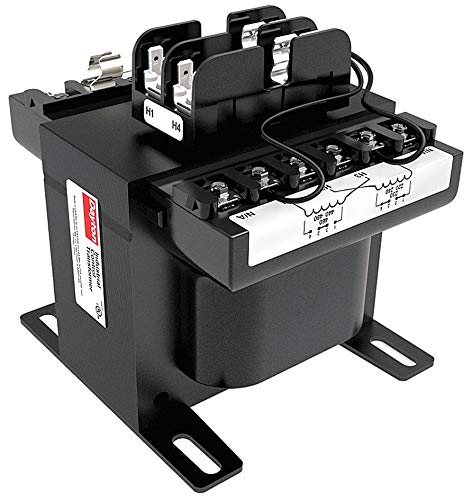
This image displays the Dayton 31EH06 Control Transformer, a black, encapsulated unit with primary and secondary terminals clearly visible on the top surface. The unit features foot-mount brackets for secure installation.
2. Safety Information
WARNING: Electrical shock hazard. Installation and servicing should only be performed by qualified personnel. Disconnect all power before working on the transformer or connected equipment.
- Always follow local and national electrical codes.
- Ensure proper grounding of the transformer.
- Do not operate the transformer in wet or explosive environments.
- Verify input and output voltages match system requirements before energizing.
- The transformer can become hot during operation. Avoid direct contact.
3. Setup and Installation
3.1 Mounting
The Dayton 31EH06 transformer is designed for foot-mount installation. Secure the transformer to a stable, vibration-free surface using appropriate fasteners through the mounting holes on the base brackets. Ensure adequate ventilation around the unit to prevent overheating.
3.2 Wiring Connections
Refer to the wiring diagram on the transformer label and the following instructions for correct connections. Use appropriately sized conductors for the current ratings.
- Primary (Input) Connections: The transformer accepts 240V AC or 480V AC input. Connect the incoming power supply to the designated primary terminals (H1, H2, H3, H4) according to the desired voltage configuration. Ensure proper phasing.
- Secondary (Output) Connections: The transformer provides 120V AC output. Connect the load to the designated secondary terminals (X1, X2).
- Grounding: Connect the transformer's ground terminal to a reliable earth ground.
- Protective Devices: The unit includes primary and secondary fuse protection. Ensure fuses are correctly rated and installed.
Note: Incorrect wiring can damage the transformer and connected equipment, and poses a safety risk. Consult a qualified electrician if unsure.
4. Operating Instructions
Once properly installed and wired, the Dayton 31EH06 Control Transformer operates automatically to convert the input voltage to the specified output voltage. No user interaction is required for its basic function.
- Ensure the input voltage supplied to the primary side matches the transformer's configured input voltage (240V AC or 480V AC).
- Monitor the load connected to the secondary side to ensure it does not exceed the transformer's 500 VA rating. Overloading can lead to overheating and damage.
- The transformer is designed for continuous operation within its specified temperature rise (80°C).
5. Maintenance
The Dayton 31EH06 Control Transformer is designed for minimal maintenance. However, periodic inspection is recommended to ensure optimal performance and longevity.
- Visual Inspection: Regularly check for any signs of physical damage, loose connections, discoloration from overheating, or accumulation of dust and debris.
- Cleaning: If dust or debris accumulates, disconnect power and carefully clean the exterior of the transformer using a dry, soft cloth or compressed air. Do not use liquids.
- Connection Check: Periodically verify that all electrical connections are tight and secure. Loose connections can cause arcing and overheating.
- Fuse Check: If the transformer is not providing output, check the primary and secondary fuses for continuity. Replace blown fuses with those of the correct rating.
Important: Always disconnect power before performing any maintenance or inspection.
6. Troubleshooting
If the transformer is not functioning as expected, perform the following checks:
- No Output Voltage:
- Verify input power is present at the primary terminals.
- Check primary and secondary fuses for continuity. Replace if blown.
- Ensure all wiring connections are secure and correct according to the diagram.
- Incorrect Output Voltage:
- Confirm the input voltage matches the transformer's configured primary voltage.
- Ensure the load is not exceeding the transformer's VA rating.
- Overheating:
- Check for proper ventilation around the transformer.
- Verify the load does not exceed the 500 VA rating.
- Inspect for loose connections.
If problems persist after performing these checks, contact a qualified technician or Dayton customer support.
7. Specifications
| Feature | Specification |
|---|---|
| Brand | DAYTON |
| Model Number | 31EH06 (Item Model Number: G8497815) |
| Input Voltage | 240V AC, 480V AC |
| Output Voltage | 120V AC |
| VA Rating | 500 VA |
| Protective Device | Primary and Secondary Fuse |
| Enclosure Style | Encapsulated |
| Mounting | Foot Mount |
| Phase | 1 |
| Frequency | 50 Hz, 60 Hz |
| Temperature Rise | 80 Degrees C |
| Product Dimensions | 8 x 5 x 6 inches |
| Item Weight | 17 Pounds |
| Certifications | FCC, UL |
8. Warranty and Support
For warranty information and technical support, please refer to the official Dayton product documentation or visit the Dayton website. Keep your purchase receipt for warranty claims.
For further assistance, contact Dayton customer service through their official channels.
Related Documents - 31EH06
 |
Dayton 3W015 4000 Watt Power Plant Wiring Diagram and Parts List Comprehensive technical documentation for the Dayton 3W015 4000 Watt Power Plant, featuring a detailed wiring diagram and an exhaustive parts list with component numbers and descriptions. Includes information on ordering repair parts. |
 |
Dayton 5EAJ3 Dehumidifier: Operating Instructions, Parts Manual, and Troubleshooting Guide Comprehensive operating instructions, parts list, and troubleshooting guide for the Dayton 5EAJ3 Dehumidifier. Learn how to install, operate, maintain, and repair your dehumidifier safely and efficiently. |
 |
Dayton Self-Priming Centrifugal Pumps: Operating Instructions and Parts Manual Comprehensive operating instructions and parts manual for Dayton Self-Priming Centrifugal Pumps, covering models 5GUP0, 5GUP4, 4UA68A, 4UA70A, 4UA72A, 4UA74A, and 4UA75A. Includes specifications, safety, maintenance, troubleshooting, and parts lists. |
 |
Dayton Dehumidifiers 1DGX4, 1DGX5, 1DGX6: Operating Instructions and Parts Manual This manual provides detailed operating instructions, safety guidelines, installation procedures, maintenance tips, troubleshooting advice, and parts lists for Dayton Dehumidifiers models 1DGX4, 1DGX5, and 1DGX6. |
 |
Dayton 61HV94 Commercial/Industrial Wet/Dry Vacuum Operating Instructions & Parts Manual Comprehensive operating instructions and parts manual for the Dayton 61HV94 Wet/Dry Vacuum, designed for commercial and industrial use. Includes safety guidelines, assembly steps, operation procedures, troubleshooting, maintenance, and a detailed parts list for optimal performance and longevity. |
 |
Dayton 3VG79B Portable Forced Air Heater: Operating Instructions and Parts Manual Comprehensive operating instructions, assembly guide, safety information, maintenance procedures, troubleshooting tips, and parts list for the Dayton 3VG79B Portable Forced Air Heater. |
Ask a question about this manual
Ask about setup, troubleshooting, compatibility, parts, safety, or missing instructions. Manuals+ will review the question and use this page’s manual context to help answer it.