
1. Product Overview
This manual provides instructions for the Ninja Reversible Slicer Disc Blade, an accessory designed for use with compatible Ninja food processors and blenders. This disc allows for both slicing and shredding functions, enhancing the versatility of your appliance. It is compatible with models such as BL773CO, BL681A, BL680A, and BL687CO.
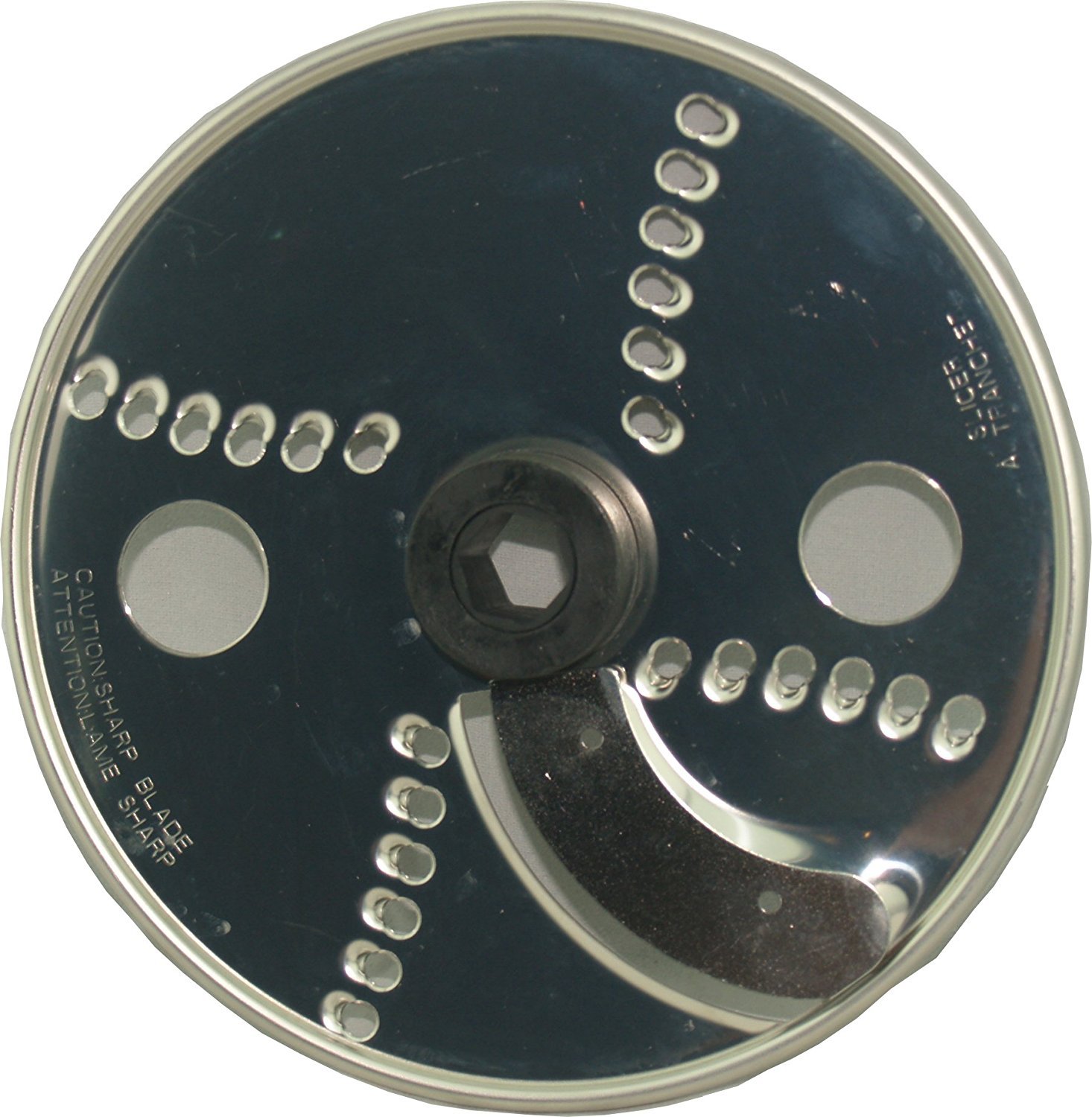
Figure 1: Ninja Reversible Slicer Disc Blade. This image shows the circular disc blade with a central hub and sharp edges, designed for food processing tasks.
2. Important Safety Instructions
Please read and understand all safety warnings before using the slicer disc blade. Failure to follow these instructions may result in injury or damage to the product.
- Sharp Blades: The disc blade has extremely sharp edges. Handle with extreme care to prevent cuts. Always hold the disc by its central hub.
- Appliance Off: Always ensure your Ninja appliance is unplugged and turned off before installing, removing, or cleaning the disc blade.
- Proper Installation: Ensure the disc blade is correctly seated and locked into place before operating the appliance.
- Never Touch Moving Parts: Keep hands, utensils, and other objects away from the moving blade during operation.
- Supervision: Close supervision is necessary when any appliance is used by or near children.
- Intended Use: Use the disc blade only for its intended purpose as described in your appliance's main instruction manual.
3. Setup and Installation
- Unplug Appliance: Ensure your Ninja food processor or blender base is unplugged from the power outlet.
- Assemble Bowl: Place the food processor bowl onto the motor base and twist clockwise until it locks into place.
- Install Disc Stem: Insert the disc stem (if applicable to your model) into the center post of the food processor bowl.
- Place Disc Blade: Carefully place the reversible slicer disc blade onto the disc stem, ensuring it sits securely. The side facing up determines whether it will slice or shred. Refer to your appliance's main manual for specific orientation for slicing vs. shredding.
- Secure Lid: Place the lid onto the food processor bowl and twist clockwise until it locks into place. Ensure the feed chute is properly aligned.
- Ready for Use: Your appliance is now ready for operation.
4. Operating Instructions
Once the slicer disc blade is installed, follow these general steps for operation:
- Prepare Food: Cut food items to fit comfortably into the feed chute. For best results, ensure food is firm and chilled.
- Plug In: Plug the appliance into a power outlet.
- Select Speed: Choose the appropriate speed setting on your Ninja appliance (e.g., "Dough," "Chop," "Blend," or specific processing settings). Refer to your appliance's main manual for recommended speeds for slicing/shredding.
- Feed Food: Turn on the appliance. Slowly and evenly feed food through the feed chute using the food pusher. Never use your fingers or other utensils to push food.
- Monitor Progress: Observe the processed food in the bowl. Stop the appliance once the desired consistency is achieved.
- Turn Off and Unplug: Always turn off the appliance and unplug it before removing the lid or accessing the disc blade.
5. Maintenance and Cleaning
Proper maintenance ensures the longevity and performance of your slicer disc blade.
- Immediate Cleaning: Clean the disc blade immediately after each use to prevent food from drying onto the surfaces.
- Hand Washing: Wash the disc blade by hand using warm, soapy water. Use a brush to safely clean around the sharp edges. Exercise extreme caution due to sharp blades.
- Dishwasher Safe: The disc blade is typically top-rack dishwasher safe. However, hand washing is recommended for best results and to prolong blade sharpness.
- Rinse Thoroughly: Rinse the disc blade thoroughly under running water to remove all soap residue.
- Dry Completely: Dry the disc blade completely before storing to prevent water spots or corrosion.
- Storage: Store the disc blade in a safe place, away from children, preferably within its original packaging or a dedicated storage container to protect the blades.
6. Troubleshooting
- Blade Not Spinning:
- Ensure the food processor bowl and lid are correctly assembled and locked onto the motor base.
- Verify the disc blade is properly seated on the disc stem.
- Check if the appliance is plugged in and powered on.
- Poor Slicing/Shredding Results:
- Ensure food items are firm and cut to an appropriate size for the feed chute.
- Do not overfill the feed chute; feed food slowly and evenly.
- Verify the disc blade is installed with the correct side up for the desired function (slicing or shredding).
- Disc Blade Does Not Fit My Model:
- Double-check your Ninja appliance model number against the compatibility list (BL773CO, BL681A, BL680A, BL687CO).
- Some Ninja models may require specific accessories or different disc types. Consult your appliance's original manual or the Ninja customer support for compatibility verification.
7. Specifications
| Product Dimensions | 6 x 6 x 0.1 inches |
| Item Weight | 3.2 ounces |
| Model Number | 8541987727 |
| ASIN | B072HDTF2X |
| Compatibility | Ninja BL773CO, BL681A, BL680A, BL687CO, and others |
8. Warranty and Support
For information regarding product warranty, please refer to the documentation included with your original Ninja appliance or visit the official Ninja website. For further assistance or support, please contact Ninja customer service directly.
You can often find support resources and contact information on the official Ninja website: www.ninjakitchen.com