
1. Introduction
The K&F Concept Variable ND2-ND400 Slim Frame Filter is designed to provide photographers with flexible control over light exposure. This filter allows for adjustable light reduction from ND2 to ND400, eliminating the need to frequently change filters during various shooting conditions. It is engineered to maintain lens resolution while enabling creative photographic techniques such as long exposure photography.
This filter reduces the amount of light entering the camera lens without affecting color reproduction, making it suitable for capturing fluid motion in waterfalls, creating light trails in night scenes, or minimizing the presence of crowds in busy daytime environments. Constructed with high-quality optical glass and a durable metal frame, it offers superior color reproduction and secure attachment with a slim design to prevent vignetting.

Image 1.1: Top-down view of the K&F Concept 37mm Variable ND Filter.
2. Product Features
- Variable Light Reduction: Adjust light reduction from ND2 (1 stop) to ND400 (8+ stops) by rotating the front ring.
- High Optical Quality: Made with high-quality optical glass for excellent color reproduction and sharpness.
- Slim Frame Design: Features a thin metal frame to minimize vignetting, especially with wide-angle lenses.
- Durable Construction: The metal frame ensures secure attachment and enhanced durability.
- Versatile Applications: Ideal for long exposure photography, controlling depth of field in bright conditions, and video recording.

Image 2.1: Side view of the filter, highlighting the adjustment markings.
3. Setup and Installation
- Identify Lens Thread Size: Check your camera lens for its filter thread size, usually indicated by a ⌀ (diameter) symbol followed by a number (e.g., ⌀37mm). Ensure it matches the 37mm filter size.
- Clean Lens and Filter: Before installation, gently clean both your lens front element and the ND filter surfaces with a microfiber cloth to remove dust or smudges.
- Attach the Filter: Carefully align the filter's threads with the threads on your camera lens. Rotate the filter clockwise until it is securely fastened. Avoid overtightening.
- Remove the Filter: To remove, rotate the filter counter-clockwise until it detaches from the lens.

Image 3.1: The variable ND filter shown in its protective case.
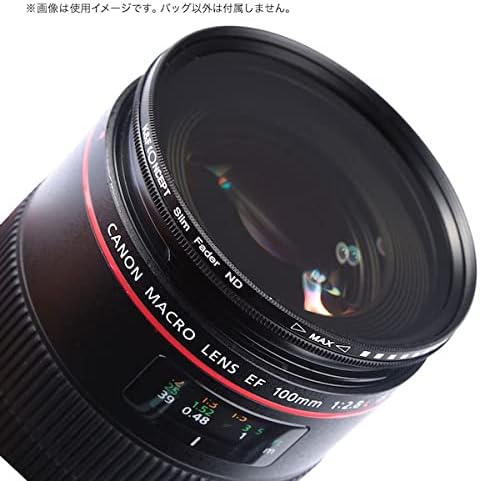
Image 3.2: The variable ND filter securely attached to a camera lens.
4. Operating Instructions
The K&F Concept Variable ND Filter allows you to control the amount of light reaching your camera sensor. This is particularly useful in bright conditions or when you want to achieve specific creative effects.
4.1 Adjusting Light Reduction
- Once the filter is attached to your lens, rotate the front ring of the filter.
- Observe the markings on the filter (e.g., MIN, MAX, or numerical indicators) and the live view or viewfinder of your camera.
- Rotating the ring will gradually increase or decrease the density of the filter, thereby adjusting the amount of light passing through.
- Adjust the filter until you achieve the desired exposure or creative effect.
4.2 Creative Applications
- Long Exposure Photography: In bright daylight, use the higher ND settings (e.g., closer to ND400) to slow down your shutter speed significantly. This allows you to capture motion blur in water, clouds, or moving subjects.
- Wide Aperture in Bright Light: Use the filter to shoot with a wide aperture (e.g., f/1.8, f/2.8) in bright conditions without overexposing the image. This helps achieve a shallow depth of field and pleasing background blur (bokeh).
- Video Recording: Maintain a cinematic shutter speed (typically 1/50th or 1/60th of a second for 24fps or 30fps video) even in bright outdoor settings, preventing overexposure and maintaining natural motion blur.

Image 4.1: Visual representation of varying ND filter strengths from light to dark.
5. Maintenance
- Cleaning: Use a soft, clean microfiber cloth specifically designed for optical surfaces to gently wipe the filter. For stubborn smudges, a small amount of lens cleaning solution can be applied to the cloth (not directly to the filter).
- Storage: When not in use, store the filter in its protective case to prevent dust accumulation and scratches. Keep it in a dry, cool place away from direct sunlight.
- Handling: Always handle the filter by its edges to avoid leaving fingerprints on the glass surface.
6. Troubleshooting
| Problem | Possible Cause | Solution |
|---|---|---|
| Vignetting (dark corners) | Using multiple filters, or using a filter with a thick frame on a wide-angle lens. | Ensure the filter is a slim frame design. Avoid stacking multiple filters, especially with wide-angle lenses. |
| Color Shift/Cross Polarization | Variable ND filters can sometimes exhibit a slight color shift or a 'cross' pattern at their maximum density settings. | Avoid using the filter at its absolute maximum density setting if color accuracy is critical. Adjust the density slightly to mitigate the effect. |
| Filter stuck on lens | Overtightening during installation. | Gently try to unscrew. If persistent, use a rubber filter wrench (not included) for better grip. |
| Dust or smudges on image | Dirty filter surface. | Clean the filter thoroughly using a lens cleaning kit. |
7. Specifications
- Brand: K&F CONCEPT
- Model: KF-NDX37
- Filter Type: Variable Neutral Density (ND)
- Density Range: ND2 to ND400 (1 to 8+ stops)
- Filter Diameter: 37mm
- Material: Optical Glass, Magnesium Alloy Frame
- Coating: No coating
- Frame Design: Slim Frame
- Aspect Ratio Compatibility: 16:9, 3:2
- GTIN: 06936069203936
8. Warranty and Support
This K&F Concept product comes with a one-year warranty from the date of purchase. The warranty covers manufacturing defects and material flaws under normal use. It does not cover damage caused by misuse, accidents, unauthorized modifications, or normal wear and tear.
For warranty claims or technical support, please contact your retailer or visit the official K&F Concept website for customer service information. Please retain your proof of purchase for warranty validation.