1. Important Safety Instructions
Read and save these instructions. To reduce the risk of fire, electric shock, or injury to persons, observe the following:
- Install this range hood in accordance with all local and national electrical codes.
- Always disconnect power at the service panel before servicing or cleaning the unit.
- Use this unit only in the manner intended by the manufacturer. If you have questions, contact the manufacturer.
- Ensure proper ventilation. Do not vent exhaust air into walls, ceilings, attics, crawl spaces, or garages.
- When cutting or drilling into walls or ceilings, do not damage electrical wiring and other hidden utilities.
- Always wear safety glasses and gloves during installation and servicing.
- To reduce the risk of a range top grease fire, never leave surface units unattended at high settings.
- Clean ventilating fans frequently. Grease should not be allowed to accumulate on fan or filter.
- Use appropriate size ducting for optimum airflow.
2. Product Overview
The Broan-NuTone Glacier BCSEK130BL is a 30-inch under-cabinet range hood designed to provide efficient kitchen ventilation. It features a powerful 300 CFM, 2-speed exhaust fan, and integrated LED lighting to illuminate your cooking area. The Captur system enhances smoke and odor removal, while the 4-way convertible design offers flexible installation options. This unit is ENERGY STAR certified, UL-Listed, HVI-2100 Certified, and can be used in ADA-compliant applications.
Key Features:
- Powerful Ventilation: 300 CFM, 2-speed exhaust fan with Captur system for efficient smoke and odor removal.
- Integrated LED Lighting: Bright, single-intensity LED module for clear illumination of the cooktop.
- Versatile Installation: 4-way convertible for ducted (vertical, horizontal, round) or non-ducted (recirculating) setups.
- Easy Maintenance: Dishwasher-safe open mesh grease filters.
- Durable Design: Constructed from alloy steel with mitered sides and a hemmed bottom.
- Certifications: ENERGY STAR, UL-Listed, HVI-2100 Certified, ADA-compliant.
Package Contents:
- Broan-NuTone Glacier BCSEK130BL Range Hood
- Grease Filters
- Mounting Hardware
- Installation Template
- User Manual
- Appliance Parts & Accessories (as included by manufacturer)
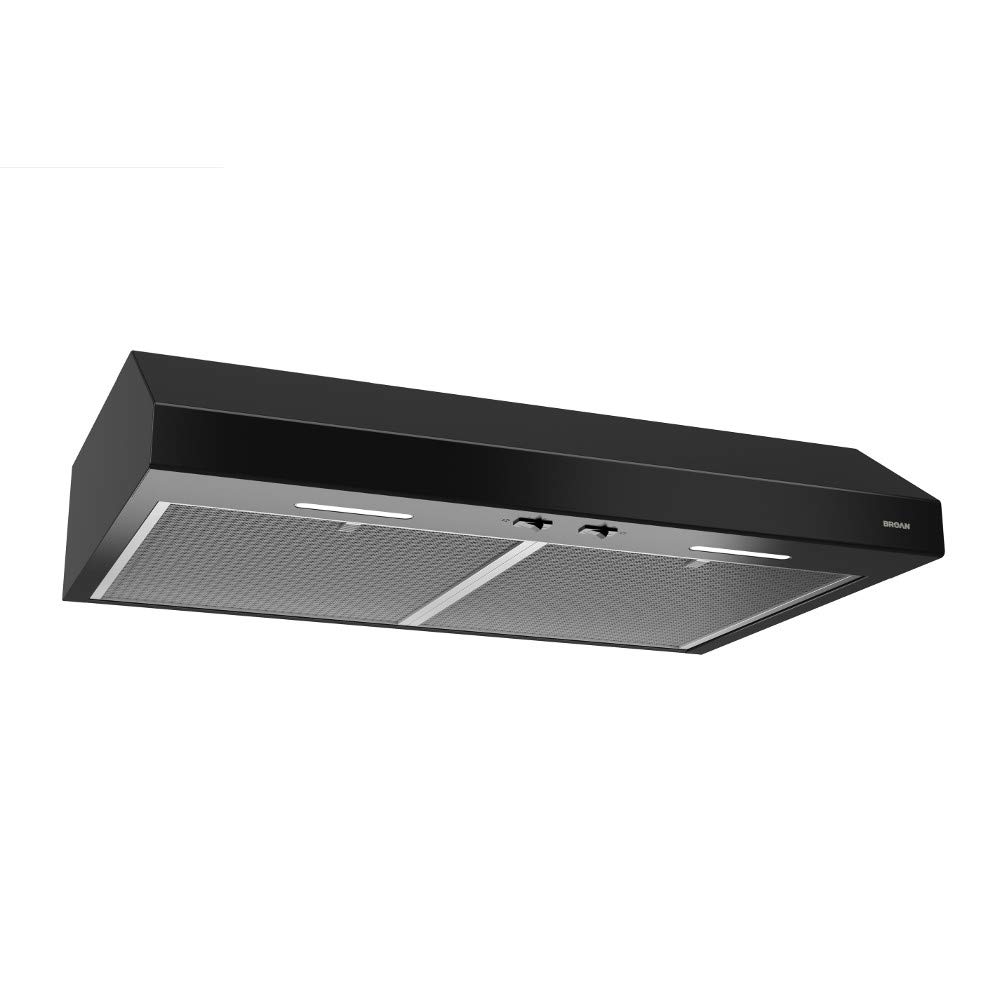
Figure 1: Broan-NuTone Glacier BCSEK130BL 30-inch Under-Cabinet Range Hood, black finish, installed under kitchen cabinets above a stove.
3. Setup and Installation
Proper installation is crucial for the optimal performance and safety of your range hood. Follow these steps carefully.
3.1 Tools Required:
- Measuring Tape
- Phillips Head Screwdriver
- Flat Head Screwdriver
- Drill with 1/8-inch, 7/64-inch, and 3/8-inch drill bits
- 1 1/2-inch Hole Saw
- Jigsaw
- Sheet Metal Shears
- Pliers
- Metal Foil Duct Tape
- Scissors
- Pencil
- Wire Stripper
- Strain Relief
- Safety Glasses and Gloves
3.2 Preparing the Range Hood:
- Remove Grease Filters: Locate and remove the two one-piece open mesh grease filters from the underside of the hood.
- Remove Damper Assembly: Unscrew and remove the damper assembly and the parts bag located inside the hood.
- Remove Wire Cover: Detach the wire cover.
- Remove Duct Plate and Knockout: Remove the round duct plate and the electrical power cable knockout.
- Select Ducting Option: Your range hood supports four ducting options:
- Vertical Ducting (3.25" x 10"): Remove the 3.25" x 10" knockout on top of the hood.
- Horizontal Ducting (3.25" x 10"): Remove the rectangular knockout on the back of the hood.
- Round Vertical Ducting (7"): Remove the round duct knockout on top of the hood. Replace the duct plate and attach the duct pipe to the hood using metal foil duct tape, ensuring an airtight seal.
- Non-Ducted (Recirculating): Remove the three screws holding the recirculation cover plate to the hood. Discard the plate and screws. No other duct knockouts should be removed for non-ducted installation.
3.3 Preparing the Cabinet:
- Mark Center Line: Measure and mark the hood's center line on the bottom of the cabinet.
- Use Template: Line up the included template with the center line on the cabinet. If you have a framed cabinet, fold over the rear edge of the template to match the cabinet frame depth at the wall.
- Drill Pilot Hole for Wiring: Drill a 1/8-inch pilot hole for house wiring at the 'A' location on the template.
- Mark Duct Access Hole: Use a sharp pencil or a 1/8-inch drill bit to mark the points along the duct access hole on the template.
- Remove Template: Remove the template from the cabinet.
- Draw Duct Border: Connect the marked points to draw the border for the exhaust ducting.
- Cut Duct Opening: Drill a 3/8-inch hole at a point along the line to start the jigsaw cut, then carefully cut out the opening with the jigsaw.
3.4 Mounting the Range Hood:
- Install Easy One Brackets: The unit includes four Easy One brackets: two for framed cabinets and two for frameless cabinets. The brackets are engraved to indicate left/right sides. Hold each bracket against the cabinet, ensuring the back of the bracket is against the back wall, then mark three screw holes.
- Drill Pilot Holes for Brackets: Use a 7/64-inch drill bit to drill pilot holes at your pencil marks.
- Secure Brackets: Secure the brackets with the included wood screws.
- Attach Strain Relief: Attach the strain relief to the hood.
- Pull House Power Cable: Pull the house power cable through the strain relief.
- Mount Hood: Simply slide the hood onto the Easy One brackets. The brackets will temporarily hold the hood in place during wiring and duct finishing. For rear ducting or electrical, use the rear Easy One slots.
- Secure Hood: Secure the hood to the brackets through the front recessed holes on top of the hood with the four included screws.
3.5 Electrical Connection:
- Connect Wiring: Connect the house power cable to the range hood wiring by connecting black to black, white to white, and the green or bare wire under the green ground screw.
- Replace Wire Cover: Replace the wiring cover and attach it to the hood with the retaining screw.
Video 1: Detailed installation guide for the Broan-NuTone Glacier Range Hood, demonstrating preparation, mounting, and electrical connections.
4. Operating Instructions
Your Broan-NuTone Glacier range hood is designed for ease of use with simple controls for ventilation and lighting.
4.1 Fan Operation:
- The range hood features a 2-speed rocker switch for fan control.
- Press the switch to select between low and high fan speeds to adjust ventilation as needed for cooking.
- Press again to turn the fan off.
4.2 Lighting Operation:
- The integrated LED module is controlled by a separate rocker switch.
- Press the switch to turn the light on to a single intensity.
- Press again to turn the light off.
Figure 2: Front view of the range hood, highlighting the rocker switches for fan speed and LED light control.
5. Maintenance
Regular maintenance ensures the longevity and efficient performance of your range hood.
5.1 Cleaning Grease Filters:
- The two one-piece open mesh grease filters are dishwasher-safe.
- To remove, pull down on the tab and slide the filter out.
- Clean filters regularly to maintain optimum grease capture and airflow.
- Allow filters to dry completely before re-installing.

Figure 3: Underside of the range hood, showing the removable mesh grease filters and integrated LED lights.
5.2 Replacing Non-Ducted Filters (if applicable):
- If your unit is installed in a non-ducted (recirculating) configuration, you will need to purchase non-ducted charcoal filters separately.
- Refer to the instructions provided with the replacement filters for proper installation.
- Replace these filters periodically as recommended by the filter manufacturer to ensure effective odor removal.
5.3 General Cleaning:
- Clean the exterior surfaces of the range hood with a soft cloth and mild detergent.
- Avoid abrasive cleaners or scouring pads, as these can scratch the finish.
- Ensure the unit is disconnected from power before cleaning.
6. Troubleshooting
If you experience issues with your Broan-NuTone Glacier range hood, consult the following common troubleshooting steps. For more detailed information, refer to the full instruction manual or contact customer service.
| Problem | Possible Cause | Solution |
|---|---|---|
| Fan does not operate. | No power to the unit; fan switch is off; wiring issue. | Check circuit breaker/fuse. Ensure fan switch is in the ON position. Verify electrical connections. |
| Light does not turn on. | Light switch is off; LED module failure; wiring issue. | Ensure light switch is in the ON position. If LED module is faulty, contact customer service for replacement. Verify electrical connections. |
| Poor ventilation/air movement. | Clogged grease filters; obstructed ducting; incorrect ducting size; fan speed too low. | Clean or replace grease filters. Check ducting for obstructions or kinks. Ensure correct duct size is used. Increase fan speed. |
| Excessive noise during operation. | Loose components; fan imbalance; foreign object in fan; incorrect installation. | Check for and tighten any loose screws. Inspect fan for debris. Ensure proper installation and secure mounting. |
7. Specifications
| Feature | Detail |
|---|---|
| Model Number | BCSEK130BL |
| Brand | Broan-NuTone |
| Dimensions (D x W x H) | 19.63 x 30 x 6 inches |
| Item Weight | 17.4 Pounds |
| Air Flow Capacity | 300 Cubic Feet Per Minute (CFM) |
| Noise Level | 1.5 Sones |
| Number of Speeds | 2 |
| Voltage | 120 Volts |
| Light Source Type | LED |
| Filter Type | Mesh (Dishwasher-safe) |
| Material | Alloy Steel |
| Mounting Type | Under Cabinet Mount |
| Control Type | Rocker |
| Ventilation Type | 4-Way Convertible (Ducted/Non-Ducted) |
| Certifications | ENERGY STAR Certified, UL-Listed, HVI-2100 Certified, ADA Compliant |
8. Warranty Information
This Broan-NuTone Glacier range hood is covered by the following limited warranties:
- Product Warranty: 1-year limited warranty on the entire unit.
- LED Module Warranty: 3-year limited warranty specifically on the LED module.
For full details regarding warranty coverage, terms, and conditions, please refer to the official warranty document included with your product or visit the Broan-NuTone website.
9. Customer Support
If you require assistance with installation, operation, maintenance, or troubleshooting that is not covered in this manual, please contact Broan-NuTone customer service.
For contact information and additional resources, please visit the official Broan-NuTone website or refer to the contact details provided in your product packaging.


