
VXDAS EL-50448 OEC-T5
VXDAS TPMS Relearn Tool User Manual
Model: EL-50448 OEC-T5
Introduction
The VXDAS EL-50448 OEC-T5 TPMS Relearn Tool is designed to activate and relearn Tire Pressure Monitoring System (TPMS) sensors in most GM vehicles manufactured between 2006 and 2023. This tool is essential for resetting TPMS alarms after tire rotations, sensor replacements, or tire changes, ensuring accurate tire pressure readings for optimal vehicle safety and performance.
What's in the Box
- TPMS Reset Tool EL-50448
Specifications
| Feature | Detail |
|---|---|
| Manufacturer | VXDAS |
| Item Weight | 2.08 ounces |
| Product Dimensions | 1.57 x 6.38 x 2.68 inches |
| Country of Origin | China |
| Item Model Number | VXDAS (EL-50448) |
| OEM Part Number | EL50448 |
| Voltage | 12 Volts |
| First Available | May 5, 2017 |
Setup
The VXDAS EL-50448 OEC-T5 tool requires a 9V battery for operation (not included). Ensure the battery is in good condition for optimal performance.
- Locate the battery compartment on the back of the tool.
- Open the battery cover.
- Insert a fresh 9V battery, ensuring correct polarity. Make sure to hold the battery firmly in place to ensure proper functionality.
- Close the battery cover securely.
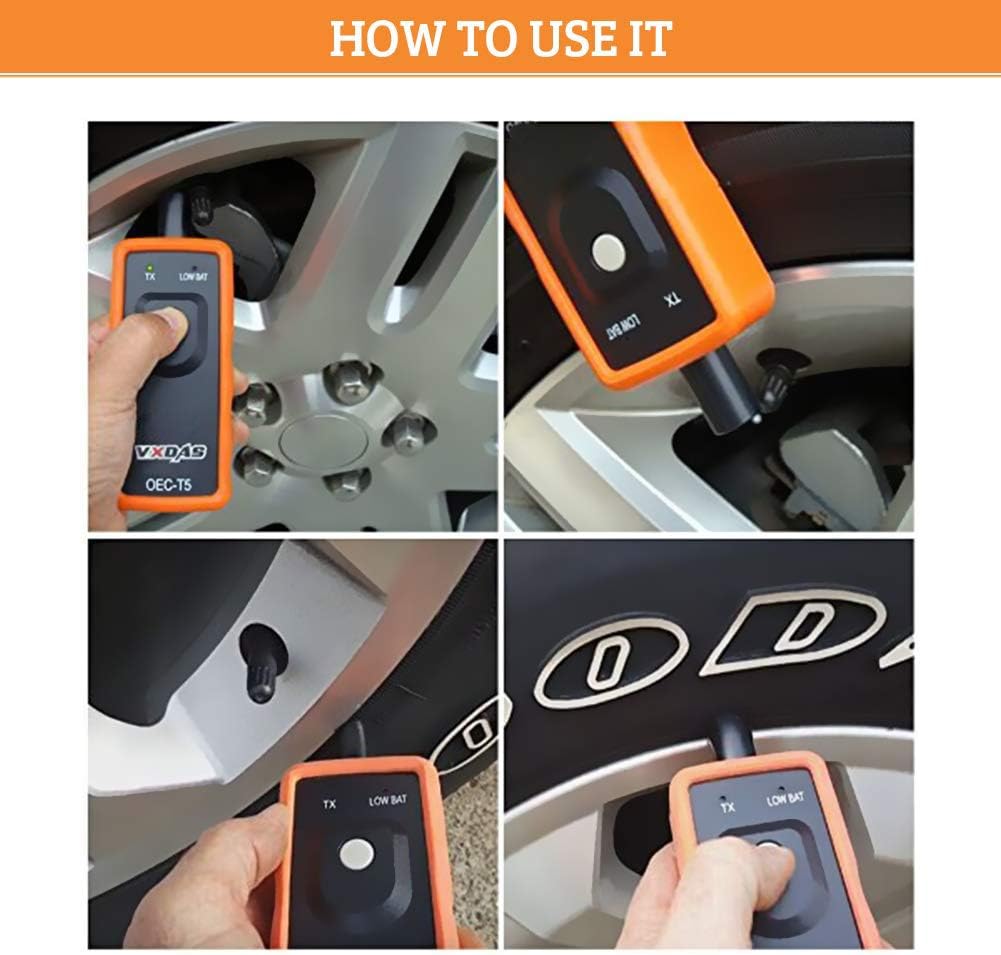
Operating Instructions: TPMS Relearn Procedure
This procedure is used to activate individual TPMS sensors and link them to your vehicle's system after tire rotations, sensor replacements, or tire changes. Perform this procedure outdoors for best results.
Step-by-Step Relearn Guide:
- Prepare the Vehicle: Ensure your vehicle is in the TPMS Learn Mode. This process varies by vehicle model, but typically involves setting the gearshift to "P" (Parking Mode) and putting the ignition switch to "ON". The vehicle's horn may beep twice to confirm entry into learn mode.
- Activate Sensors in Sequence: The relearn process starts from the front left tire.
- Hold the VXDAS EL-50448 tool against the sidewall of the tire, near the valve stem.
- Depress the "Learn" button on the tool while holding it against the tire sidewall.
- The tool's green "TX" LED will indicate it is transmitting.
- Once the vehicle's horn chirps or flashes, it indicates successful activation for that tire.
- Follow the Order: After the front left tire, proceed to the other tires in the following order:
- Front Right (Passenger Front)
- Rear Right (Passenger Rear)
- Rear Left (Driver Rear)
- Complete Relearn: After all sensors are reset, the vehicle's horn will typically chirp twice, signifying that the TPMS relearn procedure is finished.

Important Usage Tips:
- Position the antenna correctly when using the TPMS relearn tool.
- Expect occasional horn or flashing feedback after tire activation.
- This TPMS tool is a reset tool, not a sensor reprogramming device.
- Use original OEM sensors that are well-programmed for seamless operation.
Official Product Videos:
Video: Real shot How to use VXDAS EL-50448 to reset tire pressure
Description: A detailed demonstration of using the VXDAS EL-50448 tool to reset tire pressure sensors, showing the process on a vehicle.
Video: VXDAS TPMS Relearn Tool for GM & Ford
Description: An overview of the VXDAS TPMS Relearn Tool, highlighting its features and compatibility with GM and Ford vehicles.
Compatibility
The VXDAS EL-50448 OEC-T5 tool is specifically designed to work with most GM vehicles from 2006-2023 (Chevy, Buick, GMC, Opel, Cadillac, and more) equipped with 315/433 MHz TPMS sensors. It is not suitable for heavy trucks with more than 4 tires or vehicles with an external TPMS system.

Maintenance
To ensure the longevity and optimal performance of your VXDAS TPMS Relearn Tool, follow these maintenance guidelines:
- Keep the tool dry and in a cool place.
- Do not expose the product to fire, as it may cause an explosion.
- Replace the 9V battery when the "LOWBAT" indicator light illuminates.
- Clean the tool with a soft, dry cloth. Avoid using harsh chemicals or abrasive materials.
Troubleshooting
If you encounter issues while using the VXDAS EL-50448 OEC-T5 tool, consider the following common solutions:
- Tool Not Activating: Ensure the 9V battery is properly installed and has sufficient charge. The "LOWBAT" light will indicate a low battery.
- Sensor Not Responding: Verify that the vehicle is correctly in TPMS Learn Mode. Ensure the tool's antenna is positioned precisely against the tire sidewall near the valve stem. Sometimes slight adjustments to the tool's position are needed.
- No Horn Beep: If the horn does not beep after activating a sensor, it may indicate the sensor was not successfully read or the vehicle did not register it. Re-attempt the activation for that tire.
For more detailed troubleshooting steps, please refer to the official Troubleshooting Guide (PDF).
Warranty & Support
VXDAS products are designed for precision and durability. For any warranty claims, technical support, or further inquiries, please visit the official VXDAS website or contact their customer service directly. Refer to the product packaging or the official VXDAS website for specific contact information and warranty details.
Related documentsEL-50448 OEC-T5


Ask a question about this manual
Ask about setup, troubleshooting, compatibility, parts, safety, or missing instructions. Manuals+ will review the question and use this page’s manual context to help answer it.