
Naxa NAS-3082
Contents
Naxa Electronics NAS-3082 Vibe 3 Bluetooth Speaker and MP3 Player User Manual
Model: NAS-3082 | Brand: Naxa
1. Introduction
Thank you for purchasing the Naxa Electronics NAS-3082 Vibe 3 Bluetooth Speaker and MP3 Player. This portable audio device combines powerful stereo sound with vibrant multicolor LED lighting effects, offering a dynamic listening experience. It supports wireless audio streaming via Bluetooth and can play MP3 files directly from USB drives or microSD cards. Additionally, it features a built-in microphone for hands-free speakerphone functionality. This manual provides detailed instructions on setting up, operating, and maintaining your Vibe 3 speaker.

Figure 1.1: Front view of the Naxa Vibe 3 Bluetooth Speaker showcasing its multicolor LED lighting.
2. Package Contents
Please ensure all items are present in the package before proceeding:
- Naxa Vibe 3 Bluetooth Speaker (NAS-3082)
- USB Charging Cable
- User Manual
3. Product Features
The Naxa Vibe 3 Bluetooth Speaker offers a range of features designed for enhanced audio enjoyment:
- Multicolor LED lighting effects for visual ambiance.
- Stereo speakers delivering 6W RMS for clear and powerful sound.
- Wireless music streaming from Bluetooth-enabled smartphones, tablets, or laptops.
- Direct MP3 playback from USB flash drives or microSD cards.
- Integrated speakerphone function for hands-free calls when connected to a smartphone.
4. Controls and Ports
Familiarize yourself with the control buttons and connection ports on your Vibe 3 speaker:
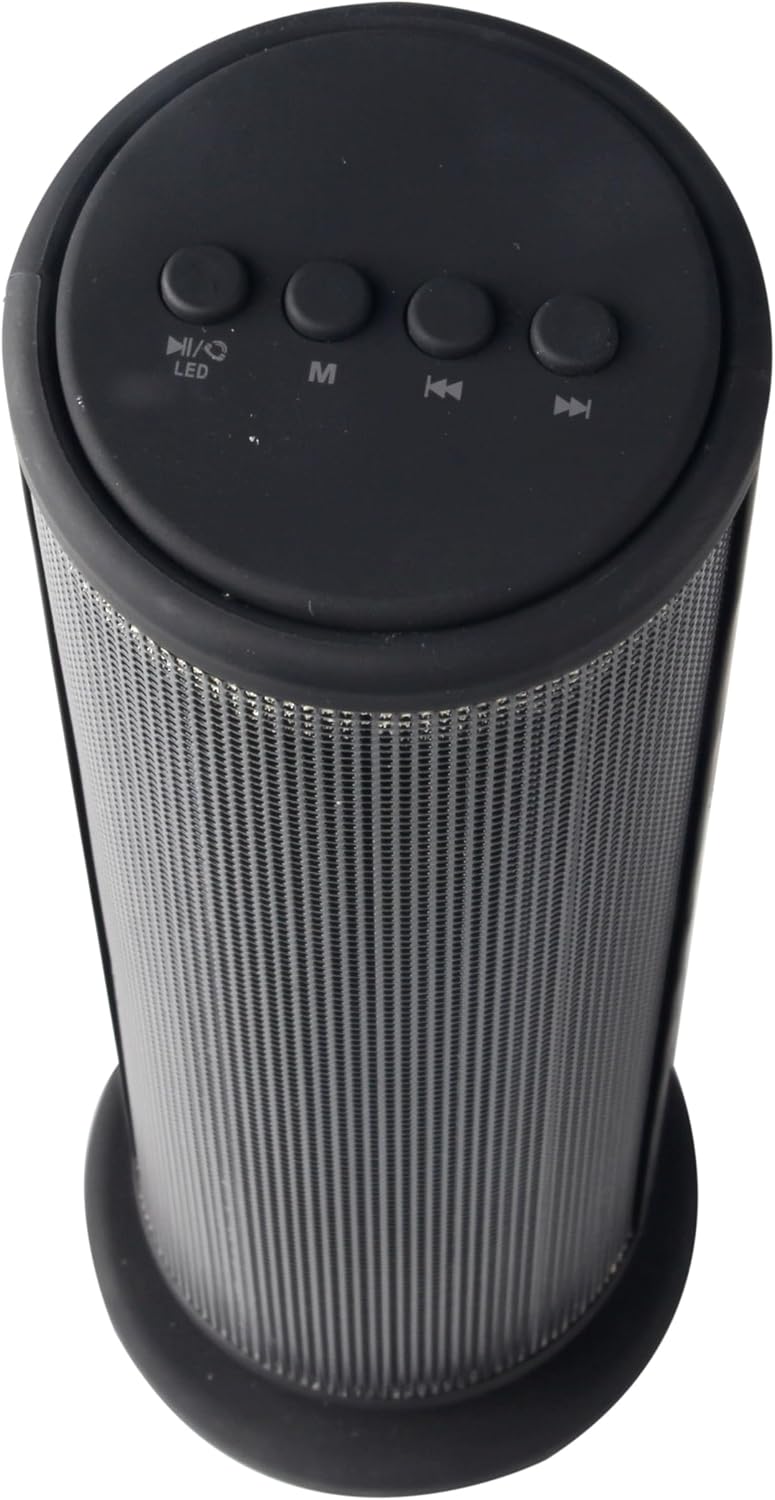
Figure 4.1: Top panel controls including Power/LED, Mode, Previous Track, and Next Track buttons.
- Power/LED Button: Press and hold to power on/off. Short press to cycle through LED light modes or turn off lights.
- Mode (M) Button: Short press to switch between Bluetooth, USB, and microSD modes.
- Previous Track/Volume Down Button: Short press for previous track. Press and hold to decrease volume.
- Next Track/Volume Up Button: Short press for next track. Press and hold to increase volume.

Figure 4.2: Rear panel ports including Micro USB charging port, USB-A port, and microSD card slot.
- Micro USB Charging Port: Connect the provided USB cable for charging.
- USB-A Port: Insert a USB flash drive for MP3 playback.
- MicroSD Card Slot: Insert a microSD card for MP3 playback.
- AUX-in Port: Connect external audio devices using a 3.5mm audio cable (not included).
5. Setup
5.1 Charging the Speaker
Before first use, fully charge the speaker.
- Connect the small end of the provided USB charging cable to the Micro USB Charging Port on the speaker.
- Connect the large end of the USB cable to a USB power adapter (e.g., smartphone charger, computer USB port) or a 5V USB wall charger.
- The charging indicator light will illuminate during charging and turn off once fully charged.
- A full charge typically takes approximately 2-3 hours.
5.2 Power On/Off
- To Power On: Press and hold the Power/LED button for a few seconds until you hear an audible prompt and the LED lights illuminate.
- To Power Off: Press and hold the Power/LED button again for a few seconds until you hear an audible prompt and the LED lights turn off.
6. Operating Instructions
6.1 Bluetooth Pairing
Pair your Vibe 3 speaker with a Bluetooth-enabled device to stream audio wirelessly.
- Ensure the speaker is powered on and in Bluetooth mode. If not, short press the Mode (M) button until you hear the "Bluetooth mode" prompt. The LED lights will flash, indicating it's ready for pairing.
- On your smartphone, tablet, or other Bluetooth device, enable Bluetooth and search for available devices.
- Select "NAS-3082" from the list of found devices.
- Once successfully paired, you will hear a confirmation sound, and the LED lights will stop flashing and display a steady pattern.
- You can now play audio from your device through the Vibe 3 speaker.
6.2 Playing from USB/MicroSD
The speaker can play MP3 audio files directly from a USB flash drive or a microSD card.
- Insert a USB flash drive into the USB-A port or a microSD card into the microSD card slot.
- The speaker will automatically switch to the corresponding mode (USB or TF/SD card) and begin playing MP3 files. If it doesn't switch automatically, short press the Mode (M) button to select the correct input.
- Use the Previous Track/Volume Down and Next Track/Volume Up buttons to navigate tracks.
- Press and hold the Previous Track/Volume Down or Next Track/Volume Up buttons to adjust the volume.
6.3 Speakerphone Function
When connected to a smartphone via Bluetooth, the Vibe 3 speaker can be used for hands-free calls.
- Answering a Call: Short press the Power/LED button to answer an incoming call.
- Ending a Call: Short press the Power/LED button again to end an active call.
- Rejecting a Call: Press and hold the Power/LED button to reject an incoming call.
6.4 LED Light Control
The Vibe 3 speaker features dynamic multicolor LED lighting.
- Short press the Power/LED button to cycle through different LED light patterns and modes.
- Continue pressing the Power/LED button to turn the LED lights off.
7. Maintenance
To ensure the longevity and optimal performance of your Naxa Vibe 3 speaker, follow these maintenance guidelines:
- Cleaning: Use a soft, dry cloth to wipe the exterior of the speaker. Do not use liquid cleaners or abrasive materials, as they may damage the finish or internal components.
- Storage: When not in use for extended periods, store the speaker in a cool, dry place away from direct sunlight and extreme temperatures.
- Battery Care: To preserve battery life, avoid fully discharging the battery frequently. Recharge the speaker regularly, even if not in constant use.
- Water Exposure: This speaker is not waterproof. Avoid exposing it to water, rain, or excessive moisture.
8. Troubleshooting
If you encounter issues with your Vibe 3 speaker, refer to the following common problems and solutions:
| Problem | Possible Cause | Solution |
|---|---|---|
| Speaker does not power on. | Battery is low or depleted. | Charge the speaker fully using the provided USB cable. |
| Cannot pair via Bluetooth. | Speaker is not in pairing mode; Bluetooth is off on device; device is too far. | Ensure speaker is in Bluetooth mode (flashing LED). Turn Bluetooth on your device. Move device closer to speaker (within 33 ft/10m). |
| No sound from speaker. | Volume is too low; incorrect mode selected; audio source issue. | Increase speaker and device volume. Press Mode (M) button to select correct input (Bluetooth, USB, microSD). Check audio playback on your source device. |
| MP3s not playing from USB/microSD. | Incorrect file format; corrupted files; drive/card not inserted correctly. | Ensure files are in MP3 format. Try a different USB drive or microSD card. Reinsert the drive/card firmly. |
9. Specifications
Detailed technical specifications for the Naxa Vibe 3 Bluetooth Speaker:

Figure 9.1: Visual representation of the Naxa Vibe 3 speaker alongside its key specifications.
| Feature | Detail |
|---|---|
| Model Name | VIBE 3 (NAS-3082) |
| Speaker Type | Subwoofer (Stereo) |
| Speaker Output Power | 6W RMS |
| Connectivity Technology | Bluetooth, USB |
| Wireless Communication | Bluetooth |
| Audio Output Mode | Stereo |
| Power Source | Built-in rechargeable battery (1200 mAh), USB charge |
| Battery Life (Play Time) | Up to 1.5 hours |
| Battery Life (Talk Time) | Up to 4 hours |
| Compatible Devices | Laptop, Tablet, Smartphone |
| MP3 Player Included | Yes (USB, microSD) |
| Special Feature | LED Light |
| Material | Plastic, Metal, Rubber/Silicone |
| Product Dimensions | 3.5 x 3.5 x 10.8 inches |
| Item Weight | 0.01 Ounces |
10. Warranty and Support
Naxa Electronics products are designed for reliability and performance. For information regarding warranty coverage, technical support, or service inquiries, please refer to the warranty card included with your product or visit the official Naxa Electronics website.
Online Support: www.naxa.com/support
Documents and downloads
Ask a question about this manual
Ask about setup, troubleshooting, compatibility, parts, safety, or missing instructions. Manuals+ will review the question and use this page’s manual context to help answer it.