
HomeSpot BTADP-236 V5
HomeSpot Bluetooth Audio Receiver User Manual
Model: BTADP-236 V5
Introduction
The HomeSpot Bluetooth Audio Receiver is designed to enable any non-Bluetooth audio speaker system, Hi-Fi, or amplifier with Bluetooth 4.2 audio streaming technology. This device allows you to wirelessly stream music from your smartphone, tablet, or other Bluetooth-enabled devices to your home audio system, providing superb wireless convenience without sacrificing audio quality. It supports advanced audio codecs including AAC, SBC, aptX, and aptX-LL for superior acoustics and low latency.

Image: Top view of the HomeSpot Bluetooth Audio Receiver, showcasing its compact design.
Package Contents
Verify that all items are present in the package:
- HomeSpot Bluetooth Audio Receiver
- Power Adapter (UL Charger)
- 3.5mm Audio Cable
- 3.5mm to RCA Cable
- Micro USB Charging Cable
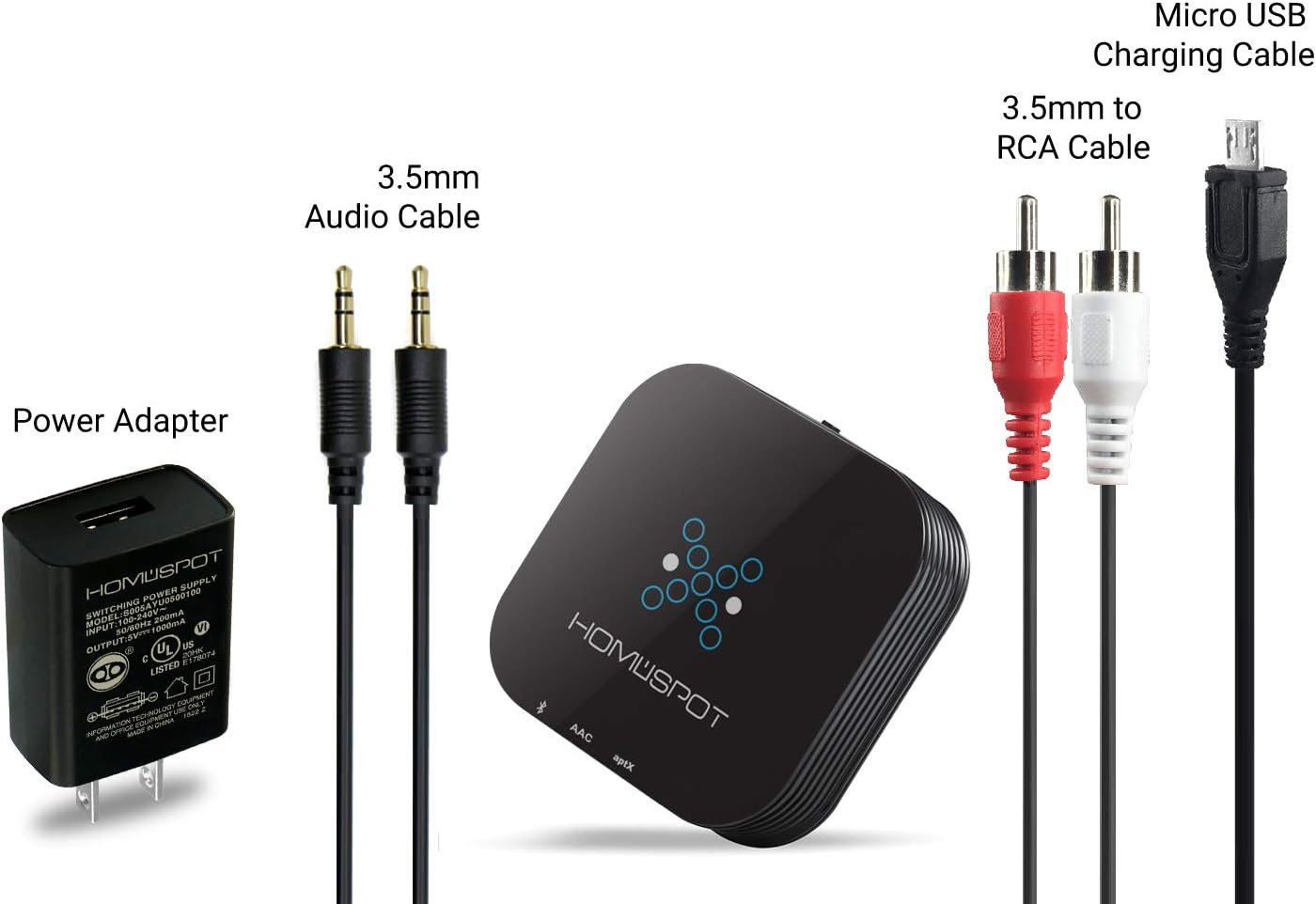
Image: All components included in the HomeSpot Bluetooth Audio Receiver package: the receiver unit, power adapter, 3.5mm audio cable, 3.5mm to RCA cable, and micro USB charging cable.
Product Overview
Familiarize yourself with the various ports and indicators on the HomeSpot Bluetooth Audio Receiver.

Image: Side view of the HomeSpot Bluetooth Audio Receiver, highlighting the AUX OUT port and the 5V DC IN (Micro USB) port.

Image: The HomeSpot Bluetooth Audio Receiver displaying its indicator lights: Blue for SBC/Pairing, Green for AAC, and Yellow for AptX/AptX Low Latency.
- AUX OUT: 3.5mm audio output jack for connecting to your audio system.
- 5V DC IN: Micro USB port for power supply.
- SBC/Pairing Indicator (Blue): Indicates standard Bluetooth codec or pairing mode.
- AAC Indicator (Green): Indicates AAC codec is active.
- AptX/AptX Low Latency Indicator (Yellow): Indicates aptX or aptX-LL codec is active.
Setup and Connection
Follow these steps to set up your HomeSpot Bluetooth Audio Receiver and connect it to your audio system.
- Power On: Connect the HomeSpot Bluetooth Audio Receiver to a power source using the supplied Micro USB Charging Cable and Power Adapter. The receiver will automatically enter pairing mode.
- Connect to Audio System:
- For audio systems with a 3.5mm auxiliary input, use the provided 3.5mm Audio Cable to connect the receiver's AUX OUT to your system's input.
- For audio systems with RCA inputs, use the provided 3.5mm to RCA Cable to connect the receiver's AUX OUT to your system's RCA inputs.

Image: The HomeSpot Bluetooth Audio Receiver connected to an A/V receiver's analog input using a 3.5mm to RCA cable.

Image: Diagram illustrating how the HomeSpot Bluetooth Audio Receiver can connect to different audio systems like amplifiers, boomboxes, and stereo speakers from mobile devices.
- Pair with Your Device:
- On your smartphone, tablet, or other Bluetooth-enabled device, go to the Bluetooth settings.
- Turn on Bluetooth and search for available devices.
- Select "GT-BT-Receiver" from the list to pair and connect.

Image: The HomeSpot Bluetooth Audio Receiver shown pairing simultaneously with an iPhone and a Samsung Android phone.
- Start Streaming: Once paired, you can now play music from your device, and the audio will be streamed wirelessly to your connected audio system.
Operating Instructions
Audio Codec Support
The HomeSpot Bluetooth Receiver supports multiple advanced audio codecs to ensure high-quality sound:
- SBC: Standard Bluetooth codec.
- AAC: Advanced Audio Coding, commonly used by Apple devices.
- aptX: High-quality audio codec for CD-like sound.
- aptX Low Latency (aptX-LL): Designed to minimize audio delay, ideal for video and gaming. For aptX-LL to function, both the transmitting device and the receiver must support it.
Extended Wireless Range
The receiver features special circuitry and a precision-tuned built-in antenna, extending the wireless range up to 30 meters (approximately 100 feet), offering greater flexibility in placement compared to other Bluetooth receivers.
True Wireless Connections (TWS)
Two HomeSpot Bluetooth Receivers can be connected to each other for True Wireless Stereo (TWS) connections, enabling synchronized audio playback across two separate speaker systems.

Image: Two HomeSpot Bluetooth Audio Receivers connected wirelessly to each other, providing a True Wireless Stereo setup with separate speakers.
Connecting with HomeSpot Bluetooth Transmitter (for aptX-LL)
To achieve the lowest latency audio/visual experience, pair the HomeSpot Bluetooth Audio Receiver with a HomeSpot Bluetooth Transmitter that also supports aptX Low Latency. This setup is ideal for watching videos without noticeable lip-sync delay.

Image: A HomeSpot Bluetooth Audio Receiver receiving audio wirelessly from a HomeSpot Bluetooth Transmitter, which is connected to a TV. The receiver then outputs audio to wired headphones, earbuds, or a home audio system.
Maintenance
To ensure the longevity and optimal performance of your HomeSpot Bluetooth Audio Receiver, follow these maintenance guidelines:
- Cleaning: Use a soft, dry cloth to clean the surface of the device. Avoid using liquid cleaners or abrasive materials.
- Storage: Store the device in a cool, dry place away from direct sunlight and extreme temperatures.
- Handling: Handle the device with care. Avoid dropping it or subjecting it to strong impacts.
- Power Supply: Always use the original power adapter or a certified 5V DC power supply to prevent damage.
Troubleshooting
| Problem | Possible Cause | Solution |
|---|---|---|
| No power/Device not turning on. | Power adapter not connected or faulty. | Ensure the power adapter is securely connected to the receiver and a working power outlet. Try a different USB port or power adapter if available. |
| Cannot pair with Bluetooth device. | Receiver not in pairing mode; Bluetooth on source device is off or already connected to another device; receiver too far from source. | Ensure the receiver is powered on and the blue indicator light is blinking (pairing mode). Turn off and on Bluetooth on your source device. Move the source device closer to the receiver. Disconnect from other Bluetooth devices. |
| No sound or low sound output. | Cables not connected properly; incorrect input selected on audio system; volume too low. | Check all audio cable connections (3.5mm or RCA) between the receiver and your audio system. Ensure your audio system is set to the correct input source. Increase volume on both the source device and the audio system. |
| Audio cutting out or distorted. | Interference; device too far from receiver; low battery on source device. | Move the source device closer to the receiver. Avoid placing the receiver near other wireless devices (Wi-Fi routers, microwaves). Charge your source device. |
| Lip-sync delay when watching videos. | aptX Low Latency not active. | Ensure both your transmitting device (e.g., HomeSpot Bluetooth Transmitter) and the receiver support and are actively using the aptX Low Latency codec (yellow indicator light). |
Specifications
| Feature | Detail |
|---|---|
| Model Number | BTADP-236 V5 |
| Brand | HomeSpot |
| Connectivity Technology | Bluetooth 4.2 |
| Supported Audio Codecs | AAC, SBC, aptX, aptX-LL |
| Wireless Range | Up to 30 meters (100 feet) |
| Audio Output Mode | Stereo (2.0 Channel) |
| Connector Type | 3.5mm Jack, RCA, Micro USB (for power) |
| Compatible Devices | Smartphones, Tablets, Laptops, and any Bluetooth-enabled audio source. |
| Item Weight | 4.8 ounces |
| Package Dimensions | 4.8 x 4.72 x 1.34 inches |
| Output Power | 9 Watts |
Warranty and Support
HomeSpot products are designed for reliability and performance. For warranty information and technical support, please visit the official HomeSpot website or contact their customer service.
HomeSpot Store: Visit the HomeSpot Store on Amazon
For further assistance, refer to the contact information provided with your product packaging or on the HomeSpot official website.