1. Introduction
The Minolta MN35Z-BK Bridge Camera is designed to capture high-quality 20-megapixel still images and record 1080p HD video. Featuring a powerful 35x optical zoom lens with optical stabilization, built-in Wi-Fi, a large 3.0-inch LCD, and 27 intelligent scene modes, this camera makes capturing perfect long-zoom shots effortless. It is an ideal choice for users seeking versatility and ease of use in a digital camera.
2. What's in the Box
Upon opening your Minolta MN35Z-BK package, please ensure all the following items are present:
- Minolta MN35Z-BK Digital Camera
- 8GB SD Card
- Camera Pouch
- Instruction Manual (this document)
- Warranty Information
3. Product Overview
The Minolta MN35Z-BK camera combines advanced features with user-friendly design. Key components include the high-resolution lens, large LCD display, and intuitive controls.
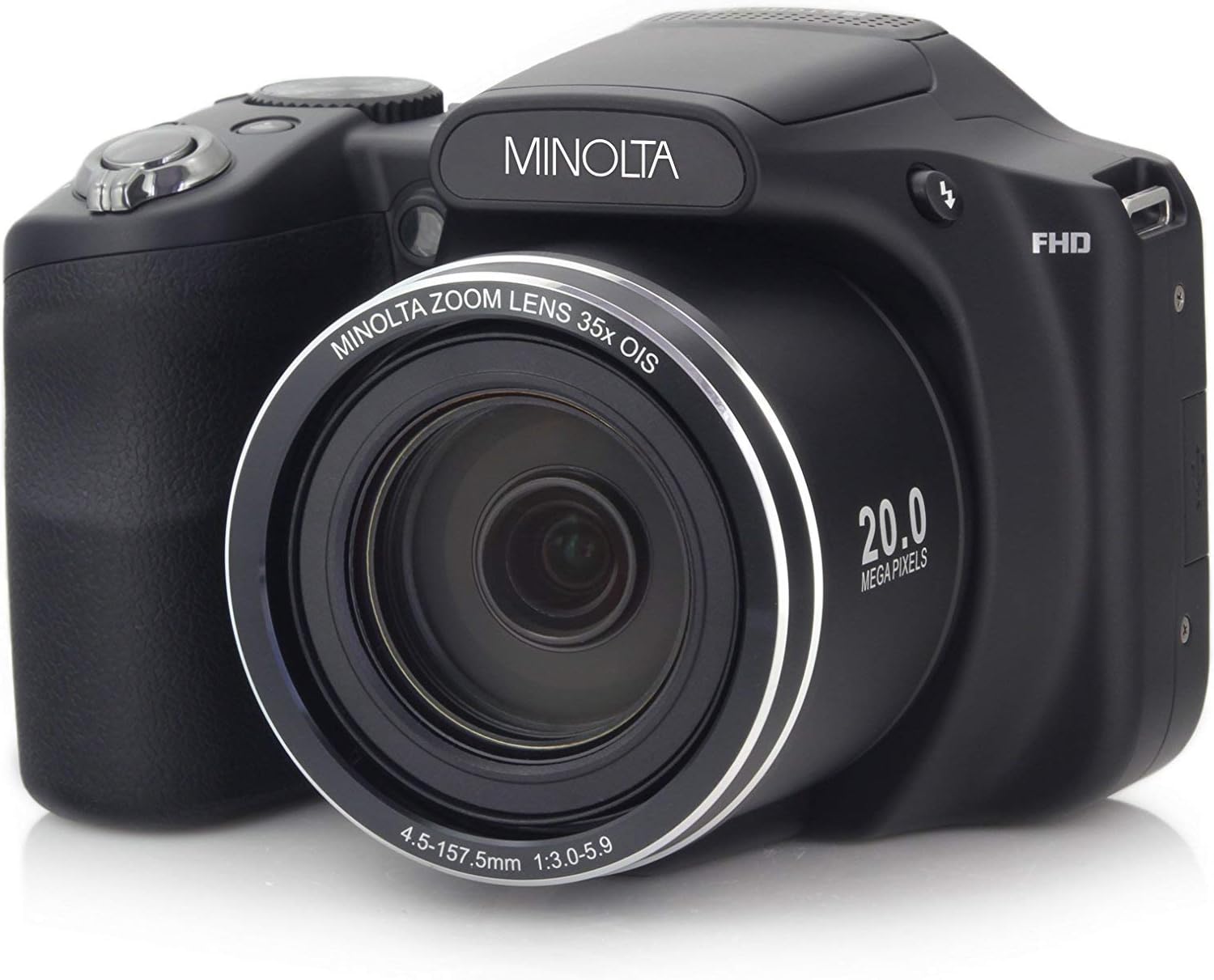
Figure 3.1: Front view of the Minolta MN35Z-BK Digital Camera, showcasing the 35x optical zoom lens and 20.0 Megapixels branding.

Figure 3.2: Rear view of the Minolta MN35Z-BK Digital Camera, highlighting the 3.0-inch LCD screen and control buttons.
Key Features:
- 20 Mega Pixels Still Image Resolution: Capture crisp, detailed photographs.
- 1080p HD Video Resolution: Record high-definition videos.
- 35x Optical Zoom with Optical Image Stabilization: Achieve clear, steady shots even at long distances.
- Wi-Fi & Bluetooth Connectivity: Easily transfer photos and control the camera remotely.
- Large 3.0 Inch LCD Screen: Provides a clear view for framing shots and reviewing content.
4. Initial Setup
4.1 Battery Installation and Charging
- Locate the battery compartment on the bottom of the camera.
- Open the compartment cover.
- Insert the provided Lithium Ion battery, ensuring the correct orientation as indicated inside the compartment.
- Close the battery compartment cover securely.
- Connect the camera to a power source using the supplied USB cable to charge the battery. The charging indicator light will show the charging status.
4.2 Inserting the SD Card
- Locate the SD card slot, usually near the battery compartment.
- Open the SD card slot cover.
- Insert the 8GB SD card with the metal contacts facing the correct direction (refer to the diagram near the slot).
- Gently push the card until it clicks into place.
- Close the SD card slot cover.
5. Operating Instructions
5.1 Taking Photos
To capture a still image:
- Turn on the camera by pressing the power button.
- Select your desired shooting mode using the mode dial (e.g., Auto, Program, Scene Modes). The camera offers 27 intelligent scene modes for various shooting conditions.
- Frame your shot using the 3.0-inch LCD screen.
- Press the shutter button halfway down to focus.
- Press the shutter button fully to take the 20-megapixel photo.
5.2 Recording Videos
To record 1080p HD video:
- Switch the camera to video recording mode.
- Press the dedicated video recording button to start recording.
- Press the button again to stop recording.
5.3 Using the Optical Zoom
The camera features a powerful 35x optical zoom. Use the zoom lever located around the shutter button to zoom in or out. The optical image stabilization helps to reduce blur when shooting at high zoom levels.

Figure 5.1: Illustration of the camera's powerful 35x optical zoom, demonstrating its ability to capture distant subjects with clarity.
5.4 Wi-Fi and Bluetooth Connectivity
The Minolta MN35Z-BK supports Wi-Fi and Bluetooth for seamless connectivity with your smartphone or tablet. This allows for:
- Image Transfer: Easily transfer photos and videos to your mobile device for sharing.
- Remote Control: Use your smartphone as a remote shutter or to control camera settings.
Refer to the camera's on-screen menu for specific instructions on enabling and connecting via Wi-Fi or Bluetooth.

Figure 5.2: The camera's Wi-Fi connectivity allows for remote control and easy photo transfer to a smartphone.
6. Maintenance and Care
6.1 Cleaning the Camera
- Use a soft, lint-free cloth to clean the camera body.
- For the lens, use a specialized lens cleaning cloth and lens cleaning solution. Avoid touching the lens surface with your fingers.
- Never use harsh chemicals or abrasive materials.
6.2 Battery Care
- Store the battery in a cool, dry place when not in use.
- Avoid fully discharging the battery frequently to prolong its lifespan.
- If the camera will not be used for an extended period, remove the battery.
7. Troubleshooting
This section addresses common issues you might encounter with your Minolta MN35Z-BK camera.
| Problem | Possible Cause | Solution |
|---|---|---|
| Camera does not power on. | Battery is depleted or not inserted correctly. | Charge the battery fully. Ensure the battery is inserted with correct polarity. |
| Lens stuck in open position. | Obstruction or mechanical issue. | Ensure no debris is blocking the lens. Try turning the camera off and on. If the problem persists, contact customer support. |
| Wi-Fi connection issues. | Incorrect settings or weak signal. | Ensure Wi-Fi is enabled on both camera and device. Check Wi-Fi signal strength. Re-pair devices if necessary. |
| Poor image quality at high zoom. | Camera shake or low light conditions. | Utilize optical image stabilization. Use a tripod for maximum stability. Ensure adequate lighting. |
| Battery charges slowly or unusually. | Faulty cable/charger or battery issue. | Ensure you are using the original charging cable and adapter. Try a different power outlet. If the issue persists, the battery may need replacement. |
8. Technical Specifications
Detailed specifications for the Minolta MN35Z-BK Digital Camera:
| Feature | Specification |
|---|---|
| Model Number | MN35Z-BK |
| Still Image Resolution | 20 Mega Pixels |
| Video Resolution | 1080p HD |
| Optical Zoom | 35x |
| Image Stabilization | Optical |
| LCD Screen Size | 3.0 inches |
| Connectivity | Wi-Fi, Bluetooth |
| Photo Sensor Technology | CMOS |
| Supported File Format | JPEG, RAW |
| Batteries Required | 1 Lithium Ion battery |
| Product Dimensions | 4.8 x 3.2 x 3.4 inches |
| Item Weight | 1.1 pounds |
| Date First Available | May 24, 2017 |
9. Warranty Information
Your Minolta MN35Z-BK Digital Camera comes with a limited warranty. Please refer to the separate warranty document included in your product packaging for detailed terms, conditions, and registration information. Retain your proof of purchase for warranty claims.
10. Customer Support
For further assistance, technical support, or service inquiries regarding your Minolta MN35Z-BK Digital Camera, please visit the official Minolta support website or contact their customer service department. You may also find additional resources and FAQs on the Minolta brand store page on Amazon: Minolta Store on Amazon.
A downloadable PDF version of the user manual is also available for your convenience: Download User Manual (PDF).