
DB Link CHD02
DB Link CHD02 Electric Fuse Holder User Manual
Model: CHD02
1. Introduction
The DB Link CHD02 is an electric fuse holder designed for automotive electronic systems. This product is manufactured in China and is engineered for durability and reliable performance in car audio and other vehicle electronic installations. This manual provides essential information for proper installation, usage, and maintenance.
2. Product Overview
The CHD02 fuse holder is a critical component for protecting your vehicle's electrical circuits from overcurrent. It is part of the car electronics product category and is designed to integrate seamlessly into various setups.
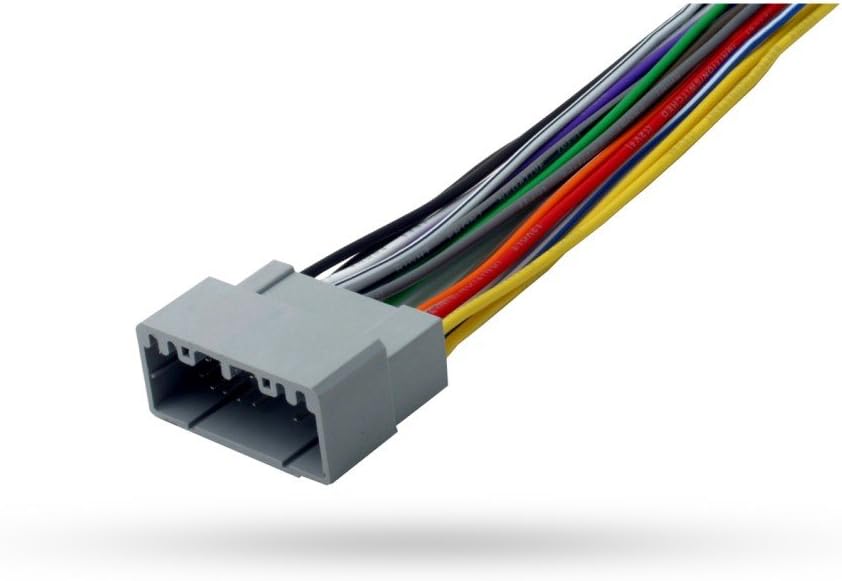
Figure 2.1: Image of a gray multi-pin electrical connector with numerous colored wires extending from it. This image displays a typical electrical connector, often used in automotive applications. It features a gray plastic housing with multiple pin slots, designed to connect various electrical components. A bundle of multi-colored wires, including black, white, gray, green, orange, red, blue, purple, and yellow, extends from the connector, indicating different electrical circuits.
Key Features:
- Product Type: Car Electronics
- Durable construction for long-lasting use
- Designed for efficient electrical circuit protection
3. Setup and Installation
Proper installation of the CHD02 fuse holder is crucial for safety and performance. Always disconnect the vehicle's battery before beginning any electrical work.
- Safety First: Ensure the vehicle's battery is disconnected to prevent accidental short circuits or electrical shocks.
- Identify Location: Choose a suitable, dry, and easily accessible location for the fuse holder, typically near the power source or the component it is protecting.
- Wire Preparation: Strip the ends of the power wires to the appropriate length for the fuse holder's terminals. Ensure a clean, secure connection.
- Connect Wires: Securely connect the positive power wire from the battery to one side of the fuse holder and the wire leading to the component (e.g., amplifier) to the other side. Use appropriate crimping tools for terminal connections.
- Insert Fuse: Once all connections are secure, insert the correct amperage fuse into the holder. Refer to your component's specifications for the recommended fuse rating.
- Secure Mounting: Mount the fuse holder firmly to a stable surface using appropriate fasteners to prevent vibration and damage.
- Reconnect Battery: Reconnect the vehicle's battery and test the circuit for proper operation.
Note: If you are unsure about any step, consult a professional automotive electrician.
4. Operating Instructions
The DB Link CHD02 Electric Fuse holder operates passively by providing overcurrent protection. When the current flowing through the circuit exceeds the fuse's rated amperage, the fuse element melts, breaking the circuit and preventing damage to connected components or wiring. No user interaction is required during normal operation.
5. Maintenance
The CHD02 fuse holder requires minimal maintenance. Regular inspection can help ensure its longevity and proper function.
- Visual Inspection: Periodically check the fuse holder for any signs of physical damage, corrosion, or loose connections.
- Cleanliness: Keep the fuse holder and surrounding area clean and free from dust, dirt, and moisture.
- Fuse Replacement: If a fuse blows, replace it only with a fuse of the exact same amperage rating. Never use a higher-rated fuse or bypass the fuse, as this can lead to severe damage or fire.
6. Troubleshooting
If a connected component stops working, the fuse in the CHD02 holder is often the first place to check.
- No Power to Component: If the connected device (e.g., amplifier) is not receiving power, check the fuse within the CHD02 holder. A blown fuse will have a broken filament.
- Repeatedly Blown Fuses: If fuses blow frequently, it indicates an underlying issue in the electrical circuit, such as a short circuit, an overloaded component, or incorrect wiring. Do not continue replacing fuses without identifying and resolving the root cause. Consult a professional if necessary.
- Loose Connections: Ensure all wire connections to the fuse holder are tight and secure. Loose connections can cause intermittent power or heat buildup.
7. Specifications
| Attribute | Value |
|---|---|
| Product Type | Car Electronics |
| Model Number | CHD02 |
| Product Dimensions | 17.71 x 12.99 x 12 inches |
| Item Weight | 15.43 pounds |
| Country of Origin | China |
| Manufacturer | DB Research L.L.P. |
| Date First Available | April 10, 2017 |
| ASIN | B0725J3J7K |
8. What's in the Box
The package for the DB Link CHD02 Electric Fuse holder typically includes:
- Fuse Holders
- GPS and Car Accessories (as specified by manufacturer)
9. Warranty and Support
Specific warranty information for the DB Link CHD02 Electric Fuse holder is not provided in the product details. For warranty claims, technical support, or further assistance, please contact DB Research L.L.P. directly or refer to the retailer where the product was purchased. Keep your proof of purchase for any warranty-related inquiries.
Ask a question about this manual
Ask about setup, troubleshooting, compatibility, parts, safety, or missing instructions. Manuals+ will review the question and use this page’s manual context to help answer it.