
1. Introduction
Thank you for choosing the Pro-User Amp Intelligent Battery Charger IBC7500B. This manual provides essential information for the safe and efficient operation, maintenance, and troubleshooting of your new battery charger. Please read this manual thoroughly before using the device.

Image: The Pro-User Amp Intelligent Battery Charger IBC7500B, a compact grey and black unit with a digital display and connection cables.
2. Safety Information
Always prioritize safety when operating electrical equipment. Failure to follow these instructions may result in electric shock, fire, or serious injury.
- Read All Instructions: Before use, read all instructions and cautionary markings on the battery charger, the battery, and the product using the battery.
- Ventilation: Ensure adequate ventilation when charging. Batteries can produce explosive gases.
- Eye Protection: Always wear eye protection and protective clothing when working with batteries.
- Avoid Sparks: Never smoke or allow a spark or flame in the vicinity of the battery or engine.
- Disconnect Power: Disconnect the charger from the mains power supply before making or breaking the connections to the battery.
- Children and Pets: Keep the charger and battery out of reach of children and pets.
- Indoor Use: This charger is designed for indoor use only. Do not expose to rain or moisture.
- Damaged Cables: Do not operate the charger with a damaged cord or plug. Replace immediately.
3. Package Contents
Verify that all items are present in the package:
- Pro-User Amp Intelligent Battery Charger IBC7500B
- Battery clamps (red and black)
- Ring terminal connectors
- Mains power cable (European plug)
- User Manual (this document)
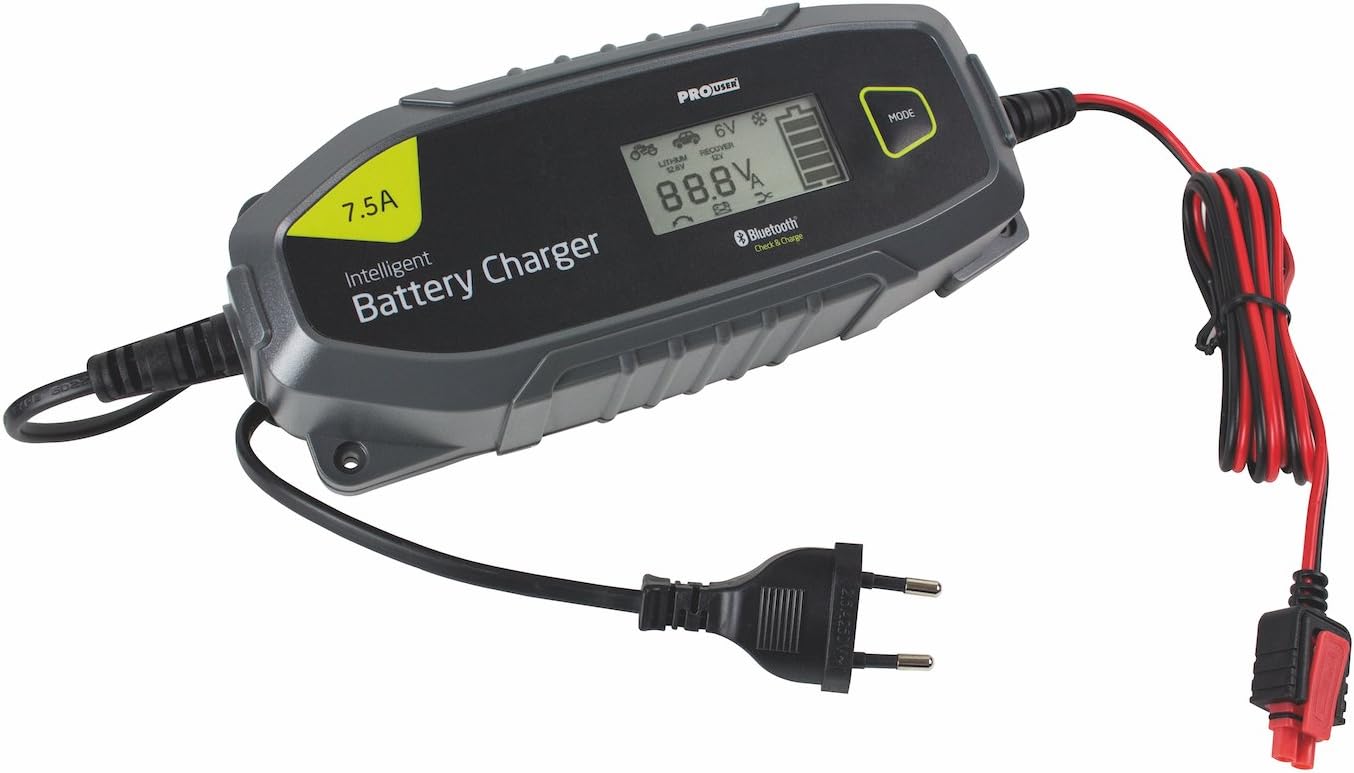
Image: The Pro-User IBC7500B charger unit, showing the attached European mains plug and the two types of battery connectors: alligator clamps and ring terminals.
4. Setup
Follow these steps to set up your battery charger:
- Connect Battery Terminals: Choose between the battery clamps or ring terminal connectors based on your application. Connect the appropriate connector to the charger's output cable. Ensure a secure connection.
- Connect to Battery:
- For positive ground systems, connect the positive (red) clamp to the positive battery terminal and the negative (black) clamp to the vehicle chassis away from the battery.
- For negative ground systems, connect the negative (black) clamp to the negative battery terminal and the positive (red) clamp to the vehicle chassis away from the battery.
- Ensure connections are tight and free from corrosion.

Image: The Pro-User IBC7500B charger connected to a car battery using the alligator clamps, positioned within the engine bay of a vehicle.
- Connect to Mains Power: Plug the charger's mains power cable into a suitable 230V AC wall outlet. The charger will perform a self-test and indicate its status on the display.
5. Operating Instructions
The Pro-User IBC7500B is an intelligent charger designed for ease of use. It automatically detects battery type and condition to apply the optimal charging program.
- Automatic Detection: Once connected to the battery and mains power, the charger will automatically analyze the battery and begin the appropriate charging cycle. The display will show the charging progress.
- Monitoring Progress: The digital display provides real-time information on the charging status, including voltage and current. You can also monitor the charging process via the dedicated Bluetooth app.
- Bluetooth Connectivity:
- Download the "Pro-User IBC Charger" app from your smartphone's app store.
- Enable Bluetooth on your smartphone and open the app.
- The app will detect the IBC7500B charger. Select it to connect.
- Through the app, you can view detailed charging data, select specific charging modes (if available for advanced users), and receive notifications.

Image: The Pro-User IBC7500B charger connected to a yellow car battery, with a smartphone screen showing the accompanying mobile application displaying battery charge percentage and voltage.
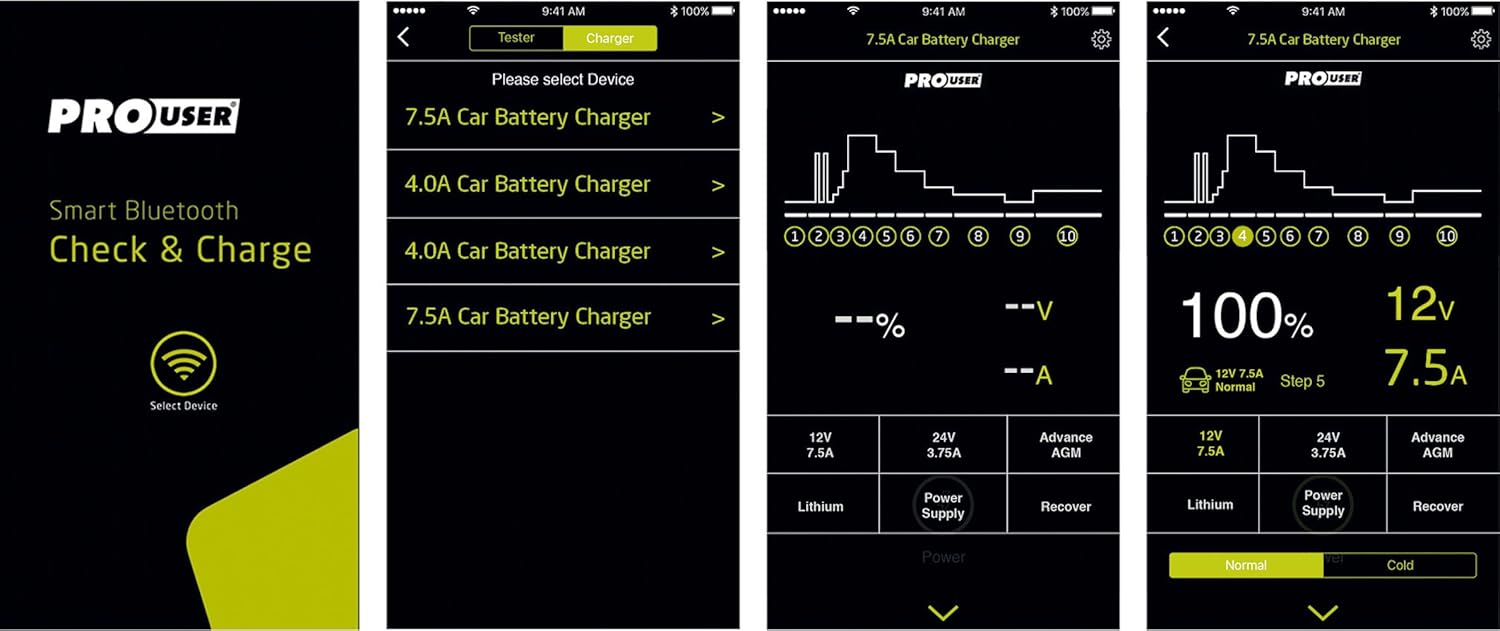
Image: A collage of four smartphone screenshots demonstrating the Pro-User IBC Charger app interface, showing device selection, charging graphs, and mode options like Lithium, Recover, and Power Supply.
- Charging Modes: The charger supports various battery types including lead-acid (Wet, MF, Ca/Ca, AGM, Gel) and Lithium (LiFePO4). It automatically selects the correct mode. For specific conditions like cold weather or deeply discharged batteries, the app might offer advanced mode selections.
- Completion: The charger will automatically switch to maintenance mode once the battery is fully charged, preventing overcharging. The display will indicate "FULL" or similar.

Image: A close-up view of the Pro-User IBC7500B charger's digital display, showing battery status, voltage, and selected mode indicators.
6. Maintenance
Proper maintenance ensures the longevity and optimal performance of your charger.
- Cleaning: Disconnect the charger from the mains and battery before cleaning. Wipe the casing with a soft, damp cloth. Do not use harsh chemicals or abrasive cleaners.
- Storage: Store the charger in a cool, dry place when not in use. Ensure cables are neatly coiled and not kinked.
- Cable Inspection: Regularly inspect the power cord, battery cables, and connectors for any signs of damage, wear, or corrosion. Replace damaged parts immediately.
7. Troubleshooting
If you encounter issues, refer to the following common problems and solutions:
| Problem | Possible Cause | Solution |
|---|---|---|
| Charger not turning on | No mains power; faulty connection | Check wall outlet, power cable, and connections. |
| Charging not starting | Incorrect battery connection; battery too deeply discharged; incorrect mode selected (if manual mode is used) | Ensure correct polarity and secure battery connections. For deeply discharged batteries, the charger may attempt a recovery mode automatically. If not, try a specific recovery mode via the app if available. |
| Error message on display | Internal fault; battery fault; short circuit | Disconnect all connections, wait a few minutes, then reconnect. If the error persists, consult customer support. |
| Bluetooth app not connecting | Bluetooth off; app not updated; interference | Ensure Bluetooth is enabled on your device. Update the app to the latest version. Try moving closer to the charger or restarting the app/charger. |
8. Specifications
| Feature | Detail |
|---|---|
| Brand | Pro User |
| Model Number | IBC7500B (Item Model: 18173) |
| Input Voltage | 230V AC (Standard European Mains) |
| Output Voltage | 12V DC |
| Charging Current | 7.5 Ampere |
| Battery Types | Lead-Acid (Wet, MF, Ca/Ca, AGM, Gel), Lithium (LiFePO4) |
| Dimensions (L x W x H) | 37 x 21.5 x 7 cm (approx.) |
| Weight | 800 g |
| Color | Black/Grey |
| Connectivity | Bluetooth (for app control) |
| Safety Compliance | TUV |
9. Warranty and Support
The Pro-User Amp Intelligent Battery Charger IBC7500B comes with a standard manufacturer's warranty. Please retain your proof of purchase for warranty claims.
For technical support, warranty information, or service inquiries, please contact your retailer or visit the official Pro-User website. Ensure you have your model number (IBC7500B) and purchase date available when contacting support.


