
Wellneo 5IN1 BEAUTY PRO
WELLNEO 5IN1 BEAUTY PRO WET & DRY User Manual
Model: 5IN1 BEAUTY PRO
1. Introduction
Thank you for choosing the Wellneo 5IN1 Beauty Pro Wet & Dry device. This versatile personal care tool is designed for various grooming needs, offering multiple functions in one compact unit. Please read this manual carefully before first use to ensure safe and optimal operation.
Package Contents
Please check that all items are present in your package:
- Wellneo 5IN1 Beauty Pro Main Unit
- Shaver Head
- Epilator Head
- Callus Remover Head
- Manicure/Pedicure Tool Set (5 pieces)
- Charger
- Cleaning Brush
- User Manual
2. Safety Information
WARNING: Failure to follow these safety instructions may result in injury or damage to the device.
- May cause cuts or skin irritation. Use with caution, especially on sensitive areas.
- Do not use near water or while charging. Ensure the device is completely dry before charging.
- Always clean and dry the device and its attachments thoroughly after each use to prevent bacterial growth and maintain hygiene.
- Keep out of reach of children.
- Do not disassemble or attempt to repair the device yourself. Contact qualified service personnel for assistance.
- If the device or charger appears damaged, discontinue use immediately.
3. Components and Features
The Wellneo 5IN1 Beauty Pro is designed for ease of use and versatility. The main unit features a comfortable grip and a simple power button.
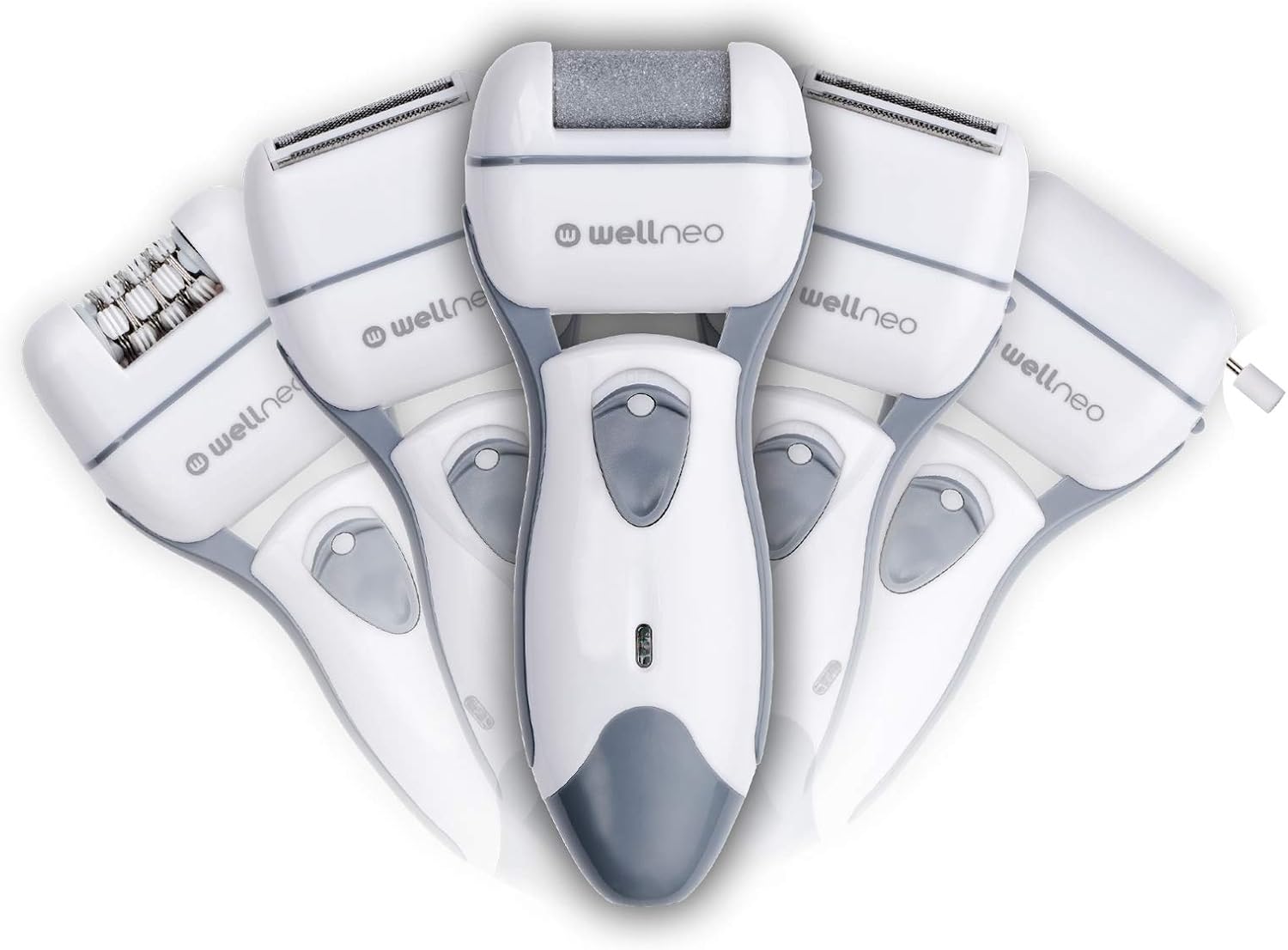
The Wellneo 5IN1 Beauty Pro device shown with multiple interchangeable heads, highlighting its versatile design.
Interchangeable Heads
The device comes with several heads to perform different functions:
- Shaver Head: For quick and efficient hair removal on various body areas.
- Epilator Head: Designed to remove hair from the root for longer-lasting smoothness.
- Callus Remover Head: Features a rotating abrasive surface to gently remove rough, dry skin from feet.
- Manicure/Pedicure Tool Set: A collection of 5 smaller tools for filing, shaping, buffing, and polishing nails.
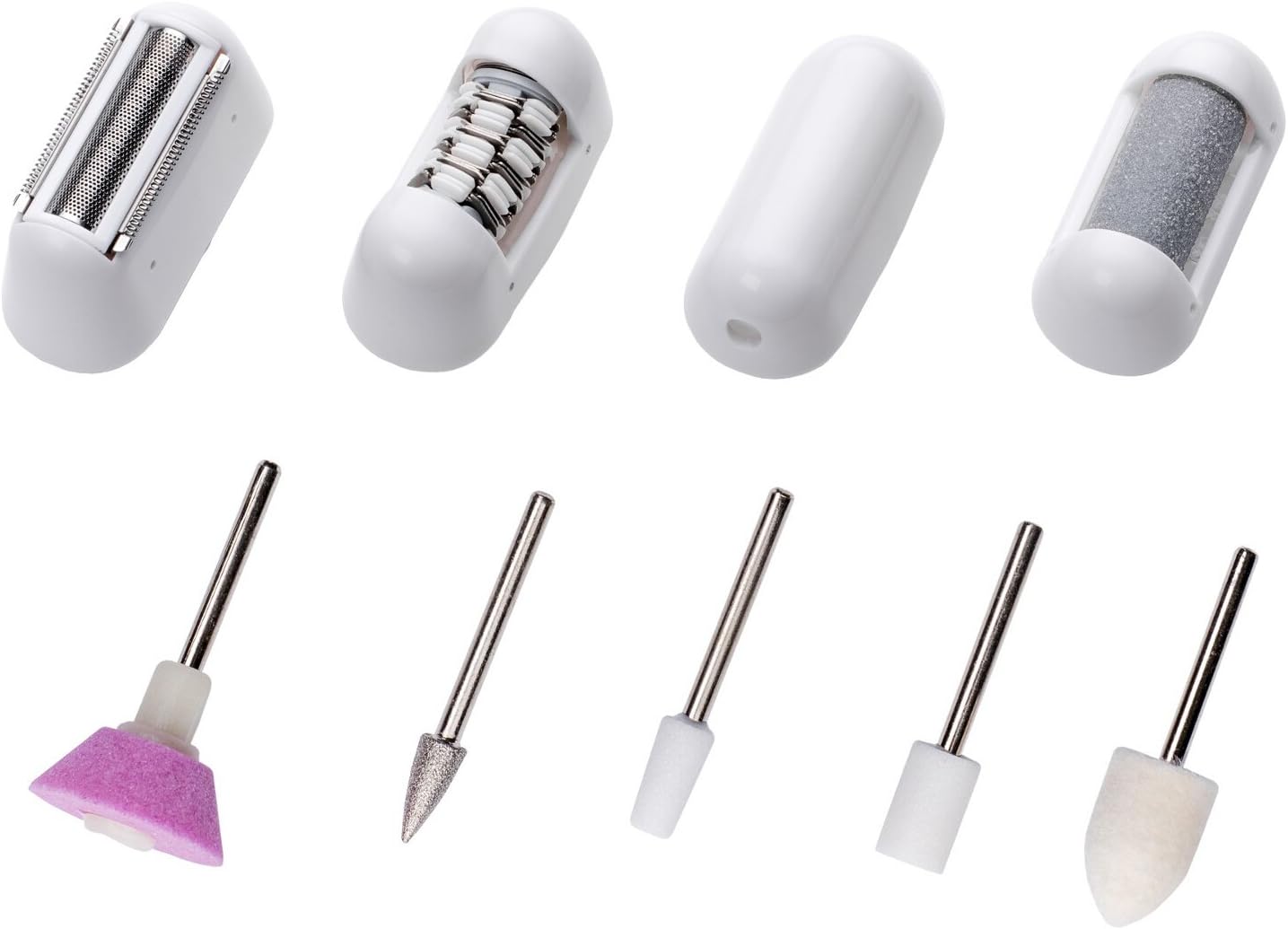
A detailed view of all interchangeable heads and the manicure/pedicure tool set included with the device.

A close-up of the main unit, showing the power button and the LED indicator light.
4. Setup
Charging the Device
- Ensure the device is turned off before charging.
- Connect the charger to the charging port on the device.
- Plug the charger into a suitable power outlet.
- The LED indicator light will illuminate to show that the device is charging.
- Allow the device to charge fully before first use. Charging time may vary.
Attaching and Removing Heads
- To attach a head, align the head with the main unit and gently push until it clicks into place.
- To remove a head, press the release button (if present) or gently pull the head away from the main unit.
- Ensure the device is turned off when changing heads.
5. Operating Instructions
General Operation
- Press the power button to turn the device on. The LED indicator will light up.
- Press the power button again to turn the device off.
- The device can be used wet or dry, but ensure it is not charging when wet.
Using the Shaver Head
- Attach the shaver head to the main unit.
- Hold the device at a 90-degree angle to the skin.
- Move the shaver gently against the direction of hair growth for best results.
Using the Epilator Head
- Attach the epilator head to the main unit.
- Hold the device at a 90-degree angle to the skin.
- Move the epilator slowly against the direction of hair growth.
- For sensitive areas, stretch the skin taut to minimize discomfort.
Using the Callus Remover Head
- Attach the callus remover head to the main unit.
- Ensure feet are clean and dry.
- Gently glide the rotating head over areas with calluses or rough skin.
- Apply light pressure and avoid staying in one spot for too long to prevent irritation.
Using Manicure/Pedicure Tools
- Select the desired tool from the set.
- Attach the tool to the appropriate slot on the main unit (if applicable, or use manually if designed for manual use).
- Use the tools for filing, shaping, buffing, and polishing nails as needed.

An illustrative diagram showing the diverse applications of the Wellneo 5IN1 Beauty Pro device for different grooming needs.
6. Maintenance and Cleaning
Regular cleaning and maintenance will prolong the life of your Wellneo 5IN1 Beauty Pro device.
Cleaning the Device
- Turn off the device and remove the attached head.
- Use the provided cleaning brush to remove any hair or debris from the shaver/epilator head and the main unit.
- For wet cleaning, rinse the heads under running water. Ensure the main unit is not submerged unless explicitly stated as fully waterproof.
- Important: Always clean and dry all parts thoroughly after use, especially after wet use, to prevent bacterial growth and corrosion.
- Wipe the main unit with a soft, damp cloth. Do not use abrasive cleaners or solvents.
Storage
Store the device and its accessories in a cool, dry place, away from direct sunlight and extreme temperatures.
7. Troubleshooting
If you encounter any issues with your Wellneo 5IN1 Beauty Pro, please refer to the table below for common problems and solutions.
| Problem | Possible Cause | Solution |
|---|---|---|
| Device does not turn on. | Battery is low or depleted. | Charge the device fully. |
| Device stops during use. | Battery is low. / Hair/debris buildup. | Recharge the device. / Clean the head and device thoroughly. |
| Poor performance (e.g., not removing hair effectively). | Head is dirty or worn. / Incorrect usage angle. | Clean the head. Consider replacing the head if it's old. / Ensure correct angle (90 degrees to skin). |
| Skin irritation after use. | Sensitive skin. / Improper technique. | Use on dry skin if wet use causes irritation. Apply soothing lotion after use. Ensure gentle pressure. |
8. Specifications
Technical details for the Wellneo 5IN1 Beauty Pro Wet & Dry device:
| Feature | Detail |
|---|---|
| Brand | Wellneo |
| Model Name | 5IN1 BEAUTY PRO |
| Power Source | Battery Powered (Rechargeable) |
| Head Type | Rotary |
| Blade Material | Stainless Steel |
| Item Weight | 313 g |
| Product Dimensions | 16 x 5 x 19 cm |
| Included Components | Charger |
| Colour | Black |
9. Warranty and Support
For warranty information and customer support, please refer to the warranty card included with your purchase or visit the official Wellneo website. Keep your proof of purchase for any warranty claims.
Ask a question about this manual
Ask about setup, troubleshooting, compatibility, parts, safety, or missing instructions. Manuals+ will review the question and use this page’s manual context to help answer it.