
Introduction
This manual provides essential information for the safe and proper installation and maintenance of the Orbit LBM-200 Mogul Rigid Conduit Body, Type LB, 2-inch. Please read this manual thoroughly before installation and retain it for future reference. This product is designed for professional electrical installations.
Product Overview
The LBM-200 is a specialized conduit body designed for use with 2-inch rigid conduit. Its "Mogul" design provides a larger internal volume, facilitating easier wire pulling, especially for large conductors or numerous wires, and allowing for greater bend radius. The "LB" type indicates that the conduit enters at one end and exits at the back, forming a 90-degree bend, making it suitable for applications requiring a change in direction close to a surface.
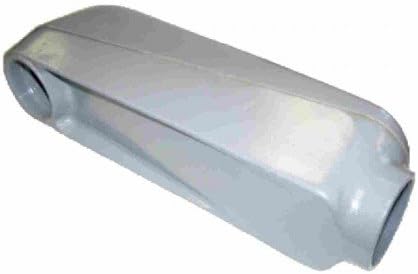
Image: The Orbit LBM-200 Mogul Rigid Conduit Body, a gray, elongated fitting with a 2-inch opening at one end and another opening on the side, indicating its "LB" configuration for a 90-degree turn in a conduit run. The robust construction is visible.
Key Features:
- Mogul Design: Provides increased wiring room and bend radius for easier wire pulling and reduced conductor stress.
- Type LB Configuration: Allows for a 90-degree change in direction, with conduit entering one end and exiting from the back.
- Rigid Conduit Compatibility: Designed specifically for use with 2-inch rigid conduit systems.
- Durable Construction: Built to withstand demanding electrical environments, ensuring long-term reliability.
Safety Information
Adherence to safety guidelines is paramount when working with electrical components. Failure to follow these instructions may result in electrical shock, fire, or property damage.
- Always disconnect power at the main circuit breaker or fuse box before installing, inspecting, or servicing electrical components.
- Installation should be performed by a qualified electrician in accordance with all national and local electrical codes and regulations (e.g., NEC in the USA).
- Ensure all connections are secure and properly tightened to prevent loose connections, which can lead to overheating or arcing.
- Do not use this product for purposes other than its intended use in rigid conduit systems.
- Wear appropriate personal protective equipment (PPE), such as safety glasses and gloves, during installation.
Installation
Follow these steps for proper installation of the LBM-200 Mogul Rigid Conduit Body:
- Prepare Conduit: Ensure the ends of the 2-inch rigid conduit are clean, free of burrs, and properly threaded. Use a reamer to smooth any rough edges inside the conduit to prevent wire insulation damage.
- Thread Connection: Thread the conduit ends into the openings of the LBM-200 conduit body. Ensure a tight and secure connection to maintain electrical continuity and mechanical integrity. Use appropriate tools (e.g., conduit wrenches) for tightening, but do not overtighten, which could strip threads or damage the fitting.
- Wire Pulling: Utilize the large internal volume of the mogul body to pull wires through the conduit system. The LB configuration allows for a smooth 90-degree turn, minimizing stress on conductors. Use appropriate wire pulling lubricant if necessary.
- Cover Installation (if applicable): If the conduit body includes a cover (often sold separately), ensure it is securely fastened using the provided screws. This protects the wiring from environmental factors and maintains the enclosure's integrity.
- Grounding: Ensure proper grounding of the entire conduit system as per local electrical codes. This is critical for safety.
Maintenance
The Orbit LBM-200 Mogul Rigid Conduit Body is designed for durability and requires minimal maintenance. However, periodic inspection is recommended to ensure continued safe and reliable operation.
- Visual Inspection: Periodically inspect the conduit body and all connections for any signs of physical damage, corrosion, cracks, or loosening.
- Connection Integrity: Ensure that all conduit connections remain tight and secure. Retighten if any looseness is detected.
- Cover Security: If a cover is installed, verify that it is securely fastened and that its gasket (if present) is intact to maintain environmental protection.
- Cleaning: Clean the exterior of the conduit body with a damp cloth if necessary. Avoid using harsh abrasive cleaners or solvents that could damage the finish or material.
Troubleshooting
This section addresses common issues that may arise during or after installation of the conduit body.
| Problem | Possible Cause | Solution |
|---|---|---|
| Difficulty pulling wires through the conduit body. | Conduit burrs, sharp bends elsewhere in the run, insufficient wire lubricant, or exceeding wire fill capacity. | Check conduit ends for burrs and ream if necessary. Ensure proper wire pulling lubricant is used. Verify that the number and size of wires do not exceed code-compliant fill limits for the conduit. |
| Loose connection between conduit and body. | Improper threading, insufficient tightening, or vibration over time. | Ensure conduit is fully threaded into the body. Tighten securely with appropriate tools. If vibration is a factor, consider additional support for the conduit run. |
| Visible corrosion or physical damage to the conduit body. | Exposure to harsh environmental conditions, chemical agents, or physical impact. | Inspect regularly. If significant damage or corrosion is present that compromises the integrity or safety of the electrical system, the conduit body should be replaced by a qualified professional. |
Specifications
- Model: LBM-200
- Type: Mogul Rigid Conduit Body, Type LB
- Conduit Size: 2 inches
- Manufacturer: Orbit Industries
- Part Number: LBM-200
- ASIN: B0722GXT4H
- First Available: March 20, 2017
Support
For technical assistance, product inquiries, or warranty information regarding the Orbit LBM-200 Mogul Rigid Conduit Body, please contact Orbit customer support. Refer to the official Orbit website or product packaging for the most current contact information and support resources.
Online Resources: Visit the Orbit Store on Amazon for additional product information and related items.